
The first web scraper I ever wrote was embarrassingly simple: a Python script with about fifteen lines, no headers, no delays, and no idea that the site I was pulling from had any interest in stopping me. It worked for exactly four days. On the fifth, every request came back with a 403. That gap between “I wrote a scraper” and “I understand what a scraper is actually doing on the wire” is where most explanations of web scraping fall short, and it’s the gap this guide is meant to close.
Web scraping isn’t a single technique; it’s a category of methods for automatically retrieving and structuring information from websites, and the right method depends entirely on what the target site allows, how it renders content, and how aggressively it defends itself against automated traffic. Understanding that variability, rather than memorizing one script, is what actually makes someone good at this.
What Web Scraping Actually Is
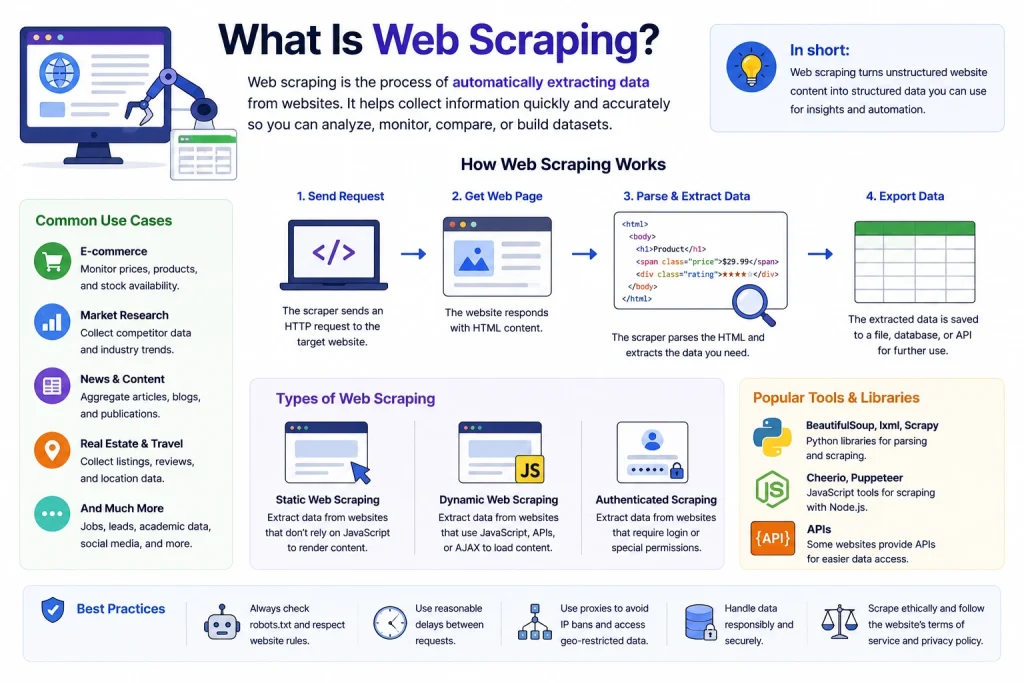
At its core, web scraping is the practice of using software to visit a web page, extract specific pieces of information from it, and save that information in a structured format a spreadsheet, a database, a JSON file, instead of a human copying and pasting it by hand. A price-comparison tool checking a hundred retailers, a research team tracking public sentiment across news sites, a recruiter aggregating job postings, and a hedge fund monitoring shipping manifests are all doing the same underlying thing: automating the retrieval of data that already exists on a public page, at a scale no person could manage manually.
It’s worth being precise about a distinction that gets blurred constantly, including in a lot of the content ranking for this exact query: scraping and crawling are related but not identical. A crawler’s job is discovery — it follows links from page to page, building a map of a site or the wider web, which is exactly what Googlebot does when it indexes new pages. A scraper’s job is extraction — once it’s on a page, it pulls out the specific data points a person actually wants. Most real-world projects combine both, using a crawling stage to find the right URLs and a scraping stage to pull the data off each one, but they solve different problems and fail for different reasons. If that boundary is still fuzzy, it’s worth reading through how scraping and crawling actually differ in practice and, separately, what a crawler is doing structurally as it moves from link to link before going further, since a lot of the confusion people have about “why is my scraper doing this” traces back to conflating the two.
How Web Scraping Has Actually Changed, Not Just How It’s Usually Described
Most explanations of web scraping freeze it in about 2018: send a request, parse HTML with a library, done. That description is increasingly incomplete, and treating it as current is a good way to build something that breaks immediately against a real target in 2026.
Three shifts matter here. First, the market itself has grown into genuinely large infrastructure — industry analysts put the global web scraping market somewhere in the $1 to $1.6 billion range for 2026, depending on how narrowly it’s defined, growing at a compound rate in the mid-to-high teens annually, which tells you this stopped being a hobbyist activity a while ago and became something enterprises budget for.
Second, the rules of engagement got formalized: the Robots Exclusion Protocol, which sites have used informally since 1994, became an official IETF standard (RFC 9309) in 2025, which means the humble robots.txt file now has a genuine specification behind it rather than just convention — parsers are expected to follow documented caching, syntax, and precedence rules instead of guessing. Third, and most significantly, extraction itself has partly shifted from “parse the DOM” to “ask a model to read the page,” with AI-native scraping frameworks now handling layout changes and unstructured content in ways that traditional selector-based parsing simply can’t.
That last shift is also why a wave of new access-control standards showed up alongside robots.txt. Sites now routinely distinguish between traditional crawlers, AI training crawlers like GPTBot and ClaudeBot, and AI-search crawlers that surface content in chat answers, often applying different rules to each — and a growing number are experimenting with llms.txt files that hand curated content directly to AI systems rather than making them extract it from raw HTML. None of this replaces classic scraping, but it’s changed the landscape a scraper operates in, and any guide claiming to be current in 2026 needs to acknowledge that the target isn’t just “a website” anymore. It’s a website actively managing several different categories of automated visitors.
How Web Scraping Actually Works, Step by Step
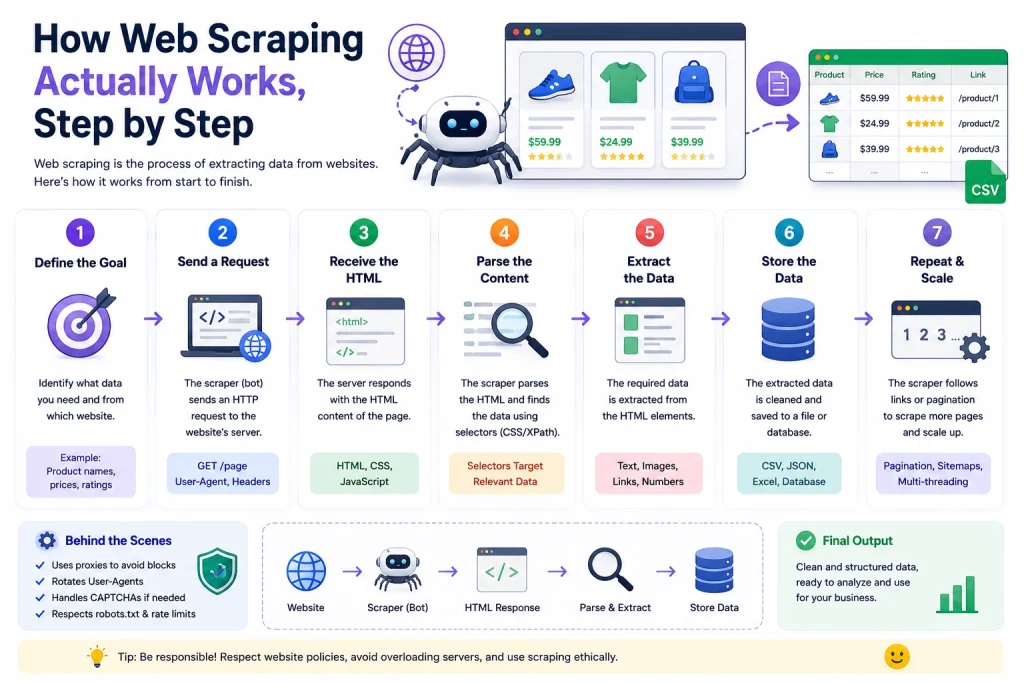
Strip away the tooling and every scraper, regardless of language or framework, goes through the same four stages. Understanding each one on its own is what makes debugging a broken scraper tractable instead of a guessing game.
Step one: sending the request
Everything starts with an HTTP request, the same basic exchange a browser makes when a person types a URL and hits enter. The scraper’s client connects to the target server and asks for a specific resource, carrying a set of headers that describe who’s asking: what browser and OS claim to be making the request, what languages and encodings it accepts, and often a cookie carrying session state from a previous visit.
Getting this stage right matters more than most people expect, because it’s the first — and often only — thing a server evaluates before deciding whether to respond at all. The mechanics of constructing that exchange correctly, including which headers actually matter and which are decoration, are covered in depth in a breakdown of how HTTP requests get built and sent for scraping specifically, and since so much of a request’s legitimacy rides on how it handles state, it’s worth understanding what cookies are actually doing during that exchange before assuming a scraper can just ignore them.
Step two: rendering, when a plain request isn’t enough
A basic HTTP request gets back whatever the server sends as raw HTML — which is plenty for a lot of older or simpler sites, but useless against the growing share of the web that builds its actual content client-side with JavaScript after the initial page load.
For those targets, the scraper needs something closer to an actual browser: a program capable of executing scripts, waiting for network calls to resolve, and rendering the final DOM the same way a person’s browser would. That’s the job of a headless browser — a full browser engine running without a visible window — and it’s the reason tools like Playwright exist as a distinct category from simple HTTP clients.
If a target renders its listings, prices, or comments after the page loads rather than baking them into the initial HTML, driving that rendering process with Playwright is usually the more reliable path than trying to reverse-engineer the underlying API calls by hand.
Step three: parsing the response into something usable
Whether the scraper receives raw server HTML or a fully rendered DOM, that markup on its own is just text — it has to be walked and interpreted to pull out the specific values that matter: a price, a title, a phone number, a review count. This is the parsing stage, and it’s where a lot of scrapers quietly break, because a parser built around one page’s exact structure stops working the moment that site redesigns a template.
The conceptual side of how raw markup actually gets turned into structured data is worth understanding on its own terms, separate from any specific library, and once that’s clear, a comparison of the libraries actually built for that job makes it much easier to pick the right tool instead of defaulting to whatever’s most popular on a given day.
Step four: structuring and storing the output
The final stage is turning parsed values into something a downstream system can actually use — a CSV, a database row, a JSON object fed into another pipeline. This part gets the least attention in most guides, but it’s where a scraping project either becomes durable infrastructure or a one-off script nobody can maintain. Deciding on a schema before scraping at scale, rather than after, is the difference between data a team can actually query and a pile of half-structured text that needs to be cleaned up later.
The Two Fundamental Approaches, and Why the Choice Between Them Actually Matters
Every scraping project ultimately chooses between two architectures, and picking the wrong one for a given target is the single most common reason projects stall out.
The first is the HTTP-client approach: lightweight, fast, and cheap to run at scale, because it never has to load images, execute scripts, or render a layout — it just requests a URL and reads the response. This is the right call for static pages, public APIs, and sites that don’t lean heavily on client-side rendering. The specifics of doing this well differ meaningfully by language: how the Python ecosystem handles this end-to-end looks different from doing the equivalent work natively in Node.js, and PHP has its own mature but less-discussed path, covered in a look at PHP’s approach to the same underlying problem alongside the specific libraries that make that PHP workflow practical rather than theoretical.
The second is browser automation: heavier and slower, but capable of handling anything an HTTP client can’t — JavaScript-rendered content, login flows, infinite scroll, and interaction-dependent pages. Choosing between the major frameworks here is less about personal preference than about what a target actually demands; how Scrapy’s request-based model compares to Selenium’s fully browser-driven one is a useful starting comparison, and for teams choosing among the current generation of browser-automation tools specifically, a direct comparison of Playwright, Selenium, and Puppeteer covers where each one holds up and where each falls short. Selenium in particular has enough history and enough ways to be misused that the specific habits that keep a Selenium-based scraper stable over the long run deserve their own dedicated read rather than being treated as an afterthought.
A third category has matured enough by 2026 to deserve its own mention rather than being lumped in as a footnote: AI-native extraction frameworks that hand a page to a language model and ask it to identify the relevant data by meaning rather than by CSS selector, which makes them far more resistant to layout changes than either traditional approach. Purpose-built frameworks like Crawl4AI, one of the more capable tools in this newer category, sit alongside a growing set of alternatives, and a direct comparison of Crawl4AI against Firecrawl is a useful reference for anyone deciding whether the AI-native path is worth the added cost over a traditional parser for a given project. For a broader survey of where this category stands overall, a rundown of the current crop of AI-native scraping tools covers more ground than any single tool comparison can.

Why Websites Fight Back, and What That Means Technically
None of the above matters much without acknowledging that a meaningful share of the modern web is built to actively resist exactly this kind of automated access. Sites lose revenue to scrapers that overload servers, undercut pricing intelligence, or resell aggregated content, so bot-management systems have become a genuinely sophisticated layer of the internet’s infrastructure rather than a simple IP blocklist.
The defenses stack in a predictable order, and understanding that order is more useful than memorizing any single workaround. Identity starts with the User-Agent header, and a scraper that never varies it — or worse, sends a default library string — is announcing itself in the first packet; keeping a pool of User-Agent strings current and believable is a small habit with an outsized effect, and having an actual working reference list of real User-Agent strings on hand beats hand-writing a handful and hoping they age well.
Beyond headers, sites increasingly build a device identity out of dozens of smaller signals — the broader concept of browser and device fingerprinting covers how that composite identity forms, and WebGL rendering fingerprints specifically are one of the harder signals to spoof convincingly, since they depend on how a specific GPU and driver combination renders a test scene.
Network origin is its own layer entirely. A scraper sending thousands of requests from one IP is trivial to flag regardless of how clean everything else looks, which is why proxy infrastructure stops being optional past a certain scale; a working comparison of proxy providers built specifically for scraping workloads is a reasonable starting point, and understanding what actually makes a residential proxy different at the network level — rather than just accepting that it’s “better” — makes it much easier to reason about when the extra cost is justified. The tradeoffs between residential and datacenter IP pools shift depending on how aggressively a specific target is defended, and one of the most common defenses worth understanding on its own is Cloudflare, given how much of the web now sits behind it — why Cloudflare specifically keeps intercepting traffic that looks clean by every other measure is worth reading before assuming a block is a proxy problem when it might be a TLS or JavaScript-fingerprint issue instead.
When prevention fails, the visible symptom shows up as either a challenge or an error code, and each tells a scraper something different: the layered approach to handling a CAPTCHA once one actually appears covers what to do when a visual or behavioral challenge shows up, while what a 403 response is actually telling a scraper and what a 429 response signals as a distinctly different kind of limit are worth distinguishing, since one usually means “you’re not authorized to access this at all” and the other means “you’re accessing it too fast.” That second case ties directly into pacing: deliberately pacing requests to avoid tripping rate-limit triggers is one of the highest-leverage habits in this entire field, and it helps to understand the concept from both directions — how throttling and rate limiting actually differ as mechanisms, and separately, how rate limiting works on the API side of that same relationship, since a growing number of scraping targets are APIs rather than rendered pages. For teams building their own infrastructure rather than renting a proxy pool outright, building a proxy layer directly in Node.js is a more involved but instructive path. Pulling all of these individual defenses into one coherent strategy is really what a complete playbook for staying unblocked is trying to do — treating detection avoidance as a system rather than a checklist of unrelated fixes.
The Legal and Ethical Boundaries That Actually Apply

This is the part most competing guides either skip entirely or handle with a vague “it depends, consult a lawyer” line, which isn’t wrong but also isn’t useful. The legal picture around scraping public web data has actually become clearer over the past few years, not murkier. In the Meta Platforms v. Bright Data case, a federal court sided with Bright Data on summary judgment, holding that scraping publicly accessible data didn’t breach Meta’s terms of service in that instance, in part because the court found the scraper wasn’t acting as a “user” of Meta’s platform in the way the terms defined.
That followed the earlier, widely cited hiQ Labs v. LinkedIn line of reasoning under the Computer Fraud and Abuse Act, which similarly leaned toward permitting scraping of data that’s publicly viewable without a login. None of this means scraping is unconditionally legal. Authenticated data, copyrighted content reuse, and personal data under privacy regulations like GDPR or CCPA are handled very differently by courts than public, unauthenticated pages, but the general trend in US case law has moved toward treating public data as fair game for automated collection, while still leaving room for breach-of-contract claims in narrower circumstances.
A fuller treatment of where those lines actually sit, including how they vary by jurisdiction and use case, is worth reading in the legal considerations that genuinely apply to a scraping project rather than relying on internet folklore about what is or isn’t allowed.
Separate from legality is etiquette, and the two get conflated constantly. Now that the Robots Exclusion Protocol carries the weight of an actual internet standard as of 2025’s RFC 9309, treating a site’s robots.txt file as optional guidance is a weaker position than it used to be, even though it still isn’t independently enforceable as law in most jurisdictions. Reading a site’s robots.txt file correctly, including the parts most people skim past is a five-minute step that prevents a meaningful share of unnecessary blocks and disputes down the line, and it’s the single easiest way to demonstrate good faith if a site owner ever does raise a concern.
Real-World Applications Worth Understanding in Depth
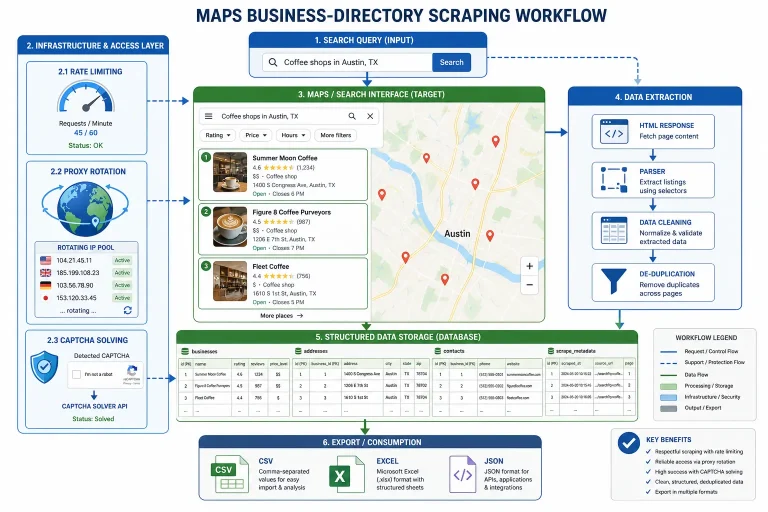
Abstract explanations only go so far, and one of the clearest ways to actually understand how scraping works is to look at a specific, well-documented target rather than a hypothetical one. Google Maps is one of the most heavily scraped sources on the web, precisely because local business data reviews, hours, ratings, contact details feeds an entire industry of lead generation and local SEO tools, and how Google Maps scraping actually works under the hood covers the specific technical obstacles that make it a harder target than a typical static site, including how Google structures its own rendering pipeline to resist exactly this kind of extraction. For anyone actually running that kind of project rather than just studying it, a comparison of the tools built specifically for Maps data extraction saves a lot of the trial and error I went through building that first version of the pipeline myself.
Tool selection matters just as much as technique, and it’s worth evaluating specific products rather than trusting marketing copy at face value — our hands-on review of Scrap.io covers where that platform actually performs and where it falls short against its claims, in the same spirit as a rundown of ScrapingBee alternatives worth considering for teams evaluating managed scraping APIs rather than building infrastructure from scratch, and our broader roundup of scraping tools across categories for anyone trying to figure out where to even start looking. Traffic analysis is its own related discipline worth understanding, since distinguishing real visitors from automated traffic runs both directions — a closer look at how that specific traffic pattern actually behaved is a useful case study in reading traffic signals critically rather than taking them at face value.
The newest frontier is wiring scraped data directly into automated decision-making rather than just storing it for later review. Wiring scraped data straight into an AI agent workflow with n8n is a good example of where this field is actually heading — scraping increasingly isn’t the end of a pipeline, it’s the input stage for an agent that acts on what it finds, whether that’s updating a pricing model, flagging a competitor’s new listing, or triggering an outreach sequence automatically.
Getting Started the Right Way
Everything above assumes some existing familiarity with the space, which isn’t always the case, and jumping straight into browser automation and proxy rotation is a rough way to learn. A gentler, beginner-focused walkthrough covers the same territory at a pace that doesn’t assume prior scripting experience, and it’s worth working through before attempting anything at production scale. The broader library of guides across this site — covering everything from specific proxy providers to individual framework comparisons — is organized to be worked through roughly in the order a real project encounters these problems, and the full collection is worth browsing for anyone building out a scraping pipeline rather than just running a one-off script.
Where This Leaves You
Web scraping, stripped of the tooling debates, is a fairly simple idea: retrieve a page, extract what’s useful, structure it into something a system can act on. What makes it hard in practice isn’t the concept — it’s the fact that the modern web has spent the last decade building increasingly sophisticated ways to distinguish a script from a person, and any durable scraping project has to take that seriously at every layer, from the TLS handshake to the legal terms governing the data itself. The field keeps moving, from a formalized robots.txt standard to AI models that read pages the way a person would rather than parsing a fixed structure, and the projects that hold up are the ones built with that continued change in mind rather than treating any single technique as permanent.
Frequently Asked Questions
Is web scraping legal?
Generally, scraping publicly accessible data — pages that don’t require a login — has trended toward being legally permissible in the US following cases like hiQ Labs v. LinkedIn and the more recent Meta Platforms v. Bright Data ruling, but that doesn’t cover every scenario. Scraping data behind authentication, reusing copyrighted content, or collecting personal data covered by privacy regulations can all carry separate legal risk regardless of how the data was accessed, so it’s worth reviewing the specific legal considerations that apply to a given project rather than assuming a blanket answer covers every case.
Why not just use an API instead of scraping?
When a site offers a public API with the data needed, it’s almost always the better option — it’s more stable, explicitly sanctioned, and won’t break when the site’s layout changes. Scraping becomes necessary specifically when no API exists, when the API doesn’t expose the needed fields, or when access is rate-limited in a way that makes an API impractical for the required volume, which is where understanding how API rate limiting actually works becomes relevant even for teams that would rather avoid scraping entirely.
Do I need a headless browser for every scraping project?
No, and using one when it isn’t necessary just adds cost and fragility. A plain HTTP client is faster, cheaper, and sufficient for any site that delivers its content directly in the initial server response. A headless browser is only necessary when a target renders its actual data client-side with JavaScript after the page loads, which is common on modern single-page applications but far from universal.
What’s the most common mistake beginners make with web scraping?
Sending requests as fast as the connection allows, with no delay and no variation in headers between them. That single habit is responsible for more blocks than any anti-bot system’s most sophisticated fingerprinting technique, simply because it’s such an obvious deviation from how a real person browses a site.
How do I know if a site allows scraping?
Start with its robots.txt file, which lays out which paths are open to automated access, and read its terms of service for any explicit language about automated data collection. Neither is a perfect legal shield on its own, but together they’re the clearest signal a site is willing to give about what it considers acceptable.
You May Also Like
 Web Scraping
How to Handle CAPTCHA While Scraping: A 2026 Developer’s Guide
 Proxies
Best Proxies for Web Scraping In 2026: How I Choose the Right Provider and Proxy Type
 Web Scraping
Cloudflare Blocking Scrapers Explained: Your 2026 Guide to Anti-Bot Protection
 Web Scraping
How Google Maps Scraping Actually Works (And Where Most Attempts Go Wrong)
 Web Scraping
Scrap.io Review 2026: What This Google Maps Lead Generation Tool Actually Gets Right (and Where It Falls Short)
 Web Scraping
The 7 Best PHP Web Scraping Libraries of 2026: The Ultimate Guide
 Web Scraping
User-Agent Rotation: What Actually Works (and What Google Detects in Milliseconds)
 Web Scraping
10 Best Google Maps Scrapers in 2026: What We Actually Recommend After Testing
 Web Scraping