There’s a moment every data engineer recognizes. You write a clean scraper, test it on ten pages, watch the JSON pour in beautifully and then deploy it. Within an hour, the requests come back as 403s. Then 429s. Then nothing at all, just blank HTML where the data used to be. Your IP is shadow-banned, your User-Agent is flagged, and the site you were extracting from yesterday now serves you a JavaScript challenge that loops forever.
This is the reality of large-scale web extraction in 2026. The global web scraping software market is projected to cross $782.5 million this year, climbing toward $2.7 billion by 2035, and the AI-driven segment alone is growing at a 39.4% CAGR. The market is booming because data is valuable, but the same growth has pushed companies like Cloudflare, Akamai, DataDome, and PerimeterX to build defensive systems that no longer rely on simple IP blocklists. They fingerprint your TLS handshake, analyze mouse trajectories, and correlate behavioral patterns across sessions. Scraping has become an adversarial discipline, and the people who succeed at it think less like coders and more like network engineers crossed with behavioral psychologists.
What follows isn’t a list of tricks. It’s a working framework the kind you build after enough scrapers have died in production to teach you what actually matters.
Why Modern Sites Block You (and Why It’s Rarely About Your Code)
Most developers assume blocks happen because their script “looks like a bot.” That’s partially true, but it understates the sophistication of what’s happening on the other end. When a request hits a protected endpoint today, the server is doing several things in parallel before it even decides whether to serve you HTML. Understanding these signals individually is the difference between guessing why you got blocked during web scraping and knowing it.
1. TLS Fingerprint (JA3 / JA4)
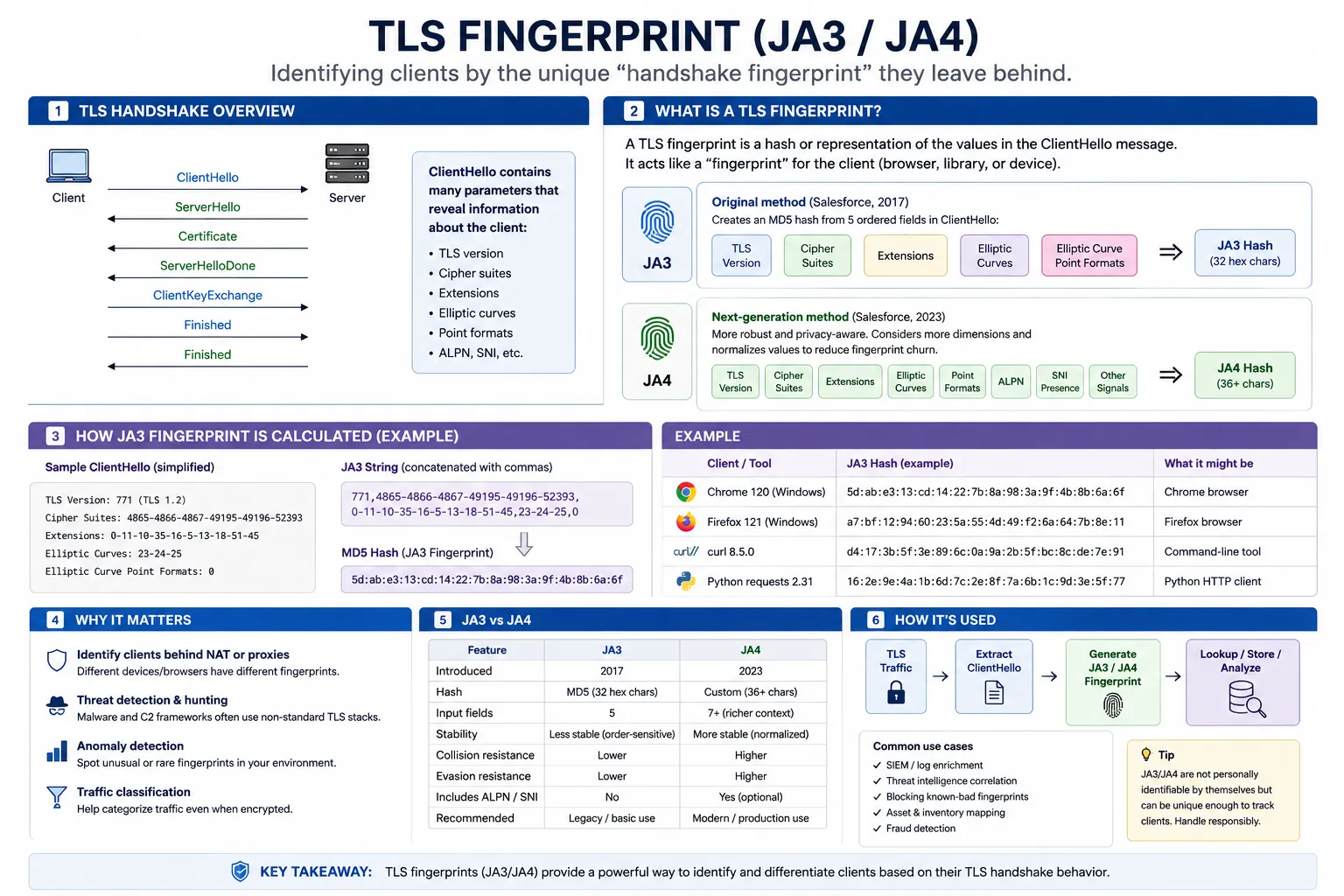
Before any HTTP traffic flows, your client and the server complete a TLS handshake. The exact order of cipher suites your client offers, the extensions it advertises, the elliptic curves it supports, and the ALPN values it negotiates produce a deterministic hash known as a JA3 or, in its newer form, JA4 fingerprint. Real Chrome on Windows generates one specific hash; Firefox on macOS produces another; Python’s requests library produces a hash that has been on every blocklist for years. Cloudflare’s own documentation confirms it uses JA3/JA4 to classify clients as “browser, bot, or application” before a single byte of your scraper’s logic runs. If your TLS hash doesn’t match a real browser, the rest of your evasion work is wasted.
2. HTTP/2 and Header Order Fingerprinting
Browsers send HTTP/2 frames in a specific, consistent order — pseudo-headers like :method, :authority, :scheme, and :path appear in a known sequence, followed by regular headers in a predictable arrangement. Frame priorities, window updates, and SETTINGS frame values are equally consistent within each browser family. Most scraping libraries fail this test silently. Even if your User-Agent says Chrome 120, the server can see that your HTTP/2 frames are arranged the way aiohttp arranges them, not the way Chrome does. This single signal has become one of the most reliable bot tells you.
3. Behavioral and Interaction Signals
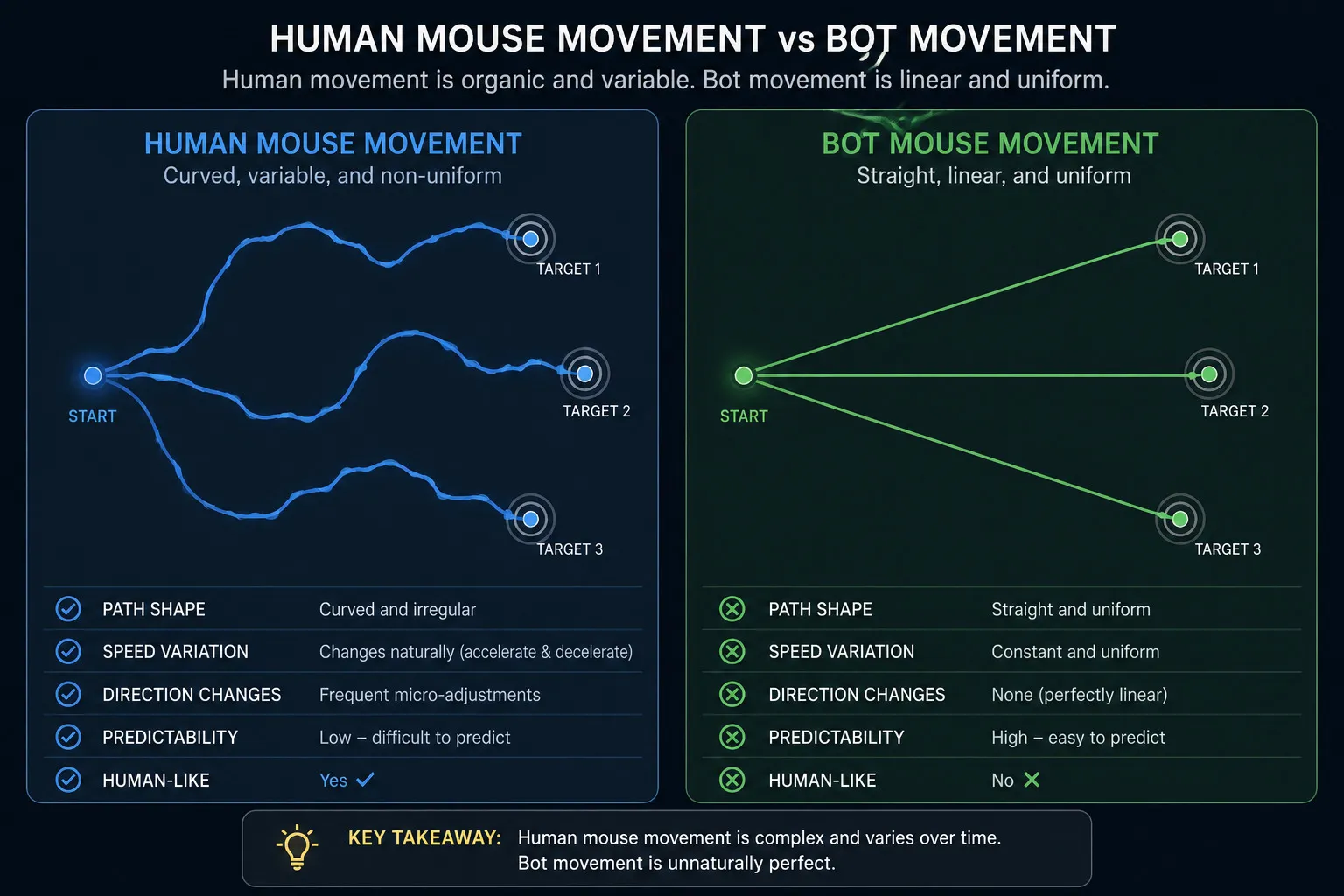
Anti-bot systems analyze how you behave once a page loads. They look at mouse movement trajectories (real users move in curves, not straight lines), scroll velocity, key-press timing, the gap between page load and first interaction, and whether your focus events match what a person would naturally do. Headless browsers without behavioral simulation produce a damning signature: pages that load, sit perfectly still for 200ms, and then trigger a form submission. No human is that mechanically efficient. Vendors like DataDome and PerimeterX assign behavioral scores in real time and escalate to challenges when the score crosses a threshold.
4. IP Reputation and ASN Scoring
Every IP address carries a reputation derived from threat intelligence feeds, historical abuse data, and its underlying autonomous system number. IPs from AWS, GCP, Azure, DigitalOcean, and Hetzner are flagged as datacenter ranges almost universally — they may still work on unprotected sites, but on protected ones they fail at roughly 60% success rates compared with 95,5% for residential IPs sourced from real consumer ISPs. Mobile IPs operating behind carrier-grade NAT score even higher in trust because thousands of legitimate users share them. Your IP isn’t just an address; it’s a score.
5. Browser Environment and Device Fingerprinting
Once JavaScript executes, the server can collect dozens of additional signals: your canvas rendering hash, WebGL vendor and renderer strings, available fonts, screen resolution and color depth, audio context fingerprint, installed plugins, the precise list of supported codecs, hardware concurrency, device memory, timezone, and language preferences. Each individual signal is weak, but combined they produce a near-unique device fingerprint. Worse, headless browsers leak telltale artifacts, navigator.webdriver being true, missing chrome runtime properties, a WebGL renderer of “SwiftShader” or “Mesa OffScreen” — that immediately mark them as automated.
The takeaway is that blocking isn’t a single decision, it’s a layered risk score. You don’t “get blocked” so much as you accumulate enough suspicion points that the site decides you aren’t worth serving.
Start by Reading the Room: Robots.txt, Terms, and the Legal Floor
Before any technical conversation, there’s a question worth asking honestly: Should you be scraping this site at all? The hiQ Labs v. LinkedIn ruling from the Ninth Circuit clarified that scraping publicly accessible data generally does not violate the Computer Fraud and Abuse Act, but the court was careful to note that this is not the same as immunity from breach-of-contract or trespass-to-chattels claims. A site’s robots.txt is not legally binding in most jurisdictions, but ignoring it weakens your position if a dispute ever arises, and it telegraphs intent in a way courts have noticed.
In practice, sensible operators treat robots.txt as a polite request rather than a wall. They respect explicit Disallow directives on sensitive endpoints, honor Crawl-delay when it’s specified, and avoid login-walled or paywalled content unless they have authorization. This isn’t just ethics, it’s risk management. Scrapers that hammer authenticated APIs are the ones that end up in lawsuits.
How to Scrape Websites Without Getting Blocked: 12 Techniques That Actually Work
The following techniques are ordered roughly by impact. The first few will solve most of your problems; the later ones matter as you scale or move against harder targets.
1. Use Residential or Mobile Proxies for Protected Targets
The single biggest determinant of success is your IP pool. Datacenter IPs are cheap but transparently identifiable. Residential proxies route through real consumer ISP connections and achieve success rates around 92–99% on protected sites where datacenter IPs sit near 60%. Mobile proxies, running through 4G/5G carrier networks, score even higher trust because of CG-NAT sharing — block one and you block thousands of legitimate users. Match the proxy tier to the target’s defensive posture rather than buying the most expensive option by default.
| Target type | Recommended proxy | Typical cost |
|---|---|---|
| Static pages, public APIs | Datacenter | $0.50–$2 / GB |
| E-commerce, social platforms | Residential | $4–$12 / GB |
| Sneaker, ticketing, banking | Mobile (4G/5G) | $8–$25 / GB |
| Geo-locked content | Residential, geo-targeted | $6–$15 / GB |
2. Spoof a Real Browser’s TLS Fingerprint
If you’re using vanilla requests or httpx against a Cloudflare-protected site, you’re already lost at the handshake. Switch to a library that impersonates a real browser’s TLS profile. curl_cffi (Python) wraps a patched libcurl to mimic Chrome, Safari, and Firefox. CycleTLS (Node/Go) rotates JA3 signatures dynamically. tls-client (Python/Go) offers granular control over cipher suites and extensions. This single change often turns a 0% success rate into 70%+ overnight on Cloudflare-fronted sites.
3. Rotate IPs with Sticky Sessions, Not Per-Request Churn
Rotating IPs on every request looks unnatural — no real user changes their IP between loading a product page and clicking “add to cart.” Use sticky sessions of 3 to 10 minutes per IP to mimic a normal browsing flow. Rotate only when the session naturally ends, when you receive a 429, or when you move to a new logical task. This single change can cut your block rate substantially.
4. Randomize Request Cadence with Human-Like Distributions
Real users don’t load pages at uniform 1.0-second intervals. They burst, pause, scroll, read, then click. Replace time.sleep(random.uniform(1, 3)) with a log-normal or Poisson distribution that produces occasional long pauses among shorter ones. Add backoff logic that doubles wait time on 429 and 503 responses rather than retrying immediately. If your request-time histogram looks like a flat rectangle, you’re going to get blocked; aim for a noisy bell curve.
5. Send Consistent, Browser-Coherent Headers
The detection system isn’t looking for one bad header — it’s looking for inconsistencies between headers. A request claiming Chrome 120 on macOS must also send matching Sec-Ch-Ua client hints, the correct Accept-Language, the Sec-Fetch-Dest, Sec-Fetch-Mode, and Sec-Fetch-Site headers Chrome actually generates, and a plausible Referer. Pulling these from a real browser session and keeping them coherent across a session is more valuable than rotating User-Agents randomly.
6. Warm Up Sessions Before Hitting Deep Pages
A scraper that lands directly on site.com/product/SKU-12345 with no cookies, no referrer, and no prior page views is suspicious by definition. Load the homepage first. Let the JavaScript set its tracking cookies. Navigate through a category page. Then request the target. Session warming raises success rates on e-commerce and travel sites dramatically, often by 20–40 percentage points.
7. Use Stealth-Patched Headless Browsers (and Run Them Headful When You Can)
For JavaScript-heavy sites, use Playwright with stealth patches, undetected-chromedriver, or rebrowser-patches. These hide the navigator.webdriver flag, fix Chrome runtime objects, and patch WebGL vendor strings that headless browsers leak. Where infrastructure allows, run with headless: false behind a virtual display (Xvfb on Linux). Several anti-bot vendors specifically probe for headless-mode artifacts, and running headful eliminates an entire detection vector.
8. Generate Coherent, Persistent Browser Fingerprints
Don’t randomize fingerprint values per request — that itself becomes a signal. Build a fingerprint profile (User-Agent, viewport, timezone, language, WebGL renderer, canvas hash, fonts) and keep it consistent within a session. When you rotate, rotate to a complete, plausible new profile, not a Frankenstein combination. Libraries like fingerprint-generator produce coherent profiles drawn from real-world distributions.
9. Respect and Read Rate-Limit Signals
When a server returns 429 with a Retry-After header, honor it. When it returns 503 with a backoff window, honor that too. Aggressive scrapers that ignore these signals get permanently flagged; polite scrapers that obey them often get tolerated indefinitely. Build a per-domain throttle that adapts dynamically — slow down when you see warning signals, speed up cautiously when responses stay clean.
10. Cache Aggressively to Reduce Request Volume
Every request you don’t make is a request that can’t get you blocked. Cache HTML responses, deduplicate URLs before queueing, and use conditional requests (If-Modified-Since, ETag) where the server supports them. A scraper that hits the same product page three times a day instead of three times an hour is dramatically less visible. This is the most underused technique in the field.
11. Solve CAPTCHAs Only as a Last Resort
If you’re triggering CAPTCHAs frequently, an earlier layer is failing. CAPTCHAs are a symptom, not the disease. That said, when they’re unavoidable, the economics are reasonable. Current pricing across major solvers:
| Service | reCAPTCHA v2 price | Success rate | Avg. solve time |
|---|---|---|---|
| 2Captcha | ~$1 per 1,000 | 95–100% | 15–40 sec |
| CapSolver | ~$0.80 per 1,000 | 95–99% | 8–20 sec |
| CapMonster Cloud | ~$0.60 per 1,000 | 97–98% | 10–25 sec |
| Anti-Captcha | ~$1 per 1,000 | 90–95% | 20–45 sec |
For image-based and FunCaptcha challenges, accuracy drops significantly — one independent benchmark measured 2Captcha at 58% on difficult image CAPTCHAs while SolveCaptcha reached 94% on invisible reCAPTCHA. Invest in not triggering them in the first place.
12. Monitor Success Rates and Fail Fast
The teams that survive in production aren’t the ones with the cleverest evasion code — they’re the ones who detect degradation within minutes. Track success rate per domain, per proxy pool, and per fingerprint profile. Alert when any combination drops below threshold. Roughly 30–40% of engineering time on a serious scraping team goes into monitoring and recovery, not the scraping itself, because sites change and anti-bot vendors push updates that can break your stack overnight.
Common Misconceptions That Burn Scraping Projects
A few ideas refuse to die in this field, and they’re worth addressing directly.
“Rotating User-Agents is enough.” It hasn’t been enough since around 2019. User-Agent rotation without matching TLS, HTTP/2, and client-hint fingerprints actively increases suspicion, because the inconsistencies become a fingerprint in themselves.
“Headless Chrome is undetectable with the right flags.” It isn’t. Every major anti-bot vendor has dedicated detection for headless Chromium artifacts. Patched browsers help but don’t make detection impossible — they raise the cost of detection enough that most sites won’t bother.
“Using an official API is always cleaner.” Sometimes the API is the trap. Several large platforms now offer official APIs with restrictive rate limits and aggressive terms of service, while their public web pages remain accessible to anyone with a browser. Choosing the API can mean worse legal exposure (because you’ve agreed to terms) and worse rate limits than the open web.
“AI-based scrapers solve all of this.” AI helps with parsing — extracting structured data from messy HTML, adapting to layout changes, and reasoning over content. It does not, on its own, solve the network-layer problem of getting the HTML in the first place. The two problems are independent, and the AI hype obscures that.
When You Should Not Build This Yourself
There’s a category of target — large e-commerce platforms, social networks, search engines — where building and maintaining your own anti-detection stack is genuinely uneconomic. The arms race moves too fast, and a team of two or three engineers will spend most of their time firefighting rather than building features. For these targets, managed scraping APIs (Bright Data Web Unblocker, Oxylabs Web Scraper API, ScraperAPI, Zyte API, Scrapfly) absorb the cat-and-mouse work and charge per successful request. At roughly $1–$5 per 1,000 successful requests for protected targets, the math frequently favors buying over building, especially for projects under a few million pages per month.
Build your own when you have unusual targets, high volume, or specific compliance requirements that make a third-party intermediary unacceptable. Buy when you’re scraping mainstream sites at moderate scale and want your engineers focused on what to do with the data.
Frequently Asked Questions
Is web scraping legal?
Scraping publicly accessible data is generally legal in the United States following the Ninth Circuit’s ruling in hiQ Labs v. LinkedIn, which held that accessing public web pages does not violate the Computer Fraud and Abuse Act. However, legality varies by jurisdiction and depends heavily on context: scraping copyrighted content, personal data covered by GDPR or CCPA, or content behind authentication can carry significant legal risk. The safer rule of thumb is to scrape only public data, respect robots.txt where reasonable, avoid circumventing technical access controls, and consult a lawyer before scraping at commercial scale.
Why does my scraper work locally but fail in production?
Almost always because your production environment uses datacenter IPs (AWS, GCP, DigitalOcean) while your local machine uses a residential ISP. Cloud provider IP ranges are pre-flagged by virtually every anti-bot vendor. The fix is to route production traffic through a residential or mobile proxy network rather than directly from your cloud servers.
How fast can I scrape without getting blocked?
There’s no universal number — it depends entirely on the target. A reasonable starting point is 1 request every 2–5 seconds per IP, distributed across a proxy pool. Large sites like Amazon may tolerate thousands of requests per minute from a well-configured pool; small sites may block you at 10 requests per minute. Calibrate empirically: start slow, watch success rates, and increase cautiously until you see the first 429s, then dial back.
Are free proxies usable for scraping?
Almost never. Free proxy lists are typically composed of misconfigured servers, honeypots set up by security researchers, or compromised devices. Reliability is poor (often below 20% uptime), speeds are unusable for production work, and many free proxies inject ads or steal credentials. For anything beyond casual learning, paid residential or mobile proxies are essential.
What’s the difference between scraping and crawling?
Crawling is the process of discovering URLs by following links across a site or the web — the work search engines do. Scraping is the process of extracting structured data from those URLs once you’ve found them. Most production data pipelines do both: a crawler discovers product pages, and a scraper extracts price, title, and description from each. The anti-bot challenges apply equally to both, though scrapers tend to hit detection thresholds faster because they target high-value endpoints repeatedly.
How do I handle JavaScript-rendered content without a full browser?
Three options, in order of preference. First, inspect the network tab in browser DevTools — many JavaScript-rendered sites fetch their data from internal JSON APIs that you can call directly. Second, use a lightweight rendering service like Splash or a managed API. Third, fall back to Playwright or Puppeteer with stealth patches. Full browsers are 10–50× more expensive in compute and bandwidth than direct API calls, so always check for an underlying JSON endpoint first.
Should I use Playwright or Puppeteer?
Playwright in most new projects. It supports Chromium, Firefox, and WebKit, has better multi-context isolation, and is maintained by a larger team at Microsoft with active development. Puppeteer still has a more mature stealth plugin ecosystem and is excellent if you’re Chrome-only and want the most community-tested stealth tooling. For most scraping workloads, the difference in stealth performance between the two is marginal once both are properly patched.
How do I know if a site uses Cloudflare, DataDome, or Akamai?
Inspect response headers and challenge pages. Cloudflare typically sets cf-ray and server: cloudflare headers, and serves challenge pages from /cdn-cgi/challenge-platform/. DataDome sets a datadome cookie and serves challenges from geo.captcha-delivery.com. Akamai’s Bot Manager sets _abck and bm_sz cookies. Tools like Wappalyzer or browser extensions like BuiltWith can identify these stacks automatically.
Can I get sued for scraping?
Yes, though most cases involve aggravating factors: scraping authenticated data, ignoring cease-and-desist letters, causing measurable infrastructure damage, or violating the agreed terms-of-service. The realistic risk for someone scraping public data politely is low, but it’s nonzero. Companies like LinkedIn, Meta, and X have aggressively sued scrapers. Keep request volumes reasonable, avoid authenticated endpoints, document your compliance posture, and don’t ignore legal correspondence if it arrives.
Conclusion
The deeper insight running through all of this is that the goal is not to be invisible — it’s to be uninteresting. Anti-bot systems aren’t trying to identify every non-human visitor; that would be impossibly expensive and would break legitimate automation, accessibility tools, and search crawlers. They’re trying to identify visitors who are worth blocking — the ones whose patterns suggest they’ll cost the site more in infrastructure or competitive damage than they’re worth in ad impressions.
A scraper that requests reasonable volumes, behaves consistently with the browser profile it claims, respects backoff signals, and caches aggressively to minimize footprint is unlikely to clear the threshold where blocking becomes worth the false-positive risk. The teams that operate at scale for years without major incidents aren’t the ones with the most exotic evasion stack. They’re the ones who treat target sites as systems to coexist with rather than adversaries to defeat.
Get the architecture right, calibrate your aggressiveness to what each target can tolerate, monitor relentlessly, and the question of how to scrape websites without getting blocked stops being about clever bypasses. It becomes a question of operational discipline — and that, more than any single tool or trick, is what separates scrapers that survive from scrapers that get noticed.
You May Also Like
 Web Scraping
What Is Web Scraping and How Does It Work? A Complete 2026 Guide
 Web Scraping
How to Handle CAPTCHA While Scraping: A 2026 Developer’s Guide
 Proxies
Best Proxies for Web Scraping In 2026: How I Choose the Right Provider and Proxy Type
 Web Scraping
Cloudflare Blocking Scrapers Explained: Your 2026 Guide to Anti-Bot Protection
 Web Scraping
How Google Maps Scraping Actually Works (And Where Most Attempts Go Wrong)
 Web Scraping
Scrap.io Review 2026: What This Google Maps Lead Generation Tool Actually Gets Right (and Where It Falls Short)
 Web Scraping
The 7 Best PHP Web Scraping Libraries of 2026: The Ultimate Guide
 Use Cases
Inside Kimwolf Traffic: How Residential Proxies Fuel Credential Stuffing, Web Scraping, & Fraud
 Web Scraping