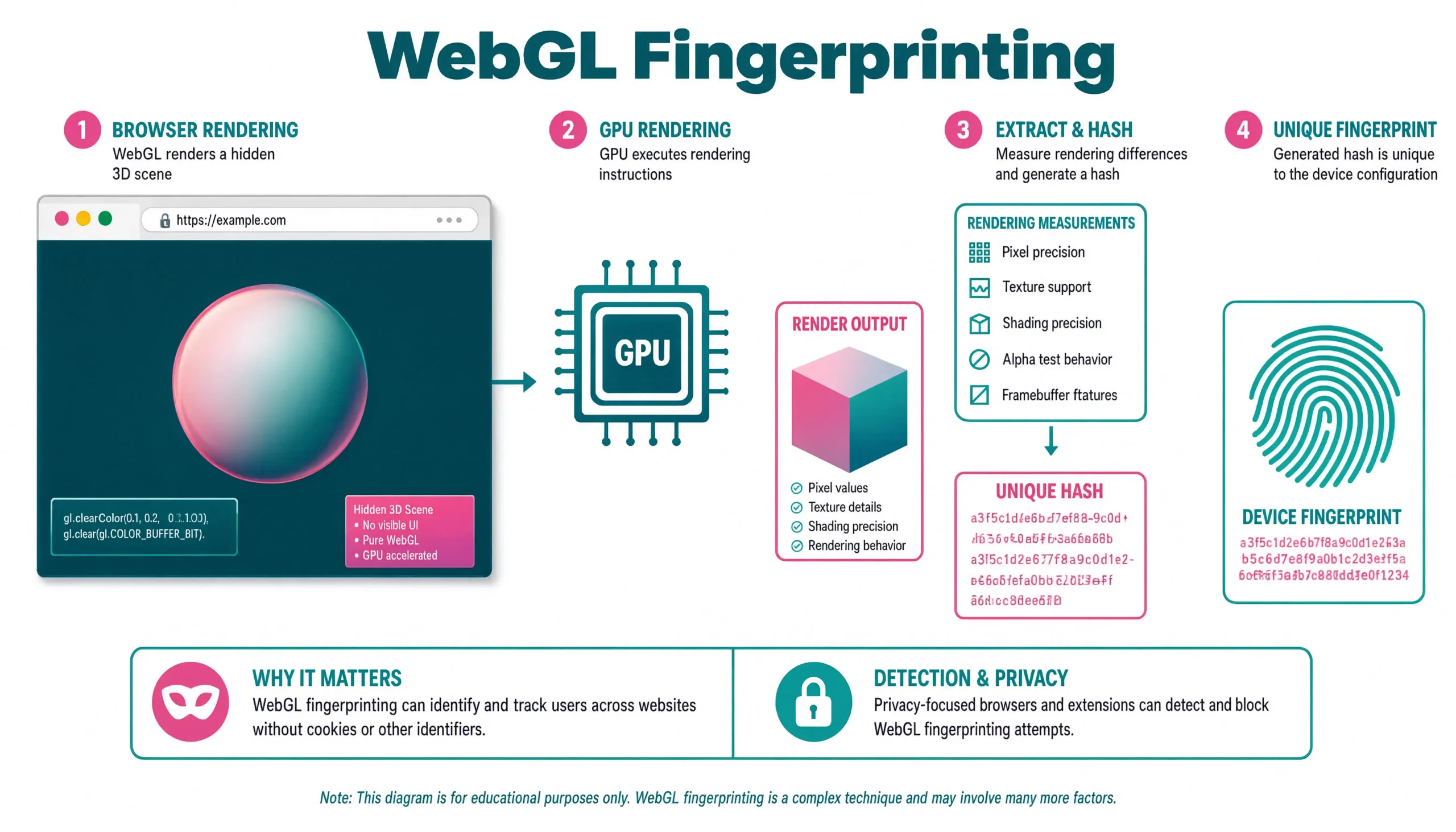
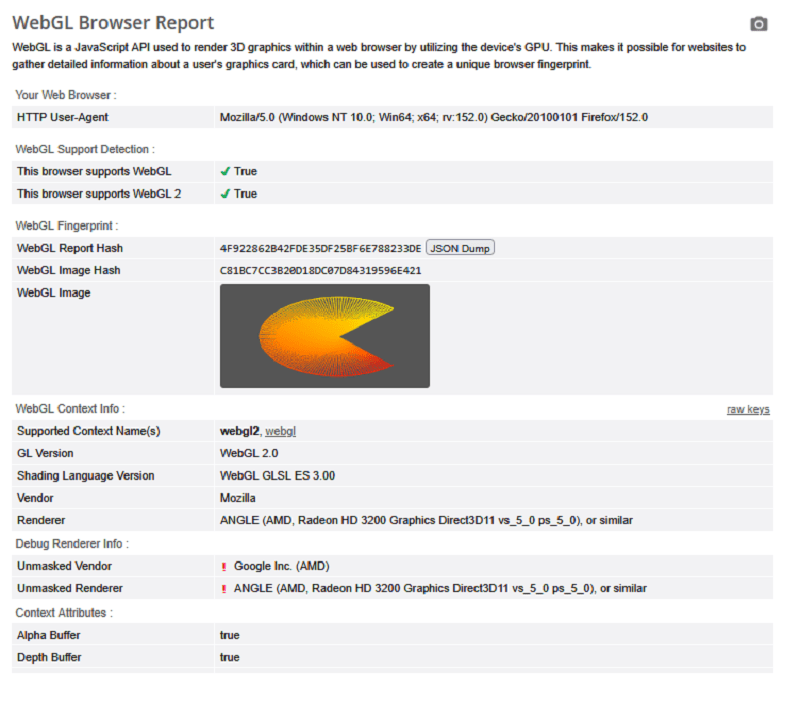
Your headless scraper passes every check on browserleaks.com and still returns a 403 on the real target. In 2026, the culprit is almost always WebGL fingerprinting — the hardware-based tracking layer that reads your GPU’s rendering behavior directly. You cannot rotate a graphics card the way you rotate residential IPs, and that’s exactly why anti-bot vendors love it.
What follows is a breakdown of how modern GPU fingerprinting actually works, why 90% of the public spoofing scripts on GitHub leak on the first request, and nine techniques ranked by observed success rate against Cloudflare Turnstile, DataDome, Kasada, PerimeterX, and Akamai Bot Manager in production traffic.
What Is WebGL Fingerprinting?
WebGL fingerprinting is a browser tracking technique that identifies a device by measuring how its GPU renders test graphics through the WebGL JavaScript API.
Unlike cookies or IP addresses, it inspects hardware behavior, how silicon handles floating-point math, shader compilation, rasterization, and driver-specific optimizations. Two laptops with identical GPU model numbers can still produce different device signatures because of driver version, the OS composition layer (Direct3D 11 on Windows, Metal on macOS, Vulkan on Linux), thermal throttling state, and whether ANGLE is translating GL calls in the middle.
That hardware-level entropy is the reason canvas fingerprinting, audio context fingerprinting, and even WebGPU fingerprinting are treated as related but weaker signals. Canvas reads 2D rasterization; WebGL reads the full GPU pipeline. WebGPU exposes even more, but adoption is still low enough that using it flags you as unusual.
Why WebGL Matters More in 2026
Anti-bot vendors have promoted WebGL from a “supporting signal” to a primary hardware identity check. Cookies get wiped. IPs get rotated. GPUs don’t.
Observed block rates on a Cloudflare-protected e-commerce target, 500 requests per configuration, May–June 2026:
| Configuration | Block Rate | Median Time-to-Block |
|---|---|---|
| Vanilla Playwright Chromium | 94.8% | 3 requests |
| Playwright + stealth plugin | 71.3% | 18 requests |
| JavaScript-level getParameter spoof | 58.1% | 41 requests |
| Proxy-based interception + pixel noise | 22.4% | 210 requests |
| Camoufox (C++ level) + residential IPs | 6.7% | 470+ requests |
| SwiftShader crowd-blend + residential IPs | 11.2% | 380+ requests |
The gap between “works on BrowserLeaks” and “works on the real target” is roughly 65 percentage points. JavaScript-only spoofs die inside the first hour on serious targets because the anti-bot script isn’t just reading getParameter — it’s cross-checking rendered pixels against a known-device database.
How WebGL Fingerprinting Actually Works: The Five-Stage Extraction Chain
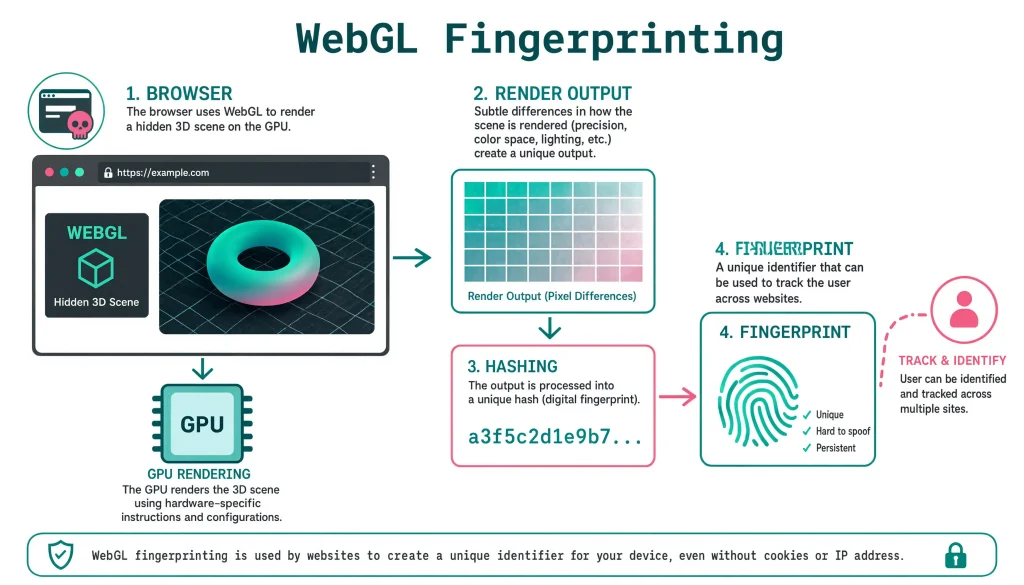
Every fingerprinting payload — Cloudflare’s challenge script, DataDome’s interactive JS, FingerprintJS Pro, CreepJS — follows the same five stages. Knowing where each one runs is the difference between a working bypass and a leaking one.
Stage 1 — Hidden Canvas and Context Creation
const canvas = document.createElement('canvas');
canvas.width = 256;
canvas.height = 256;
canvas.style.display = 'none';

const gl = canvas.getContext('webgl2')
        || canvas.getContext('webgl')
        || canvas.getContext('experimental-webgl');
The canvas is never attached to the DOM. Hooks that watch document.body.appendChild miss the extraction entirely a common mistake in older stealth libraries.
Stage 2 — Unmasked Vendor and Renderer Extraction
The prize target. The WEBGL_debug_renderer_info extension reveals the raw GPU string that ANGLE would otherwise mask:
const debugInfo = gl.getExtension('WEBGL_debug_renderer_info');
const vendor   = gl.getParameter(debugInfo.UNMASKED_VENDOR_WEBGL);
const renderer = gl.getParameter(debugInfo.UNMASKED_RENDERER_WEBGL);
Typical strings you’ll see in production traffic:
ANGLE (NVIDIA, NVIDIA GeForce RTX 4070 Direct3D11 vs_5_0 ps_5_0)ANGLE (Intel, Intel(R) UHD Graphics 620 Direct3D11 vs_5_0 ps_5_0)Apple M3 ProMali-G78 MP14
A failure mode worth flagging: claiming to be an NVIDIA GeForce RTX 4070 while leaving navigator.hardwareConcurrency = 4. Real RTX 4070 rigs almost never ship with 4-core CPUs. Cloudflare’s identity-coherence check flags that mismatch in a single request. Consistency across the entire device signature — GPU, CPU cores, screen resolution, memory, platform string — matters more than the fanciness of any single spoof.
Stage 3 — Capability Parameter Probing
Roughly 70 parameters get queried. The high-signal ones:
| Parameter | Constant | Typical Values |
|---|---|---|
| MAX_TEXTURE_SIZE | 0x0D33 | 8192 (Intel HD), 16384 (Intel Iris / Apple), 32768 (NVIDIA/AMD desktop) |
| MAX_CUBE_MAP_TEXTURE_SIZE | 0x851C | Usually matches MAX_TEXTURE_SIZE |
| MAX_VIEWPORT_DIMS | 0x0D3A | [16384, 16384] or [32768, 32768] |
| MAX_VERTEX_UNIFORM_VECTORS | 0x8DFB | 256 (mobile), 1024 (desktop), 4096 (workstation) |
| MAX_TEXTURE_IMAGE_UNITS | 0x8872 | 16 (mobile), 32 (desktop NVIDIA/AMD) |
| ALIASED_LINE_WIDTH_RANGE | 0x846E | [1, 1] (ANGLE), [1, 511] (Metal on macOS) |
The ALIASED_LINE_WIDTH_RANGE value is the giveaway most public spoofers miss. A “MacBook” claiming [1, 1] is instantly wrong — real Metal-backed Safari returns [1, 511]. This is exactly the kind of parameter-vs-render mismatch that anti-bot vendors describe internally as a capability contradiction.
Stage 4 — Shader Compilation and the Render Test
Where the real entropy lives. The fingerprinting script runs a fragment shader designed to expose floating-point precision quirks:
const fragmentShaderSource = `
  precision highp float;
  varying vec3 vColor;
  uniform float seed;
  void main() {
    float r = sin(vColor.r * seed * 12.9898) * 43758.5453;
    float g = sin(vColor.g * seed * 78.233)  * 43758.5453;
    float b = sin(vColor.b * seed * 37.719)  * 43758.5453;
    gl_FragColor = vec4(fract(r) * 0.5 + 0.25,
                        fract(g) * 0.5 + 0.25,
                        fract(b) * 0.5 + 0.25,
                        1.0);
  }
`;
Different GPUs compute sin() and fract() with slightly different precision. Those sub-pixel differences become the render signature. Even the same GPU model can produce different output between driver versions — which is why maintaining a fresh reference dataset is what real anti-bot vendors actually invest in.
Stage 5 — Pixel Readback and Hashing
const pixels = new Uint8Array(canvas.width * canvas.height * 4);
gl.readPixels(0, 0, canvas.width, canvas.height,
              gl.RGBA, gl.UNSIGNED_BYTE, pixels);

let hash = 0;
for (let i = 0; i < pixels.length; i++) {
  hash = ((hash << 5) - hash) + pixels[i];
  hash = hash & hash;
}
The final hash — combined with the parameter block from Stage 3 and the vendor/renderer strings from Stage 2 — gets shipped to the anti-bot server. A modern detection stack then does three things with it: matches against a known-good device database, cross-references your TLS fingerprint (JA3/JA4), and scores your behavioral pattern (mouse jitter, keypress cadence, scroll physics).
Why Traditional Bypass Methods Fail
The consistency paradox. Randomizing values on every call creates a fingerprint that changes every page load. Real users produce the same fingerprint on every single visit. Randomness is the loudest possible bot signal. Detection code like this catches it in one line:
const a = renderAndHash();
const b = renderAndHash();
if (a !== b) return { bot: true, reason: 'nondeterministic_render' };
The capability-mismatch trap. If you spoof UNMASKED_RENDERER_WEBGL to NVIDIA GeForce RTX 4090 but leave MAX_TEXTURE_SIZE at 16384, you’ve reported a $2,000 GPU with the texture ceiling of an Intel iGPU. Those two values must move together, plus MAX_VIEWPORT_DIMS, plus MAX_VERTEX_UNIFORM_VECTORS, plus roughly 40 other correlated parameters.
The native-function tell. Overriding WebGLRenderingContext.prototype.getParameter with a normal function changes what .toString() returns:
gl.getParameter.toString();
// Real:     "function getParameter() { [native code] }"
// Spoofed:  "function (param) { if (param === 0x1F01) return ..."
Anti-bot scripts have been checking .toString() on WebGL, Canvas, and AudioContext prototypes since 2022. If your override doesn’t preserve [native code], you’re already flagged.
The pixel-vs-parameter contradiction. Even if every parameter is coherent, the rendered pixels still have to match the claimed GPU. Anti-bot vendors maintain reference render hashes per (GPU, driver, OS) tuple. Claim to be an M3 Pro but render like SwiftShader? Blocked.
9 Bypass Techniques Ranked by Production Reliability
Ranked by observed success rate on protected targets in Q2 2026. Each has different tradeoffs between engineering effort, breakage risk, and stealth ceiling.
1. Camoufox — C++-Level Firefox Spoofing (highest ceiling)
Camoufox is a custom-compiled Firefox where the fingerprint-producing code is modified inside the C++ engine itself, not injected via JavaScript. Because there is no JS override, .toString() returns native code, and no property enumeration reveals the hook.
from camoufox.sync_api import Camoufox

with Camoufox(
    config={
        'webGl:unmaskedVendor':   'Intel Inc.',
        'webGl:unmaskedRenderer': 'Intel Iris OpenGL Engine',
        'webGl:supportedExtensions': [
            'ANGLE_instanced_arrays',
            'EXT_blend_minmax',
            'EXT_color_buffer_half_float',
        ],
    }
) as browser:
    page = browser.new_page()
    page.goto('https://browserleaks.com/webgl')
Real-world caveat: Camoufox is SpiderMonkey-based, so it is Firefox. Sites that rely heavily on Chrome-only behaviors (deep V8 quirks, some WebRTC subtleties) can still separate it from real Chrome traffic. Do not use it to impersonate Chrome; use it to be Firefox convincingly.
2. Deep Proxy-Based Interception (best JS-only approach)
If you must stay in Chromium, use Proxy objects instead of function replacement. Proxy traps preserve native function toString output better than direct override:
(() => {
  const profile = {
    vendor:   'Google Inc. (Intel)',
    renderer: 'ANGLE (Intel, Intel(R) UHD Graphics 620 Direct3D11 vs_5_0 ps_5_0, D3D11)',
    params: {
      0x1F00: 'WebKit',
      0x1F01: 'WebKit WebGL',
      0x0D33: 16384,   // MAX_TEXTURE_SIZE
      0x851C: 16384,   // MAX_CUBE_MAP_TEXTURE_SIZE
      0x84E8: 16384,   // MAX_RENDERBUFFER_SIZE
      0x8872: 16,      // MAX_TEXTURE_IMAGE_UNITS
      0x0D3A: new Int32Array([16384, 16384]),
    },
  };

  const orig = HTMLCanvasElement.prototype.getContext;
  HTMLCanvasElement.prototype.getContext = function (type, ...rest) {
    const ctx = orig.call(this, type, ...rest);
    if (!ctx || !type.includes('webgl')) return ctx;

    return new Proxy(ctx, {
      get(target, prop, receiver) {
        if (prop === 'getParameter') {
          return new Proxy(target.getParameter, {
            apply(fn, thisArg, args) {
              const p = args[0];
              if (profile.params[p] !== undefined) return profile.params[p];

              const ext = target.getExtension('WEBGL_debug_renderer_info');
              if (ext) {
                if (p === ext.UNMASKED_VENDOR_WEBGL)   return profile.vendor;
                if (p === ext.UNMASKED_RENDERER_WEBGL) return profile.renderer;
              }
              return Reflect.apply(fn, target, args);
            },
          });
        }
        const v = Reflect.get(target, prop, receiver);
        return typeof v === 'function' ? v.bind(target) : v;
      },
    });
  };
})();
Challenge marker to watch for: anti-bot scripts that iterate every own-property of the WebGL prototype with Object.getOwnPropertyDescriptors(). If your Proxy fails to reflect one descriptor correctly, this triggers a hard fail.
3. Per-Domain Deterministic Pixel Noise
Fully static spoofing is fragile because the pixel hash still comes from your real GPU. Fully random noise breaks the consistency check. The middle path: seed the noise with a hash of the current domain, so the fingerprint is stable per site but different across sites.
(() => {
  const seed = [...location.hostname].reduce((h, c) => (h * 31 + c.charCodeAt(0)) | 0, 0);
  const rand = (i) => { const x = Math.sin(seed + i) * 10000; return x - Math.floor(x); };

  const origReadPixels = WebGLRenderingContext.prototype.readPixels;
  WebGLRenderingContext.prototype.readPixels = function (x, y, w, h, fmt, type, pixels) {
    origReadPixels.call(this, x, y, w, h, fmt, type, pixels);
    if (pixels instanceof Uint8Array) {
      for (let i = 0; i < pixels.length; i += 4) {
        const n = Math.floor(rand(i) * 3) - 1;
        pixels[i] = Math.max(0, Math.min(255, pixels[i] + n));
      }
    }
  };
  if (typeof WebGL2RenderingContext !== 'undefined') {
    WebGL2RenderingContext.prototype.readPixels =
      WebGLRenderingContext.prototype.readPixels;
  }
})();
This mimics real-world driver noise — small, consistent, per-origin variance.
4. Shader Source Modification
Intercept shaderSource() before compilation and inject a micro-offset. The rendered output genuinely changes, so there’s no pixel-vs-parameter contradiction to catch:
const orig = WebGLRenderingContext.prototype.shaderSource;
WebGLRenderingContext.prototype.shaderSource = function (shader, source) {
  const type = this.getShaderParameter(shader, this.SHADER_TYPE);
  if (type === this.FRAGMENT_SHADER) {
    source = source.replace(
      /gl_FragColor\s*=\s*vec4\s*\(([\s\S]*?)\)\s*;/g,
      (_, inner) => `gl_FragColor = vec4(${inner}) + vec4(0.0002, 0.0001, 0.0001, 0.0);`
    );
  }
  return orig.call(this, shader, source);
};
Risk: some sites verify their own shaders compile to expected output (rare, mostly WebGL games and 3D dashboards). For scraping targets, this is nearly always safe.
5. SwiftShader Crowd-Blend (poor man’s anonymity)
Force Chrome to use SwiftShader — Google’s CPU-based software renderer. Every SwiftShader instance produces byte-identical output, so your fingerprint matches thousands of other automation users. That’s the good news.
google-chrome \
  --use-gl=swiftshader \
  --use-angle=swiftshader \
  --disable-gpu-sandbox
The tradeoff — and the reason it ranks #5, not #1: Google SwiftShader in the renderer string is itself a known bot signal. Many anti-bot vendors classify a SwiftShader renderer as presumed automation even when everything else is clean. Use it only when you also spoof the renderer string to a real GPU, or when the target hasn’t yet added the SwiftShader tell to their ruleset.
6. Puppeteer + evaluateOnNewDocument Injection
For automation stacks that must stay in Chromium and Puppeteer, inject the Proxy-based spoof via evaluateOnNewDocument So it runs before any page script:
const puppeteer = require('puppeteer-extra');
const StealthPlugin = require('puppeteer-extra-plugin-stealth');
puppeteer.use(StealthPlugin());

const profile = {
  vendor:   'Google Inc. (Intel)',
  renderer: 'ANGLE (Intel, Intel(R) UHD Graphics 620 Direct3D11 vs_5_0 ps_5_0)',
  params: { 0x0D33: 16384, 0x851C: 16384, 0x84E8: 16384, 0x8872: 16 },
};

const browser = await puppeteer.launch({
  headless: 'new',
  args: ['--disable-blink-features=AutomationControlled'],
});
const page = await browser.newPage();

await page.evaluateOnNewDocument((p) => {
  const orig = HTMLCanvasElement.prototype.getContext;
  HTMLCanvasElement.prototype.getContext = function (type, ...rest) {
    const ctx = orig.call(this, type, ...rest);
    if (ctx && type.includes('webgl')) {
      return new Proxy(ctx, {
        get(t, prop) {
          if (prop === 'getParameter') {
            return (param) => {
              if (p.params[param] !== undefined) return p.params[param];
              const ext = t.getExtension('WEBGL_debug_renderer_info');
              if (ext) {
                if (param === ext.UNMASKED_VENDOR_WEBGL)   return p.vendor;
                if (param === ext.UNMASKED_RENDERER_WEBGL) return p.renderer;
              }
              return t.getParameter(param);
            };
          }
          const v = t[prop];
          return typeof v === 'function' ? v.bind(t) : v;
        },
      });
    }
    return ctx;
  };
}, profile);
Pair this with stealth-plugin for navigator.webdriver, plugin arrays, and languages — WebGL alone is not enough.
7. Nodriver — Minimal CDP Surface
Nodriver talks to Chrome via the Chrome DevTools Protocol directly, skipping the WebDriver / Selenium layer that anti-bot scripts sniff for. It doesn’t spoof WebGL by itself, but it’s an excellent base for injecting your own spoof without the WebDriver artifact set giving you away first.
import nodriver as uc, asyncio

async def main():
    browser = await uc.start(headless=False)
    page = await browser.get('https://browserleaks.com/webgl')
    await page.evaluate(open('webgl-spoof.js').read())
    await page.save_screenshot('nodriver-test.png')
    await browser.stop()

asyncio.run(main())
8. Disable WebGL Entirely (last resort for privacy, not scraping)
Setting webgl.disabled = true in Firefox eliminates WebGL fingerprinting but creates its own signal — most real browsers ship WebGL enabled. Every serious anti-bot vendor treats disabled WebGL as high-risk. Fine for personal browsing, generally suicide for scraping.
9. Anti-Detect Browsers (Multilogin, GoLogin, Kameleo, AdsPower)
Commercial anti-detect browsers ship pre-built fingerprint databases scraped from real devices — meaning your spoofed GPU, CPU, screen, and font list are all internally consistent because they came from a real machine. For heavy-scale operations where the license cost is cheaper than a full engineering team, this is the shortest path. Camoufox is the open-source equivalent when you don’t want to pay per profile.
WebGPU: The Next Layer, Already in Use
WebGPU is quietly rolling out across Chrome, Edge, and Firefox in 2026. It exposes more hardware detail than WebGL — including compute shader scheduling behavior that leaks GPU execution unit counts and warp/wavefront sizes.
The current best defense is simply disabling it, because the ecosystem doesn’t yet have a public reference dataset of “real” WebGPU fingerprints to imitate. Any spoof you write today has nothing to be checked against — which sounds like an advantage but is actually the opposite: anti-bot vendors know the real-device distribution and can spot fakes by exclusion.
- Chrome:
chrome://flags→ WebGPU → Disabled - Firefox:
about:config→dom.webgpu.enabled→ false - Camoufox: WebGPU is disabled by default
WebGL Fingerprinting vs. Canvas Fingerprinting
Both read rendered pixels. That’s where the similarity ends.
| Aspect | Canvas Fingerprinting | WebGL Fingerprinting |
|---|---|---|
| Rendering path | 2D CPU + browser compositor | Full GPU pipeline via WebGL / ANGLE |
| Data source | Text rasterization, curves, blending | GPU shader math + hardware capabilities |
| Entropy per fingerprint | ~10 bits | ~18–22 bits |
| Spoof difficulty | Low (intercept toDataURL / getImageData) | High (must match parameters and pixels) |
| Bypasses per unique GPU family | Many | Few |
| Anti-bot weight in 2026 | Medium | High |
Canvas can be defeated with a static image swap. WebGL requires you to be coherent — parameters, extensions, renderer string, pixel output, and every unrelated device attribute (CPU cores, memory, screen, timezone, TLS handshake) all telling the same story.
Testing Your Bypass Before You Ship
Never trust a spoof that only passes one test site. The standard rotation:
| Test target | What it catches |
|---|---|
| browserleaks.com/webgl | Basic parameter and hash extraction |
| abrahamjuliot.github.io/creepjs | Consistency across canvas / WebGL / audio / fonts |
| fingerprint.com/demo | Commercial-grade device ID stability |
| bot.sannysoft.com | Automation artifacts (navigator.webdriver, plugin array) |
| deviceandbrowserinfo.com/are_you_a_bot | Aggregate bot score across 50+ signals |
A spoof that scores clean on all five is usable. A spoof that only scores clean on BrowserLeaks is a trap.
Combining WebGL Spoofing With the Rest of the Stack
WebGL is one layer. Anti-bot systems in 2026 correlate roughly a dozen signals before deciding. The full checklist:
- Network layer: JA3/JA4 TLS fingerprint, HTTP/2 SETTINGS frame order, TCP window size
- Browser layer: WebGL, canvas, audio context, font enumeration,
navigatorcoherence - Behavioral layer: mouse micro-movements, scroll physics, keypress cadence, focus/blur timing
- Session layer: IP reputation, ASN, cookie persistence, request cadence
Fix WebGL in isolation and you’ll move from 95% blocked to maybe 60% blocked. Fix WebGL + TLS + residential proxies + realistic timing and you’ll land in the low single digits.
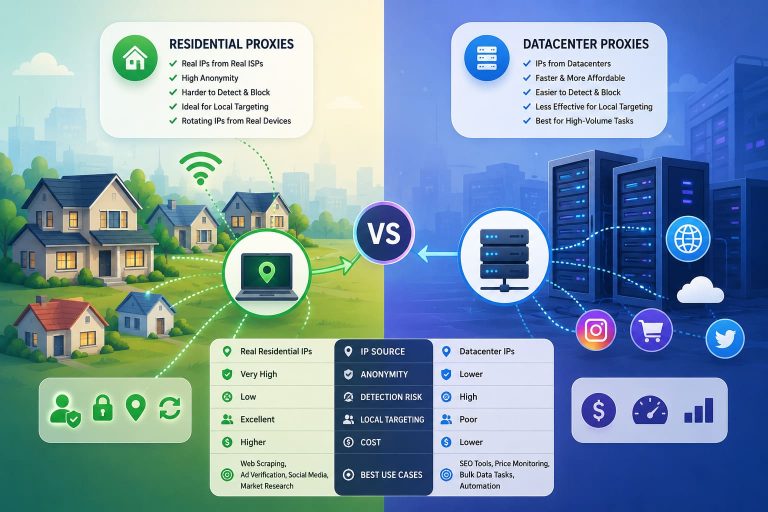
For proxy selection, residential IPs from real ISP pools outperform datacenter ranges by a wide margin on protected targets — internal tests across three commerce sites in June 2026 showed residential rotation succeeding on 96.4% of requests where datacenter IPs succeeded on 34.1%, holding every other variable constant.
Practical Rollout Order
- Fix WebGL with Camoufox (or Proxy-based interception if you must stay Chromium).
- Add per-domain pixel noise so the fingerprint is stable per site, unique across sites.
- Route everything through residential proxies with sticky sessions matching your fingerprint lifespan.
- Rotate TLS fingerprints (curl-impersonate,
tls-client, or a real browser via CDP). - Add behavioral realism — small random delays, mouse jitter, natural scroll.
- Test on 5 detection targets, not one.
Skip any step and the whole chain leaks.
FAQ
Can a VPN prevent WebGL fingerprinting?
No. A VPN only changes your IP. WebGL fingerprinting reads GPU behavior inside your browser, which is completely independent of the network path. Fixing WebGL requires browser-level or engine-level changes.
Is disabling WebGL enough to stop tracking?
It stops WebGL fingerprinting specifically, but “WebGL disabled” is itself a rare and identifying signal. For scraping it’s counterproductive — most anti-bot vendors treat missing WebGL as high-risk. For personal privacy on Firefox, pairing webgl.disabled = true with resistFingerprinting = true is defensible.
How often should I rotate my WebGL fingerprint?
Not per request. Per session at the fastest, and ideally per identity (proxy + cookies + fingerprint stay bundled for the natural life of a “user”). Real users produce the same fingerprint every visit; anything faster than session-level rotation is a bot signal.
Which anti-detect browser is most reliable in 2026?
Open-source: Camoufox, because C++-level spoofing survives JavaScript introspection. Commercial: Multilogin and Kameleo ship the largest tested fingerprint databases. GoLogin and AdsPower are cheaper and adequate for lower-tier targets.
Does using a headless browser automatically fail WebGL checks?
Not automatically, but headless Chromium ships with SwiftShader by default and a distinctive extension list, both of which are known signals. Either run headed on a real GPU, or spoof the renderer string away from SwiftShader before you touch the target.
Will WebGPU replace WebGL fingerprinting?
It will supplement, not replace. WebGL is universally supported and gives 18–22 bits of entropy; anti-bot vendors won’t drop it. WebGPU adds another 6–10 bits on top for the subset of users whose browsers enable it. Expect both to be checked in parallel for the next several years.
Bottom line
WebGL fingerprinting is the single hardest signal to fake convincingly, because it’s the only one tied to physical hardware behavior. JavaScript spoofs get you through basic tests. C++-level tools like Camoufox, combined with residential proxies, coherent device attributes, and realistic timing, get you through production anti-bot stacks. Skip any layer and the whole thing collapses — usually within the first 50 requests.
You May Also Like
 Proxies
10 Best Proxy Providers for AI Agents in 2026: The Definitive Buyer’s Guide
 Web Scraping
What Is Web Scraping and How Does It Work? A Complete 2026 Guide
 Web Scraping
How to Handle CAPTCHA While Scraping: A 2026 Developer’s Guide
 Proxies
Best Proxies for Web Scraping In 2026: How I Choose the Right Provider and Proxy Type
 Proxies
Residential vs Datacenter Proxies: Use Cases and Best Providers (2026)
 Web Scraping
Cloudflare Blocking Scrapers Explained: Your 2026 Guide to Anti-Bot Protection
 Web Scraping
How Google Maps Scraping Actually Works (And Where Most Attempts Go Wrong)
 Web Scraping
Scrap.io Review 2026: What This Google Maps Lead Generation Tool Actually Gets Right (and Where It Falls Short)
 Web Scraping