
If you’ve ever tried to build a prospect list straight out of Google Maps, you already know the wall you hit at around 120 results. Scrap.io exists specifically to get you past that wall. It’s a cloud-based data extraction platform built on top of an indexed database that the company says covers more than 225 million business listings across 195 countries, and its entire pitch is that you shouldn’t need a developer on staff to pull country-scale lead lists out of Google Maps.
That’s a bold claim, so before writing anything else, I checked it against the actual review platforms rather than repeating numbers from a single marketing source. Here’s where things land: Scrap.io holds a 4.8 rating on Capterra, a 4.9 on G2, and — this is where a lot of recycled “reviews” of this product get it wrong — a TrustScore that sits closer to 4 out of 5 on Trustpilot, based on roughly 75 submitted reviews, not the inflated 4.2+ figure you’ll see quoted elsewhere. It’s a solid spread of ratings across three independent platforms, but it’s not uniformly perfect, and a fair review should say so.
Key Takeaways
- What it does: Pulls business contact data from Google Maps at a scale the native interface won’t allow, then enriches each listing by crawling the business’s own website.
- Core differentiator: Works around Google Maps’ roughly 120-result display cap, so a single query can return thousands of records instead of two pages worth.
- Data depth: Vendor materials describe 30-plus data fields per listing, covering things like categorized email addresses, mobile-vs-landline phone classification, and the technology stack behind a business’s website.
- Pricing structure: Credit-based subscriptions starting at $49/month for 10,000 export credits, with credits only spent on export — not on searching or filtering.
- Trial: A 7-day free trial bundled with 100 export credits.
- Independent ratings: 4.8 on Capterra, 4.9 on G2, and roughly 4 stars on Trustpilot — genuinely good, though the Trustpilot number is softer than most recycled “reviews” of this tool report.
Building an accurate prospect list the manual way is a slog. You know your ideal customers are sitting right there on Google Maps, but copying names, numbers, and emails one listing at a time doesn’t scale past a weekend project. That’s the specific itch Scrap.io is trying to scratch, and it’s worth understanding both what the platform gets right and where a buyer should ask harder questions before committing budget to it.
What Scrap.io Actually Is
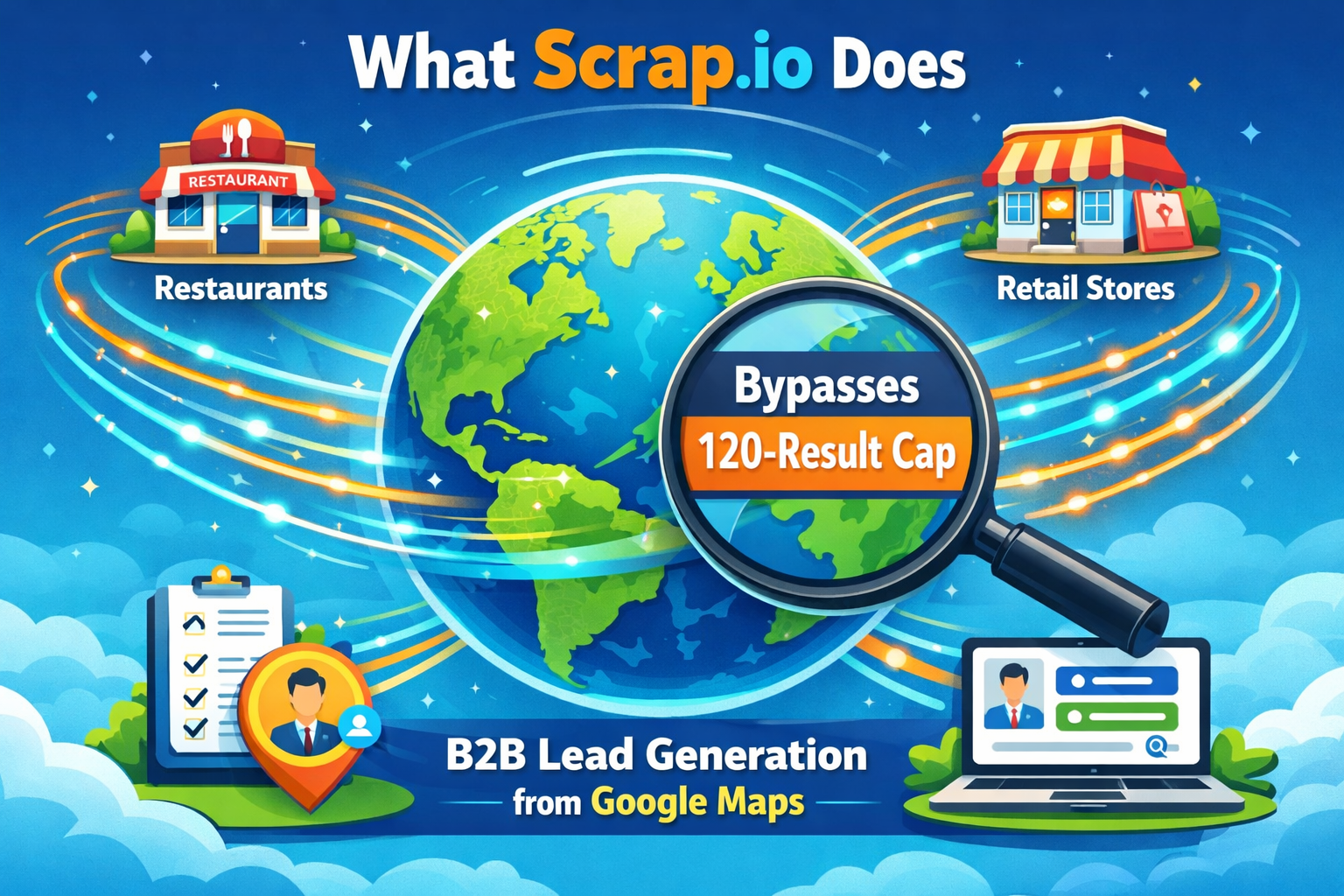
Scrap.io runs server-side. That distinction matters more than it sounds like it should. A lot of tools in this space are Chrome extensions that only capture what’s rendered on your screen, which means your extraction is limited by however far you’re willing to manually scroll and click. Scrap.io instead queries its own pre-built index of Google Maps listings, so there’s no browser tab to babysit and no scrolling required.
If you want to understand the mechanics behind that kind of approach — the difference between pulling data from a live page versus querying a maintained index — it helps to look at the broader distinction between web scraping and web crawling, since the two get used interchangeably but solve different problems. Scrap.io is really doing both: crawling to build and refresh its index, then scraping on demand when a user runs a search.
The headline feature is bypassing that ~120-result ceiling Google Maps imposes on any single search. Run a query for “electricians in Ohio” through the native map interface and you’ll hit that cap fast. Run the same query through Scrap.io and — according to the company’s own published test comparing a manual script against the platform on a search for restaurants in France — the platform surfaced roughly 139,000 listings versus about 52,000 from a DIY scraper limited by the display cap and incomplete city coverage. Take vendor-published benchmarks with a grain of salt, as you should with any company grading its own homework, but the underlying mechanism (an indexed database vs. a live-rendered cap) is a real and verifiable architectural difference, not just marketing language.
Feature Breakdown: Where the Data Actually Comes From

Scrap.io’s pitch isn’t just volume — it’s what happens after the initial pull. The platform doesn’t stop at the Google Maps card; it crawls the linked business website to add a second layer of data on top of the base listing.
Classified emails. Rather than dumping a single generic address, Scrap.io sorts what it finds into categories like sales, support, marketing, and administration, with individual names parsed out where available. That matters if you’re running targeted outreach and don’t want a cold pitch landing in an accounting inbox.
Phone number typing. The system distinguishes mobile numbers from landlines, which is the difference between a list you can text and a list you can only cold-call.
Website technology and ad pixel detection. For agencies selling web design, SEO, or paid media services, knowing whether a prospect is running Shopify versus a stale template, or whether they have a Meta Pixel installed at all, is a meaningful qualifier before you ever send an email.
Pre-export filtering. Because Scrap.io’s credit system only deducts when you export, you can filter down to businesses with a verified email, a mobile number, or a minimum review rating before spending a single credit. That’s a genuinely useful design decision — it shifts the cost risk away from experimentation.
Export formatting. CSV and Excel exports are available, with the Excel version color-coding which fields came straight from the Google Maps listing versus which were added through website enrichment, so you’re not left guessing at data provenance.
Integrations. A REST API, a Make.com connector, and an MCP connector for AI agent workflows are all part of the offering, which puts it in reach of teams building automated pipelines rather than manually exporting spreadsheets. If you’re the kind of team stitching scraped data into a larger automation stack, it’s worth comparing this against the broader ecosystem of AI agent workflows built with n8n, since a lot of teams route enrichment data through exactly that kind of pipeline before it ever reaches a CRM.
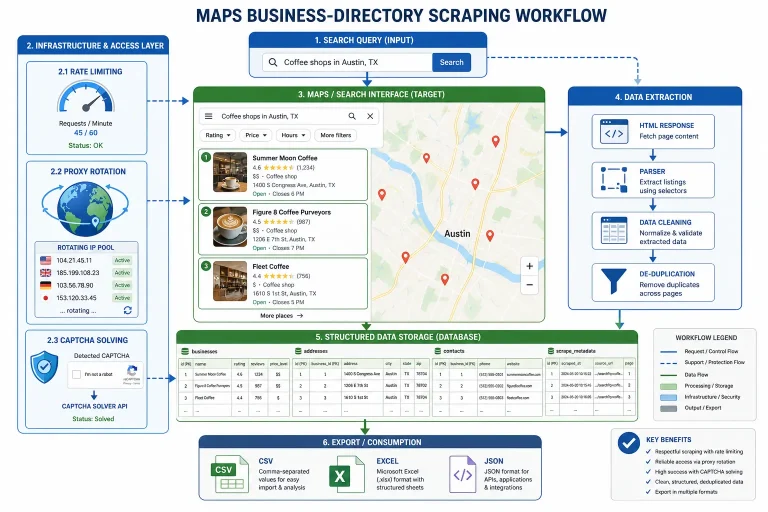
Under the hood, any tool operating at this scale has to deal with the same obstacles every scraper runs into: getting blocked, rate-limited, or fingerprinted. Scrap.io abstracts that away from the end user, but it’s worth understanding what’s actually being handled on your behalf — things like rotating user agents, managing residential proxy networks, and avoiding detection through browser fingerprinting techniques. If you’ve ever tried to build something similar yourself and hit a wall of CAPTCHAs, this is exactly the maintenance burden a managed platform is meant to remove.
Legality and Data Compliance: The Part Most Reviews Skip
This is the section most “Scrap.io review” posts either skip entirely or wave away with a single line. It deserves more than that.
Scraping publicly available business listings sits on reasonably solid legal ground in the US — the Ninth Circuit’s ruling in hiQ Labs v. LinkedIn established that pulling public data doesn’t itself violate the Computer Fraud and Abuse Act, even though it may still conflict with a platform’s terms of service (which is a contractual issue, not a criminal one). In the EU, GDPR’s legitimate interest basis can cover B2B data processing, though that gets murkier the moment personal data belonging to individuals — rather than business contact points — enters the picture.
None of that means scraping is a legal free-for-all. Rate limits, robots.txt directives, and platform-specific terms of service still shape what’s advisable even where it isn’t strictly illegal. Anyone evaluating a tool like Scrap.io — or building an in-house equivalent — should read up on the actual legal considerations around web scraping before assuming “publicly visible” automatically means “fair game for any use.” That’s especially true for the outreach side of the equation: once you’ve exported an email list, CAN-SPAM and GDPR obligations on the messaging side don’t disappear just because the data collection itself was compliant.
Scrap.io Pricing in 2026

Scrap.io runs on a monthly subscription with a “zero-waste” credit model — you spend credits only when you export a record, not while searching or applying filters. That’s a meaningfully different structure from pay-per-query tools where every experiment costs money.
| Plan Name | Monthly Price (USD) | Export Credits |
|---|---|---|
| Basic | $49 | 10,000 |
| Professional | $99 | 20,000 |
| Agency | $199 | 40,000 |
| Enterprise | $499 | 100,000 |
Pricing on SaaS platforms shifts often enough that it’s worth double-checking the current numbers directly on Scrap.io’s own pricing page before you commit, rather than trusting any single review — including this one — as the final word months after publication.
The 7-day free trial comes with 100 export credits, which is enough to run a real test: pick your ideal customer profile, search a target city or region, apply your filters, and export a sample before deciding whether the data quality matches what you actually need.
Honest Pros and Cons
Strengths
- Genuinely bypasses the Google Maps display limit, which is the single biggest practical constraint anyone doing this manually runs into.
- The website-enrichment layer (classified emails, tech stack detection, ad pixel presence) goes beyond what a basic scraper or the raw Maps listing provides.
- The pay-on-export credit model removes the cost penalty from filtering and experimentation.
- Independently verified ratings on Capterra and G2 are strong, and even the more modest Trustpilot score still reflects a majority of positive experiences.
- No coding, proxy management, or infrastructure required from the end user.
Weaknesses
- There’s no permanent free tier — only a time-boxed trial.
- Several Capterra and G2 reviewers flagged the pricing as steep for smaller operations, particularly once you need country-level coverage rather than a single city.
- It’s a Google Maps specialist. If your prospecting needs extend into employee-level org charts, funding data, or intent signals outside local business listings, you’ll be pairing this with another tool, not replacing one.
- The API and automation connectors assume a baseline of technical comfort that not every marketing team will have on hand.
Scrap.io vs. Apollo vs. ZoomInfo vs. Lusha
| Feature | Scrap.io | Apollo.io | ZoomInfo | Lusha |
|---|---|---|---|---|
| Primary use case | Local B2B leads sourced from Google Maps | Integrated prospecting and outbound engagement | Enterprise-grade verified company and contact database | Quick individual contact lookup via extension |
| Data source | Google Maps, enriched via website crawling | LinkedIn, proprietary database, web crawling | Proprietary database with human verification | Proprietary database, community-sourced |
| Best fit | SMBs and agencies targeting local, physical-location businesses | Sales teams wanting prospecting plus outreach in one place | Large enterprises needing depth over breadth | Individuals or small teams needing fast contact lookups |
| Pricing model | Credit-based subscription from $49/month | Tiered subscription with credit allowances | High-ticket annual contracts | Tiered subscription, includes a free tier |
Apollo is a broader engagement platform with sequencing baked in; Scrap.io doesn’t try to compete there and is narrower by design. ZoomInfo sits at the enterprise end of the market with a price tag to match, which puts it out of reach for most SMB budgets that Scrap.io is actually built for. Lusha solves a different problem entirely — individual contact lookup rather than bulk list-building by location and category.
The DIY Alternative: Building Your Own Google Maps Scraper
Before paying for any tool, it’s fair to ask whether you could just build this yourself. The honest answer is: yes, but the maintenance cost is real and easy to underestimate. A custom scraper built on Playwright, Selenium, or Puppeteer can technically pull Google Maps data, and there’s a well-worn path for doing exactly that with Python-based scraping frameworks. But Google’s front-end changes its class names and selector structure without warning, so scripts that work today can break within weeks. Add proxy costs, CAPTCHA-handling, and the ongoing selector maintenance, and a “free” DIY approach starts costing real engineering hours every month.
There’s also a fast-growing category of purpose-built AI-driven scraping tools worth comparing against a specialist like Scrap.io if your needs go beyond Google Maps specifically — Amazon listings, general web crawling, or multi-platform aggregation. The right choice really comes down to whether your prospecting is narrowly focused on local business listings (where a specialist tool has the edge) or spread across a wider range of data sources (where a more generalist scraping platform earns its cost).
Who Should Actually Use This
Marketing agencies targeting local business categories, SaaS companies selling into the SMB market, and sales teams in industries like real estate, insurance, or home services are the clearest fit. The value proposition is straightforward: this replaces what would otherwise be hundreds of hours of manual copy-paste work with a filtered, exportable list that plugs directly into a CRM or outreach sequence.
If your pipeline depends on data Scrap.io doesn’t touch — org charts, funding rounds, intent signals, or anything beyond what’s visible on a Google Maps listing and its linked website — you’ll want to pair it with a broader sales intelligence platform rather than expecting it to cover that ground alone.
Conclusion
Scrap.io does what it says it does: it gets past the Google Maps result cap, adds a real layer of enrichment on top of the raw listing data, and charges you only for what you actually export. The independent review data backs that up, with the caveat that the Trustpilot score is a bit more modest than the near-perfect numbers some recycled reviews report. For a team specifically hunting local business leads, it’s a legitimately useful, fairly priced tool. For anyone needing broader company intelligence beyond what a Google Maps listing can show, it’s one piece of the stack rather than the whole solution.
The most sensible next step is the 7-day trial. Run a search against your actual ideal customer profile, apply the filters you’d use in production, and export a real sample before paying for anything.
Frequently Asked Questions
What is Scrap.io used for?
Scrap.io is used for B2B lead generation by extracting business data from Google Maps at a scale the native interface doesn’t allow. Common use cases include sales prospecting, marketing list building, and local market research.
Does Scrap.io have a free trial?
Yes. The trial runs for 7 days and includes 100 export credits, enough to test the search, filtering, and export workflow on a real query before committing to a paid plan.
How accurate is the data from Scrap.io?
The base listing data comes from Google Maps, which is generally reliable for business names, addresses, and categories. Scrap.io adds a further enrichment pass by crawling each business’s website for emails and social profiles, which improves completeness but inherits the same accuracy limits as the source websites themselves.
Can Scrap.io integrate with a CRM?
Yes, through its API, Make.com connector, and support for standard CSV/Excel exports that most CRMs accept directly.
What makes Scrap.io different from a basic scraper or Chrome extension?
Three things: it runs server-side rather than depending on an open browser tab, it gets around the roughly 120-result display cap through its own indexed database, and it enriches each listing with website-derived data rather than stopping at the raw Maps card.
Is using Scrap.io legal?
Scraping publicly available Google Maps listings sits on reasonably solid legal footing in the US following precedent set in hiQ v. LinkedIn, though violating a platform’s terms of service remains a contractual risk rather than a criminal one. Compliance obligations shift depending on jurisdiction and how the resulting data is used, particularly for outreach, so it’s worth reviewing the specifics rather than assuming any scraping activity is automatically risk-free.
You May Also Like
 Web Scraping
What Is Web Scraping and How Does It Work? A Complete 2026 Guide
 Web Scraping
How to Handle CAPTCHA While Scraping: A 2026 Developer’s Guide
 Proxies
Best Proxies for Web Scraping In 2026: How I Choose the Right Provider and Proxy Type
 Web Scraping
Cloudflare Blocking Scrapers Explained: Your 2026 Guide to Anti-Bot Protection
 Web Scraping
How Google Maps Scraping Actually Works (And Where Most Attempts Go Wrong)
 Web Scraping
The 7 Best PHP Web Scraping Libraries of 2026: The Ultimate Guide
 Use Cases
Inside Kimwolf Traffic: How Residential Proxies Fuel Credential Stuffing, Web Scraping, & Fraud
 Web Scraping
User-Agent Rotation: What Actually Works (and What Google Detects in Milliseconds)
 Web Scraping