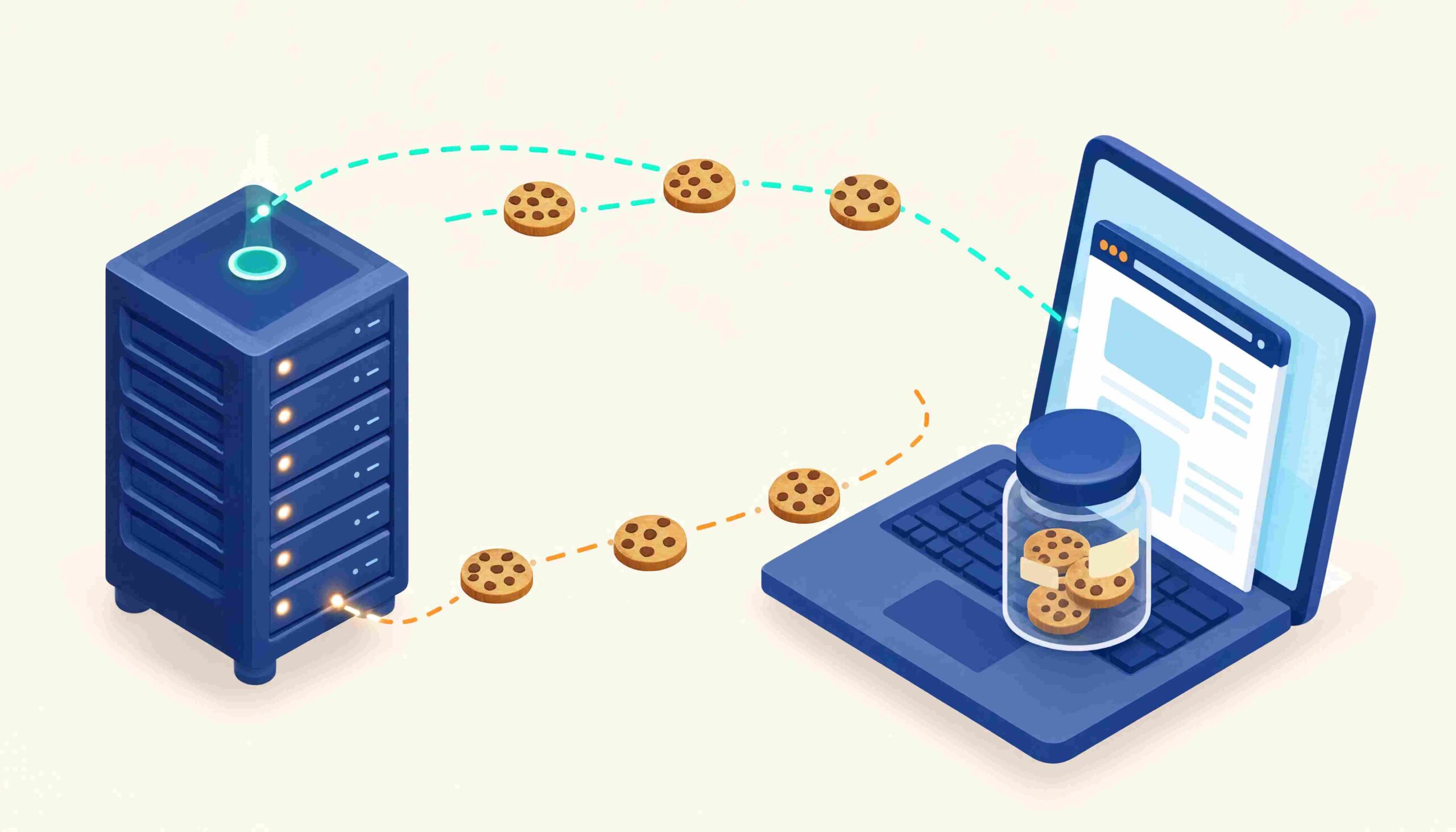
The first time a login script breaks for no obvious reason, most people assume the password is wrong. The second time, they suspect the server. By the third time, they finally open the browser developer tools, click the Application tab, and notice a long list of cookies sitting underneath the site. That moment is usually when HTTP cookies stop being an abstract concept and start being a real engineering problem.
I have seen the same pattern repeat across teams. A Python scraper logs in successfully on Monday and returns 403 on Wednesday. An analytics dashboard loses a third of its Safari visitors after a browser update. A perfectly working login form collapses the moment it gets embedded inside an iframe on a partner site. In almost every one of these cases, the root cause traces back to a cookie attribute that nobody thought to check.
Cookies look simple on the surface, but they sit at the intersection of authentication, analytics, privacy regulation, and automation. That is precisely why they cause so much trouble for the people building on top of them. The goal here is to walk through how cookies actually behave in production, what tends to go wrong, and how to handle them properly in Python and analytics workflows.
Key Takeaways
- Cookies exist because HTTP is stateless. They are the workaround that made authenticated, personalized web applications possible in the first place.
- Attributes matter more than the value itself. A cookie’s real behavior is controlled by
Secure,HttpOnly,SameSite,Domain,Path, and its lifetime, not by what is stored inside it. - Session cookies and persistent cookies are not interchangeable. They behave differently in browsers, in Python
requests.Session, and in Selenium, and confusing the two leads to silent failures in automation. - Third-party cookies are not formally dead. Google reversed its deprecation plan in April 2025, but Safari and Firefox still block them by default, which makes any cross-site dependency structurally fragile.
- SameSite causes more bugs than any other attribute. Most “it worked yesterday” failures in cross-domain logins and embedded widgets come back to this single setting.
- For automation, the useful question is not “what is a cookie.” It is “which cookies does this site actually require, and how long do they stay valid.”
- HttpOnly cookies are usually safer than localStorage for tokens. The real tradeoff is XSS exposure versus CSRF exposure, not a clean win for either side.
How HTTP Cookies Actually Work
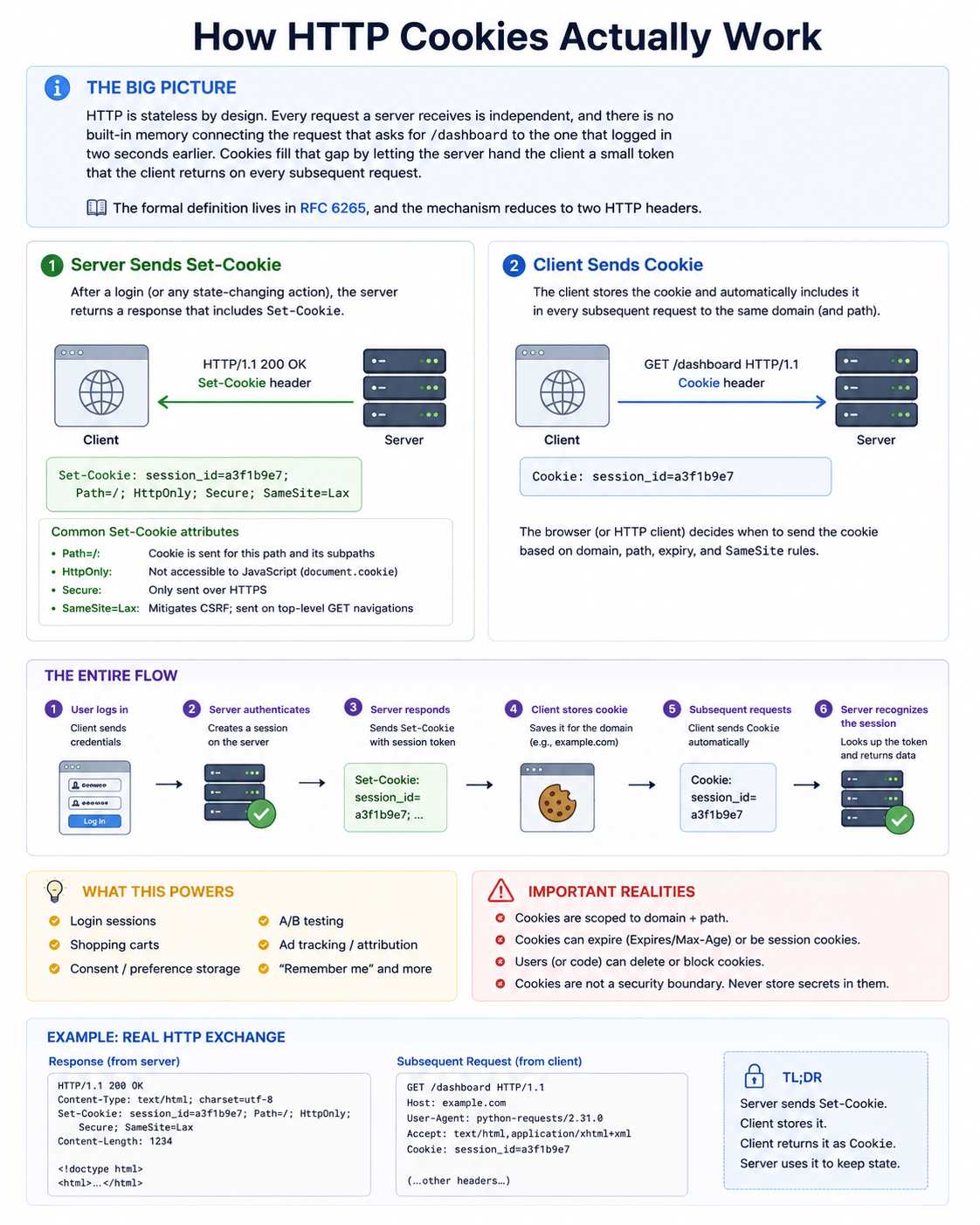
HTTP is stateless by design. Every request a server receives is independent, and there is no built-in memory connecting the request that asks for /dashboard to the one that logged in two seconds earlier. Cookies fill that gap by letting the server hand the client a small token that the client returns on every subsequent request.
The formal definition lives in RFC 6265, and the mechanism reduces to two HTTP headers.
The server sends Set-Cookie in its response:
Set-Cookie: session_id=a3f1b9e7; Path=/; HttpOnly; Secure; SameSite=Lax
The client, whether a browser, a Python script, or any HTTP agent, then sends Cookie back on every subsequent request to the same domain:
Cookie: session_id=a3f1b9e7
That exchange is the entire core mechanism. Login sessions, shopping carts, consent banners, A/B test assignments, and ad tracking are all built on top of this pattern.
Why the Stateless Design Still Matters
A frequent misconception is that cookies are stored on the server. They are not. The server only keeps whatever it chooses to retain in its own session store. The cookie itself lives entirely on the client, which is the reason cookies can be inspected, modified, exported, hijacked, or replayed, and the reason cookie-based authentication has its own substantial security literature.
The Anatomy of a Cookie: Attributes That Control Behavior
The name-value pair is the least interesting part of a cookie. The attributes are where actual behavior is defined, and where most bugs originate.
| Attribute | Purpose | Practical Implication |
|---|---|---|
| Domain | Which host the cookie is sent to | A wrong domain means the cookie is set but never returned |
| Path | URL prefix required for the cookie to be sent | A cookie scoped to /api/ will not be sent to / |
| Expires / Max-Age | Lifetime of the cookie | Absent values create a session cookie that dies with the browser |
| Secure | Restricts sending to HTTPS only | Localhost HTTP scraping frequently fails because of this |
| HttpOnly | Blocks JavaScript access via document.cookie | Essential for XSS defense, irrelevant for server-to-server scraping |
| SameSite | Restricts cross-site sending | Source of most modern login and iframe bugs |
SameSite: The Attribute That Breaks the Most Workflows
SameSite deserves its own section because it accounts for a disproportionate share of production failures.
SameSite=Strict blocks the cookie on any cross-site request, including a user clicking a link from another site. It is the safest option, but it breaks many legitimate flows.
SameSite=Lax is the modern default in major browsers. It allows the cookie on top-level GET navigations but blocks it on cross-site POST, iframe, and resource requests.
SameSite=None permits cross-site sending, but only when combined with Secure. Servers that omit Secure will have their cookie silently rejected by Chromium browsers, a failure mode that produces no console error and confuses developers for hours.
When automating workflows, you rarely set SameSite yourself, but you do need to understand it because cookies captured from a real browser session can behave very differently when replayed from a script that does not preserve the original request context.
Session Cookies vs Persistent Cookies
This distinction matters more than most tutorials acknowledge, particularly for analytics and automation.
- A session cookie has no
ExpiresorMax-Ageattribute. It lives in browser memory and disappears when the browser process ends. These cookies typically carry the actual authenticated session identifier, which is the thing you need to stay logged in. - A persistent cookie has an explicit lifetime and is written to disk. These cookies handle “remember me,” language preferences, analytics IDs, and consent state.
For a scraper, this distinction translates into a hard operational rule. Session cookies do not survive a process restart unless you explicitly serialize them. If your script logs in fresh on every run, you are probably abusing the target site’s authentication endpoint and risking rate-limiting or bans. Persisting session cookies between runs, with a sensible refresh strategy, is almost always the more sustainable approach.
First-Party vs Third-Party Cookies: The 2026 Reality
A first-party cookie is set by the domain the user is actively visiting. A third-party cookie is set by a different domain loaded inside the page, typically an ad network, analytics provider, or embedded widget.
For several years, the conventional wisdom was that third-party cookies were on their way out. That narrative changed in 2025. Google announced in April 2025 that it would not proceed with the planned Chrome prompt to deprecate third-party cookies, and major Privacy Sandbox APIs began winding down later that year.
For analysts and engineers, the practical implications are:
- Third-party cookies are not formally dead in Chrome, but Safari and Firefox have blocked them by default for years. Any cross-site personalization that depends on them is structurally fragile regardless of Chrome’s stance.
- First-party data strategies, such as server-side analytics, first-party identity graphs, and consented data collection, remain the direction the industry is moving even without a hard deprecation deadline.
- For market research and BI workflows, treating third-party cookie data as authoritative is a methodological mistake. The coverage gaps from Safari and Firefox users alone are large enough to skew most B2C analyses.
Cookies in Python: Practical Patterns
Most people working through this topic will eventually need to handle cookies in code. The patterns below cover the situations that appear most often in real projects.
Automatic Cookie Handling with requests.Session
The requests library handles cookies automatically when you use a Session object. This is almost always the right choice.
import requests

session = requests.Session()
session.post("https://datacelix.com/login", data={"user": "x", "pass": "y"})

# Cookies set by the login response are now sent automatically
response = session.get("https://datacelix.com/dashboard")
The session’s cookies attribute is a RequestsCookieJar, which you can inspect, modify, or export.
Persisting Cookies Across Runs
For long-running scrapers, you want to avoid re-authenticating on every execution.
import pickle

# Save
with open("cookies.pkl", "wb") as f:
    pickle.dump(session.cookies, f)

# Load
with open("cookies.pkl", "rb") as f:
    session.cookies.update(pickle.load(f))
A subtle mistake at this stage is assuming the loaded cookies are still valid. Always make a lightweight authenticated request, such as a profile endpoint or session check, before launching the actual scraping job.
Transferring Cookies Between Selenium and Requests
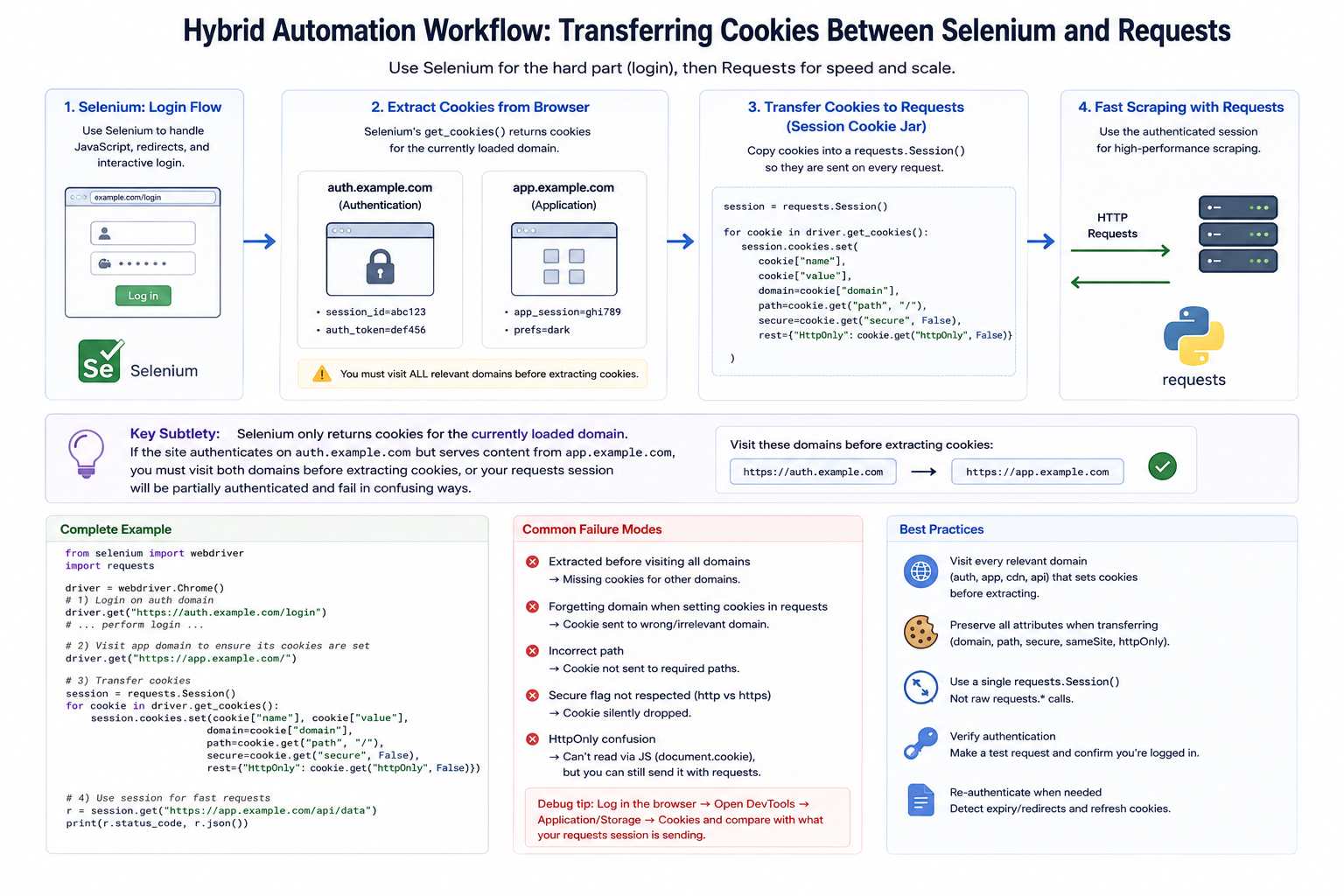
A common pattern is to use Selenium for a JavaScript-heavy login, then switch to requests for faster scraping.
from selenium import webdriver
import requests

driver = webdriver.Chrome()
driver.get("https://example.com/login")
# ... perform login ...

session = requests.Session()
for cookie in driver.get_cookies():
    session.cookies.set(cookie["name"], cookie["value"], domain=cookie["domain"])
The subtle failure mode is that Selenium only returns cookies for the currently loaded domain. If the site authenticates against auth.example.com but serves content from app.example.com, you must visit both domains before extracting cookies, or your requests session will be partially authenticated and fail in confusing ways.
Cookies vs Local Storage vs Session Storage
This comparison comes up constantly for developers. The honest answer is that the three serve different purposes, and the “which is better” framing misleads more than it clarifies.
| Feature | Cookies | localStorage | sessionStorage |
|---|---|---|---|
| Sent to server automatically | Yes | No | No |
| Max size | ~4 KB | ~5 to 10 MB | ~5 to 10 MB |
| Accessible from JavaScript | Only if not HttpOnly | Always | Always |
| Persists after browser close | If lifetime is set | Yes | No |
| XSS exposure | Mitigated by HttpOnly | Full exposure | Full exposure |
| CSRF exposure | Yes (mitigated by SameSite) | None | None |
The popular advice that “JWTs belong in localStorage because cookies are insecure” deserves real pushback. HttpOnly cookies are actually more resistant to XSS than localStorage, which is fully readable by any script executing on the page. The real choice is XSS exposure versus CSRF exposure, and the answer depends on which threat model better matches your application.
Expert Insights: Patterns From Real Projects
Several patterns become predictable after enough exposure to login automation, analytics pipelines, and integration work.
Most “cookie problems” are actually attribute problems. The cookie is being set correctly, the client is even storing it, but Secure, SameSite, or Domain is preventing it from being sent back on the request that needs it. Reading the raw Set-Cookie header in the network tab solves more bugs than any amount of code review.
Login flows that involve a redirect through a separate authentication domain are the most fragile part of any scraper. The browser handles the cross-domain handoff transparently. A script almost never does, unless you explicitly walk through each domain in the redirect chain.
Sites that detect bots rarely block on the obvious signals. They look at cookie consistency across requests, the order in which cookies are set, and whether session cookies survive a page reload the way a real browser session would. Scripts that overwrite or duplicate cookies during a session look unmistakably automated, even when every individual request looks correct.
Analytics teams consistently overestimate the reliability of cookie-based attribution. Between Safari’s Intelligent Tracking Prevention, Firefox’s Enhanced Tracking Protection, and the growing share of users on privacy-focused browsers, cookie-based user counts in B2C audiences can be off by twenty to forty percent. First-party server-side tracking is no longer optional for serious measurement work.
Common Mistakes to Avoid
Beginners and experienced developers alike tend to repeat the same handful of errors when working with cookies.
The first is treating cookies as opaque strings instead of structured data. A cookie value might look like a random hash, but the attributes around it carry the actual behavioral rules. Copying a cookie without copying its Domain, Path, and lifetime almost always produces a broken session.
The second is hardcoding cookie values from a browser session into a script. Browser-issued cookies often come bound to specific request contexts, IP addresses, or user-agent strings. Replaying them from a different environment frequently fails, and the failure mode looks like authentication working partially.
The third is ignoring cookie expiration. Long-running scrapers that never refresh their session cookies will eventually start hitting login walls at unpredictable intervals. Building a small session-validity check at the start of each run prevents most of these failures.
The fourth is conflating Session objects with persistent sessions. A requests.Session() in Python only persists cookies for the lifetime of the Python process. Without explicit serialization, every script run starts with an empty cookie jar.
The fifth is misreading SameSite. Developers often set SameSite=None to “make it work” without adding Secure, then spend hours debugging why Chromium silently rejects the cookie.
Practical Recommendations
When working with cookies in any serious capacity, a few habits will save significant debugging time.
Inspect the raw Set-Cookie headers in the network tab before writing any code. The attributes tell you what behavior to expect, and any mismatch between expectation and behavior is usually traceable to one of them.
Use requests.Session for any Python automation involving more than one request to the same site. Manual cookie handling is almost never the right answer.
Serialize cookies between runs and validate them with a lightweight check before doing real work. This single habit eliminates the most common class of scraper failures.
When transferring cookies between tools, such as from Selenium to requests, walk through every domain involved in the authentication flow, not just the final landing page.
For analytics work, never treat third-party cookie data as ground truth. Cross-reference with first-party signals whenever possible, and document the measurement gaps explicitly in any report.
For security-sensitive applications, default to HttpOnly, Secure, and SameSite=Lax unless you have a specific reason to deviate. These three flags eliminate the majority of cookie-related vulnerabilities at zero cost.
Frequently Asked Questions
Are HTTP cookies the same as browser cookies?
Yes, in practical terms. The HTTP specification defines the transport mechanism, and the browser is the most common client that implements it. Any HTTP client, including Python’s requests library or curl, handles the same cookies through the same headers.
Can a website read cookies set by another website?
Not directly. Cookies are scoped to the domain that set them. A third-party cookie can be read by the same third party across multiple sites that embed its content, which is the basis of cross-site tracking, but a site cannot read cookies belonging to an unrelated domain.
Do cookies work without JavaScript?
Yes. Cookies are an HTTP-level mechanism, completely independent of JavaScript. The HttpOnly flag exists specifically to prevent JavaScript from accessing them, which improves security.
Why does my Python scraper get logged out even when I save cookies?
The most likely reasons are session cookies that were not actually persisted, server-side session expiration independent of the cookie’s lifetime, or missing cookies from a secondary authentication domain. A session-validity check at the start of each run will surface these issues quickly.
Is it legal to scrape cookies from websites I have logged into?
The cookies in your own browser are yours to access. What changes the legal picture is what you do with the data behind them. Automated access to a service typically falls under that service’s terms of use, and aggressive scraping can violate those terms even when the cookies themselves are legitimately obtained.
Will third-party cookies stop working in Chrome?
Not in the immediate term. Google reversed its deprecation plan in April 2025 and confirmed Chrome will continue to support third-party cookies for the foreseeable future. However, Safari and Firefox already block them by default, so any cross-site dependency remains unreliable in practice.
Conclusion
HTTP cookies are simple in concept and surprisingly complicated in practice. The mechanism itself is just two headers, but the attributes layered on top, the privacy regulations wrapped around them, and the inconsistent ways browsers and HTTP clients handle them combine to make cookies one of the most failure-prone parts of any web-facing system.
Understanding what HTTP cookies are is the easy part. Understanding which ones a site actually requires, how long they remain valid, and how their attributes interact with browsers, scripts, and privacy settings is the part that separates people who use cookies from people who actually work with them. The patterns and recommendations above are not exhaustive, but they cover the situations that produce the majority of real-world bugs, and they should give a solid foundation for handling cookies properly in development, automation, and analytics work.
You May Also Like
 Web Scraping
Crawl4AI vs Firecrawl: A Practitioner’s 2026 Guide to Choosing the Right Web Crawler for AI Pipelines
 Web Scraping
WebGL Fingerprinting in 2026: How It Works and 9 Bypass Methods That Survive Production
 Web Scraping
What Is Crawl4AI? The Open-Source Web Crawler Powering LLM and RAG Pipelines
 Web Scraping
What Is Data Parsing in Web Scraping? A Working Engineer’s Walkthrough With Three Real Sites
 Web Scraping
Playwright vs Selenium vs Puppeteer: Which One Actually Wins for Web Scraping?
 Web Scraping
10 Best ScrapingBee Alternatives in 2026: Tested, Compared, and Ranked
 Web Scraping
Beyond the Header: Diagnosing and Defeating HTTP 403 Forbidden in Web Scraping
 Data Acquisition
HTTP Error 429: The Rate Limit Wall Every Scraper Eventually Hits And How to Actually Get Past It
 Data Acquisition