
Every proxy decision eventually comes down to the same trade-off: do you want to look like a real person, or do you want to move fast and cheap? Residential and datacenter proxies sit on opposite ends of that trade-off, and picking the wrong one for a given job is one of the most common reasons scraping or automation projects stall out with bans instead of data.
At Datacelix, this is a question we field constantly from teams building extraction pipelines — usually after they’ve already burned a chunk of budget on the wrong proxy type. The short version: neither proxy type is “better.” They’re built for different jobs, and the sites you’re targeting usually decide the answer for you before your budget does.
This guide goes past the usual surface-level comparison table. It covers what actually separates the two categories at a technical level, how a third and fourth category (ISP and mobile proxies) fit into the picture, how detection systems actually score IP origin against everything else in your request, what these providers really cost once you account for wasted traffic and failed requests, and which vendors are worth evaluating in 2026 based on how they’ve performed in independent testing rather than what their landing pages claim.
What Actually Separates a Datacenter IP From a Residential One
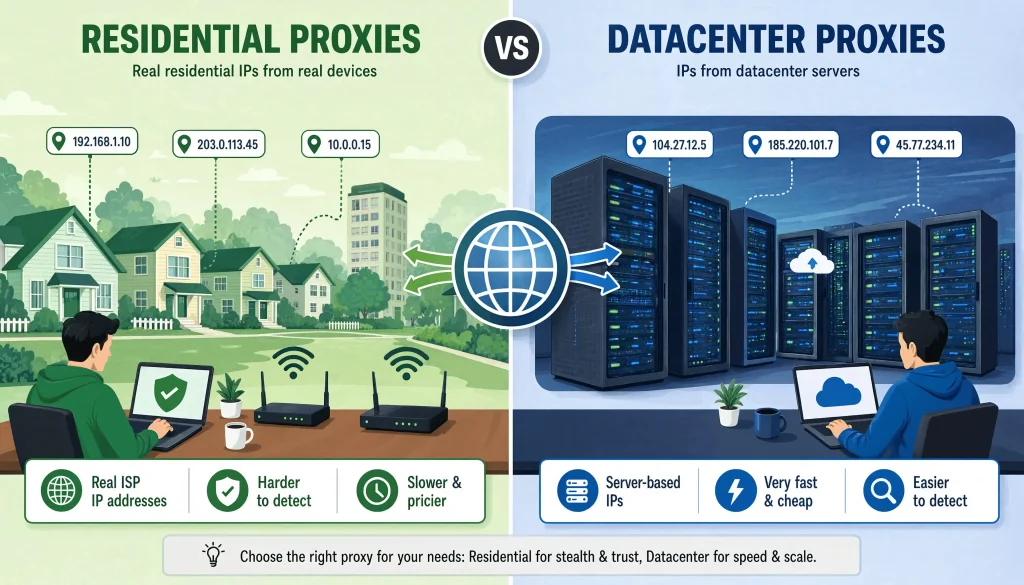
A datacenter proxy is an IP address that lives on a server inside a commercial data center — AWS, a cloud host, or a proxy provider’s own server farm. It has no connection to a residential internet service provider, and that absence is exactly what makes it detectable. Every IP address on the internet belongs to an Autonomous System Number, a block registered to whichever organization owns that range. Hosting companies register their ranges under ASNs that are public record. A site doesn’t need to guess whether a request came from a data center. It can look up the ASN and know within milliseconds.
A residential proxy routes traffic through an IP address that an ISP has actually assigned to a real household device a router, a phone, a laptop plugged into home broadband. To the site on the other end, the request looks indistinguishable from someone browsing at home, because technically, that’s exactly what’s happening on the other side of the tunnel. The ASN for that IP resolves to Comcast, BT, Telkomsel, or whichever ISP actually owns it, and residential ASNs don’t carry the automatic suspicion that hosting-company ASNs do.
That single difference in origin cascades into nearly everything else about how the two proxy types behave in practice:
| Datacenter Proxies | Residential Proxies | |
|---|---|---|
| Speed | Very fast, low latency, often under 100ms | Slower and more variable, dependent on the home connection behind it |
| Cost | Low, frequently priced per IP per month | Higher, almost always priced per GB of traffic |
| Detection risk | Higher ASN lookup is a near-instant tell | Lower traffic resolves to a legitimate consumer ISP |
| IP pool scale | Large but drawn from a finite, catalogued set of ranges | Often larger in absolute numbers and far more geographically granular |
| Session control | Typically static the same IP for as long as you hold it | Usually rotating by default, with sticky sessions available for a limited window |
| Best fit | High-volume work against low-protection targets | Anything behind serious anti-bot systems or IP-reputation-based platforms |
There’s also a third category that gets left out of most comparisons: ISP proxies, sometimes called static residential proxies. These are IPs registered to an ISP — so they carry a residential ASN — but hosted on datacenter-grade infrastructure for stability and speed. They split the difference:
- Trust signal of a residential ASN, without the reliability issues of an actual home connection
- Uptime and latency are much closer to datacenter performance than genuine residential IPs
- Pricing that typically sits between standard residential and datacenter rates
- Best fit for account management and any workflow that needs a long-lived, consistent identity that still needs to read as residential
And a fourth tier sits above residential entirely: mobile proxies, which route through IPs assigned to cellular carriers. Because carriers use Carrier-Grade NAT, thousands of real mobile subscribers can share a single public IP at any given moment, which makes banning that IP a genuinely costly decision for a platform — it risks blocking real paying customers alongside whatever automated traffic triggered the ban. That makes mobile IPs the hardest tier to get blocked on and the most expensive.
Where Datacenter Proxies Actually Win
Datacenter proxies get an unfair reputation as the “lesser” option, but for a large share of real workloads they’re the correct call, not just the cheap one:
- Bulk monitoring against low-protection targets. SERP tracking against your own properties, internal QA testing, and scraping public datasets that don’t run aggressive bot management are all places where a datacenter IP’s speed advantage outweighs any detection risk. If a target site isn’t running Cloudflare-grade defenses, there’s rarely a reason to pay residential prices for the privilege of looking more human than you need to.
- High-concurrency workloads. When a job needs thousands of parallel connections and a strict time budget, datacenter proxies deliver throughput that residential pools generally can’t match, since the underlying hardware is built for exactly that kind of load rather than routing through a consumer router with whatever bandwidth is left over after the household’s own usage.
- Internal or authenticated tooling. Ad verification against your own campaigns, testing your own site from multiple regions, or automation that never touches a third-party anti-bot system doesn’t need the disguise a residential IP provides. Paying a per-GB residential rate for traffic that’s never going to be scrutinized is money spent solving a problem you don’t have.
- Price monitoring at scale. Retail and travel price trackers that need to hit tens of thousands of product pages daily often lean on large datacenter pools specifically because the economics only work at a low per-request cost — the margins in price intelligence rarely support residential-tier bandwidth pricing across that volume.
The catch is exactly what the comparison table implies: datacenter ranges are catalogued, and a site with real bot management will flag them the moment your request pattern looks even slightly automated. Sometimes, before a single request even completes, if the ASN alone is enough to trigger a challenge. If you’re already running into blocks on this front, it’s worth reading through the specifics of a 403 error during scraping before assuming more IPs will fix it. Often, the fingerprint or request pattern is the actual problem, and no amount of IP rotation solves a TLS signature that screams “Python script” on every connection.
Where Residential Proxies Earn Their Price Tag
- E-commerce and marketplace scraping. Amazon, major retailers, and travel booking platforms have gotten extremely good at flagging datacenter ranges, largely because real customers never come from AWS IP blocks. Residential IPs blend into normal shopping traffic in a way datacenter IPs structurally cannot, and for these targets the extra cost per GB is simply the price of admission rather than an optional upgrade.
- Ad verification and brand protection. Confirming what an ad actually looks like in a specific city, on a specific carrier, from a specific device type, requires an IP that genuinely originates from that context. Ad networks serve different creative based on granular location and connection type, so a datacenter IP registered to a data center three time zones away simply can’t reproduce what a local resident would see.
- Social media and account-based work. Platforms that manage multiple accounts per user lean heavily on IP reputation as a trust signal, and a shared or reused datacenter IP puts every account behind it at risk the moment one gets flagged — a single compromised IP can take down an entire batch of accounts that had nothing to do with whatever triggered the flag in the first place.
- Anything behind serious bot management. Sites running Cloudflare, Akamai, or PerimeterX-style protection layer IP reputation on top of TLS fingerprinting and behavioral analysis. A clean residential IP removes one whole category of suspicion before the request even reaches the harder checks, though it’s still not a substitute for getting the fingerprinting and request pacing right on your end. A residential IP paired with an obviously automated request pattern just gets you a slower, more expensive block.
- Localized SEO and SERP research. Search results vary meaningfully by location, and residential IPs let you see what a search engine actually returns for a query in a specific city rather than an approximation based on a datacenter’s registered location, which search engines increasingly discount or flag as non-organic.
The trade-off is real: residential bandwidth costs several times more per gigabyte than datacenter traffic, and connection speeds are less predictable since you’re routing through a home connection rather than enterprise-grade server hardware. A page that loads in 200ms through a datacenter proxy might take a full second or more through a residential one, and that difference compounds fast across a large crawl.
How Sourcing Actually Works and Why It Matters
Not all residential IPs come from the same place, and the sourcing model behind a provider’s pool has real ethical and practical implications that rarely make it into a comparison table.
Most large residential networks are built on a peer-to-peer model: consumers install an app often a free VPN, a browser extension, or some other utility and in exchange, their device’s bandwidth gets shared as a proxy exit node whenever it’s idle. This is how providers scale into the tens of millions of IPs. The legitimacy of this model hinges entirely on informed consent. Regulators have started paying closer attention to this exact question. Several data protection authorities in Europe have opened inquiries into whether users genuinely understand that installing a “free” app means their home connection becomes a commercial proxy node for someone else’s traffic.
A smaller set of providers source IPs directly through partnerships with ISPs instead, which tends to produce a cleaner, more transparent chain of custody, but usually at a real price premium and sometimes a smaller overall pool. Before signing with any residential provider, it’s worth asking directly:
- How is the pool sourced: peer-to-peer apps, ISP partnerships, or a mix of both?
- What disclosure do end users get: Before their device becomes an exit node?
- Is there a published policy on data handling and how the network avoids capturing sensitive traffic that passes through a shared device?
- What happens to a household’s connection if their device is being used as a proxy while they’re also actively using it?
If ethical sourcing matters to your organization and increasingly, it should be a compliance question rather than just a values one a satisfying answer to all four is worth more than a headline IP-pool number.
Session Types: Rotating vs Sticky, and Why It Changes Everything
Proxy behavior isn’t just about IP origin — it’s also about how long you hold a given IP before it changes, and this detail decides whether a proxy setup will actually work for your specific task.
- Rotating sessions assign a new IP on every request, or on a fixed interval. This is the default for most residential pools and is exactly what you want for high-volume, stateless scraping where each request is independent — product listings, search results, price checks. Rotation spreads load across the pool and minimizes the chance any single IP gets flagged from overuse.
- Sticky sessions hold the same IP for a defined window, typically anywhere from a few minutes up to thirty minutes depending on the provider. This matters enormously for anything involving a login, a shopping cart, a multi-step form, or any workflow where a site would consider a mid-session IP change suspicious in its own right — imagine a real user’s IP switching between three different cities in the middle of a checkout flow. A site’s fraud detection would flag that instantly, and so would yours if a scraper simulating that user behaved the same way.
Getting this mismatched is one of the more common reasons a “working” proxy setup starts failing halfway through a task: a rotating pool assigned to a login-dependent workflow will look exactly like account takeover behavior to the platform on the other end, regardless of how clean the individual IPs are.
The Cost Question Nobody Puts in the Marketing Copy
Datacenter proxies are usually billed per IP, per month — a fixed cost regardless of how much you actually use them. Residential proxies are almost always billed per gigabyte of traffic, which means the real cost of a job depends heavily on page weight, not just request count. A lightweight JSON API response might cost fractions of a cent to fetch through a residential pool; a full rendered page with images, fonts, and scripts can burn through the same budget in a handful of requests.
This is where a lot of budgets go sideways. A few things worth checking before committing to a plan:
- Measure actual page weight on your real targets rather than estimating from request count alone.
- Block unnecessary assets — images, fonts, third-party scripts — at the browser level if you’re running full browser automation, since this can cut residential proxy costs dramatically without touching the data you actually need.
- Track failed and blocked requests separately. A request that gets challenged, retried, and eventually fails still consumes bandwidth on most billing models, so a scraper with a high failure rate isn’t just slower — it’s burning through paid traffic for no return.
- Get request pacing right before scaling proxy spend. A bigger proxy budget is not a substitute for a better-behaved scraper, and the right scraping tools usually solve more of the cost problem than a bigger plan does.
How Detection Systems Actually Weigh IP Origin Against Everything Else
It’s worth being explicit about something the proxy industry doesn’t always emphasize: IP type is one signal among several, not the whole picture. A modern anti-bot stack — Cloudflare’s bot management being the most widely deployed example — typically layers three kinds of checks together:
- IP reputation — ASN lookup, historical abuse data, and whether the address has been seen making automated requests before.
- Fingerprinting — both at the TLS handshake level and, for JavaScript-executing clients, at the browser environment level: canvas rendering, installed fonts, automation-specific properties that tools like Selenium leave behind.
- Behavioral analysis — request timing, navigation patterns, and whether the traffic moves through a site the way a person actually would.
A residential IP with a perfect reputation score can still get flagged if the TLS fingerprint matches a known scraping library, or if the request pattern shows a bot jumping straight from a homepage to a checkout page with no intermediate browsing at all. Conversely, a datacenter IP paired with a well-configured headless browser, a realistic fingerprint, and human-like pacing can sometimes get further against moderate protection than a residential IP used carelessly. The proxy is the foundation, not the entire structure — treating it as a silver bullet is the single most common mistake teams make when a “good” proxy plan still results in bans.
A Practical Framework for Choosing
Rather than starting from “which proxy type sounds more advanced,” it’s more useful to work backward from three questions:
- What is the target actually defending against? A blog, a small e-commerce store, or an internal dashboard usually isn’t running enterprise bot management, and a datacenter proxy paired with sane request pacing will get you through fine. A major retailer, an airline, or anything sitting behind Cloudflare’s rate limiting and reputation scoring is a different calculation entirely — that’s where residential IPs stop being optional and start being the baseline requirement.
- Does the workflow require session persistence? Anything involving login, cart state, or multi-step forms needs sticky sessions and probably needs a residential or ISP proxy, since an IP change mid-session is itself a red flag independent of anything else about the request.
- What does the data volume actually look like? High-volume, lightweight requests against forgiving targets favor datacenter economics. Lower-volume, high-value requests against strict targets justify residential pricing, because the cost of getting blocked — lost time, incomplete data, a burned account — usually outweighs the marginal savings of a cheaper proxy.
It’s also worth separating the proxy decision from everything else in your setup. IP type alone won’t save a scraper that’s still sending a static user agent on every request or running through a bare HTTP client with no JavaScript execution. A residential IP paired with a headless browser that hasn’t been configured to hide its automation signatures will still get caught the IP is one layer of a stack, not the whole defense.
Best Residential and Datacenter Proxy Providers in 2026
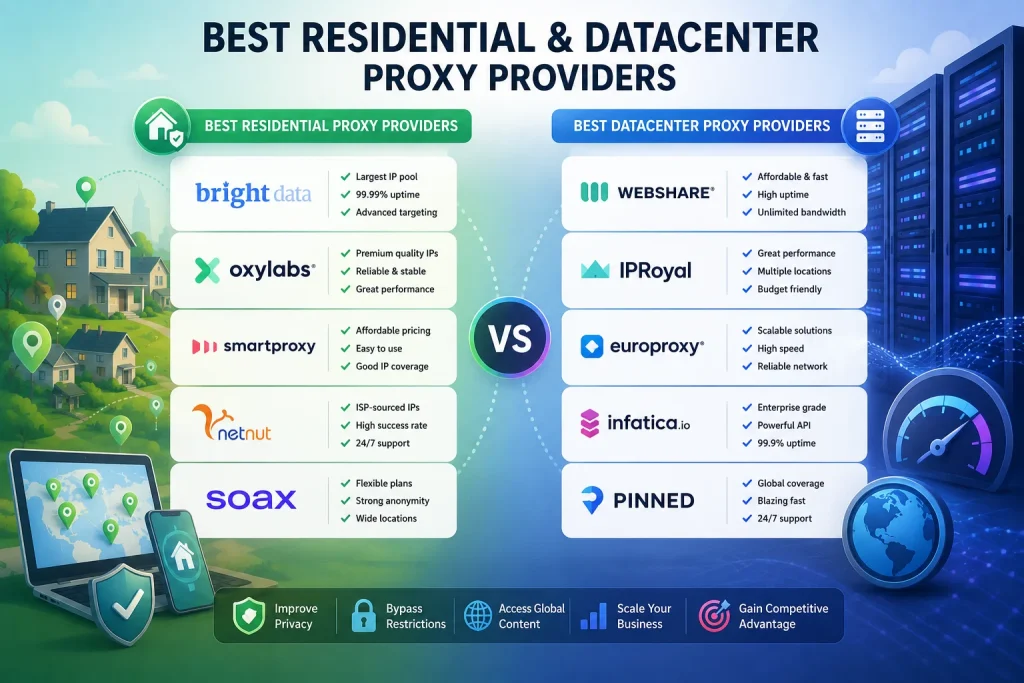
Provider quality shifts fast in this market, and pricing changes often enough that any table goes stale within months — so treat this as a shortlist to test against your actual target, not a final answer. Run a small trial against the specific pages you need before committing to a monthly plan; published success-rate numbers are almost always measured against generic test sites, not your actual target.
Residential Proxy Providers
- Bright Data — the largest and most mature network in the space, with geo-targeting precise down to city and ASN level, and the deepest tooling built around the raw proxy layer: scraping browsers, a dedicated unlocker product, and dataset marketplaces. Priced and built for enterprise budgets and technically sophisticated teams rather than solo projects; the platform has a real learning curve.
- Oxylabs — operates at a comparable scale to Bright Data, with a strong reputation for stability on genuinely difficult targets and a dedicated account management layer for larger customers. Positioned squarely at enterprise buyers, and entry pricing reflects that.
- Decodo (formerly Smartproxy) — consistently the strongest price-to-performance option in independent testing, with a noticeably cleaner self-service dashboard than the enterprise-tier providers above it. Usually the most sensible starting point for teams that want solid performance without an enterprise sales conversation.
- IPRoyal — a good middle ground: non-expiring traffic, transparent per-GB pricing, and enough geo-targeting granularity for most non-enterprise use cases, without the minimum commitments that come with the top-tier providers.
- NetNut — sources residential IPs directly through ISP partnerships rather than a peer-to-peer app model, which matters if ethical sourcing is a genuine priority. That cleaner sourcing comes with a real trade-off in ease of use — the platform and dashboard experience trail the more consumer-friendly competitors.
- Webshare — better known for datacenter proxies, but also runs a residential offering worth a look if you’re already using its dashboard for other proxy types and want to consolidate billing and management in one place.
Datacenter Proxy Providers
- Webshare — the easiest entry point in the category, with a genuinely usable free tier and a self-service dashboard that lets you spin up proxies without talking to a sales team. Strong for testing an approach before committing real budget, though its feature set is lighter than the enterprise players once you scale up.
- Bright Data and Oxylabs — again lead the enterprise tier here, with large static IP pools, city-level geo-targeting, and the infrastructure to support very high concurrency. The trade-off is the same as on the residential side: pricing and setup complexity that make more sense for teams already running serious volume.
- Decodo — a reliable mid-tier pick, with published uptime figures around 99.9%+ and response times consistently under half a second in independent benchmarks, at pricing that undercuts the top two enterprise providers without a major drop in reliability.
- IPRoyal — rounds out the value tier with competitive per-IP dedicated pricing and straightforward plans, a reasonable option for teams that want predictable, budget-friendly access without the enterprise sales process.
- Rayobyte — worth a specific mention for its emphasis on ethically sourced datacenter IPs and consistently well-reviewed customer support. A good fit for teams that weight vendor responsiveness and sourcing transparency as highly as raw pool size.
Whichever provider you land on, the same rule applies across every tier: published benchmarks are a starting filter, not a guarantee. Run your own trial against your actual target, track success rate and cost per completed request rather than cost per GB alone, and be willing to switch providers mid-project if the numbers don’t hold up once you’re past the trial period.
How to Actually Test a Provider Before Committing
Most providers offer a trial or a small pay-as-you-go tier specifically so you can validate performance before signing up for a larger commitment — and skipping this step is one of the more expensive mistakes teams make. A reasonable testing process looks like this:
- Run a fixed batch of requests — a few hundred is usually enough for a meaningful signal — against the actual pages you plan to scrape, not the provider’s own test endpoints or a generic site like a search homepage.
- Track three numbers: success rate (requests that complete without a block or challenge), average response time, and the rate of challenge pages or CAPTCHAs encountered.
- Compare providers under identical conditions — same request pacing, same headers, same target pages — since a provider that looks best in someone else’s benchmark may perform differently against the specific defenses your target runs.
- Test at the volume you actually intend to run at, not just a small sample. Some pools perform well at low concurrency and degrade noticeably once you scale up request volume, which a five-minute trial won’t necessarily surface.
Frequently Asked Questions
Can I mix residential and datacenter proxies in the same project?
Yes, and it’s often the most cost-effective setup. A common pattern is running low-risk, high-volume requests through datacenter IPs and reserving residential IPs for the specific pages or platforms that actually enforce strict bot management — there’s rarely a reason to pay residential rates across an entire pipeline when only part of it faces real scrutiny.
Are residential proxies always safer to use than datacenter proxies?
Safer from a detection standpoint, not necessarily from a legal or ethical one. How the proxy provider sources its IPs matters — some residential networks rely on apps where users may not fully understand their device is being used as an exit node, which raises its own set of concerns worth checking before you commit to a provider. For the scraping side of the equation specifically, it’s worth reviewing the broader legal considerations around web scraping rather than assuming IP type settles the question on its own.
Why does my datacenter proxy still get blocked even with rotation?
Rotating IPs helps with rate-based detection but does nothing about ASN-level flagging, TLS fingerprinting, or behavioral analysis. If a site is scoring you on those signals, a fresh datacenter IP just gives it a new address to flag under the same underlying pattern — the block follows the behavior, not just the address.
Do residential proxies guarantee I won’t get rate limited?
No. Rate limiting is enforced per session or per behavioral pattern in many setups, not purely per IP, so an aggressive request rate on a residential IP can still trip an HTTP 429 response even though the IP itself looks clean and carries no history of abuse.
Is it worth paying for mobile proxies instead of either option?
For specific workloads — particularly ad verification and platforms with very strict account trust scoring — mobile IPs can outperform both residential and datacenter proxies, since Carrier-Grade NAT makes individual mobile IPs harder to isolate and ban without risking real subscribers. They come at a real cost premium, though, so they’re usually reserved for the workloads where residential proxies alone aren’t holding up rather than a default choice.
What’s the practical difference between ISP proxies and regular residential proxies?
ISP proxies carry a residential ASN — so they get the same trust benefit as a home IP — but run on stable, datacenter-grade hosting rather than an actual consumer connection. That gives you better uptime and speed than genuine residential IPs, at a cost that typically sits between standard residential and datacenter pricing. They’re a strong fit for account management and any workflow that needs a long-lived, consistent identity that still needs to read as residential.
How many IPs or how much bandwidth do I actually need?
This depends far more on data volume and session requirements than on request count alone. A better starting question than “how many IPs” is “how much data will this job actually transfer,” since residential billing is almost always metered by gigabyte rather than IP count. Running a small test batch and measuring actual bandwidth per successful request is the most reliable way to size a plan before committing to a monthly budget.
Should I use a proxy provider’s built-in unlocker or scraping API instead of raw proxies?
If the target is genuinely difficult — heavy JavaScript rendering, aggressive bot management, frequent CAPTCHA challenges — a managed unlocking layer on top of the raw proxy can save significant engineering time, since it handles fingerprint rotation, header consistency, and challenge-solving on your behalf. The trade-off is cost and reduced control; for straightforward targets, raw proxies paired with your own request logic are usually cheaper and give you more visibility into what’s actually failing when something breaks.
You May Also Like
 Proxies
10 Best Proxy Providers for AI Agents in 2026: The Definitive Buyer’s Guide
 Web Scraping
How to Handle CAPTCHA While Scraping: A 2026 Developer’s Guide
 Proxies
Best Proxies for Web Scraping In 2026: How I Choose the Right Provider and Proxy Type
 Use Cases
Inside Kimwolf Traffic: How Residential Proxies Fuel Credential Stuffing, Web Scraping, & Fraud
 Web Scraping
User-Agent Rotation: What Actually Works (and What Google Detects in Milliseconds)
 Web Scraping
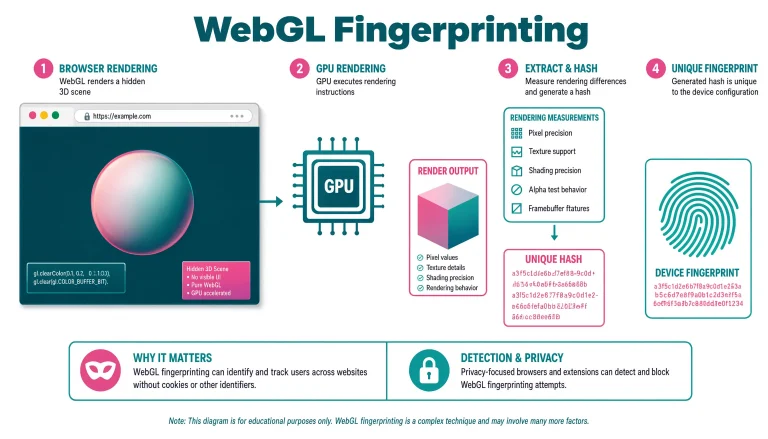
WebGL Fingerprinting in 2026: How It Works and 9 Bypass Methods That Survive Production
 Proxies
Node Unblocker: A Practical Guide for Building a Real Node.js Web Proxy
 Use Cases
API Throttling vs API Rate Limiting in System Design: What Actually Matters in Production
 Web Scraping