If you are here, you are probably doing one of three things: collecting public web data, scaling a crawler, or debugging a scraper that suddenly went from “working fine” to “429 everywhere.” This guide is written for developers, data engineers, SEO teams, ecommerce analysts, and automation builders who need a practical, current explanation instead of the usual generic advice.
From my own scraper reviews, most rate-limit failures are not caused by “too much scraping” in the abstract. They usually come from one of these patterns: bursty concurrency, repeated duplicate requests, unstable session identity, or retry logic that panics and makes the problem worse.
What Is a Rate Limit in Web Scraping?
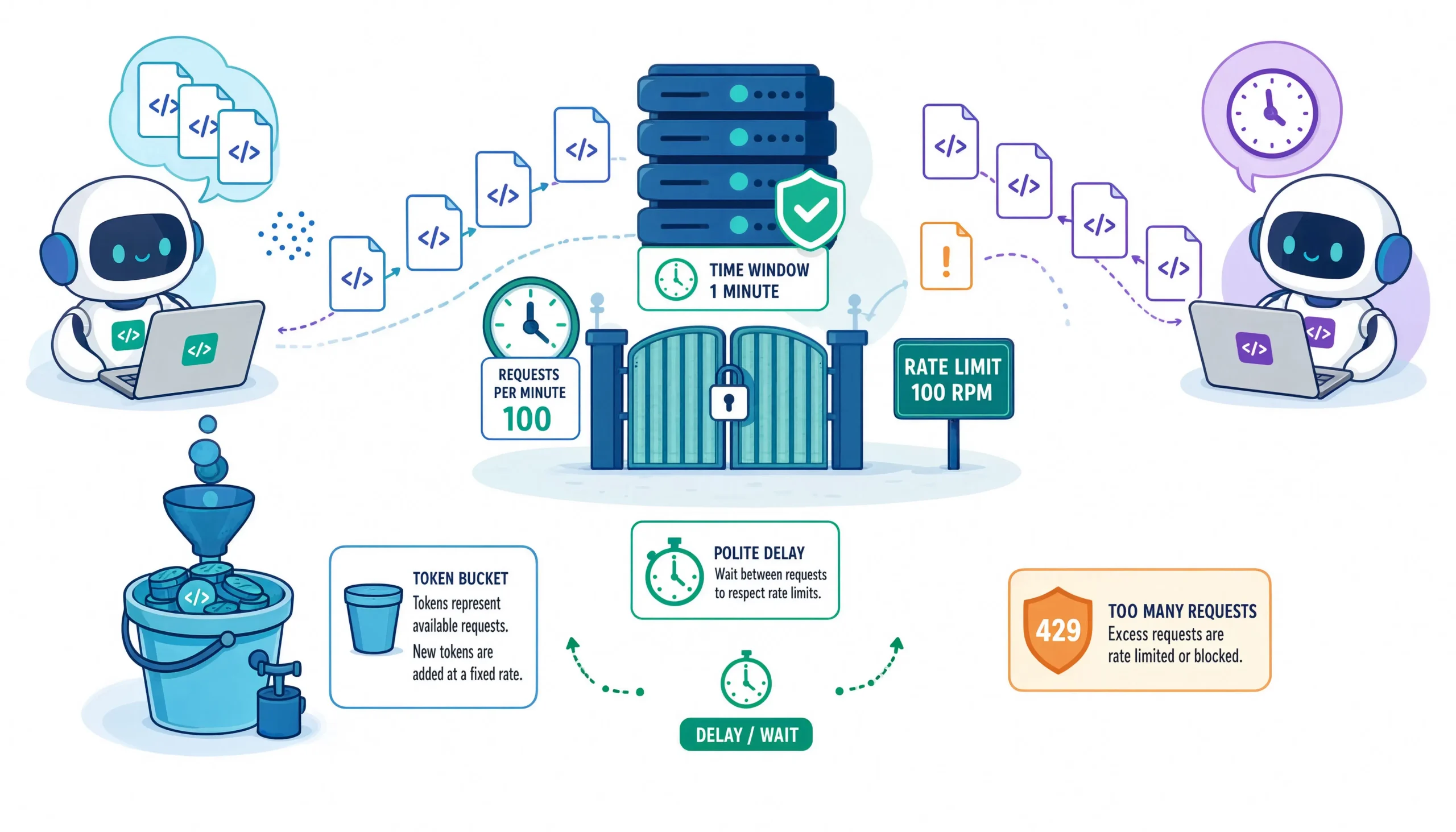
A rate limit is a control that restricts how many requests a client can send in a defined period. The client might be identified by IP address, API key, cookie, account, session, or a broader request fingerprint. When the threshold is exceeded, the server can delay, challenge, or block more requests for a period of time.
For web scraping, the important takeaway is this: rate limiting is not just “too many requests per minute.” On modern stacks, it can also be tied to URI path, headers, query patterns, cookies, country, ASN, and even fingerprinting characteristics such as JA3/JA4 on advanced WAF setups.
Why This Topic Matters More in 2026
Automation is no longer edge traffic. According to Imperva’s 2026 Bad Bot Report, automated traffic accounted for more than 53% of all web traffic in 2025, up from 51% the year before. Imperva’s 2025 report also found that bad bots alone made up 37% of all internet traffic, and 44% of advanced bot traffic targeted APIs in 2024. That matters because many rate-limit rules are now tuned around machine-speed access patterns, especially on APIs and high-value workflows.
How Rate Limits Actually Work
At a basic level, the server counts requests over time and compares them to a threshold. If you exceed the threshold, you may get a 429 Too Many Requests response, often with a Retry-After header telling you how long to wait before retrying.
In practice, different systems implement this differently:
- Fixed windows: Example, 100 requests per minute.
- Sliding windows: Count requests over the last rolling interval.
- Token bucket / leaky bucket logic: Allow short bursts, then refill over time.
- Mitigation timeouts: Once triggered, the system blocks or challenges for a separate duration.
Cloudflare’s rate-limiting rules explicitly use a matching expression, counting characteristics, a period, a requests-per-period threshold, and a mitigation timeout. AWS WAF rate-based rules similarly use an evaluation window and a rate threshold, and AWS notes that enforcement is near the configured limit, not an exact hard line.
How Cloudflare and AWS WAF Commonly Enforce Limits
Cloudflare can count far more than just IPs. Depending on plan and configuration, it can rate limit based on IP, query, host, headers, cookie, ASN, country, path, and fingerprint-related characteristics, with counting periods that can range from seconds to much longer windows. Cloudflare also notes that rate limiting is not designed to guarantee an exact number of requests reaching origin because counters update with slight delay.
AWS WAF rate-based rules support evaluation windows of 1, 2, 5, and 10 minutes, with a minimum rate limit setting of 10 requests for the selected window. AWS also supports aggregation on forwarded IP data and other criteria, which is a reminder that simply rotating a single obvious signal is rarely enough on mature defenses.
Common Rate-Limit Signals You Should Recognize
| Signal | What it usually means | What to do next |
|---|---|---|
| 429 Too Many Requests | You crossed a threshold in the current window | Read Retry-After, back off, reduce concurrency |
| Cloudflare Error 1015 | Cloudflare rate-limiting rule was triggered | Slow down, widen gaps, stop burst retries |
| 403 after repeated bursts | Temporary or hard block, often after prior throttling | Pause session, inspect body, consider a cooldown |
| 503 with challenge page | Overload protection or anti-bot gate | Inspect HTML body, not just status code |
| 200 with CAPTCHA or JS challenge | Soft block disguised as success | Treat as failure, do not continue blindly |
| Blank or hanging responses | Silent throttling or edge mitigation | Lower request volume and inspect network patterns |
A 429 is the clearest signal. A Retry-After header may tell you exactly how long to wait, either as seconds or an HTTP date. Cloudflare’s 1015 page also confirms that the site owner configured rate-limiting rules and that repeated retries can extend the block window.
Challenge markers that often get missed
Body-level block marker: A 200 response that renders a CAPTCHA or “Checking your browser” page is still a block.
Response-pattern marker: A run of 403s or 404s after rapid enumeration can be a rate-limit-driven anti-probing response, not just “missing pages.” Cloudflare specifically recommends response-based counting for these patterns.
Retry storm marker: If your retry logic fires immediately after a 429, your own recovery code may be the thing escalating the ban.
Before You “Bypass” Anything, Do This First
The most durable fix is not stealth. It is request efficiency.
A good web-scraping workflow should first check whether the site offers a public API, feed, export, or direct download. If it does, that path is usually more stable, less error-prone, and more aligned with the site’s intended access model. A university web-scraping best-practices guide from Pitt explicitly recommends checking for direct downloads or an API before scraping.
Also check robots.txt, terms, and crawl intervals before you scale. The same guide recommends respecting robots.txt, limiting concurrency, adding delays, caching requests, and avoiding unnecessary load on the server.
5 Smart Ways to Handle 429s and Stay Under the Radar
1) Use adaptive backoff, not fixed sleeps
A fixed “sleep 2 seconds between requests” rule feels safe, but it breaks quickly when the target changes thresholds by endpoint, geography, or time of day. A better pattern is adaptive backoff:
- Honor
Retry-Afterif present - Add jitter so workers do not wake up at the same instant
- Increase delays after repeated 429s
- Use a circuit breaker when the block rate spikes
This lines up with how HTTP 429 is meant to be handled. Retry-After exists specifically to tell clients how long to wait before the next attempt.
import random
import time
import requests

def get_with_backoff(url, session, max_retries=5):
    for attempt in range(max_retries):
        r = session.get(url, timeout=30)

        if r.status_code != 429:
            return r

        retry_after = r.headers.get("Retry-After")
        if retry_after and retry_after.isdigit():
            wait = int(retry_after)
        else:
            wait = min(60, 2 ** attempt)

        wait += random.uniform(0.25, 1.25)
        time.sleep(wait)

    raise RuntimeError("Too many consecutive 429 responses")
Why this works: It turns your scraper into a cooperative client instead of a panic loop.
2) Rotate IPs intelligently, not randomly
Yes, many rate limits are IP-based. But “rotate proxies” is only half the story.
What actually works in production is:
- Spread load across a clean proxy pool
- Keep per-IP request volume low
- Match the IP type to the task
- Avoid free proxy lists for anything serious
In my experience, free proxies create more debugging noise than throughput because they are slow, burned, or already flagged. If you do use rotation, use it to distribute load, not to slam the same target harder from ten directions.
Cloudflare and AWS both show why this matters. These systems can aggregate on IP and forwarded IP data, but also on other characteristics, which means IP rotation helps most when the rest of the session also looks coherent.
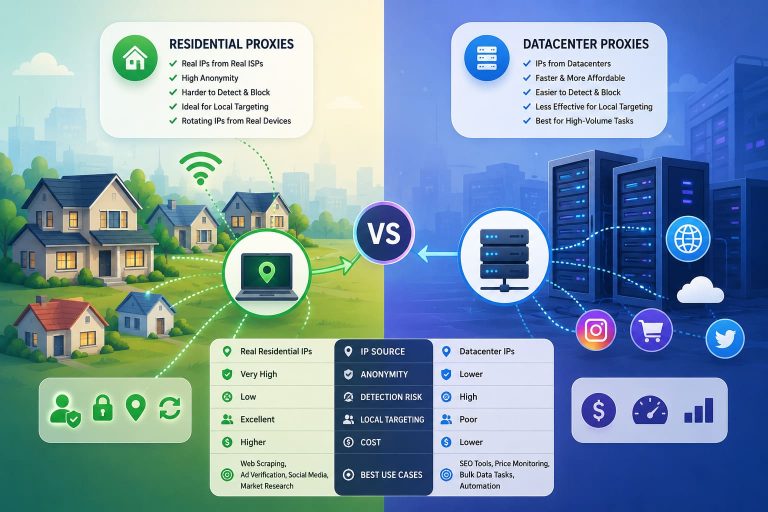
Residential vs datacenter proxies, when each makes sense
| Proxy type | Best use case | Tradeoff |
|---|---|---|
| Datacenter | Low-sensitivity targets, cost efficiency, fast bulk fetches | More likely to be flagged on strict anti-bot stacks |
| Residential | Consumer sites, tougher anti-bot defenses, and geo-sensitive pages | Higher cost, slower pool validation |
| Mobile | Mobile-only flows, stricter trust scoring contexts | Highest cost, limited use cases |
Practical rule: If the site is consumer-facing and aggressively protected, success usually comes from lower velocity plus better identity consistency, not from piling on raw proxy count.
3) Keep session identity and headers consistent
One of the most overlooked scraping mistakes is mixing signals that do not belong together.
Examples:
- A mobile carrier IP with a desktop Chrome header
- A US IP with a browser language stack that looks Eastern European
- A rotated IP with the same exact cookies and stale session state
- Ten different “users” with an identical, uncommon header order
Cloudflare’s best-practices documentation makes it clear that sophisticated rate limiting can be tied to request attributes beyond raw volume, and advanced counting characteristics can include headers, cookies, and fingerprints.
import random
import requests

profiles = [
    {
        "headers": {
            "User-Agent": "Mozilla/5.0 (Windows NT 10.0; Win64; x64) AppleWebKit/537.36 Chrome/126.0.0.0 Safari/537.36",
            "Accept-Language": "en-US,en;q=0.9",
            "Accept": "text/html,application/xhtml+xml,application/xml;q=0.9,*/*;q=0.8",
        },
        "proxy": "http://user:pass@proxy-us-1.example:8000"
    },
    {
        "headers": {
            "User-Agent": "Mozilla/5.0 (iPhone; CPU iPhone OS 17_5 like Mac OS X) AppleWebKit/605.1.15 Version/17.5 Mobile/15E148 Safari/604.1",
            "Accept-Language": "en-US,en;q=0.8",
            "Accept": "text/html,application/xhtml+xml,application/xml;q=0.9,*/*;q=0.8",
        },
        "proxy": "http://user:pass@proxy-us-mobile.example:8000"
    }
]

profile = random.choice(profiles)
session = requests.Session()
session.headers.update(profile["headers"])
proxies = {"http": profile["proxy"], "https": profile["proxy"]}
Best practice: Rotate the whole profile, not just the User-Agent.
4) Reduce waste with caching, deduplication, and crawl discipline
A surprising number of 429 problems are self-inflicted by bad crawl hygiene:
- Refetching the same URL repeatedly
- Hitting tracking or parameterized duplicates
- Crawling without canonicalization
- Retrying pages that are already complete in your dataset
- Running too many workers against the same hot endpoint
A university scraping guide recommends using canonical URLs, caching requests and responses, and limiting parallel requests to reduce unnecessary server load. That is not just “ethical scraping” advice. It is also one of the most effective rate-limit avoidance techniques available.
Simple ways to cut request volume fast
Canonical URL normalization: Strip junk query parameters when they do not change the page you need.
- HTTP caching: Reuse previously fetched content where possible.
- Incremental scraping: Only fetch new or changed records.
- Queue deduplication: Prevent multiple workers from crawling the same URL at the same time.
- Off-peak scheduling: Spread jobs into lower-traffic windows if freshness requirements allow.
5) Control concurrency at the domain and endpoint level
This is the step many teams skip. They set a global concurrency limit, but the real limit is often narrower:
- Per domain
- Per subdomain
- Per path
- Per API key
- Per authenticated session
- Per action type, such as login or search
Cloudflare’s best-practices docs recommend exact-path matching, response-based counting, and more targeted controls for login, API, and GraphQL endpoints. That reflects how real rate-limit systems are often tuned: not for the whole site, but for expensive actions and sensitive resources.
Better concurrency model
| Scope | Bad model | Better model |
|---|---|---|
| Whole crawler | 50 global workers | Separate budgets by host |
| Whole host | 10 requests/sec to every path | Lower budgets for login, search, and API endpoints |
| Retry logic | Immediate retry on all failures | Endpoint-aware retry with backoff |
| Queueing | Fire all ready jobs | Token budget per origin + priority queue |
My rule of thumb: Treat /login, /search, /graphql, /api/*, and paginated inventory endpoints as “high-friction” surfaces from the start.
A Safer “Bypass Stack” for Modern Scrapers
If I were building a scraper today for a rate-limited target, I would not start with stealth tricks. I would start with this stack:
- Request budgeting: Per-domain and per-endpoint ceilings
- Adaptive backoff: Honor
Retry-After, exponential delay, jitter - Deduplication: Do not request what you already have
- Stable session profiles: Coherent IP, headers, cookies, language
- Distributed load: Clean proxy pool when truly needed
- Observability: Track 429 rate, 403 rate, median response time, challenge rate
That combination solves more real-world 429 problems than random header rotation ever will.
Soft Limits vs Hard Limits vs Bans
| Type | Typical behavior | Recovery |
|---|---|---|
| Soft limit/throttling | Delays, intermittent 429s, challenge pages | Reduce rate and wait |
| Hard limit | Immediate block after threshold, often 429 or 403 | Wait for window reset or mitigation timeout |
| Temporary ban | Sustained 403s or challenge loops for a period | Stop traffic, cooldown, change session only if permitted |
| Permanent ban | Long-term denial tied to IP, account, or subnet | Requires a different access path or explicit permission |
Cloudflare’s Error 1015 guidance explicitly says repeated retries can extend your lockout window, which is why the wrong retry logic often turns a soft limit into a temporary ban.
Why User-Agent Rotation Alone Is Not Enough
A lot of outdated scraping advice still says “just rotate User-Agents.” That can help with very basic filters, but it does not solve modern rate limiting by itself.
Today’s anti-bot and WAF systems often evaluate:
- Request rate
- Session continuity
- Cookie behavior
- Header coherence
- Response patterns
- Endpoint sensitivity
- IP reputation
- Browser or TLS fingerprint clues
Cloudflare’s current rate-limiting documentation and best-practice guidance reflect that broader model.
When a Managed Scraping API Is Actually Worth It
There is a point where DIY stops being cost-effective.
A managed scraping platform starts making sense when you need:
- Browser execution at scale
- Reliable residential or mobile routing
- CAPTCHA solving
- Session persistence
- Geo-targeted access
- Automatic retries with fingerprint consistency
- Higher engineering throughput than a custom proxy stack can deliver
That is not a shortcut for bad scraping discipline. It is a decision about operational overhead.
Legal and Ethical Considerations You Should Not Skip
Rate limiting exists for legitimate reasons: protecting performance, keeping APIs stable, preventing abusive automation, and preserving fair access. Even a technically successful scraper can still create legal, contractual, or business risk if it ignores site terms, privacy obligations, or explicit crawl restrictions.
A good baseline is:
- Check for an official API or export first
- Review
robots.txt - Read terms of service
- Avoid collecting sensitive or personal data you do not need
- Keep request rates conservative
- Ask for permission when the use case is commercially important
The Pitt library guide makes the same point clearly: use scraped data responsibly, respect robots.txt, do not overload the server, and ask when in doubt.
FAQs:
Is HTTP 429 always an IP block?
No. A 429 means the client exceeded a rate threshold, but the identity being counted might be an IP, API key, cookie, session, account, or another request characteristic.
What does Retry-After mean in scraping?
It tells the client how long to wait before making a follow-up request. It may be returned as seconds or as a specific date/time.
What is Cloudflare Error 1015?
It is Cloudflare’s “you are being rate limited” error. The site owner configured a rate-limiting rule, and your request volume exceeded it for the chosen period.
Why do I get a 200 response but still fail to scrape?
Because some sites return challenge pages, CAPTCHAs, or interstitials with a 200 status. You have to validate the response body, not just the code.
Should I rotate proxies for every request?
Not always. For some targets, rotating too aggressively hurts continuity and trust. For others, distribution across a pool is necessary. The right answer depends on the site’s enforcement logic, your crawl volume, and whether the session needs continuity.
What is the safest way to scrape a rate-limited site?
Use the official API or export if available, keep your request rate conservative, honor Retry-After, cache aggressively, and only scale concurrency after measuring the real threshold.
You May Also Like
 Proxies
10 Best Proxy Providers for AI Agents in 2026: The Definitive Buyer’s Guide
 Web Scraping
What Is Web Scraping and How Does It Work? A Complete 2026 Guide
 Web Scraping
How to Handle CAPTCHA While Scraping: A 2026 Developer’s Guide
 Proxies
Best Proxies for Web Scraping In 2026: How I Choose the Right Provider and Proxy Type
 Proxies
Residential vs Datacenter Proxies: Use Cases and Best Providers (2026)
 Web Scraping
Cloudflare Blocking Scrapers Explained: Your 2026 Guide to Anti-Bot Protection
 Web Scraping
How Google Maps Scraping Actually Works (And Where Most Attempts Go Wrong)
 Web Scraping
Scrap.io Review 2026: What This Google Maps Lead Generation Tool Actually Gets Right (and Where It Falls Short)
 Web Scraping