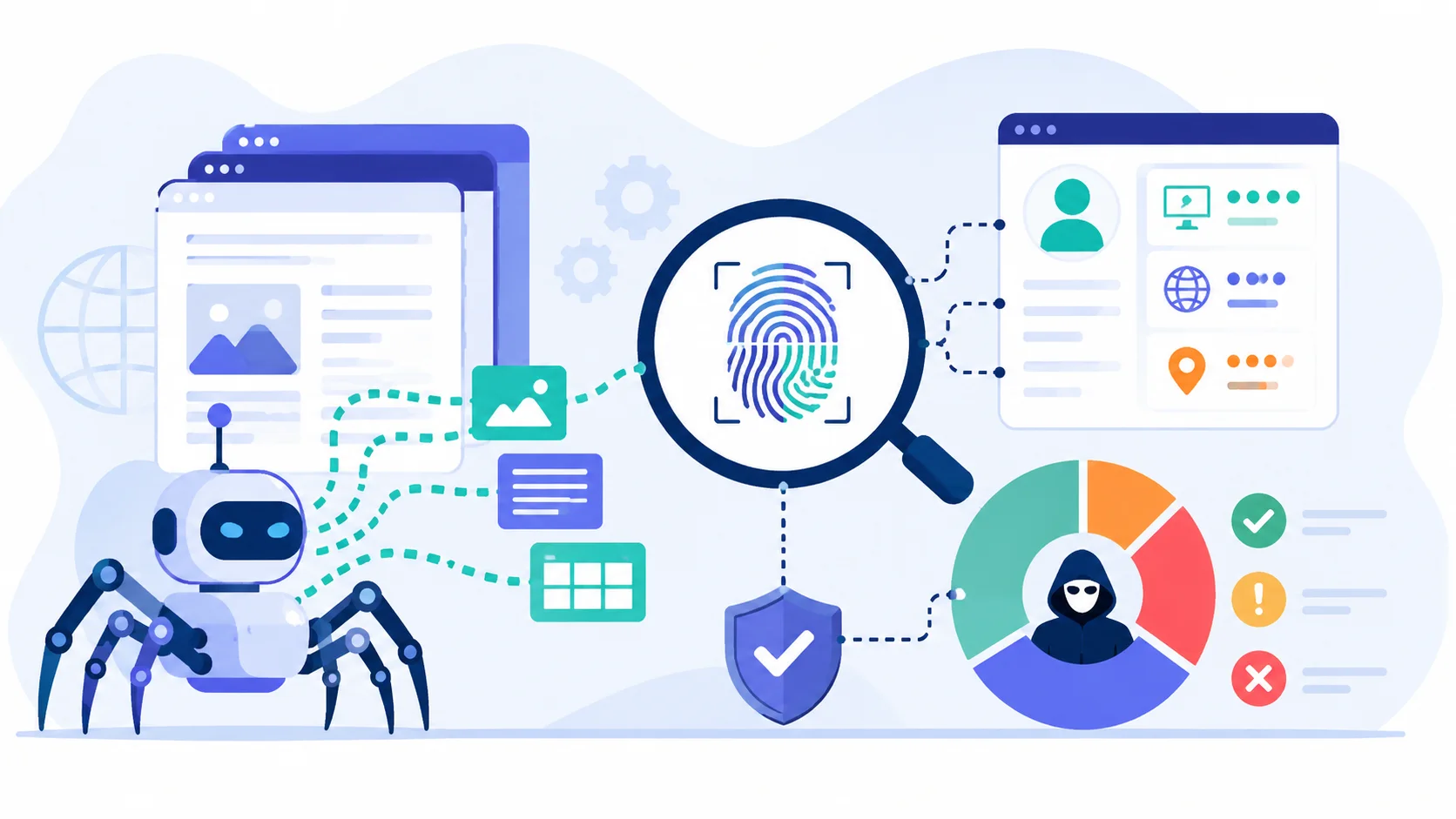
The first time I ran into fingerprinting, I did not know it had a name. I had a Python scraper that worked beautifully against a target site for about two weeks. Headers matched a real browser exactly, requests were spaced out, and proxies were clean residential IPs. Then one morning, every request started coming back as a 403, and nothing I changed at the request level made any difference.
What I eventually figured out after far too many hours of debugging was that the site had upgraded its bot detection, and the new system was not looking at my headers at all. It was looking at the way my HTTP client negotiated the TLS handshake. The headers said “Chrome 119 on Windows.” The TLS handshake said, “Python’s ssl library.” Those two things never appear together in real traffic, and the site’s defenses knew it.
That mismatch is what fingerprinting is, in one sentence. It is the practice of identifying clients not by what they claim to be, but by the technical signatures they unavoidably leave behind. And once you understand it exists, a lot of mysterious scraping failures suddenly make sense.
Key Takeaways
- Web scraping fingerprinting is a set of detection techniques that identify automated traffic based on technical signals your client cannot easily fake.
- The main layers are TLS fingerprinting, HTTP/2 fingerprinting, browser fingerprinting, and behavioral fingerprinting.
- Headers and User-Agent strings are the easiest to fake, which is why fingerprinting has moved deeper into the connection stack.
- A scraper that passes header checks but fails fingerprint checks looks suspicious in a very specific way, claiming to be a browser while behaving like a script.
- Bypassing fingerprinting requires tools that operate at the right layer. Stock HTTP libraries cannot do it. Specialized clients and real browsers can.
What Is Web Scraping Fingerprinting?
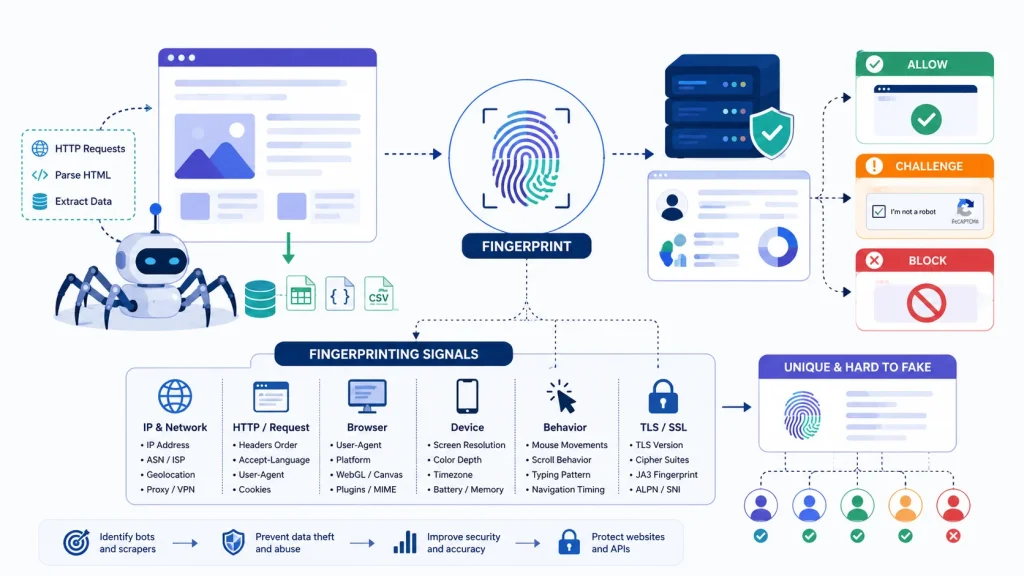
A fingerprint, in this context, is any technical signature that distinguishes your client from another. Some of these signatures are deliberate, like the User-Agent string. Most are accidental, byproducts of how your software is built that you never thought about because they were never meant to be a signal.
The reason fingerprinting exists is simple. Headers are trivially easy to fake. Anyone can set their User-Agent to “Chrome on Windows” in two lines of code, and bot detection systems realized years ago that they could not trust what a client claims to be. So they started looking at things the client cannot easily change.
The TLS handshake is one. The exact sequence of cipher suites your client offers, the order of TLS extensions, the supported versions, the elliptic curves all of this gets locked in by the SSL library you are using, and Python’s ssl library produces a different signature than Chrome’s BoringSSL, which produces a different signature than Firefox’s NSS. None of them look like each other. A bot detection system that has seen Chrome connect millions of times knows exactly what Chrome’s handshake looks like, and it knows immediately when something else is pretending.
The HTTP/2 protocol layer is another. HTTP/2 has its own settings, its own pseudo-header order, its own stream priority behavior. Real browsers send these in specific patterns. Most scraping libraries either do not support HTTP/2 at all, or support it in ways that look nothing like a browser.
Once you stack TLS, HTTP/2, headers, JavaScript execution, and behavioral patterns together, you get a multi-layer fingerprint that is extremely hard to fake unless you know what you are doing. That is the actual challenge of modern scraping. It is not really about headers anymore. It is about getting the whole stack right.
The Layers of Fingerprinting
Different sites care about different things. The deeper the protection, the more layers you have to worry about. Here is how I think about each layer when debugging a scraper that is getting blocked.
TLS Fingerprinting
This is the first thing modern bot detection systems check, because it happens before any HTTP traffic even flows. The moment your client connects, it sends a TLS ClientHello message that contains a specific pattern of cipher suites, extensions, supported versions, and curves. That pattern gets hashed into a signature commonly called a JA3 or its newer variant JA4.
Real browsers produce signatures that are well-known and common. Python’s requests library, Node.js, Go’s standard HTTP client, and most other automation tools produce signatures that are equally well-known and entirely absent from normal user traffic. A bot detection system with even modest sophistication knows the difference.
In my experience, TLS fingerprinting alone catches roughly 70 to 80 percent of unprepared scrapers. If you have never thought about TLS and you are getting blocked on a protected site, this is almost certainly part of the reason.
HTTP/2 Fingerprinting
Once the TLS handshake completes, the HTTP/2 connection begins, and that layer has its own fingerprint. HTTP/2 uses pseudo-headers (:method, :authority, :scheme, :path), settings frames with specific values, window update behaviors, and stream priority handling. Browsers and scraping libraries handle these differently in subtle ways.
The fingerprinting standard here is sometimes called HTTP/2 fingerprinting or Akamai fingerprinting, named after the security company that developed much of the early research. Like TLS fingerprinting, it captures signals you cannot easily change without using a specialized client.
Header Fingerprinting
This is the layer most people know about and the one that gets all the attention in tutorials. Real browsers send a specific set of headers in a specific order with specific casing. The order matters. The capitalization matters. Chrome sends headers in one order, Firefox in another, Safari in a third.
A scraper that sets the right headers but in the wrong order is still identifiable. A scraper that uses Title-Case header names when the browser it claims to be uses all-lowercase is identifiable. A scraper that sends Sec-Fetch-* headers when the User-Agent claims to be a browser version too old to support them is identifiable.
I have estimated, based on my own debugging, that maybe 60 percent of scraping tutorials get header order wrong without mentioning it. The advice they give works fine against unprotected sites and falls apart against anything serious.
Browser Fingerprinting
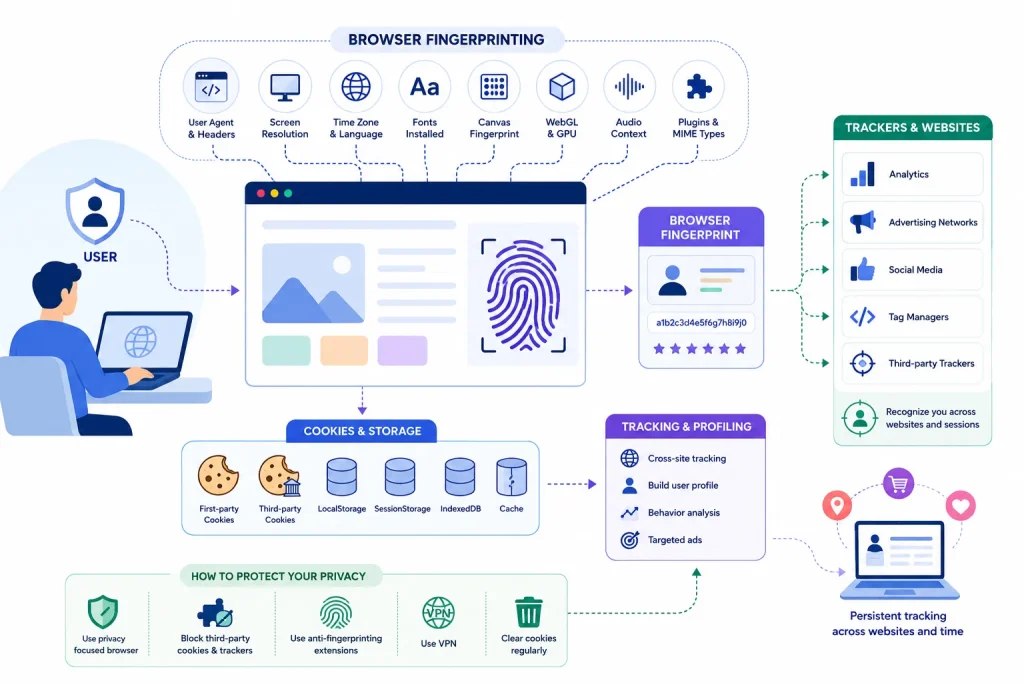
This layer only applies when you are running an actual browser (headless or otherwise) rather than making raw HTTP requests. It involves JavaScript running in the browser environment and collecting signals about that environment.
The signals include:
- Canvas fingerprinting: drawing an invisible image and reading back the rendered bytes, which vary subtly based on your GPU, drivers, and font configuration
- WebGL fingerprinting: querying details about the WebGL renderer, which produces device-specific signatures
- Audio fingerprinting: generating sound and analyzing the output, which varies by audio stack
- Font enumeration: listing available fonts on the system
- Screen and timezone data: resolution, color depth, timezone offset, language settings
- Navigator properties: values exposed by the browser’s JavaScript environment, including subtle markers that indicate automation
Stock Playwright and Puppeteer leak automation markers through several of these signals. The navigator.webdriver property, for instance, is true in stock automated browsers and false in real ones. There are dozens of similar tells, and stealth plugins try to patch them all.
Behavioral Fingerprinting
The deepest layer, and the one most resistant to faking, is behavioral. Real users move their mouse before clicking. They scroll inconsistently. They pause between actions. They type at human speeds with realistic error patterns. They focus and unfocus tabs.
A bot that loads a page, immediately clicks a specific element, fills a form in 200 milliseconds, and submits is behaviorally different from any real human, even if every other signal looks perfect. Sites running advanced bot protection collect these behavioral patterns and use machine learning to classify traffic.
This is where the most sophisticated detection systems live. It is also why bypassing them often requires not just better tools but actually simulating human-like behavior – random delays, mouse movement patterns, scroll behavior, and similar touches that make automation indistinguishable from real use.
How Fingerprinting Catches Scrapers in Practice
The way fingerprinting actually catches a scraper is rarely a single failing check. It is the combination of signals that does not add up.
Picture what a detection system sees. The request claims to be Chrome 119 on Windows 11. The User-Agent says so. The Sec-Fetch headers are present and correct for that version. The Accept-Language is set to en-US. Everything in the header section looks fine.
Then the system checks the TLS fingerprint. It does not match Chrome 119. It matches Python’s requests library. Now the system has a contradiction. The headers claim browser, the connection claims script. No real user produces that combination, ever.
The block is not because any individual signal failed. The block is because the signals are inconsistent with each other. This is the central insight that took me a long time to internalize. Fingerprinting is not really about catching scrapers. It is about catching liars.
The implication for anyone building scrapers is important. You cannot bypass fingerprinting by changing one thing. You have to make all the signals line up — TLS, HTTP/2, headers, browser environment, behavior — into a coherent story. A scraper that gets all of those right looks indistinguishable from a real user, because in every measurable way, it is.
A Quick Reference: What Sites Check and How
Different protection systems prioritize different signals. Based on my observations across enough sites, here is a rough breakdown of which fingerprinting layers matter most for common bot protection systems.
| Detection Layer | What It Checks | Used Heavily By | How Easy to Bypass |
|---|---|---|---|
| TLS Fingerprint (JA3/JA4) | Cipher suites, extensions, curves in ClientHello | Cloudflare, Akamai, DataDome | Hard without specialized client |
| HTTP/2 Fingerprint | Pseudo-headers, settings, stream behavior | Akamai, Cloudflare | Hard without browser-grade client |
| Header Order and Values | Header sequence, casing, completeness | Almost all systems | Easy to medium |
| Canvas/WebGL | Rendering output, GPU signals | DataDome, PerimeterX, Imperva | Medium with stealth tools |
| Navigator Properties | webdriver flag, plugin list, languages | Most browser-based protections | Medium with stealth patches |
| Behavioral Patterns | Mouse, scroll, timing, focus events | Advanced systems, banking, ticketing | Hard, requires simulation |
| IP Reputation | ASN, history, data center detection | All major systems | Medium with residential proxies |
Key Features Worth Knowing
A few specific things about fingerprinting that took me longer to learn than I would like to admit, and that are not always obvious from documentation.
- JA3 is being phased out in favor of JA4. Older articles talk about JA3 as the standard, but the newer JA4 family of fingerprints is more granular and harder to evade. Modern detection systems are moving to JA4, and tools that only address JA3 are falling behind.
- TLS fingerprints are not random. Your client produces the same fingerprint every time. If you make 10,000 requests from the same library, all 10,000 share a fingerprint. This is how detection systems can correlate traffic even across IP changes.
- Headless mode is detectable in ways most people miss. Stock headless Chrome announces itself through dozens of small differences from headful Chrome — missing plugins, different rendering paths, specific window dimensions. Stealth plugins patch many of these, but not all.
- Browser version matters more than people assume. Real users update their browsers. A scraper claiming to be Chrome 95 in 2026 is suspicious by version alone. Keep your impersonation targets current.
- Mobile fingerprints are different from desktop fingerprints. If you set a mobile User-Agent but your TLS and browser fingerprint look like desktop Chrome, you have a contradiction. Mobile impersonation requires mobile-grade tools.
- Some sites cache your fingerprint per IP. Switching IPs without also rotating fingerprints can look more suspicious than not switching at all, because the same fingerprint from a new IP suggests proxy use.
How Scrapers Actually Get Around Fingerprinting
There is no universal trick. The right approach depends on which layer is catching you. Here is what actually works in practice, based on the projects I have built.
Tools That Solve TLS Fingerprinting
For HTTP-based scraping where you need browser-like TLS, the standout tools are:
- curl_cffi in Python, which uses curl’s TLS impersonation to produce Chrome, Safari, or Firefox JA3/JA4 fingerprints directly. One line of code switches your impersonation target. This is the tool that single-handedly extended the lifespan of HTTP-based scraping for me on Cloudflare-protected sites.
- tls-client in Python and Go, which provides similar TLS impersonation with a slightly different feature set.
- undici with custom configuration in Node.js, though full browser impersonation in Node is less mature than in Python.
These tools handle TLS and HTTP/2 fingerprinting at once, which gets you past most of the deep-protocol layers without needing a real browser.
Tools That Solve Browser Fingerprinting
When the site requires actual JavaScript execution, you need a real browser. The question is which one and with what patches.
- Playwright with stealth modifications through
playwright-extraand the stealth plugin patches dozens of known automation tells. It is not perfect against the most advanced detection, but it handles a significant share of real-world targets. - Patchright, a community-maintained fork of Playwright with stealth patches built in, has been gaining traction as a more robust alternative for harder targets.
- Browser automation services like Browserless, Brightdata’s Scraping Browser, or Apify’s headless browser pools handle fingerprinting on their infrastructure, which is useful if you do not want to maintain stealth patches yourself.
In my own work, the combination of curl_cffi for sites that do not need JavaScript and patched Playwright for those that do covers maybe 95 percent of what I run into. The remaining 5 percent are sites with extreme bot protection — the kind ticketing sites and major social platforms use — where the only realistic path is paid managed services that specialize in those targets.
Behavioral Mimicry
For sites that monitor behavior, simply using the right tools is not enough. You also need to add realistic timing and interaction patterns.
That means random delays between actions (not fixed waits), mouse movement that arrives at click targets along curves rather than straight lines, scroll patterns that pause and resume the way humans do, and load patterns where you do not immediately attack the exact element you want. The closer your scraper behaves to a curious human, the harder it is to classify as a bot.
This is where serious scraping starts to look more like simulation engineering than data extraction, which is part of why some targets are simply not worth attempting.
Where I Have Seen This Matter Most
Some categories of sites care about fingerprinting far more than others. Knowing the landscape helps you set expectations.
E-commerce sites with dynamic pricing, like major airlines and online travel agencies, invest heavily in fingerprinting because their entire business depends on not exposing pricing logic to competitors. Cloudflare, DataDome, and Akamai are common here.
Ticketing sites have some of the most aggressive bot protection on the internet because scalping is a constant problem. These sites use multiple layers, including behavioral analysis, and are some of the hardest targets I have encountered.
Social media platforms invest enormously in fingerprinting at every layer, including custom detection logic specific to their platform. Even with the best tooling, success rates here are unpredictable.
News sites with paywalls often use Cloudflare or a similar service to gate access. These are usually manageable with the right HTTP impersonation tools.
General e-commerce, blogs, public data sites, and unprotected APIs often have minimal or no fingerprinting. For these, a clean User-Agent and good request hygiene is enough.
The rough breakdown I have observed is that maybe 30 to 40 percent of commercial sites now use some form of meaningful fingerprinting, up sharply from a few years ago. That share is growing, and the sophistication is growing with it.
Common Mistakes People Make
After enough debugging sessions, certain mistakes show up repeatedly.
- Treating fingerprinting as a User-Agent problem. Changing your User-Agent does nothing about TLS or HTTP/2 fingerprints. Most people start here, and most people stay stuck here.
- Using stock headless browsers and expecting to be invisible. Out of the box, Playwright and Puppeteer leak automation markers immediately. Stealth modifications are not optional for protected targets.
- Not updating impersonation targets. Pretending to be Chrome 100 in 2026 is suspicious by version alone. Keep current with real browser versions.
- Mismatching layers. Mobile User-Agent with desktop TLS fingerprint, or Chrome User-Agent with Firefox-like header order. The contradictions get caught.
- Trying to brute force through repeated retries. Once you have been flagged, retries from the same fingerprint and IP only confirm the classification. Change the signal that is failing, not the request volume.
- Underestimating the cost of solving this. For some targets, the engineering effort to consistently bypass fingerprinting exceeds the value of the data. Knowing when to walk away is part of the skill.
Practical Recommendations
A short framework for thinking about fingerprinting when you are building or fixing a scraper.
- First, identify which layers your target actually checks. Not every site checks everything. If a site is unprotected, you do not need stealth tools, and overengineering wastes time. If a site is using Cloudflare, you almost certainly need TLS impersonation. If it is using DataDome or PerimeterX, you probably need a full browser with stealth patches plus residential proxies.
- Second, match your tool to the layer. Use
curl_cffior similar for TLS-level evasion. Use patched Playwright for JavaScript and browser-level fingerprinting. Combine with residential proxies for IP reputation. Do not use a browser when an HTTP client will work — browsers are slow and expensive at scale. - Third, test your fingerprint before you scale. Tools like
https://tls.peet.wslet you see exactly what your client looks like at the TLS and HTTP/2 layer. Compare your scraper’s fingerprint to a real browser’s. If they do not match, you have your answer about why you are being blocked. - Fourth, plan for fingerprint rotation. Just like you rotate IPs, rotate fingerprints across long-running jobs. Always presenting the same JA4 from the same IP looks more suspicious than realistic variation.
- Fifth, accept that some sites will not be worth the effort. Fingerprinting is moving fast enough that maintaining bypasses for the hardest targets is a real ongoing cost. For commercial work, sometimes a managed scraping service that specializes in your target is more economical than building it yourself.
FAQ
What exactly is a TLS fingerprint?
It is a signature derived from the specific pattern of cipher suites, extensions, supported versions, and elliptic curves your client offers during the TLS handshake. Tools like JA3 and JA4 hash this pattern into a string that uniquely identifies your client type. Real browsers produce well-known fingerprints; stock scraping libraries produce very different ones, which is how they get caught.
Can I bypass fingerprinting just by changing my User-Agent?
No. The User-Agent is a header that gets checked separately from TLS and HTTP/2 fingerprints. Changing it does nothing about the deeper layers, which is why many scrapers fail despite having a perfect-looking User-Agent. You need tools that actually impersonate browsers at the connection level.
Is fingerprinting the same as IP blocking?
No, they are different layers of defense and often used together. IP blocking looks at where your traffic comes from. Fingerprinting looks at what your traffic looks like. A scraper can pass IP checks with residential proxies and still fail fingerprint checks, or vice versa. You usually need to address both.
Do all websites use fingerprinting?
No. Many smaller sites and public-facing APIs do not use sophisticated bot protection at all. Fingerprinting is most common on commercial sites with anti-bot services in front of them — sites using Cloudflare, DataDome, PerimeterX, Akamai, Imperva, or similar systems. My rough estimate is that around 30 to 40 percent of commercial sites now use meaningful fingerprinting.
How do I check what my scraper’s fingerprint looks like?
Several free tools online let you send a request and see your TLS and HTTP/2 fingerprint. tls.peet.ws and similar services display your client’s JA3, JA4, and HTTP/2 signatures. Compare these to what a real browser produces from the same machine. If they differ significantly, your scraper is detectable at the fingerprint layer.
Why does my scraper work for a while and then suddenly stop?
The most common reason is that the target site upgraded its bot protection or your fingerprint got flagged after enough requests. Bot detection systems often use a soft-fail approach where they tolerate some unusual traffic before classifying it as a bot. Once the classification happens, blocking is usually persistent against that fingerprint and IP combination.
Are paid scraping services better at handling fingerprinting?
For the most difficult targets, often yes. Services like Bright Data’s Scraping Browser, ZenRows, and similar platforms maintain their own stealth infrastructure and update it constantly. Whether they are worth the cost depends on your volume and the difficulty of your targets. For mainstream targets, well-configured open-source tools are usually enough.
Is bypassing fingerprinting legal?
The technical act of changing your client’s fingerprint is not illegal in itself. What you do with the resulting access is what matters legally. Scraping public data with a custom fingerprint is generally a gray area at worst. Bypassing technical controls to access non-public data, evade bans, or commit fraud is where legal exposure increases significantly. For commercial work, get legal advice specific to your jurisdiction.
Final Thoughts
Fingerprinting is the part of web scraping that separates people who have been doing this casually from people who have been doing it long enough to have been blocked by everything. Once you understand that detection has moved past headers and into the deeper layers of how your client connects, a lot of mysterious failures suddenly become explainable.
The good news is that the tools have kept up. curl_cffi, patched browser automation, residential proxies, and managed scraping services together cover almost every scenario you will run into. The bad news is that the gap between casual scraping and serious scraping is wider than it used to be, and closing it requires real engineering effort.
If you are getting blocked despite having perfect headers and clean proxies, fingerprinting is almost certainly the reason. Spend an hour learning what your client actually looks like at the TLS and HTTP/2 layer, compare it to a real browser, and address the gaps you find. That single investment has saved me more debugging time than almost anything else I have learned in scraping.
You May Also Like
 Proxies
10 Best Proxy Providers for AI Agents in 2026: The Definitive Buyer’s Guide
 Web Scraping
What Is Web Scraping and How Does It Work? A Complete 2026 Guide
 Web Scraping
How to Handle CAPTCHA While Scraping: A 2026 Developer’s Guide
 Proxies
Best Proxies for Web Scraping In 2026: How I Choose the Right Provider and Proxy Type
 Proxies
Residential vs Datacenter Proxies: Use Cases and Best Providers (2026)
 Web Scraping
Cloudflare Blocking Scrapers Explained: Your 2026 Guide to Anti-Bot Protection
 Web Scraping
How Google Maps Scraping Actually Works (And Where Most Attempts Go Wrong)
 Web Scraping
Scrap.io Review 2026: What This Google Maps Lead Generation Tool Actually Gets Right (and Where It Falls Short)
 Web Scraping