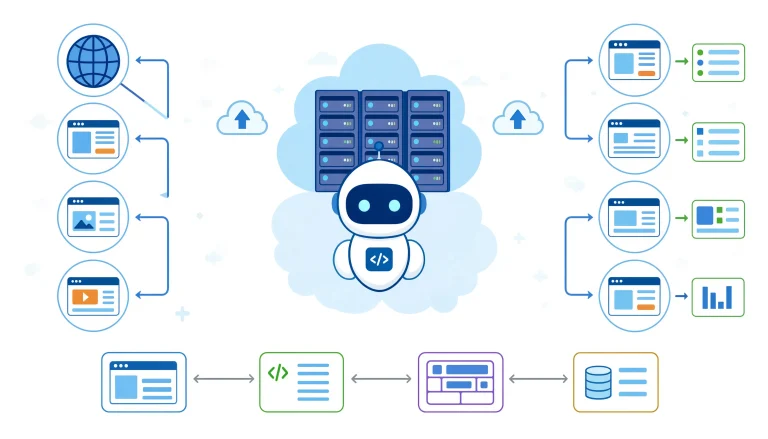
Strip a modern web browser down to its essentials: the HTML parser, CSS layout engine, JavaScript runtime, network stack, and storage layer, then remove the chrome, tabs, and address bar. What remains is a GUI-less browser engine. That’s the textbook definition, and it’s also where most explanations stop being useful.
In production, an automated browser instance behaves less like a stripped-down Chrome and more like a programmable runtime that acts like a user but deploys like infrastructure. It renders pages, executes scripts, manages authenticated sessions, and persists state — all while running quietly inside a container, on a build agent, or across a Kubernetes cluster.
The category isn’t new. PhantomJS opened the door in 2011 and was effectively retired in 2018 once headless Chrome shipped. The ecosystem has since consolidated around three serious frameworks — Puppeteer (Chromium-focused), Playwright (cross-engine), and Selenium (the incumbent) — alongside an increasingly dominant fourth category: managed cloud browser platforms. By 2026, three forces are reshaping the field at once: AI-driven extraction, far more sophisticated bot mitigation, and the steady migration from self-hosted automation fleets to API-fronted browser services.
This guide is written for engineers who need to make architectural decisions, not just memorize a definition.
Key Takeaways
- A GUI-less browser engine runs the same Blink/Gecko/WebKit rendering pipeline as its desktop counterpart — you simply drive it through code rather than clicks.
- Expect 2–15× throughput improvements over headed automation, but budget for the hidden costs: weaker observability and rising detection risk if the runtime ships with defaults.
- For new work in 2026, Playwright is the default. Puppeteer still fits Chromium-only pipelines. Selenium belongs to legacy QA matrices, not greenfield projects.
- Default automation runtimes are flagged faster than most teams expect. Managed platforms like Browserless, ScrapingBee, and Nimbleway are increasingly the pragmatic choice for serious extraction work.
- These tools aren’t universal. For static HTML,
httpxoraxiosis dramatically cheaper. For visual debugging, a windowed session is irreplaceable.
What’s Actually Running Under the Hood
The Engine Layer
A headless runtime isn’t an approximation; it’s the real thing without the paint stage. Chromium’s headless mode uses Blink plus V8. Firefox’s equivalent runs Gecko and SpiderMonkey. WebKit (exposed through Playwright) runs the same engine that ships in Safari.
JavaScript executes. CSS resolves. The DOM builds. Layout and event dispatch happen exactly as they would in a windowed session. The only difference is that the composited frame never reaches a display surface — it lives in memory, accessible through APIs, screenshot buffers, or PDF exports.
The Control Layer: Protocols That Matter
You don’t drive these engines by clicking. You drive them through a wire protocol sitting between your code and the rendering process. Three protocols are in play right now, and the protocol choice has real downstream consequences.
Chrome DevTools Protocol (CDP) is Chromium-native. Puppeteer speaks it directly. It’s fast, granular, and exposes deep capabilities — network interception, runtime evaluation, tracing, performance timelines. The catch: it’s Google-controlled, Chromium-only, and the surface shifts between versions.
W3C WebDriver (classic) is what Selenium relies on. It’s verbose and slower because it uses an HTTP request-response loop, but it’s standardized, predictable, and works across every major engine.
WebDriver BiDi is the most consequential protocol shift in years, and it’s playing out across 2025 and 2026. BiDi is a W3C standard that runs over WebSockets, giving you bidirectional, real-time streaming: network events, console output, JS exceptions, and navigation lifecycle pushed to your code as they happen. It marries CDP’s async network introspection with WebDriver’s cross-browser portability.
Adoption has moved quickly:
- Puppeteer made BiDi the default starting in v24, with Firefox support landing at v23.
- Selenium has shipped BiDi since v4, with higher-level abstractions slated for v5.
- Cypress switched Firefox automation to BiDi by default in 14.1.0 and removed CDP entirely in v15.
- Playwright’s BiDi integration is still experimental in mid-2026; the migration will land once it can support Playwright’s full cross-browser surface.
- Firefox formally deprecated CDP support starting at v129, making BiDi the only forward path for Mozilla-based automation.
When picking tooling in 2026, treat BiDi readiness as a forward-compatibility signal, not a checkbox feature. The protocol fragmentation that has shaped this space for a decade is finally collapsing into a single standard.
Where These Tools Earn Their Keep
Any task that needs a full browser stack but doesn’t need a human watching one. In practice, that splits into four workloads:
Data extraction from JavaScript-rendered surfaces. When the payload lives behind client-side hydration, lazy-loaded modules, or authenticated session flows, an HTTP client physically cannot reach it. The runtime executes the JS, waits for the DOM to settle, and yields fully rendered content. This is the workhorse pattern for pricing intelligence, market research, and data science pipelines.
Automated testing across browsers and OSes. QA teams parallelize thousands of scenarios on CI workers that have no display server. Headless execution makes this practical without Xvfb hacks or virtual framebuffers, and it’s the default for regression, smoke, and integration suites.
Pixel-faithful artifact generation. Screenshots, PDF exports, and print workflows all need a real rendering pipeline. Visual regression baselines, invoice generation, compliance archives, and marketing assets typically route through a programmable runtime.
Synthetic monitoring. Simulated user journeys — login, add-to-cart, checkout — measure timing, JS errors, and network waterfalls. This produces real-world performance telemetry that API pings can’t approximate.
Headless Testing: What the Term Actually Means
Headless testing simply means running browser-driven tests with the GUI suppressed. The engine runs in the background, driven by scripts that click, type, navigate, and assert.
The distinction worth internalizing: “headless” describes a runtime mode, not a framework. Playwright, Puppeteer, and Selenium all toggle between visible and invisible execution. The decision is environmental, not architectural.
In CI/CD, GUI-less execution is effectively the only option — build agents don’t have displays, and even when they do, the resource overhead is wasteful. Locally, engineers tend to flip into headed mode the moment something fails, because the observability gap matters: a failing background test gives you a stack trace and maybe a screenshot, while a windowed session gives you DevTools, layout inspection, and live state. Mature teams default to invisible execution and switch modes for investigation.
Browser Automation Frameworks
Engineers often conflate “headless browser” with “browser automation framework.” They’re separate layers. The engine renders; the framework controls. By 2026, the framework field has consolidated to three serious contenders plus a growing layer of managed services.
Playwright (Microsoft, 2020–present) is the default for new work. A single unified API spans Chromium, Firefox, and WebKit. Auto-waiting is built into every action, which eliminates the timing-based flakiness that defined the Selenium era. Bindings exist for JavaScript, TypeScript, Python, .NET, and Java. Browser contexts give you isolated sessions — independent cookies, storage, and cache — without the cost of spawning fresh processes. For cross-engine work on modern web apps, nothing comes close on productivity.
Puppeteer (Google, 2017–present) is the Chromium-native option. Direct CDP access gives you granular control over network interception, request blocking, and runtime evaluation. It’s lighter than Playwright if you only need Chromium, and its BiDi default (v24+) keeps it relevant for Firefox automation. The plugin ecosystem — stealth, ad blocking, proxy rotation — is mature. Reach for it when you need raw CDP or when your stack is already Chromium-aligned.
Selenium (2004–present) is the legacy standard. The widest language and browser coverage of any framework, including Safari and IE. It runs on classic WebDriver, which is stable but slow, and it lacks auto-waiting, so engineers end up bolting in explicit waits and sleep logic by hand. It still has a home in enterprises with entrenched Java and C# test matrices. Selenium 4’s BiDi integration is a meaningful step forward, but the API ergonomics still feel a decade behind modern alternatives. Don’t anchor new projects to it.
Managed cloud platforms (Browserless, ScrapingBee, Nimbleway, and similar) expose programmable browser instances as an API. Proxy rotation, fingerprint randomization, session persistence, and bot-mitigation evasion are handled upstream. Per-request cost is higher, but operational overhead approaches zero. In 2026, when scrape success rate is a business KPI, externalizing the evasion problem is increasingly the rational call.
Tool Comparison: Playwright vs. Puppeteer vs. Selenium
| Dimension | Playwright | Puppeteer | Selenium |
|---|---|---|---|
| First release | 2020 | 2017 | 2004 |
| Engines supported | Chromium, Firefox, WebKit | Chromium (Firefox experimental) | All major |
| Languages | JS, TS, Python, .NET, Java | JS, TS | JS, Python, Java, C#, Ruby, Kotlin |
| Protocol | CDP + custom bridges | CDP (BiDi default from v24) | W3C WebDriver / BiDi |
| Auto-waiting | Built-in | Manual | Manual |
| Cross-engine consistency | High (unified API) | N/A (Chromium only) | Medium (vendor drift) |
| BiDi readiness | Experimental | Default (v24+) | Supported (v4+) |
| Best for | New projects, cross-engine | Chromium-only, CDP access | Legacy enterprise QA, Safari |
| 2026 recommendation | Default choice | If already Chromium-invested | Avoid for greenfield |
Mode Selection: Invisible vs. Windowed
The choice between background and windowed execution isn’t philosophical — it’s environmental.
Run invisibly when you’re inside a CI pipeline (build agents lack displays); when concurrency density matters (background instances use roughly half the memory of windowed ones and start faster); when raw throughput is the priority (the 2–15× speedup comes from skipping GPU compositing and paint); when you’re deploying into containers, cloud VMs, or serverless environments without a graphical subsystem; or when you’re only producing artifacts (screenshots, PDFs, HTML dumps don’t need a visible surface).
Run windowed when you’re debugging a failing test and need to watch timing, overlays, and JS errors unfold in real time; when you’re authoring new automation and want immediate feedback per action; when you’re validating rendering quirks (font smoothing, WebGL output, CSS transforms occasionally diverge between modes); when native browser dialogs are in play (file pickers, print dialogs, certificate warnings); or when you’re demoing to stakeholders, where a visible user journey beats a log file.
In practice, mature teams don’t pick. They default to invisible execution and flip to windowed for investigation. Playwright reduces this to a single flag:
// CI run
const browser = await chromium.launch({ headless: true });

// local debugging
const browser = await chromium.launch({ headless: false });
Same script, both modes.
What the Documentation Won’t Tell You
The Detection Arms Race
This is the part most introductory material skips. A default automated Chromium instance — puppeteer.launch({ headless: true }) and nothing else — is increasingly trivial to flag. The 2026 detection stack has moved well past navigator.webdriver checks. Cloudflare, DataDome, Akamai, and PerimeterX layer signals from the network stack upward, and several of those signals are unreachable from JavaScript entirely.
TLS handshake fingerprinting (JA4). The TLS Client Hello — sent before any encrypted bytes flow — carries a specific ordered sequence of cipher suites, extensions, and supported groups. JA4 (the successor to JA3) hashes that into a stable identifier for the TLS implementation. A scraper sending a Chrome User-Agent from a Python requests session, or a slightly outdated Chromium build, produces a JA4 that doesn’t match real Chrome. That mismatch is scored as a bot signal before any HTML is returned. You cannot rewrite JA4 from JavaScript — it’s compiled into the TLS library underneath the client.
HTTP/2 frame fingerprinting. Once TLS completes, the HTTP/2 SETTINGS frame leaks the client identity. Chrome ships six settings in a fixed order — HEADER_TABLE_SIZE: 65536, MAX_CONCURRENT_STREAMS: 1000, INITIAL_WINDOW_SIZE: 6291456, and the rest — followed by a WINDOW_UPDATE with a delta of 15663105. Vendors fingerprint all of it: the values, the order, the WINDOW_UPDATE delta, and the pseudo-header sequence (:method, :authority, :scheme, :path for Chrome; :method, :path, :authority, :scheme for Firefox). A client with a matching JA4 but HEADER_TABLE_SIZE: 4096 coming from Python httpx produces a “wrong-shape Chrome” signal that gets flagged at the next layer down. Akamai’s EdgeWorker stacks JA4 at the TLS layer and HTTP/2 SETTINGS immediately above it.
Client hints consistency. The User-Agent Client Hints (UA-CH) pipeline and Sec-Fetch-* metadata originate from different browser subsystems. In a real browser, they’re internally coherent. In an automated runtime, several of those subsystems are stubbed or disabled, producing identity gaps: Sec-Fetch-Site: none on internal navigations that should be same-origin; a Linux User-Agent paired with a CH-UA-Platform of Windows; absent Client Hints on browsers that should always emit them; Sec-Fetch-Mode: navigate on XHRs that should be cors. These are difficult to spoof because they require synchronizing the entire identity stack, not patching a single header.
Canvas and font rendering divergence. GPU drivers and font stacks differ between headed and headless execution paths. Detection systems render a hidden canvas, hash the pixels, and cross-reference the result against known fingerprints for the claimed hardware. A reported high-end GPU paired with WebGL output that doesn’t match that hardware’s known signature is an immediate red flag. The discrepancy lives in the rendering pipeline itself, not in any JavaScript API you can monkey-patch.
This pressure has produced two diverging response strategies in 2026:
- Stealth patching —
puppeteer-extra-plugin-stealth,undetected-chromedriver, Playwright stealth forks. Effective against mid-tier protection, requires continuous upkeep against drift, and fundamentally treats symptoms rather than causes. JavaScript patches can’t reach the TLS or HTTP/2 layers. - Outsourced evasion — buy browser-as-a-service capacity from providers who maintain proxy pools, fingerprint randomization, and session management as a core product. When success rate is a business metric, externalizing this is often cheaper than maintaining it in-house.
The Memory and Concurrency Reality
These runtimes are efficient relative to windowed browsers, not relative to HTTP clients. A single Chromium instance consumes 100–300 MB of RAM. Running thousands concurrently is an orchestration problem, not a server-sizing problem.
The realistic density ceiling is 10–12 automated sessions per CPU core before memory pressure or context-switching costs dominate. Windowed instances drop that to 6–8. Pure HTTP scrapers push past 800 sessions per server. If your target is 10M pages/day, browser-per-request architectures will not get you there — you need persistent contexts, connection pooling, and request deduplication.
Flakiness, Observability, and the Maintenance Tax
Flakiness in automated tests rarely traces back to the runtime — it traces back to baked-in timing assumptions. A click immediately after page.goto() will intermittently fail because the target may not be interactive yet. Playwright’s auto-waiting largely retires this class of bug, but teams migrating from Puppeteer or Selenium often carry waitForTimeout patterns forward, importing race conditions into the new framework.
The observability gap is structural. When an invisible test fails at 2 AM in CI, there’s no DevTools to open. You get a screenshot, a video trace if you wired one up, and a log. Reproducing locally in windowed mode may not surface the same failure because the rendering environment differs subtly. That’s the hidden cost of background execution: it pays back in throughput and pays out in investigation time.
Then there’s drift. Browser versions ship monthly. CDP commands churn. Detection systems update weekly. A stealth configuration that worked in March can break in April. Operating these tools at scale is running a service, not just shipping software — which is precisely why managed offerings keep gaining ground.
The “Headless Is Faster” Myth
Faster, yes — but not because the JS engine is faster. V8 in a background Chromium instance is the same V8 in your desktop Chrome. The speedup comes from skipping GPU compositing, CSS animation, and screen paint. For pure DOM and JS workloads, the gap is narrow. For workloads involving screenshots, animations, or visual effects, the gap widens dramatically.
AI-Native Extraction in 2026
AI-driven extraction is now a real alternative to selector-based scraping. Engineers describe the target data in natural language; an LLM interprets the rendered DOM and returns structured output. This collapses selector brittleness but introduces latency and inference cost. Importantly, it doesn’t replace the underlying browser engine — the LLM still needs a rendered DOM as input. What it changes is who can build extraction pipelines. Non-engineers can now pull data that previously required dedicated dev work.
The Legal and Ethical Boundary
These tools get associated with scraping, but scraping isn’t inherently dubious. Public-data extraction for research, pricing intelligence, and competitive analysis is broadly legal in U.S. jurisdictions — the hiQ Labs v. LinkedIn precedent established the contours. Where liability emerges is around bypassing authentication, breaking Terms of Service, and circumventing technical protection measures. The runtime itself is neutral; the use case sets the legal exposure.
Implementation Patterns from the Field
Pattern 1: Hybrid E-Commerce Price Monitor
A retail intelligence team tracks 100,000 product pages across 50 competitor sites daily. Some serve static HTML; others are React SPAs with dynamically computed pricing.
Architecture. httpx for static targets. Playwright with persistent contexts for the JS-heavy ones. Both feed a unified job queue. Session cookies persist across runs to skip re-authentication. Residential proxy rotation handles aggressive rate limits.
Lesson. Reaching for a programmable browser on every URL is the most common architectural mistake. Hybrid routing typically reduces infrastructure spend by ~40% while increasing throughput.
Pattern 2: Sharded CI Regression Suite
A SaaS company runs 5,000 end-to-end tests per PR across Chrome, Firefox, and Safari.
Architecture. Playwright in background mode, sharded across 20 CI workers. Windowed mode locally for failure investigation. Trace viewer for post-mortem analysis.
Lesson. The invisible-by-default, windowed-on-demand split is the pragmatic standard for any team with a serious test budget.
Pattern 3: Hardened Anti-Bot Extraction
A data science team needs public data from a site fronted by Cloudflare and DataDome. Plain HTTP gets blocked. Default automated Chromium gets challenged.
Architecture. undetected-chromedriver with custom profiles, rotated UAs, human-paced interaction delays (50–150ms per keystroke, 500–3000ms between actions), session warming on benign pages before hitting the target, and proxy rotation — or full delegation to a managed evasion platform.
Lesson. Stealth isn’t a library you install once. It’s a continuous operational posture. For many teams, buying it as a service is the honest economic answer.
Mistakes That Repeatedly Burn Teams
Defaulting to a programmable browser for static HTML. A 100× performance penalty for zero benefit. Profile the target first.
Shipping with navigator.webdriver exposed. Launching without stealth treatment flags the runtime instantly on any protected target.
Sleep-based waits. await page.waitForTimeout(3000) is a race condition with a delay. Use auto-waiting (Playwright) or explicit-condition waitForSelector (Puppeteer).
Leaking browser processes. Long-running scripts that don’t clean up accumulate zombies and exhaust memory. Wrap launches in try/finally or use context managers.
Testing only in background mode. Some bugs — font rendering, WebGL, extension interactions — only surface windowed. A sanity subset in visible mode catches them.
Ignoring native dialogs. Unhandled alert() or confirm() calls hang scripts indefinitely. Attach dialog listeners.
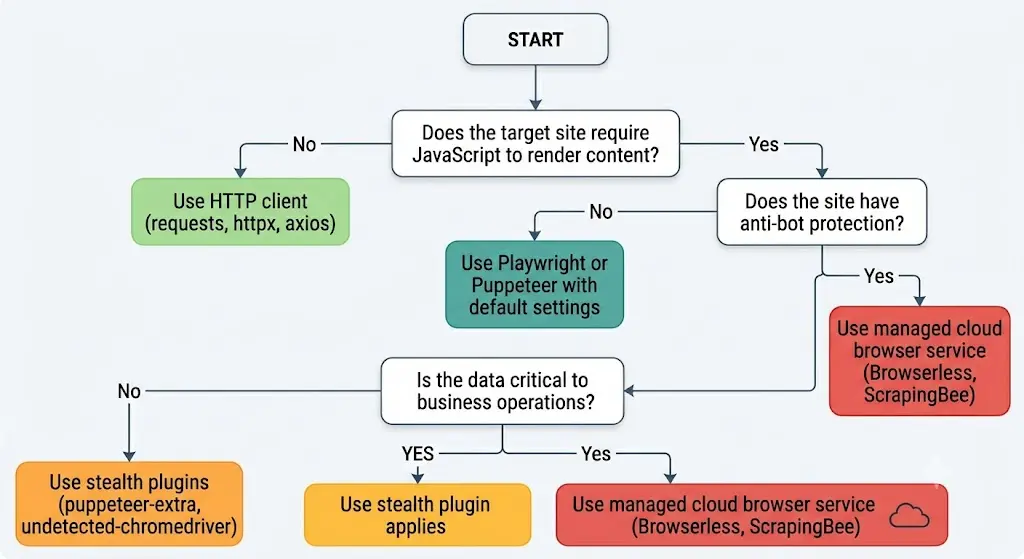
Decision Framework: Do You Actually Need One?
FAQ
What is a headless browser?
A full browser engine running without a graphical interface. It parses HTML, resolves CSS, executes JavaScript, and handles network I/O exactly like its windowed counterpart — the difference is that it’s driven programmatically through APIs rather than mouse and keyboard.
Can websites detect it?
Yes. Modern bot mitigation layers TLS fingerprints (JA4), HTTP/2 SETTINGS, client hints consistency, and canvas/WebGL hashes on top of the older JavaScript-surface checks. Default configurations are flagged quickly. Stealth tooling or managed evasion is required for serious targets.
What’s the best framework for new work in 2026?
Playwright, in most cases. Cross-engine support, auto-waiting, and multi-language bindings make it the productivity leader. Puppeteer remains the right answer for Chromium-only workflows that need direct CDP. Selenium is appropriate when you’re maintaining an existing test matrix, not when you’re starting one.
Do these runtimes handle cookies, localStorage, and IndexedDB?
Fully. Playwright’s browser contexts go further by giving you isolated session containers — separate cookies, storage, and cache — without launching new processes. That isolation is what makes multi-account workflows fast.
Can I generate screenshots and PDFs?
Yes — both are core, first-class features across Playwright, Puppeteer, and Selenium. Full-page captures, element-scoped captures, and PDF export are standard.
Is scraping with these tools legal?
Public data extraction is broadly legal in U.S. jurisdictions per hiQ Labs v. LinkedIn. Bypassing authentication, breaking Terms of Service, or circumventing technical protections moves you into materially riskier territory. The tool is neutral; the use case decides the exposure. Consult counsel for specifics.
Background or windowed for tests?
Background for CI and large parallel suites where throughput and density matter. Windowed for local debugging, visual validation, and reproducing flakes. Mature teams use both.
What is WebDriver BiDi and why does it matter?
A W3C standard enabling real-time bidirectional communication between automation code and browsers over WebSockets. It combines CDP’s event streaming and network introspection with WebDriver’s cross-engine portability. It’s the default in Puppeteer v24+, supported in Selenium since v4, and on track to unify the fragmented protocol landscape that has shaped this category for years.
Closing Thoughts
A programmable browser runtime isn’t a “browser without a window” — it’s the bridge between human-shaped browsing and machine-shaped automation. Understanding it isn’t optional for teams building modern scrapers, test pipelines, or workflow automation.
It’s also not a silver bullet. It’s slower and heavier than HTTP clients for static content. It’s detectable without proper hardening. And it carries operational complexity that teams routinely underestimate until they’re in production.
The pragmatic stance in 2026: use a full runtime where it’s genuinely required — JavaScript-heavy surfaces, stateful flows, visual artifacts — and stay on simpler tools everywhere else. For new projects, Playwright is the sensible default. For high-stakes extraction, either invest seriously in stealth or buy evasion as infrastructure. For everything else, the best code you can write is often a well-placed HTTP request.
The tool is powerful. Its value depends entirely on whether it’s the right one for the job in front of you.
You May Also Like
 Use Cases
Inside Kimwolf Traffic: How Residential Proxies Fuel Credential Stuffing, Web Scraping, & Fraud
 Web Scraping
Robots.txt for Web Scraping Guide In 2026
 Web Scraping
Web Scraping With JavaScript and Node.js: A Practical Guide
 Web Scraping
Crawl4AI vs Firecrawl: A Practitioner’s 2026 Guide to Choosing the Right Web Crawler for AI Pipelines
 Web Scraping
WebGL Fingerprinting in 2026: How It Works and 9 Bypass Methods That Survive Production
 Web Scraping
What Is Crawl4AI? The Open-Source Web Crawler Powering LLM and RAG Pipelines
 Web Scraping
Best HTML Parsing Libraries for Web Scraping In 2026
 Web Scraping
HTTP Requests for Web Scraping: The Foundation Most Tutorials Skip
 Web Scraping