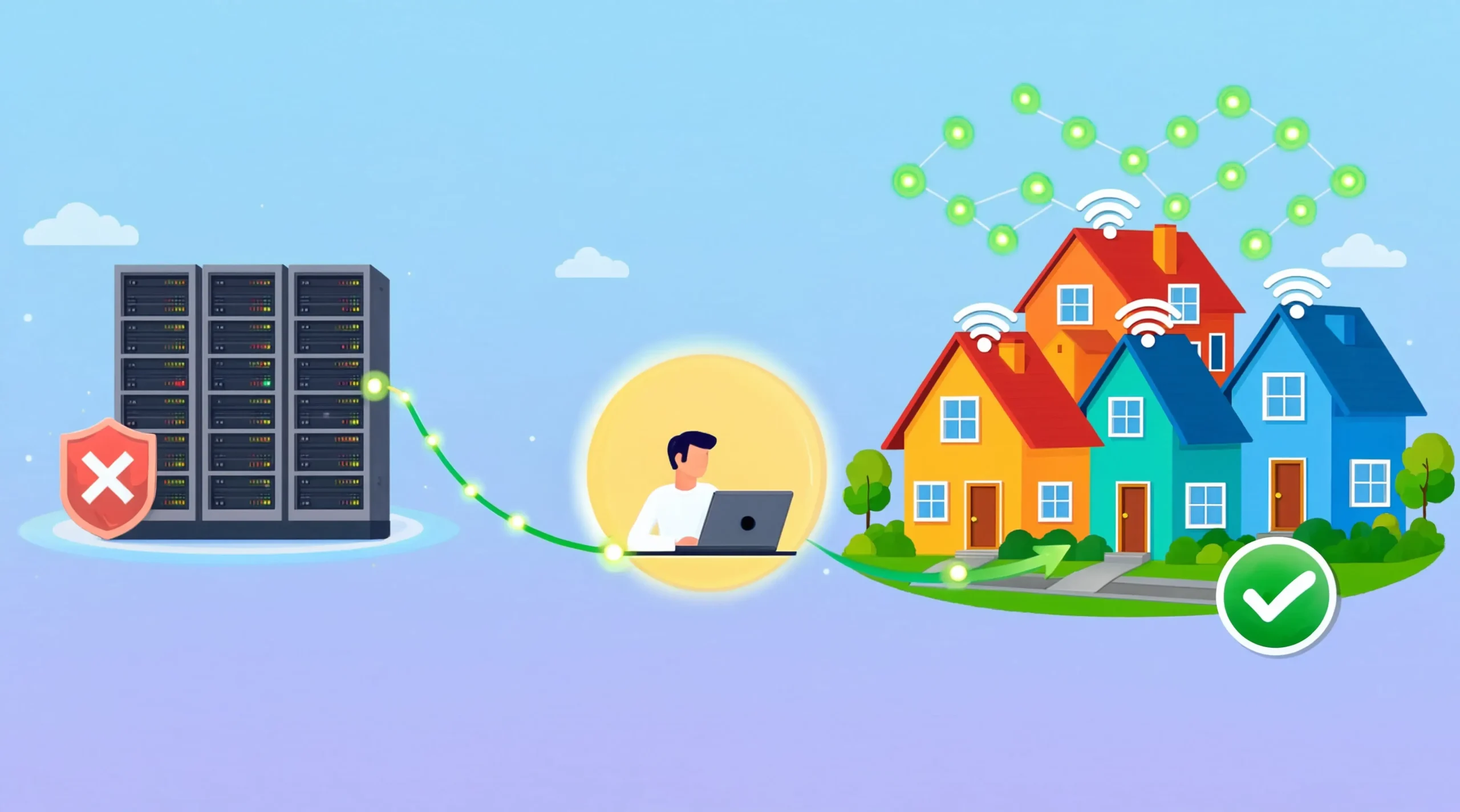
The first time I bought residential proxies, I spent two days figuring out why they were three times slower than the datacenter proxies I had been using, and another week realizing that the speed loss was actually the point. That experience taught me something most articles on this topic skip: residential proxies are not a faster, better version of regular proxies. They are a different tool entirely, with different costs, different tradeoffs, and a much narrower set of jobs they are actually good at.
If you have been looking at residential proxy providers and getting confused by the wildly different prices, conflicting claims about success rates, and the sheer number of brands promising the same thing, you are not alone. The market is genuinely messy. Some providers are excellent. Some sell repackaged versions of other people’s networks. Some operate in ways that raise real ethical questions about how those IP addresses ended up in their pool in the first place.
What I want to do here is walk through what residential proxies actually are, when they make sense (and when they do not), how to think about pricing, and which providers I would actually consider in 2026 based on what the market looks like right now.
Key Takeaways
- Residential proxies route your traffic through real consumer IP addresses assigned by internet service providers to households, which makes them much harder for websites to flag as automated traffic.
- They are slower and more expensive than datacenter proxies for a reason. The cost premium buys you legitimacy that datacenter IPs cannot fake, and that legitimacy is what gets you through anti-bot systems.
- Most projects do not actually need them. If your target site does not block datacenter IPs, paying for residential proxies is wasted money. Test with cheaper options first.
- Ethical sourcing is a real concern. Some providers obtain their residential IPs through clear, consented opt-in programs. Others use methods that are murkier. The provider you choose says something about what you are comfortable supporting.
- Pricing ranges from around $1.75 to over $15 per GB depending on the provider, plan size, and quality of the IP pool. Bandwidth cost adds up faster than most people expect on real workloads.
- Bright Data, Oxylabs, Decodo (formerly Smartproxy), IPRoyal, and Webshare are the names that consistently show up in serious evaluations for 2026, each with meaningfully different strengths.
- ISP proxies are the hybrid option worth knowing about. They look residential to websites but run on datacenter infrastructure, giving you better speed at the cost of a smaller pool and higher per-IP price.
What Is a Residential Proxy?
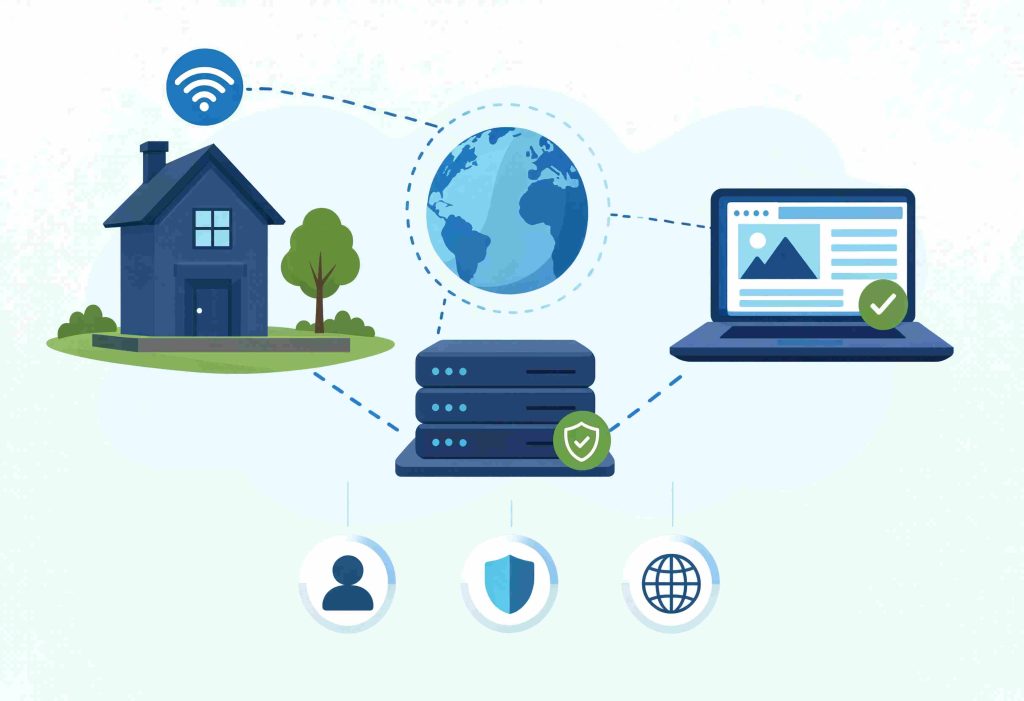
Strip away the marketing language and a residential proxy is just an internet connection that belongs to a real person, which a proxy provider routes your traffic through. When a website looks at the IP address making the request, it sees a Comcast subscriber in Atlanta or a BT customer in Manchester, not a server in an AWS data center.
That is the whole trick. Websites can buy lists of known datacenter IP ranges and block them in bulk. They cannot do the same with residential IPs without blocking real customers, which means residential traffic gets treated with much less suspicion by default.
The mechanics work in one of two ways depending on the provider. Some run peer-to-peer networks where ordinary users install software (usually bundled with a free VPN or app) that turns their connection into an exit node in exchange for the free service. Others contract directly with ISPs and end users through explicit opt-in programs. The difference matters more than people realize, and we will come back to it.
When you connect to a residential proxy provider, you typically authenticate to a gateway, specify your targeting parameters (country, city, ISP, sometimes ASN), and the provider routes your request through one of the available residential IPs in their pool. Most providers offer pools ranging from a few million to over 100 million IPs, though the realistic active pool at any given moment is usually a fraction of that.
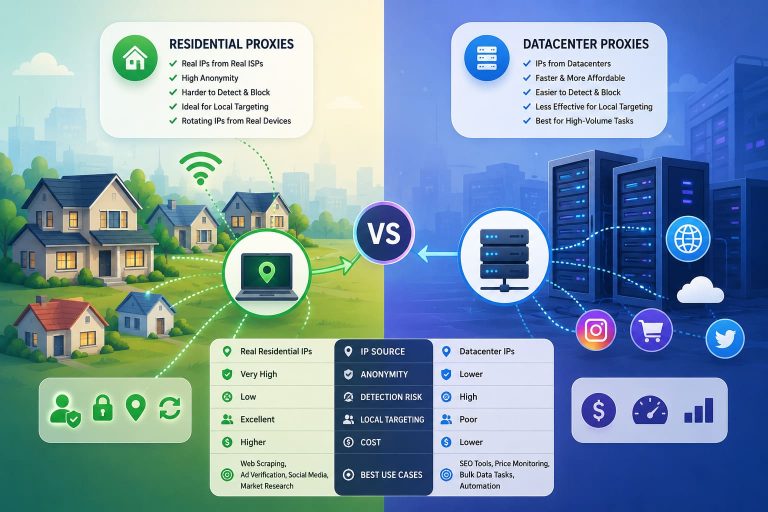
Residential vs Datacenter vs ISP Proxies
The three main proxy types serve different jobs, and confusing them costs people a lot of money.
Datacenter proxies run on servers in commercial data centers. They are fast, cheap (often under $1 per IP per month), and available in huge quantities. The catch is that their IP ranges are publicly known and easy to block. For scraping public, non-protected sites or for tasks where speed matters more than stealth, they are still the right choice.
Residential proxies use real consumer IPs as described above. They are slower, more expensive, and bandwidth-metered rather than per-IP. They are what you actually need when the target site is using Cloudflare, Akamai, DataDome, or similar protection.
ISP proxies are an interesting middle ground. They are technically datacenter-hosted, but the IP addresses are registered under real ISPs rather than hosting companies. To a website, an ISP proxy looks residential. To you, it behaves like a datacenter proxy in terms of speed and stability. The tradeoff is a much smaller pool and higher per-IP cost, typically $2 to $8 per IP per month.
Here is how I think about the choice in practice:
| Need | Best Choice | Why |
|---|---|---|
| High-volume scraping of unprotected sites | Datacenter | Cheapest per request, fast enough |
| Scraping sites with serious anti-bot protection | Residential | Only realistic option for sustained success |
| Long-running sessions, account management | ISP proxies | Stable IPs, residential appearance |
| Geographically specific testing or ad verification | Residential | Real local IPs, accurate geolocation |
| Sneaker drops, ticket purchases | ISP or residential | Both work, ISP for speed, residential for volume |
The mistake I see most often is using residential proxies for tasks that datacenter proxies would handle fine. The cost difference can be 10x or more, and you only need residential when the cheaper option is actually getting blocked.
How Residential Proxies Actually Work?
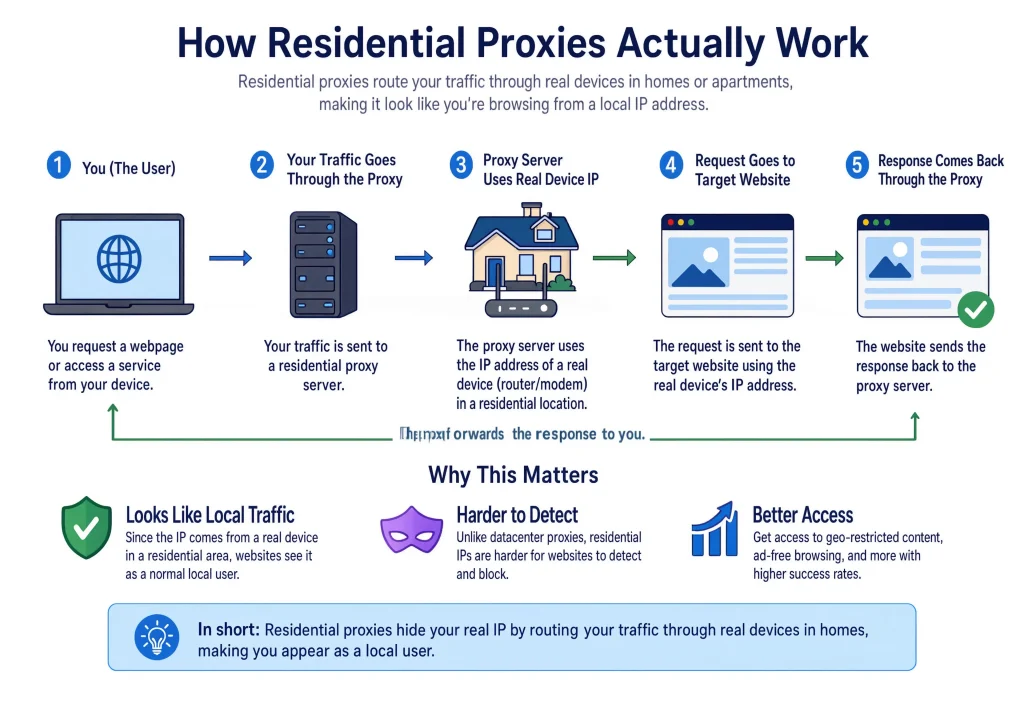
The marketing version says you connect to a global network of millions of clean residential IPs and your scraping problems disappear. The reality is more complicated.
When you send a request through a residential proxy, the provider’s infrastructure routes it through one of the active exit nodes in their pool. That exit node is somebody’s home connection, possibly an Android phone running a free VPN app whose terms of service include an obscure clause about sharing bandwidth. The request goes out from that person’s IP, hits the target site, and the response comes back through the same path.
Several things follow from this that change how you should think about residential proxies:
Speed varies wildly. Some exit nodes are on fiber connections. Others are on overloaded mobile data. Latency can range from 200ms to several seconds depending on which IP you happen to get routed through. This is not a defect, it is the inherent nature of using random consumer connections.
IP quality is inconsistent. Not every residential IP is clean. Some have been used by other proxy customers for years and are already flagged. Some belong to users who run sketchy software. The quality of the IP pool varies dramatically between providers, and this is where the premium providers earn their pricing.
Sessions are tricky. By default, most residential proxy services rotate IPs on every request, which works for stateless scraping but breaks anything that requires session continuity. Sticky sessions (where you hold the same IP for 1, 10, or 30 minutes) are available from every serious provider, but the underlying exit node can still drop offline if the real user closes their app or loses connection.
Bandwidth, not connections, is what you pay for. Residential pricing is almost always per gigabyte of traffic, which means downloading large pages, images, or media will burn through your plan much faster than scraping text-only APIs.
The Ethics Question Nobody Wants to Discuss
This is the part of the residential proxy market that the providers themselves rarely address directly, and it is worth being honest about.
Where do all these residential IPs come from? In the cleanest case, they come from users who explicitly opted into a program in exchange for compensation, free service, or both. Bright Data’s EarnApp, Honeygain, and similar programs work this way. Users install software, get paid in some form, and consent (in theory) to having their bandwidth used for proxy traffic.
In the murkier cases, residential IPs end up in proxy networks through software development kits (SDKs) embedded in free apps, where the consent is buried deep in terms of service that nobody reads. Users might not realize that the free VPN they installed is selling their bandwidth to scrapers. Some providers have been caught using methods that are even less defensible.
Here is what this means in practice:
If you are running a business that uses residential proxies, the sourcing of your provider’s network reflects on your operation. If a provider is later exposed for unethical sourcing practices, your supplier relationship becomes a reputational issue.
Major providers like Bright Data, Oxylabs, and Decodo have invested heavily in compliance frameworks and document their sourcing practices publicly. Smaller providers sometimes do too, but the documentation is often less detailed and harder to verify.
The cheapest residential proxies on the market are usually cheap for a reason. If a provider is selling residential IPs at $1 per GB while the major providers charge $5 to $10, ask where the discount is coming from. Sometimes it is genuinely better unit economics. Sometimes it is corners cut on sourcing.
My honest position: pay slightly more for a provider with a documented, defensible sourcing policy. The legal and reputational risk of using IPs obtained through dubious means is not worth the savings.
When Residential Proxies Actually Make Sense
Not every scraping or automation project needs residential proxies. In fact, most do not. The cases where they genuinely earn their cost premium are narrower than the marketing suggests.
- Scraping sites with sophisticated anti-bot systems. If your target is using Cloudflare’s bot management, Akamai, DataDome, PerimeterX, or similar protection, datacenter IPs will get blocked quickly. Residential is the realistic option here.
- Ad verification. Companies running paid ad campaigns need to verify that their ads are appearing correctly to users in different geographies. The only way to see what a user in São Paulo actually sees is to make the request from a São Paulo residential IP. Datacenter IPs are typically excluded from ad networks’ rendering paths.
- Price monitoring on e-commerce sites. Major retailers actively block scrapers and show different prices to different regions. Residential IPs from the target geography give you the actual customer-facing prices.
- SEO monitoring for localized search results. Google’s SERPs vary by location, language, and history. Residential IPs from specific regions are essential for accurate local SEO tracking.
- Social media research. Almost every social platform aggressively blocks datacenter IPs. Residential is required for any serious research on these platforms.
- Sneaker, ticket, and limited-release purchases. This use case is controversial and increasingly restricted, but it remains a significant portion of the residential proxy market.
- Market research and competitive intelligence at scale. Anything that involves visiting many competitor sites from many different perspectives benefits from the unpredictability of residential IPs.
Outside these use cases, the value of residential proxies drops sharply. For internal testing, scraping public APIs that do not enforce rate limits aggressively, or any project where you can solve the problem with datacenter IPs, the premium is not justified.
Residential Proxies Pricing
Residential proxy pricing is intentionally confusing. Providers list rates that look competitive but only apply to specific plan tiers, and the actual cost per successful request varies based on factors most calculators ignore.
A realistic snapshot of 2026 pricing:
| Provider Tier | Price Range | Typical Plan Sizes |
|---|---|---|
| Premium (Bright Data, Oxylabs) | $5.88 to $15 per GB | Flexible, with enterprise discounts |
| Mid-tier (Decodo, NetNut, SOAX) | $3 to $8 per GB | 5 GB to 100+ GB plans |
| Budget (IPRoyal, Webshare, Proxy-Cheap) | $1.75 to $5 per GB | Various, some with non-expiring bandwidth |
The numbers above are list prices. Effective cost is what matters, and it depends on success rate. A proxy at $2 per GB with a 60 percent success rate on your target site costs more per usable response than a proxy at $6 per GB with a 95 percent success rate.
A practical way to evaluate this: most reputable providers offer free trials or money-back periods. Use them. Test the providers you are considering against your actual target sites and measure the success rate and effective cost per successful request. The provider that wins on list price often does not win on effective cost.
Bandwidth consumption is also worth thinking about upfront. A scraper hitting text-heavy pages might use 50 KB to 200 KB per page, including all assets. At 100 KB average, 1 GB gets you about 10,000 page loads. At 1 million page loads per month, you are looking at 100 GB, which at $5 per GB is $500. Numbers add up faster than the per-GB price suggests.
The Best Residential Proxy Providers Worth Considering in 2026
The residential proxy market has consolidated around a handful of serious players, plus a long tail of resellers and smaller operators. Here is how I think about the top tier going into 2026.
1. Bright Data
Bright Data remains the most comprehensive option, with the largest pool (over 150 million IPs claimed), the broadest geographic coverage, and the most complete feature set. It is also the most expensive, with pricing that starts around $5.88 per GB and scales up. Bright Data is the right choice when you need enterprise-grade reliability, detailed targeting, or the additional services they sell on top (like their unblocker and scraper APIs). For smaller projects, they are usually overkill.
2. Oxylabs
Oxylabs is the closest direct competitor and usually trades back and forth with Bright Data on whichever feature each has prioritized most recently. The pool is large, the targeting is granular, and their sourcing documentation is among the most thorough in the industry. Pricing is similar to Bright Data. For most use cases, the choice between them comes down to specific feature needs and how their support team treats you during a trial.
3. Decodo
Decodo (formerly Smartproxy) sits in the upper middle of the market. The rebrand happened in 2024, but the underlying product remains one of the most polished mid-tier options. Pricing is meaningfully lower than the top two, the dashboard is one of the best in the industry, and the IP pool quality is high enough for most serious work. This is often my default recommendation for teams that need real quality but cannot justify enterprise pricing.
4. IPRoyal
IPRoyal stands out for its non-expiring bandwidth model on certain plans, which is rare in this market. You buy a chunk of GB and use it whenever, with no monthly reset. Pricing is competitive and the IP pool has grown substantially. They are a good choice for projects with irregular usage patterns where committing to a monthly bandwidth allotment does not make sense.
5. Webshare
Webshare is the budget option that does not feel like a budget option. Their residential plans are priced aggressively, the platform is developer-friendly, and they have invested visibly in ethical sourcing documentation. The pool is smaller than the premium providers, which can show up in harder targeting scenarios, but for general-purpose work it is more than adequate.
6. SOAX and NetNut
SOAX and NetNut round out the second tier and are worth considering for specific use cases. SOAX has strong mobile proxy options if you need them. NetNut runs a direct ISP peering model that gives them different network characteristics than peer-to-peer providers.
The names I would be cautious about are the very cheap providers advertising premium features at prices that do not add up. The economics of running a real residential proxy network do not support $0.50 per GB pricing, and providers offering that level are usually either reselling another network with markup hidden elsewhere, or sourcing their IPs in ways they cannot defend publicly.
Common Mistakes I See
After enough exposure to teams setting up residential proxy infrastructure, the same mistakes show up repeatedly.
Picking residential when datacenter would work. This is the most expensive mistake and the most common. Test with cheaper proxies first. Only escalate to residential when you have evidence that the cheaper option is being blocked.
Underestimating bandwidth consumption. The per-GB pricing looks reasonable until you realize that every image, script, font, and ad on a modern web page counts against your bandwidth. Disabling unnecessary resource loading in your scraper (blocking images, fonts, and ads at the browser level) can cut bandwidth usage by 50 to 80 percent.
Treating rotating proxies as a security feature. Rotating your IP on every request does not hide that you are scraping. Anti-bot systems track session fingerprints, behavioral patterns, and request timing independently of IP. If your scraping pattern is obviously automated, rotating IPs just makes you look like a botnet using fresh IPs, which is also detectable.
Ignoring sticky sessions when they would help. For workflows that involve any session state (login, multi-page checkout, account management), forcing IP rotation breaks the workflow. Most providers support sticky sessions that hold the same IP for 10 to 30 minutes, which is usually what you actually want.
Not testing with real targets before committing. Provider success rates vary wildly by target site. A provider that excels on Amazon might struggle on Walmart. Always run a real test on your actual target sites before signing a multi-month contract.
Buying the largest plan available for a discount. Bandwidth on most plans does not roll over. Buying 500 GB when you will use 50 GB is just paying more per GB after you account for waste. Start small, measure actual consumption, then scale up.
Practical Recommendations
Based on the patterns above, here is how I would approach setting up residential proxies for a new project.
Start by characterizing your target. What anti-bot system is the site using? You can usually identify Cloudflare, Akamai, DataDome, and PerimeterX from response headers and JavaScript challenges. The system in use determines whether you need residential at all and how aggressive your other countermeasures need to be.
Test with datacenter proxies first. If they work, you are done. If they get blocked, escalate to ISP proxies. If those also fail, then residential is justified. This staircase saves significant money compared to defaulting to residential.
Run a real comparison trial. Pick two or three providers, get trial accounts, and run identical scraping jobs through each. Measure success rate, average response time, and effective cost per successful request. The winner on paper rarely matches the winner in practice.
Optimize bandwidth before scaling. Block images, fonts, and unnecessary scripts at the browser or HTTP client level. Cache responses where possible. The cost of a residential proxy plan is mostly determined by the bandwidth you waste, not by your raw request volume.
Use sticky sessions deliberately. Plan your workflow around when you need IP continuity and when you do not. Most providers let you mix sticky and rotating sessions within the same plan.
Document your provider’s sourcing practices. If you are running a business, the answer to “where do your provider’s IPs come from” should be defensible. The major providers have public documentation. Use it.
Frequently Asked Questions
Are residential proxies legal?
Using residential proxies is legal in most jurisdictions. The legal question is usually about what you do through them. Scraping publicly available data is generally legal in the US and most of Europe, but violating a site’s terms of service, accessing data behind authentication without authorization, or violating computer fraud laws creates legal exposure regardless of the proxy you used.
Can I get residential proxies for free?
Free residential proxies almost always come with serious problems. Either they are honeypots, they are slow and unreliable, or they are part of a network that is using your connection to sell to other scrapers. For any real use case, free is more expensive than paid in the long run.
How many GB do I need per month?
Depends entirely on your workload. For text-only API scraping at low volume, 5 to 20 GB is often enough. For full-page browser-based scraping at scale, plans of 100 GB or more are common. Start small, measure your actual consumption for two weeks, then size your plan to that.
Do residential proxies guarantee I will not get blocked?
No. They make blocking harder, not impossible. Modern anti-bot systems look at many signals beyond IP address, including browser fingerprint, behavioral patterns, and request timing. Residential proxies are one piece of a larger anti-detection strategy.
What is the difference between rotating and sticky residential proxies?
Rotating proxies change your IP on every request or every few seconds. Sticky proxies hold the same IP for a configurable period, typically 1 to 30 minutes. Rotating is for stateless scraping at scale. Sticky is for any workflow that involves session continuity.
Can residential proxies bypass Cloudflare?
Better than datacenter proxies can, but not automatically. Cloudflare’s bot management evaluates multiple signals, and IP type is only one of them. Residential proxies combined with proper browser automation, stealth measures, and behavioral patterns are what actually get through Cloudflare consistently.
Conclusion
Residential proxies are a real tool that solves a real problem, but they are also one of the most misused categories in the web scraping market. Teams routinely buy them when they do not need them, underestimate the bandwidth costs, and pick providers based on list price without testing actual success rates.
The honest summary: residential proxies are essential when you are scraping sites with serious anti-bot protection, doing ad verification, or working with location-specific data where the IP origin actually matters. For everything else, cheaper alternatives are usually adequate, and the cost difference is large enough to be worth caring about.
The providers worth considering in 2026 cluster into a clear hierarchy. Bright Data and Oxylabs at the top for enterprise-grade work. Decodo, IPRoyal, and Webshare in the middle for serious projects without enterprise budgets. A long tail of smaller providers, some of which are excellent for specific niches and some of which exist mostly to repackage other people’s networks. Test before you commit, ask hard questions about sourcing, and remember that the proxy is one piece of a larger anti-detection strategy, not a solution by itself.
You May Also Like
 Proxies
10 Best Proxy Providers for AI Agents in 2026: The Definitive Buyer’s Guide
 Web Scraping
What Is Web Scraping and How Does It Work? A Complete 2026 Guide
 Web Scraping
How to Handle CAPTCHA While Scraping: A 2026 Developer’s Guide
 Proxies
Best Proxies for Web Scraping In 2026: How I Choose the Right Provider and Proxy Type
 Proxies
Residential vs Datacenter Proxies: Use Cases and Best Providers (2026)
 Web Scraping
Cloudflare Blocking Scrapers Explained: Your 2026 Guide to Anti-Bot Protection
 Web Scraping
How Google Maps Scraping Actually Works (And Where Most Attempts Go Wrong)
 Web Scraping
Scrap.io Review 2026: What This Google Maps Lead Generation Tool Actually Gets Right (and Where It Falls Short)
 Web Scraping