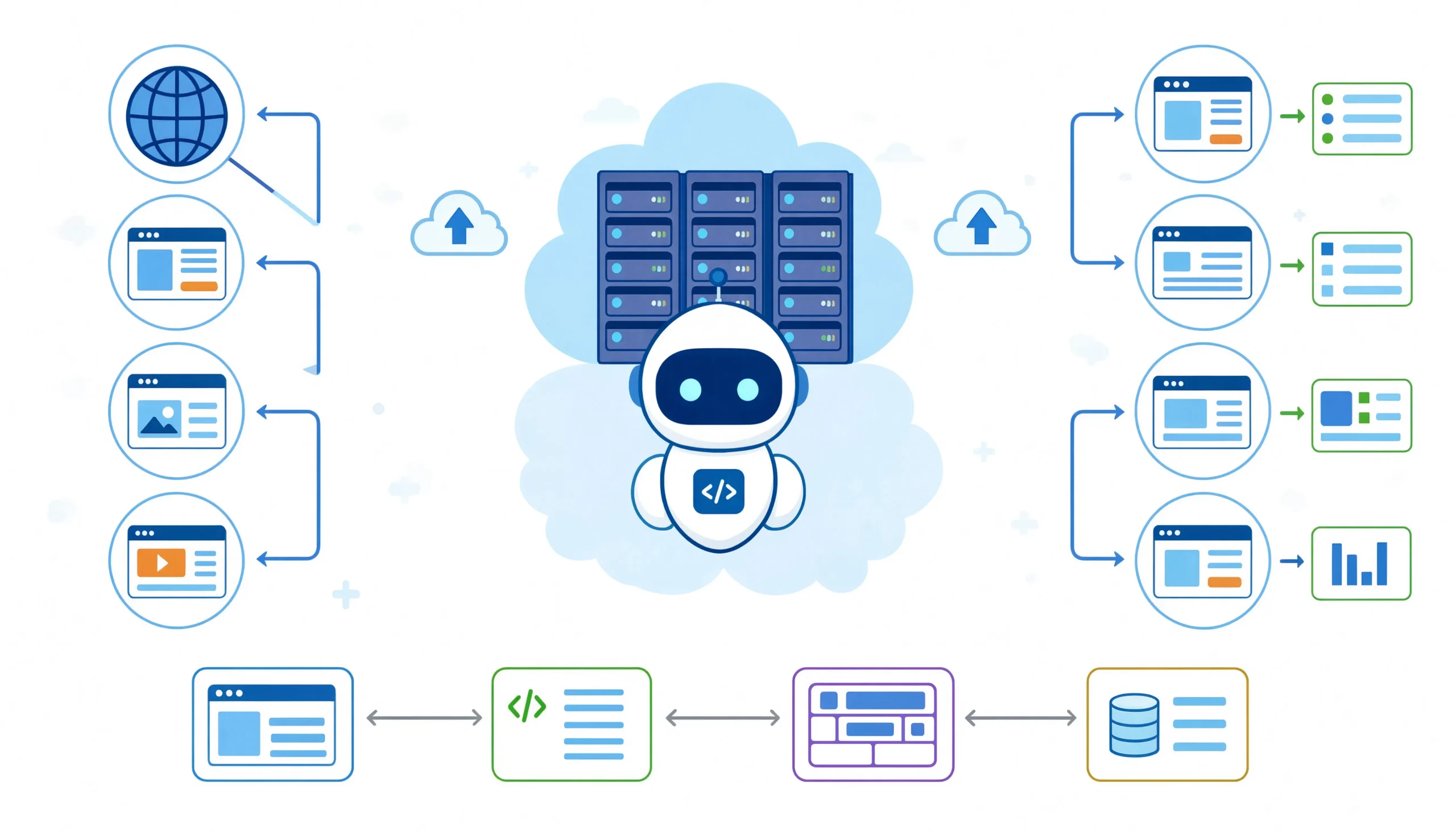
Web scraping starts with an HTTP request. Before parsing, before selectors, before data extraction, there is a single message sent from your machine to a server. If that message looks wrong, nothing else happens. The server blocks it, redirects it, or returns an empty shell. Most tutorials jump straight to BeautifulSoup and XPath, but they skip the layer that determines whether your scraper works at all.
This guide covers the HTTP layer specifically for web scraping. It explains how requests work, which headers matter, how to handle status codes, and how to build a resilient client that survives real-world conditions. Every example is written in Python with httpx, which supports both sync and async patterns and handles HTTP/2 natively.
What an HTTP Request Actually Is
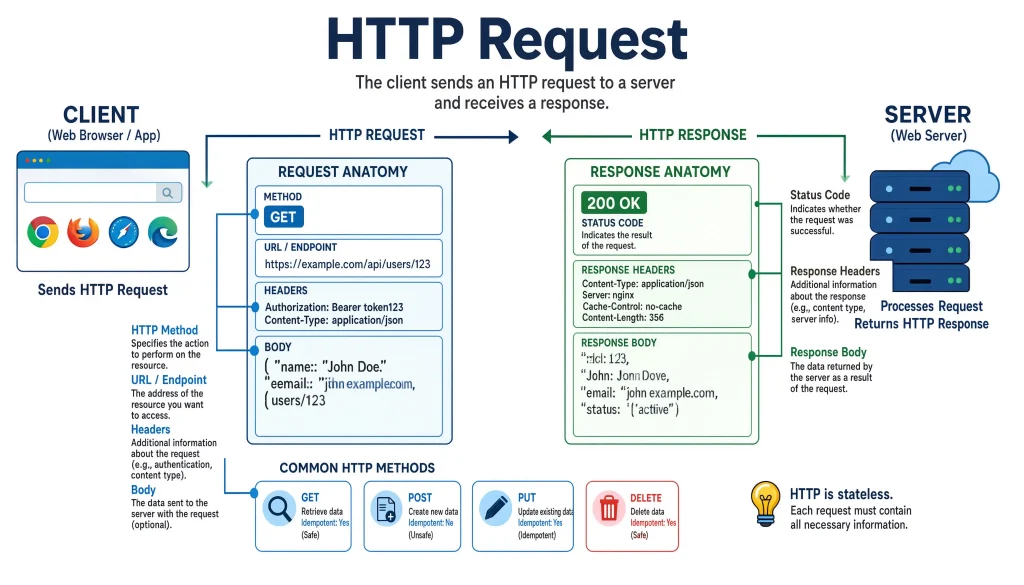
An HTTP request is a text message your client sends to a server. It has three parts: a request line, headers, and an optional body. The request line contains the method, the URL path, and the HTTP version. The headers are key-value pairs that tell the server who you are, what you want, and how you want it. The body carries data for POST, PUT, and PATCH requests.
Here is what a real browser request looks like when you visit a product page:
GET /products/laptop-pro-16 HTTP/2
Host: example-store.com
User-Agent: Mozilla/5.0 (Windows NT 10.0; Win64; x64) AppleWebKit/537.36 (KHTML, like Gecko) Chrome/126.0.0.0 Safari/537.36
Accept: text/html,application/xhtml+xml,application/xml;q=0.9,image/avif,image/webp,image/apng,*/*;q=0.8
Accept-Language: en-US,en;q=0.9
Accept-Encoding: gzip, deflate, br
Referer: https://www.google.com/search?q=laptop+pro+16
Sec-Fetch-Dest: document
Sec-Fetch-Mode: navigate
Sec-Fetch-Site: cross-site
Sec-Fetch-User: ?1
Upgrade-Insecure-Requests: 1
Cookie: session_id=abc123; csrftoken=xyz789; _ga=GA1.2.123456789.1234567890
That is 14 headers. Most beginner scrapers send three: User-Agent, Accept, and maybe a Cookie. The server notices the difference immediately. Anti-bot systems are not looking for one missing header. They are looking for the pattern. A real browser sends a specific constellation of headers in a specific order, with specific values, over a specific TLS handshake, with specific HTTP/2 behavior. Miss any piece of that constellation and you stand out.
The Methods That Matter for Scraping
GET: The Workhorse
GET requests retrieve data from a server. They are idempotent, meaning calling the same GET request multiple times should produce the same result. For scraping, GET is what you use 95 percent of the time. Every product page, every article, every search result is a GET.
import httpx

response = httpx.get(
    'https://example-store.com/products/laptop-pro-16',
    headers={
        'User-Agent': 'Mozilla/5.0 (Windows NT 10.0; Win64; x64) AppleWebKit/537.36',
        'Accept': 'text/html,application/xhtml+xml,application/xml;q=0.9,*/*;q=0.8',
        'Accept-Language': 'en-US,en;q=0.9',
        'Accept-Encoding': 'gzip, deflate, br',
        'Referer': 'https://www.google.com/',
        'Sec-Fetch-Dest': 'document',
        'Sec-Fetch-Mode': 'navigate',
        'Sec-Fetch-Site': 'cross-site',
        'Sec-Fetch-User': '?1',
        'Upgrade-Insecure-Requests': '1',
    }
)
Notice the Sec-Fetch headers. These are part of the Fetch Metadata Request Headers standard that modern browsers send to help servers distinguish between same-origin requests, cross-origin navigation, and sub-resource loads. Anti-bot systems check these. If your scraper sends a GET request for an HTML page without Sec-Fetch-Dest: document, that is a signal. If you request an image without Sec-Fetch-Dest: image, that is another signal.
POST: Submitting Forms and API Calls
POST requests send data to the server. In scraping, you use POST for two things: submitting search forms and calling APIs directly.
When a site has a search form that submits via POST rather than GET parameters, you replicate the form submission:
response = httpx.post(
    'https://example-store.com/search',
    data={
        'query': 'laptop pro 16',
        'category': 'electronics',
        'sort': 'price_asc',
    },
    headers={
        'Content-Type': 'application/x-www-form-urlencoded',
        'Origin': 'https://example-store.com',
        'Referer': 'https://example-store.com/',
    }
)
The Content-Type header matters here. If the form expects application/x-www-form-urlencoded and you send application/json, the server rejects it. If the form uses CSRF protection, you need to extract the token from the page first, then include it in your POST data.
For API calls, POST usually carries JSON:
response = httpx.post(
    'https://api.example-store.com/v2/products/search',
    json={
        'query': 'laptop pro 16',
        'filters': {'category': 'electronics'},
        'pagination': {'page': 1, 'limit': 24}
    },
    headers={
        'Content-Type': 'application/json',
        'X-Requested-With': 'XMLHttpRequest',
        'Authorization': 'Bearer eyJhbGciOiJIUzI1NiIs...',
    }
)
The X-Requested-With: XMLHttpRequest header tells the server this is an AJAX call, which many APIs expect. Without it, some endpoints return HTML instead of JSON.
HEAD: Checking Before You Fetch
HEAD requests are identical to GET except the server returns only headers, no body. I use them to check if a page has changed before downloading the full content:
response = httpx.head('https://example-store.com/products/laptop-pro-16')
last_modified = response.headers.get('Last-Modified')
etag = response.headers.get('ETag')

# Compare against cached values, skip if unchanged
This saves bandwidth and reduces server load, which matters when you are scraping thousands of pages. Some servers do not support HEAD or return misleading headers, so I always validate against a few test requests before relying on this optimization.
OPTIONS: Discovering API Capabilities
OPTIONS requests ask the server what methods and headers are allowed for a given endpoint. I use them when reverse-engineering an API to see if CORS restrictions will block my scraper:
response = httpx.options('https://api.example-store.com/v2/products')
allowed_methods = response.headers.get('Allow', '')
access_control = response.headers.get('Access-Control-Allow-Origin', '')
If the API returns Access-Control-Allow-Origin: *, you can call it from any origin. If it returns a specific domain, your scraper needs to spoof the Origin header or use a proxy that handles CORS.
Headers: The Fingerprint That Betrays You
Every header you send is a piece of your scraper’s fingerprint. Anti-bot systems do not just check the User-Agent. They check the combination, the order, the values, and whether they match the TLS fingerprint and HTTP/2 behavior.
User-Agent: The Most Overrated Header
Everyone knows to set a User-Agent. What most people get wrong is using outdated strings or rotating through a list of 50 agents without matching the other headers to each one. If your User-Agent says Chrome 126 but your Sec-CH-UA header says Chrome 120, that is a mismatch. If your User-Agent says Windows but your Accept-Language says Japanese, that is another mismatch.
I maintain a small set of realistic User-Agent strings, each paired with the complete header set that matches that browser version. I rotate through them, but I never mix headers from different browsers:
BROWSER_PROFILES = [
    {
        'user_agent': 'Mozilla/5.0 (Windows NT 10.0; Win64; x64) AppleWebKit/537.36 (KHTML, like Gecko) Chrome/126.0.0.0 Safari/537.36',
        'sec_ch_ua': '"Not/A)Brand";v="8", "Chromium";v="126", "Google Chrome";v="126"',
        'accept': 'text/html,application/xhtml+xml,application/xml;q=0.9,image/avif,image/webp,image/apng,*/*;q=0.8',
        'accept_language': 'en-US,en;q=0.9',
        'accept_encoding': 'gzip, deflate, br',
    },
    {
        'user_agent': 'Mozilla/5.0 (Macintosh; Intel Mac OS X 10_15_7) AppleWebKit/537.36 (KHTML, like Gecko) Chrome/126.0.0.0 Safari/537.36',
        'sec_ch_ua': '"Not/A)Brand";v="8", "Chromium";v="126", "Google Chrome";v="126"',
        'accept': 'text/html,application/xhtml+xml,application/xml;q=0.9,image/avif,image/webp,image/apng,*/*;q=0.8',
        'accept_language': 'en-US,en;q=0.9',
        'accept_encoding': 'gzip, deflate, br',
    },
]
Accept-Encoding: The Compression Trap
The Accept-Encoding header tells the server which compression formats your client supports. Real browsers send gzip, deflate, br (Brotli). If your scraper omits this header, the server sends uncompressed responses, which are larger and slower. But there is a subtler issue: some anti-bot systems check whether your client actually decompresses the response correctly. If you claim to support Brotli but your HTTP client does not decompress it, the server detects the mismatch.
httpx and requests handle decompression automatically if you do not interfere. The problem arises when people manually set Accept-Encoding: identity to avoid compression, which is an immediate bot signal. Always let your HTTP client handle compression transparently.
Referer: The Navigation Trail
The Referer header tells the server where you came from. For scraping, this is critical because many sites check that navigation paths look natural. If you request a product page directly without a Referer, that is suspicious. If you request it with a Referer from the category page, that looks normal. If you request it with a Referer from Google search, that also looks normal.
I implement session pre-walking for sites with aggressive anti-bot: before scraping the target page, I request the homepage, then the category page, then the product page, carrying the correct Referer at each step. This mimics a real user’s browsing session and establishes cookies that the anti-bot system expects:
session = httpx.Client()

# Step 1: Visit homepage
session.get('https://example-store.com/', headers={'User-Agent': UA})

# Step 2: Visit category page with homepage as referer
session.get(
    'https://example-store.com/electronics/',
    headers={'User-Agent': UA, 'Referer': 'https://example-store.com/'}
)

# Step 3: Visit product page with category as referer
response = session.get(
    'https://example-store.com/products/laptop-pro-16',
    headers={'User-Agent': UA, 'Referer': 'https://example-store.com/electronics/'}
)
This pattern, which some call “session pre-walking” or “warmup,” is the difference between getting blocked immediately and scraping successfully for hours.
Cookie Management: The Session State

Cookies are how servers track your session across requests. For scraping, you need to handle cookies carefully. Some cookies are functional session IDs, CSRF tokens, cart contents. Others are tracking, analytics, advertising, fingerprinting. The functional ones you must preserve. The tracking ones you might want to drop to reduce your fingerprint.
httpx and requests both have session objects that automatically persist cookies across requests. But they also persist tracking cookies that anti-bot systems use to correlate your behavior. I use a selective approach: extract the functional cookies after the warmup, drop the tracking ones, and send only what is necessary:
session = httpx.Client()

# Warmup to collect cookies
session.get('https://example-store.com/')
session.get('https://example-store.com/electronics/')

# Extract only functional cookies
functional_cookies = {
    'session_id': session.cookies.get('session_id'),
    'csrftoken': session.cookies.get('csrftoken'),
}

# Create a clean session with only functional cookies
clean_session = httpx.Client(cookies=functional_cookies)
Status Codes: Reading the Server’s Response
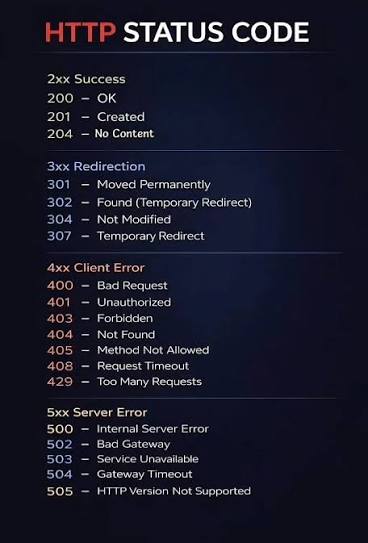
The server replies with a status code, headers, and a body. The status code is a three-digit number that tells you what happened. For scrapers, these codes are not just error indicators. They are routing signals that tell you what to do next.
200 OK: Success, But Verify
A 200 status means the server processed your request and returned content. It does not mean the content is what you expected. I have seen 200 responses that returned CAPTCHA pages, login walls, or empty shells. Always validate the body, not just the status:
response = session.get(url)

if response.status_code == 200:
    if 'checking your browser' in response.text.lower():
        # Cloudflare challenge, switch to headless browser
        handle_challenge(url)
    elif 'sign in' in response.text.lower() and 'password' in response.text.lower():
        # Login wall, need authentication
        handle_login_required(url)
    elif len(response.text) < 1000:
        # Suspiciously short, likely an error page
        handle_short_response(url, response.text)
    else:
        # Actually good content
        parse_and_store(response.text)
301 and 302: Redirects
Redirects tell you the resource moved. 301 is permanent, 302 is temporary. Your HTTP client should follow redirects automatically, but you need to check the final URL. Some sites redirect bots to a honeypot page while serving real content to legitimate requests. If the final URL is /blocked or /challenge, you know what happened:
response = session.get(url, follow_redirects=True)

if 'blocked' in str(response.url) or 'challenge' in str(response.url):
    handle_block(response.url)
400 Bad Request: You Broke Something
400 means your request was malformed. Check your headers, your payload format, and your URL encoding. Common causes: missing Content-Type, invalid JSON, or URL parameters that need encoding:
from urllib.parse import quote

# Wrong: spaces in URL
url = f'https://example.com/search?q=laptop pro 16'

# Right: URL-encoded
url = f'https://example.com/search?q={quote("laptop pro 16")}'
401 Unauthorized: Authentication Required
401 means you need credentials. This is different from 403, which means the server understood who you are and decided to block you anyway. For 401, check if your session expired, your token is invalid, or you need to log in first.
403 Forbidden: The Anti-Bot Block
403 is the status code that keeps scrapers awake at night. It means the server understood your request and refused it. In scraping, 403 usually means one of four things:
- Your IP is blocked.
- Your User-Agent is flagged.
- Your headers do not match a real browser.
- Your TLS fingerprint is wrong.
The fix depends on the cause. Rotate proxies for IP blocks. Update headers for fingerprint mismatches. Use curl_cffi for TLS fingerprinting issues. Check the response body for clues:
if response.status_code == 403:
    body_preview = response.text[:500].lower()

    if 'cloudflare' in body_preview:
        handle_cloudflare_block()
    elif 'akamai' in body_preview or 'akamai' in response.headers.get('Server', ''):
        handle_akamai_block()
    elif 'datadome' in body_preview:
        handle_datadome_block()
    else:
        # Generic block, rotate everything
        rotate_proxy_and_headers()
404 Not Found: Resource Gone

404 means the page does not exist. In scraping, this usually means the product was removed, the URL structure changed, or your URL generation logic has a bug. Log it and move on. Do not retry 404s they will not magically start working:
if response.status_code == 404:
    log_dead_url(url)
    return None
429 Too Many Requests: Rate Limited
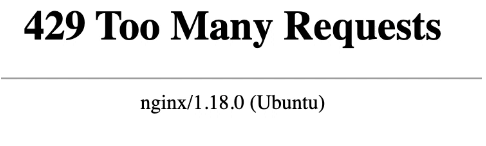
429 means you are sending requests too fast. The server might include a Retry-After header telling you how long to wait. Respect it. If there is no Retry-After, implement exponential backoff with jitter:
import time
import random

def fetch_with_backoff(url, max_retries=5, base_delay=1.0):
    for attempt in range(max_retries):
        response = session.get(url)

        if response.status_code == 429:
            retry_after = response.headers.get('Retry-After')
            if retry_after:
                wait = float(retry_after)
            else:
                wait = base_delay * (2 ** attempt)

            # Add jitter to avoid thundering herd
            wait = wait * random.uniform(0.5, 1.5)
            time.sleep(wait)
            continue

        return response

    raise Exception(f"Rate limited on {url} after {max_retries} retries")
500, 502, 503, 504: Server Errors
5xx codes mean the server failed, not you. These are usually transient. Retry with backoff, but cap your retries. If a site returns 503 consistently for hours, it is probably down for maintenance:
RETRYABLE_CODES = {500, 502, 503, 504}
MAX_RETRIES = 3

def fetch_with_retry(url):
    for attempt in range(MAX_RETRIES):
        response = session.get(url)

        if response.status_code in RETRYABLE_CODES:
            delay = min(2 ** attempt, 60)  # Cap at 60 seconds
            time.sleep(delay)
            continue

        return response

    log_persistent_failure(url)
    return None
520-524: Cloudflare’s Extended Family
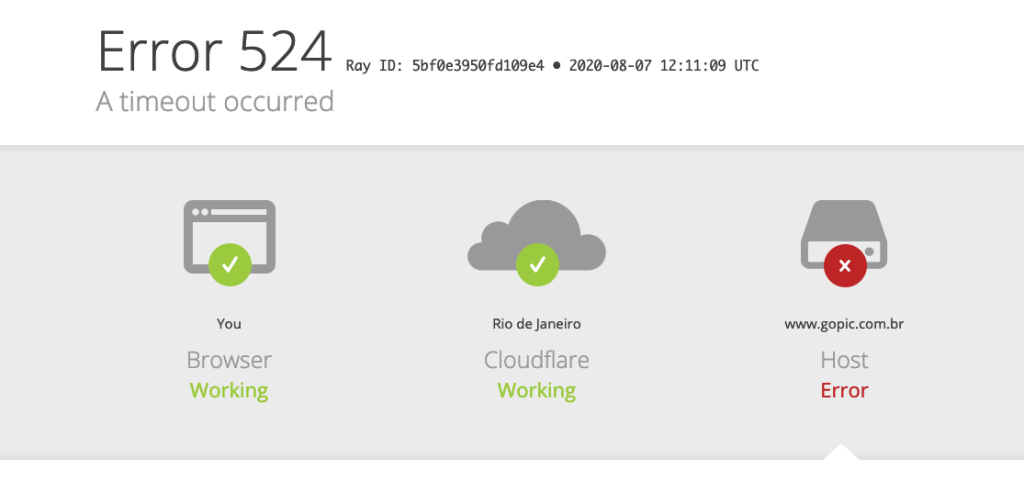
These are Cloudflare-specific errors. 520 means the origin server returned something unexpected. 521 means the origin is down. 522 is a connection timeout. 524 is a response timeout. For scrapers, 520 often means your TLS or HTTP/2 fingerprint was rejected. The fix is curl_cffi or a headless browser:
from curl_cffi import requests as cffi_requests

# curl_cffi impersonates Chrome's TLS and HTTP/2 fingerprint
response = cffi_requests.get(url, impersonate="chrome120")
Building a Resilient HTTP Client for Scraping
After years of iterating, here is the HTTP client pattern I use for every scraping project. It handles headers, retries, backoff, proxy rotation, and challenge detection in one place:
import httpx
import time
import random
from typing import Optional, Sequence

class ScrapingClient:
    def __init__(
        self,
        proxy_pool: Optional[Sequence[str]] = None,
        max_retries: int = 5,
        base_delay: float = 1.0,
        max_delay: float = 60.0,
    ):
        self.proxy_pool = list(proxy_pool) if proxy_pool else [None]
        self.max_retries = max_retries
        self.base_delay = base_delay
        self.max_delay = max_delay
        self.proxy_index = 0

        self.headers = {
            'User-Agent': 'Mozilla/5.0 (Windows NT 10.0; Win64; x64) AppleWebKit/537.36 (KHTML, like Gecko) Chrome/126.0.0.0 Safari/537.36',
            'Accept': 'text/html,application/xhtml+xml,application/xml;q=0.9,image/avif,image/webp,image/apng,*/*;q=0.8',
            'Accept-Language': 'en-US,en;q=0.9',
            'Accept-Encoding': 'gzip, deflate, br',
            'Sec-Fetch-Dest': 'document',
            'Sec-Fetch-Mode': 'navigate',
            'Sec-Fetch-Site': 'none',
            'Sec-Fetch-User': '?1',
            'Upgrade-Insecure-Requests': '1',
        }

    def _get_next_proxy(self) -> Optional[str]:
        proxy = self.proxy_pool[self.proxy_index % len(self.proxy_pool)]
        self.proxy_index += 1
        return proxy

    def _backoff(self, attempt: int) -> None:
        delay = min(self.base_delay * (2 ** attempt), self.max_delay)
        jitter = random.uniform(0.5, 1.5)
        time.sleep(delay * jitter)

    def get(self, url: str, referer: Optional[str] = None) -> httpx.Response:
        headers = dict(self.headers)
        if referer:
            headers['Referer'] = referer

        for attempt in range(self.max_retries):
            proxy = self._get_next_proxy()

            try:
                with httpx.Client(
                    headers=headers,
                    proxy=proxy,
                    follow_redirects=True,
                    timeout=30.0,
                ) as client:
                    response = client.get(url)
            except (httpx.ConnectError, httpx.TimeoutException):
                self._backoff(attempt)
                continue

            # Check for challenge pages disguised as normal responses
            if response.status_code in (403, 503):
                body_lower = response.text[:1000].lower()
                challenge_signals = [
                    'checking your browser',
                    'just a moment',
                    'ddos protection',
                    'enable javascript',
                ]
                if any(sig in body_lower for sig in challenge_signals):
                    raise ChallengeDetected(f"Anti-bot challenge on {url}")

            # Rate limited
            if response.status_code == 429:
                retry_after = response.headers.get('Retry-After')
                if retry_after:
                    time.sleep(float(retry_after))
                else:
                    self._backoff(attempt)
                continue

            # Server errors, retry with backoff
            if response.status_code in {500, 502, 503, 504}:
                self._backoff(attempt)
                continue

            # Success or client error we should not retry
            return response

        raise MaxRetriesExceeded(f"Failed to fetch {url} after {self.max_retries} attempts")

# Usage
client = ScrapingClient(
    proxy_pool=[
        'http://user:pass@proxy1.example.com:8080',
        'http://user:pass@proxy2.example.com:8080',
    ]
)

# Warmup session
client.get('https://example-store.com/')
client.get('https://example-store.com/electronics/', referer='https://example-store.com/')

# Scrape target
response = client.get(
    'https://example-store.com/products/laptop-pro-16',
    referer='https://example-store.com/electronics/'
)
This client encapsulates everything I have learned about making HTTP requests for scraping. It rotates proxies, respects Retry-After headers, detects challenge pages even when they return 200, implements exponential backoff with jitter, and carries Referer headers through a session warmup.
The TLS and HTTP/2 Layer: Where Most Scrapers Die
Here is the advanced topic that separates working scrapers from broken ones. Modern anti-bot systems do not just inspect your headers. They inspect your TLS handshake and your HTTP/2 behavior.
TLS fingerprinting works because every TLS client sends a specific combination of cipher suites, extensions, and elliptic curves in its Client Hello message. Python’s ssl module sends a different fingerprint than Chrome. Cloudflare’s Bot Management can detect this mismatch and block you before any HTTP headers are exchanged.
HTTP/2 fingerprinting works because browsers send HTTP/2 settings, header ordering, and pseudo-header sequences in specific patterns. Python’s httpx sends HTTP/2 differently than Chrome. The mismatch is detectable.
The fix is curl_cffi, which impersonates Chrome’s TLS and HTTP/2 fingerprints:
from curl_cffi import requests as cffi_requests

response = cffi_requests.get(
    'https://cloudflare-protected-site.com',
    impersonate="chrome120",
    headers={
        'Accept-Language': 'en-US,en;q=0.9',
    }
)
When curl_cffi is not enough; the next step is a headless browser with Playwright, which uses the real Chrome binary and therefore has the correct TLS and HTTP/2 fingerprints built in.
FAQ
Why does my scraper get blocked even with a realistic User-Agent?
Anti-bot systems check more than the User-Agent. They inspect the full header constellation, TLS fingerprint, HTTP/2 behavior, IP reputation, and request patterns. A realistic User-Agent with mismatched Sec-Fetch headers, wrong Accept-Encoding, or a datacenter IP will still get blocked. Match the full browser fingerprint, not just one header.
What is the difference between 401 and 403 in scraping?
401 means the server does not know who you are — missing or invalid credentials. 403 means the server knows who you are and decided to block you anyway. In scraping, 401 usually means an expired session or missing token. 403 usually means anti-bot detection triggered. Handle them differently: refresh credentials for 401, rotate proxies and headers for 403.
Should I follow redirects automatically or handle them manually?
Follow redirects automatically for most scraping tasks. httpx and requests do this with follow_redirects=True. But always check the final URL. Some sites redirect bots to honeypot pages like /blocked or /challenge while serving real content to legitimate requests. If the final URL contains suspicious paths, treat it as a block.
How do I know if a 200 response actually contains useful data?
Validate the response body, not just the status code. Check for challenge page text like “Checking your browser” or “Just a moment.” Check for login walls. Check if the content length is suspiciously short. A 200 response with a Cloudflare challenge page is not useful data. Always implement body validation before parsing.
What is session pre-walking and why does it matter?
Session pre-walking means visiting pages in a natural sequence before reaching your target. Visit the homepage, then the category page, then the product page, carrying the correct Referer at each step. This establishes cookies the anti-bot system expects and mimics real user behavior. Skipping straight to the target page without warmup looks like a bot.
When should I use HEAD requests instead of GET?
Use HEAD when you want to check if a page has changed before downloading the full content. Compare the Last-Modified or ETag header against cached values. If unchanged, skip the download. This saves bandwidth and reduces server load. Do not rely on HEAD if the server does not support it well — test first.
Why does my scraper fail on some sites even though curl works?
curl uses libcurl, which has a different TLS fingerprint than Python’s httpx or requests. A site might block Python’s fingerprint while allowing curl’s. The fix is curl_cffi, which uses the same TLS library as curl but from Python code. Alternatively, use a headless browser which has the real browser’s fingerprint.
How do I handle cookies without carrying tracking data?
Use httpx.Client() or requests.Session() to persist cookies, then selectively extract only functional cookies like session_id and csrftoken. Drop tracking cookies like _ga, _gid, or advertising identifiers. Create a clean session with only the functional cookies. This reduces your fingerprint while maintaining session state.
What is the Accept-Encoding identity trap?
Some scrapers set Accept-Encoding: identity to avoid dealing with compression. This is a major bot signal. Real browsers send gzip, deflate, br. Let your HTTP client handle decompression transparently. httpx and requests do this automatically. Never manually set Accept-Encoding: identity in production scraping.
How do I detect a soft block versus a real 200 response?
A soft block returns 200 status but serves a challenge page or fake data instead of real content. Detect it by checking the response body for challenge text, measuring content length, or looking for specific HTML structures. A real product page is thousands of bytes. A challenge page is usually shorter and contains specific phrases.
What is the thundering herd problem in retry logic?
When multiple scraper workers hit a 429 or 503 simultaneously, they all retry at the same time if using fixed delays. This floods the server and makes the problem worse. Fix it with jitter — multiply your backoff delay by a random factor between 0.5 and 1.5. This spreads retries across time and reduces server load.
How do I handle sites that require specific HTTP/2 behavior?
Some anti-bot systems check HTTP/2 settings, header ordering, and pseudo-header sequences. Python’s httpx sends HTTP/2 differently than Chrome. If a site blocks your HTTP/2 fingerprint, use curl_cffi which impersonates Chrome’s HTTP/2 behavior, or switch to a headless browser which uses the real Chrome binary and therefore has correct HTTP/2 patterns built in.
The Bottom Line
HTTP requests are the foundation of web scraping. Get them wrong and you never reach the parsing stage. Get them right and you can scrape sites that block most automation.
The key principles I follow:
- Match the full browser fingerprint, not just the User-Agent. Headers, TLS, HTTP/2, and behavior all matter.
- Implement session pre-walking to establish natural navigation patterns and collect functional cookies.
- Validate every 200 response because status codes lie. Challenge pages and soft blocks return 200.
- Treat status codes as routing signals, not just errors. 429 means slow down. 403 means rotate. 404 means skip. 503 means retry.
- Use exponential backoff with jitter for retries. Never hammer a server that is already struggling.
- Monitor proxy health and remove burned IPs quickly. A blocked proxy wastes requests and raises suspicion.
The web is not static HTML anymore. It is a distributed system of APIs, CDNs, anti-bot layers, and dynamic content. Your HTTP client is the interface to that system. Build it with the same care you would build a database connection pool or an API client. Because in scraping, your HTTP layer is your API client. And if it fails, nothing else matters.
You May Also Like
 Web Scraping
What Is Web Scraping and How Does It Work? A Complete 2026 Guide
 Web Scraping
How to Handle CAPTCHA While Scraping: A 2026 Developer’s Guide
 Proxies
Best Proxies for Web Scraping In 2026: How I Choose the Right Provider and Proxy Type
 Web Scraping
Cloudflare Blocking Scrapers Explained: Your 2026 Guide to Anti-Bot Protection
 Web Scraping
How Google Maps Scraping Actually Works (And Where Most Attempts Go Wrong)
 Web Scraping
Scrap.io Review 2026: What This Google Maps Lead Generation Tool Actually Gets Right (and Where It Falls Short)
 Web Scraping
The 7 Best PHP Web Scraping Libraries of 2026: The Ultimate Guide
 Use Cases
Inside Kimwolf Traffic: How Residential Proxies Fuel Credential Stuffing, Web Scraping, & Fraud
 Web Scraping