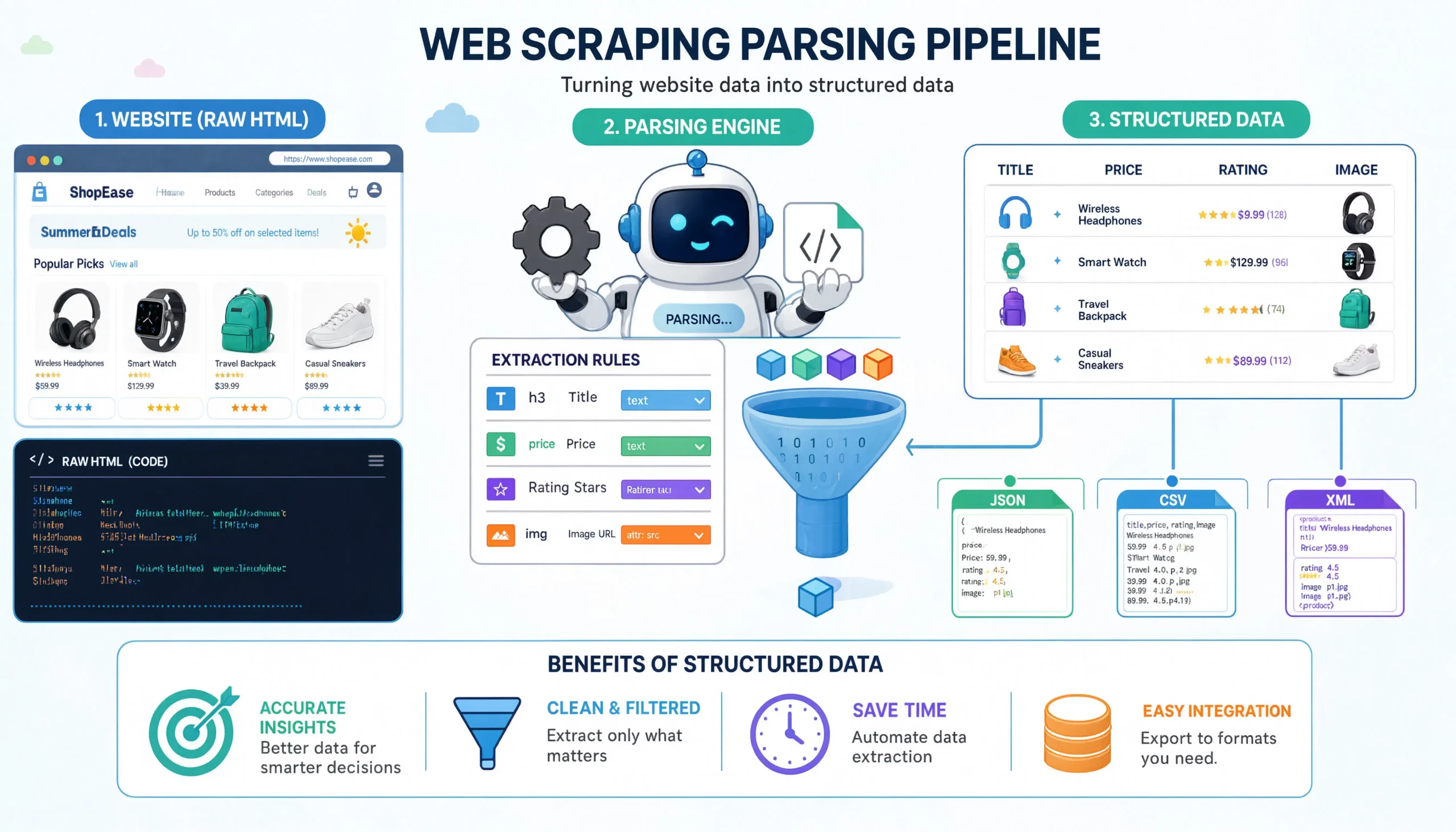
I want to start this guide with something most parsing tutorials skip: a confession. When I first learned web scraping, I thought parsing was the hard part. CSS selectors, XPath expressions, regex, that’s where the craft seemed to live. Years later, I’d describe it almost the opposite way. Parsing is the easy part. Getting to a page you can actually parse is the hard part. And once you’re there, the cleanest parse is almost never the one with the cleverest selector.
This guide is going to walk you through what data parsing actually is, what it looks like in practice on three very different real websites, and the small decisions that separate a parser you’ll still trust six months from now from one that silently rots.
I’ll use three live targets:
casper.com/products/casper-snow-v3?variant=41670971949137— a Shopify-powered product page. Easy to fetch, and a perfect example of why you should almost never parse the rendered HTML when there’s something better hiding in plain sight.indeed.com/jobs?q=web+developer&l=New+Jersey— a job listings page. When I tried to fetch it for this guide, I got a Cloudflare 403 security check page back, which is itself the lesson.imdb.com/search/title/?title_type=feature&num_votes=25000&genres=animation— an IMDb search. Same story: AWS WAF returned a JavaScript challenge instead of the listings.
You’ll see the wins and the walls. That’s the honest version of this topic.
What “Parsing” Actually Means
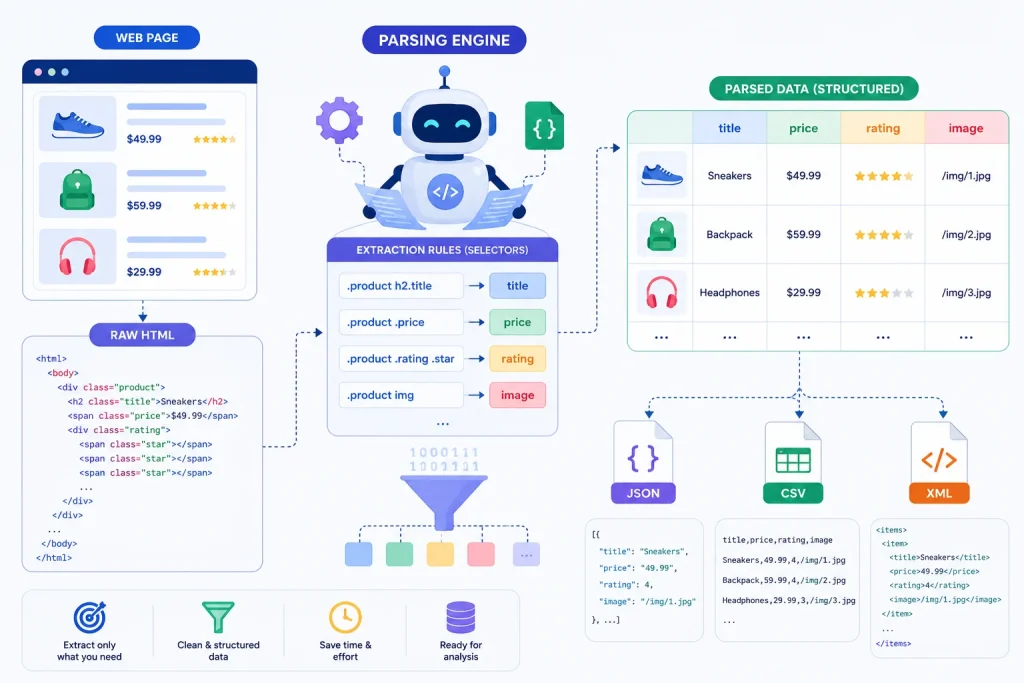
Strip away the jargon and parsing is one thing: taking a blob of structured-but-messy text and turning it into typed, queryable data.
In web scraping, the blob is usually HTML. Sometimes it’s JSON embedded inside HTML. Sometimes it’s a hidden API response. The job is to walk that blob and pull out the fields you care about price, title, salary or rating in a form you can write to a CSV, a database, or another script.
There are three layers worth keeping straight, because they get conflated constantly:
- Fetching — getting the bytes (
requests.get, headless browser, hidden API call). - Parsing — turning those bytes into a tree you can query (
BeautifulSoup,lxml,json.loads). - Extraction — pulling the specific fields out of that tree using selectors, paths, or keys.
People say “I’m parsing this page” when they mean all three together. That’s fine in conversation, but when something breaks, it almost always breaks in exactly one of those layers, and knowing which one saves you hours of guessing.
The Two Ways to Parse, and When to Use Each
Before I touch a single line of code, I make one decision: am I parsing HTML or am I parsing data?
That sounds tautological. It isn’t.
Most modern websites — Shopify stores, news sites, e-commerce platforms, anything built on a CMS in the last decade — embed clean, structured data right inside the page. Sometimes as a <script type="application/ld+json"> block. Sometimes as a window.__INITIAL_STATE__ object. Sometimes as a hidden JSON API the page itself calls.
When that data is there, parsing the HTML is the wrong move. The HTML is the worst version of the data: it’s been templated, escaped, styled, and translated for human eyes. The JSON is the version the engineers themselves use internally. It’s stable, typed, and changes far less often than the markup around it.
I’ll show you both approaches with Casper.
Example 1: The Casper Product Page — Parsing the Right Layer
Here’s the URL: https://casper.com/products/casper-snow-v3?variant=41670971949137. The variant=41670971949137 is the Queen size of the Snow mattress.
A first-time scraper would open the page in a browser, right-click “Price,” inspect, and write something like:
import requests
from bs4 import BeautifulSoup

r = requests.get("https://casper.com/products/casper-snow-v3?variant=41670971949137",
                 headers={"User-Agent": "Mozilla/5.0 (Windows NT 10.0; Win64; x64) AppleWebKit/537.36 (KHTML, like Gecko) Chrome/149.0.0.0 Safari/537.36"})

soup = BeautifulSoup(r.text, "html.parser")
price = soup.select_one("span.price-item--regular").text.strip()
print(price)
This works… until Casper’s design team renames .price-item--regular to .product-price__amount. Which they will. CSS class names are the second-most-volatile thing on a website, right behind ad scripts.
Now here’s the right way. When I fetched that exact URL, the response included this in the <head>:
<script type="application/ld+json">
{
  "@context": "http://schema.org/",
  "@type": "ProductGroup",
  "brand": {"@type": "Brand", "name": "Casper"},
  "category": "Mattresses",
  "name": "Snow",
  "hasVariant": [
    {
      "@type": "Product",
      "name": "Snow - Twin XL",
      "sku": "SNOW3MATTWINXL",
      "gtin": "192472031474",
      "offers": {
        "price": "2120.00",
        "priceCurrency": "USD",
        "availability": "http://schema.org/InStock"
      }
    },
    {
      "@type": "Product",
      "name": "Snow - Queen",
      "sku": "SNOW3MATQUEEN",
      "gtin": "192472031498",
      "offers": {
        "price": "2720.00",
        "priceCurrency": "USD",
        "availability": "http://schema.org/InStock"
      }
    }
    // ... King, California King, Split King, Full
  ]
}
</script>
This is JSON-LD — JSON for Linking Data, the format Google asks every e-commerce site to emit so its crawler can build rich snippets. Casper’s SEO team is contractually motivated to keep this accurate and up-to-date. You’re piggybacking on that incentive.
Here’s the parser:
import json
import requests
from bs4 import BeautifulSoup

URL = "https://casper.com/products/casper-snow-v3?variant=41670971949137"
HEADERS = {
    "User-Agent": (
        "Mozilla/5.0 (Windows NT 10.0; Win64; x64) "
        "AppleWebKit/537.36 (KHTML, like Gecko) "
        "Chrome/149.0.0.0 Safari/537.36"
    ),
    "Accept-Language": "en-US,en;q=0.9",
}

def parse_casper(url: str) -> dict:
    r = requests.get(url, headers=HEADERS, timeout=20)
    r.raise_for_status()

    soup = BeautifulSoup(r.text, "html.parser")

    # Pull every JSON-LD block on the page.
    for block in soup.find_all("script", type="application/ld+json"):
        try:
            data = json.loads(block.string)
        except (json.JSONDecodeError, TypeError):
            continue

        if data.get("@type") == "ProductGroup":
            variants = []
            for v in data.get("hasVariant", []):
                offer = v.get("offers", {})
                variants.append({
                    "name": v.get("name"),
                    "sku": v.get("sku"),
                    "gtin": v.get("gtin"),
                    "price": float(offer.get("price")),
                    "currency": offer.get("priceCurrency"),
                    "in_stock": "InStock" in offer.get("availability", ""),
                })

            return {
                "product": data.get("name"),
                "brand": data.get("brand", {}).get("name"),
                "category": data.get("category"),
                "variants": variants,
            }

    raise ValueError("No ProductGroup JSON-LD found on page")


if __name__ == "__main__":
    result = parse_casper(URL)
    print(json.dumps(result, indent=2))
Running this against the page I fetched returns the full variant table. Twin XL at $2,120, Queen at $2,720, King and Cal King both at $3,495, Split King at $4,240 without ever touching a single CSS class. If Casper redesigns their PDP tomorrow, this parser keeps working, because the JSON-LD lives in a layer the designers don’t touch.
Why this approach wins, plainly
- Stable. Schema.org property names change on a multi-year timescale. Class names change every quarter.
- Typed. Prices come as numeric strings, not
"$2,720.00 USD"strings you have to regex. - Complete. One request gets you every variant, not just the one in the current URL.
- Self-documenting. Anyone reading the parser sees
offers.price, not.col-md-6 > div:nth-child(2).
My rule, after years of writing these: before you write a single selector, view-source the page and search for application/ld+json, __NEXT_DATA__, __NUXT__, __INITIAL_STATE__, and window.__APOLLO_STATE__. One of those is on the page roughly 70% of the time on modern stacks, and they’re all gold.
Example 2: When the Page Won’t Even Let You Parse — Indeed
Here’s where the tutorials stop being honest.
I tried to fetch https://www.indeed.com/jobs?q=web+developer&l=New+Jersey with a clean User-Agent. The response came back with HTTP 403 and a body that started like this:
<title>Security Check - Indeed.com</title>
...
window.INDEED_CLOUDFLARE_STATIC_PAGE = {
  PAGE_TYPE: "captcha",
  RAY_ID: "a13caa348d9b6de2"
};
There are no jobs on this page. There’s a Cloudflare challenge. If I ran BeautifulSoup against that response and tried to extract job titles, I’d get an empty list — and I’d spend the next hour debugging my selector when the selector was never the problem.
This is the first thing I check in any parser, and you should too:
def fetch_or_fail(url: str, headers: dict) -> str:
    r = requests.get(url, headers=headers, timeout=20)

    # Hard failures
    if r.status_code in (401, 403, 429):
        raise RuntimeError(
            f"Blocked at fetch layer ({r.status_code}). "
            "Don't parse this — it's a challenge page, not real content."
        )

    # Soft failures — the response is 200 but the page is a challenge
    challenge_markers = [
        "Security Check",
        "captcha",
        "challenge-platform",
        "AwsWafIntegration",
        "Just a moment",
        "Checking your browser",
    ]
    if any(m in r.text for m in challenge_markers):
        raise RuntimeError(
            "Got a 200 OK, but the body is an anti-bot challenge. "
            "Switch to a headless browser, a residential proxy, or a scraping API."
        )

    return r.text
For Indeed specifically, this means a vanilla requests script isn’t going to work no matter how clever your parser is. Your options, in roughly increasing order of cost and complexity:
- Use a real headless browser (
Playwright,playwright-stealth, ornodriver) so the JS challenge actually executes. - Route through residential proxies so the IP doesn’t carry a datacenter reputation.
- Pay for a scraping API to handle the unblocking layer for you.
Only after you get past Cloudflare do you start thinking about parsers. And when you do, the same JSON-first instinct from Casper applies: Indeed’s listings on the rendered page sit inside a hydration blob like window._initialData — that’s the layer you actually want, not the rendered <div>s of each job card.
Here’s the parser you’d write once you have a real response, assuming you successfully render the page via Playwright:
import re, json
from playwright.sync_api import sync_playwright

def parse_indeed(url: str) -> list[dict]:
    with sync_playwright() as p:
        browser = p.chromium.launch(headless=True)
        ctx = browser.new_context(
            user_agent=(
                "Mozilla/5.0 (Windows NT 10.0; Win64; x64) "
                "AppleWebKit/537.36 (KHTML, like Gecko) "
                "Chrome/149.0.0.0 Safari/537.36"
            ),
            locale="en-US",
        )
        page = ctx.new_page()
        page.goto(url, wait_until="domcontentloaded")
        html = page.content()
        browser.close()

    # Indeed embeds search results in a hydration script.
    # The blob name has changed over time (window._initialData → window.mosaic),
    # so I match defensively.
    m = re.search(r"window\._initialData\s*=\s*(\{.*?\});", html, re.DOTALL)
    if not m:
        raise ValueError("Hydration blob not found — Indeed may have changed it again.")

    data = json.loads(m.group(1))
    # The exact path inside the blob shifts; find jobs by structure, not by hard-coded keys.
    jobs = []
    def walk(node):
        if isinstance(node, dict):
            if "jobTitle" in node and "companyName" in node:
                jobs.append({
                    "title": node.get("jobTitle"),
                    "company": node.get("companyName"),
                    "location": node.get("formattedLocation"),
                    "salary": node.get("salarySnippet", {}).get("text"),
                    "jk": node.get("jobkey"),
                })
            for v in node.values():
                walk(v)
        elif isinstance(node, list):
            for item in node:
                walk(item)

    walk(data)
    return jobs
Two things to notice. First, I’m not selecting .jobsearch-SerpJobCard or whatever the current class name is — Indeed reshuffles those constantly. I’m walking the hydration object and matching by shape ("jobTitle" in node and "companyName" in node). This is a habit I picked up the hard way: when a site has clearly typed data, match on the data’s structure, not on the surrounding chrome.
Second, the regex finds the blob even if it shifts around. The robust version of this looks for multiple known blob names and falls back gracefully.
Example 3: IMDb — Same Story, Different Vendor
When I fetched https://www.imdb.com/search/title/?title_type=feature&num_votes=25000&genres=animation, the response came back HTTP 202 with this body:
<title></title>
...
window.awsWafCookieDomainList = [];
window.gokuProps = { ... };
<script src="https://...awswaf.com/.../challenge.js"></script>
<noscript>
  <h1>JavaScript is disabled</h1>
  In order to continue, we need to verify that you're not a robot.
</noscript>
This is AWS WAF’s bot challenge. Different vendor than Indeed (Cloudflare), same idea: a JavaScript puzzle the browser must solve before the real HTML is served. Plain requests never sees the listings.
When you get past it again, via a real browser or a managed scraping endpoint — IMDb’s search results page is one of the cleaner ones in the wild, because it embeds a Next.js __NEXT_DATA__ blob with the full result set. Here’s the parser, written defensively:
import json
from bs4 import BeautifulSoup

def parse_imdb_search(html: str) -> list[dict]:
    soup = BeautifulSoup(html, "html.parser")

    blob = soup.find("script", id="__NEXT_DATA__")
    if not blob:
        # If __NEXT_DATA__ is missing, the page is almost certainly a challenge.
        raise ValueError("No __NEXT_DATA__ — likely a bot-check page, not a results page.")

    data = json.loads(blob.string)

    # IMDb nests the actual list deep. The exact path changes between deploys,
    # so I walk for the shape rather than hard-code the key chain.
    titles = []
    def walk(node):
        if isinstance(node, dict):
            # A search result node looks like {"titleText": {"text": ...}, "ratingsSummary": {...}, ...}
            if "titleText" in node and "ratingsSummary" in node:
                titles.append({
                    "title": node.get("titleText", {}).get("text"),
                    "year": node.get("releaseYear", {}).get("year"),
                    "rating": node.get("ratingsSummary", {}).get("aggregateRating"),
                    "votes": node.get("ratingsSummary", {}).get("voteCount"),
                    "id": node.get("id"),
                })
            for v in node.values():
                walk(v)
        elif isinstance(node, list):
            for item in node:
                walk(item)

    walk(data)
    return titles
The pattern is identical to what I did with Indeed: don’t trust paths, trust shapes. Sites running Next.js, Nuxt, or any React-based SSR framework reshape their hydration trees constantly between deploys. Walking the tree and matching on structural fingerprints ("titleText" in node and "ratingsSummary" in node) has saved me dozens of times.
The Cross-Cutting Lessons I’d Tape to My Monitor
I’ve written hundreds of parsers across the last several years. If I had to compress what I’ve learned into the smallest possible list:
1. Check what you got before you parse it. A parser that runs on a 403 page produces empty data. Empty data shipped to a database looks identical to “this product is out of stock.” Always assert on response status, content length, and a known “good page” marker before you call BeautifulSoup.
2. JSON beats HTML every single time. If the site emits JSON-LD, __NEXT_DATA__, or a hidden API, parse that. The HTML is the rendered output; the JSON is the source. Sites change rendered output far more often than they change their data model.
3. Match on shape, not path. walk() traversals that look for the right combination of keys survive site redesigns. Hard-coded paths like data["props"]["pageProps"]["aboveTheFoldData"]["titleText"]["text"] are a time bomb — they work today and break next Tuesday.
4. Fail loudly, not silently. A try/except that returns None when a selector misses turns a broken parser into a data quality problem you’ll discover three months later. Raise, log, alert. You’d rather know.
5. Decouple fetching from parsing. I keep fetch(url) -> str and parse(html) -> dict in different functions, with the raw HTML written to disk on errors. When something breaks in production, I can re-run the parser against the saved HTML offline. This habit alone has saved me more debugging time than every other practice combined.
6. The cleanest parser is a small parser. When I find myself writing more than ~50 lines to extract one record, I stop and look for the data layer I missed. There almost always is one.
When Parsing Genuinely Is the Hard Part
I opened this guide saying parsing is the easy part. That’s mostly true. The exceptions are worth naming:
- Legacy sites built before JSON was cool. Government databases, old forum software, regional retailers. No JSON-LD, no hydration blob, just
<table>soup. Here you actually do live and die by your selectors, andlxmlwith XPath outperforms BeautifulSoup substantially. - Sites where the data is rendered into canvas or images. Increasingly common as an anti-scraping measure. You’re now in OCR territory, which is a different problem.
- PDFs masquerading as web pages. A surprising amount of public data still ships this way.
pdfplumberfor text-based PDFs, OCR for scanned ones.
For everything else — every modern e-commerce site, news site, job board, listings platform — parsing is a 30-line function. Getting the page to load is the part that takes engineering.
A Mental Checklist Before You Write Any Parser
I run through this in my head every time I open a new target. You can steal it:
- Did I view-source the page and search for
ld+json,__NEXT_DATA__,__INITIAL_STATE__? - Did I open DevTools → Network and check whether the page calls a JSON API I could hit directly?
- Does my fetcher detect challenge pages and fail loudly instead of returning HTML to the parser?
- Am I matching on structure (key combinations) rather than fragile CSS paths?
- If the parser returns zero records, does it raise — or does it silently insert nothing?
- Do I save the raw response when a parse fails, so I can debug offline?
Tape that list somewhere. It’s the difference between a parser you babysit and one that runs unattended.
If there’s one thing I want you to take from this guide, it’s that parsing is downstream of decision-making. The choice of which layer of the response to parse — rendered HTML versus embedded JSON versus a hidden API — matters far more than the choice between BeautifulSoup and lxml. Pick the right layer and almost any tool works. Pick the wrong one and you’ll be rewriting selectors for the rest of the year.
The Casper example I walked through took eleven lines of meaningful code and pulls every variant, every price, every SKU. The Indeed and IMDb examples don’t even get to the parsing step in vanilla Python — they’re a reminder that “I can’t scrape this” usually means “I lost at the fetching layer,” not “my selectors are wrong.” Naming which layer failed is half the job.
Happy parsing…
You May Also Like
 Web Scraping
What Is Web Scraping and How Does It Work? A Complete 2026 Guide
 Web Scraping
How to Handle CAPTCHA While Scraping: A 2026 Developer’s Guide
 Proxies
Best Proxies for Web Scraping In 2026: How I Choose the Right Provider and Proxy Type
 Web Scraping
Cloudflare Blocking Scrapers Explained: Your 2026 Guide to Anti-Bot Protection
 Web Scraping
How Google Maps Scraping Actually Works (And Where Most Attempts Go Wrong)
 Web Scraping
Scrap.io Review 2026: What This Google Maps Lead Generation Tool Actually Gets Right (and Where It Falls Short)
 Web Scraping
The 7 Best PHP Web Scraping Libraries of 2026: The Ultimate Guide
 Use Cases
Inside Kimwolf Traffic: How Residential Proxies Fuel Credential Stuffing, Web Scraping, & Fraud
 Web Scraping