Most people stumble into web scraping the same way. You’re staring at a webpage full of useful information, product prices, job listings, sports stats, real estate data and you realize copying it manually would take weeks. There has to be a faster way. There is. The trouble is that nearly every tutorial online either drowns beginners in jargon or hands them a script without explaining what’s actually happening underneath.
This guide takes the opposite approach. We’ll move slowly, build understanding before code, and treat web scraping as what it really is: a structured conversation with the public-facing internet. Throughout the article, we’ll use a real, beginner-friendly practice site books.toscrape.com, which was built specifically for people learning this skill. It has 1,000 books spread across 50 catalog pages, with titles, prices, ratings, stock status, and category breakdowns. Every example below uses live data pulled directly from that site, so you can run the code yourself and get matching results.
By the end, you’ll not only know how to extract data, but you’ll understand why certain methods work, when they fail, and how this practice fits into a data economy projected to reach roughly $1.03 billion in market size by 2027, growing at a compound annual rate of about 13.9% according to Grand View Research. That’s not a niche skill anymore. It’s becoming infrastructure.
What Web Scraping Actually Is (And What It Isn’t)
Before touching code, it helps to clear up the confusion around the term itself. Web scraping is the automated extraction of data from websites. That’s it. You’re writing a small program that visits a page, reads its underlying HTML, and pulls out specific pieces a price, a headline, a table, a rating, then saves them somewhere structured, usually a spreadsheet or a database.
People often confuse scraping with hacking. They’re nothing alike. Scraping only touches information that’s already visible to anyone with a browser. You’re not bypassing logins, cracking encryption, or accessing private servers. You’re reading a public page faster than a human could.
The closer cousin is the API, an Application Programming Interface, which is essentially a website’s official, sanctioned data pipeline. When a site offers an API, you should almost always use it instead. Scraping enters the picture when no API exists, or when the API is too limited for your use case. A useful way to think about it: APIs are the front door, scraping is the window that’s already open. Both are legal entry points; one is just more polite.
Recent industry surveys suggest that around 65% of organizations working with alternative data rely on some form of web scraping, and roughly 80% of data scientists report using scraped data at least occasionally. The practice has quietly moved from a niche hacker skill to a baseline competency in analytics.
The Mental Model You Need First
Here’s something most tutorials skip. Before you scrape anything, you need to understand how a webpage is built, because that structure determines everything about how you extract data from it.
Every webpage you see is, underneath the visuals, a tree of nested tags written in HTML. A book listing on books.toscrape.com isn’t really a “book listing” — it’s an <article> element with the class product_pod, containing an <h3> for the title (which wraps an <a> tag holding the link), a <p> with class price_color for the price, and a <p> with class instock availability showing whether it’s in stock. Your scraper doesn’t see the pretty rendered page. It sees this skeleton. Your job is to teach the scraper which branches of the tree hold the data you want.
Modern sites add a complication: many of them don’t ship the data inside the initial HTML at all. Instead, they load a barebones page, then use JavaScript to fetch and render the content dynamically — the Single Page Application pattern used by sites built with React, Vue, or Angular. This matters enormously for beginners, because simpler scraping tools can’t see JavaScript-rendered content. They’ll fetch the page and find an empty shell.
Luckily, books.toscrape.com is a fully static site, which makes it perfect for learning the fundamentals before things get harder.
Step One: Inspect Before You Code
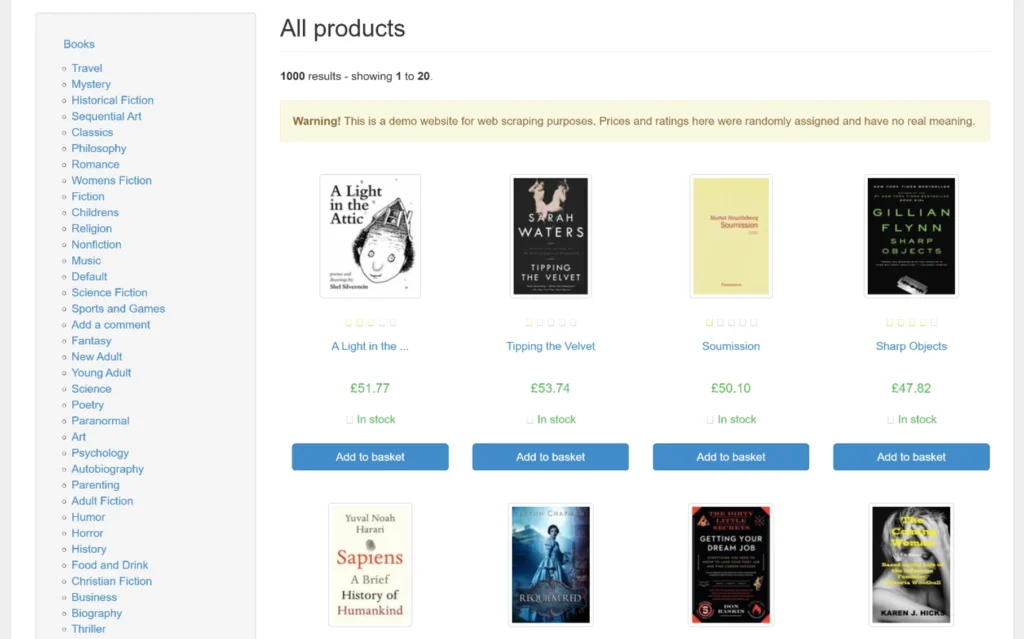
Open books.toscrape.com in Chrome or Firefox. Right-click on the price of the first book — “A Light in the Attic,” currently priced at £51.77 — and choose “Inspect.” A panel opens showing the exact HTML element behind that visual.
You’ll see something like this:
<article class="product_pod">
  <div class="image_container">
    <a href="catalogue/a-light-in-the-attic_1000/index.html">
      <img src="..." alt="A Light in the Attic" class="thumbnail">
    </a>
  </div>
  <p class="star-rating Three"></p>
  <h3>
    <a href="catalogue/a-light-in-the-attic_1000/index.html" title="A Light in the Attic">
      A Light in the ...
    </a>
  </h3>
  <div class="product_price">
    <p class="price_color">£51.77</p>
    <p class="instock availability">In stock</p>
  </div>
</article>
Notice several things. The full title is in the title attribute of the <a> tag — the visible text is truncated with “…”, so you should grab the attribute, not the inner text. The rating is encoded as a class name (star-rating Three means three stars). The price is straightforward. Stock status appears in a separate paragraph.
This reconnaissance phase determines whether your scraper will be ten lines or a hundred. Beginners who skip it tend to write code, watch it fail, and have no idea why.
While you’re inspecting, also open the Network tab and reload the page. You’ll see that the entire HTML — including all twenty book listings — arrives in the very first response. No JavaScript fetching. No async loading. This is the easy case.
Step Two: Choose Your Tools Honestly
The Python ecosystem dominates web scraping, not because it’s the only option, but because its libraries are mature, well-documented, and gentle on beginners. Here’s an honest comparison of the four tools you’ll hear about most.
| Tool | Best For | Learning Curve | Handles JavaScript | Speed | Pricing |
|---|---|---|---|---|---|
| Requests + BeautifulSoup | Static HTML pages, simple projects, learning fundamentals | Low | No | Fast | Free / Open source |
| Scrapy | Large-scale crawls, multiple pages, production pipelines | Medium-High | Limited (needs splash/playwright add-on) | Very fast | Free / Open source |
| Selenium | JavaScript-heavy sites, sites requiring clicks, scrolls, logins | Medium | Yes | Slow | Free / Open source |
| Playwright | Modern replacement for Selenium, better async support | Medium | Yes | Medium-fast | Free / Open source |
Key Features to Compare When Choosing a Tool
- Reliable handling of HTTP errors and redirects
- Flexible parsing (CSS selectors, XPath, regex fallbacks)
- Built-in support for headers, cookies, and sessions
- Reasonable defaults that don’t hammer servers
- An active community — every scraper breaks eventually, and you’ll need help
Best For Each Scenario
- Beginners learning fundamentals: Requests + BeautifulSoup
- Crawling thousands of pages with retry logic: Scrapy
- Logging into a site and interacting with forms: Playwright (or Selenium)
- Quick one-off data pulls: Requests + BeautifulSoup
Advantages of Starting with Requests + BeautifulSoup
The temptation is to pick the most powerful tool. Resist it. Requests + BeautifulSoup forces you to understand what’s actually happening — the HTTP request, the response, the parsing. Frameworks like Scrapy hide all of that behind their own abstractions. You’ll learn faster from the simpler stack.
Step Three: Setting Up Your Environment
Before writing code, set up a clean working environment. This takes five minutes and saves hours later.
# Create a project folder
mkdir books-scraper
cd books-scraper

# Create a virtual environment
python3 -m venv venv
source venv/bin/activate     # Mac/Linux
venv\Scripts\activate        # Windows

# Install the libraries
pip install requests beautifulsoup4 lxml pandas
The lxml parser is faster than Python’s built-in html.parser — use it when you can. pandas will help us clean and export data later.
Step Four: Your First Real Scraper
Let’s extract every book on the first page of books.toscrape.com. The logic flows like this:
- Send a request. Your script asks the server for the page, exactly as a browser would.
- Parse the response. Hand the HTML to BeautifulSoup, which turns it into a navigable Python object.
- Locate your targets. Tell BeautifulSoup: “Find every
<article>with classproduct_pod.” - Extract each field. Inside each book block, pull the title, price, rating, and stock status.
- Store the results. Write them to a CSV file.
Here’s the working code:
import requests
from bs4 import BeautifulSoup
import csv

URL = "https://books.toscrape.com/"

response = requests.get(URL)
response.encoding = "utf-8"
soup = BeautifulSoup(response.text, "lxml")

books = []
for item in soup.select("article.product_pod"):
    title = item.h3.a["title"]
    price = item.select_one(".price_color").text.strip()
    rating = item.select_one("p.star-rating")["class"][1]  # e.g., "Three"
    stock = item.select_one(".instock.availability").text.strip()
    link = item.h3.a["href"]

    books.append({
        "title": title,
        "price": price,
        "rating": rating,
        "stock": stock,
        "link": link,
    })

with open("books_page1.csv", "w", newline="", encoding="utf-8") as f:
    writer = csv.DictWriter(f, fieldnames=books[0].keys())
    writer.writeheader()
    writer.writerows(books)

print(f"Scraped {len(books)} books from page 1.")
Run this. You should see Scraped 20 books from page 1. and a new CSV file. Open it and the first few rows will match what we saw on the live site:
| Title | Price | Rating | Stock |
|---|---|---|---|
| A Light in the Attic | £51.77 | Three | In stock |
| Tipping the Velvet | £53.74 | One | In stock |
| Soumission | £50.10 | One | In stock |
| Sharp Objects | £47.82 | Four | In stock |
| Sapiens: A Brief History of Humankind | £54.23 | Five | In stock |
Thirty lines. That’s a working scraper, and you now have real structured data extracted from an unstructured page.
Step Five: Scraping All 50 Pages
One page is a demo. Real value comes from collecting the full catalog. The site uses predictable pagination — each subsequent page is at catalogue/page-2.html, catalogue/page-3.html, and so on, up to page-50.html. Total: 1,000 books.
There are two approaches. The naive one is to loop from 1 to 50 and hope nothing breaks. The smarter one is to follow the “next” button until it disappears, which adapts automatically if the site ever changes.
import requests
from bs4 import BeautifulSoup
import csv
import time
from urllib.parse import urljoin

BASE_URL = "https://books.toscrape.com/"
START_URL = "https://books.toscrape.com/catalogue/page-1.html"

def scrape_page(url):
    response = requests.get(url, timeout=10)
    response.encoding = "utf-8"
    soup = BeautifulSoup(response.text, "lxml")

    books = []
    for item in soup.select("article.product_pod"):
        books.append({
            "title": item.h3.a["title"],
            "price": item.select_one(".price_color").text.strip(),
            "rating": item.select_one("p.star-rating")["class"][1],
            "stock": item.select_one(".instock.availability").text.strip(),
            "link": urljoin(url, item.h3.a["href"]),
        })

    next_btn = soup.select_one("li.next a")
    next_url = urljoin(url, next_btn["href"]) if next_btn else None
    return books, next_url

all_books = []
current_url = START_URL
page_count = 0

while current_url:
    page_count += 1
    print(f"Scraping page {page_count}: {current_url}")
    books, current_url = scrape_page(current_url)
    all_books.extend(books)
    time.sleep(1)  # Be polite — one request per second

print(f"\nTotal books scraped: {len(all_books)}")

with open("all_books.csv", "w", newline="", encoding="utf-8") as f:
    writer = csv.DictWriter(f, fieldnames=all_books[0].keys())
    writer.writeheader()
    writer.writerows(all_books)
Two things in this code deserve attention.
First, the polite delay. time.sleep(1) between pages spreads your 50 requests over about a minute instead of hammering the server in three seconds. Even on a practice site, build this habit now. Production sites will ban you for less.
Second, the next-button approach. By following li.next a, the scraper stops automatically when there are no more pages. It also works correctly even if a site has 49 or 51 pages instead of exactly 50.
When you run this, you’ll end up with a CSV containing all 1,000 books. That’s enough data to do real analysis average prices by rating, distribution of stock status, frequency of certain words in titles. Suddenly, you’re not scraping anymore. You’re doing data science.
Step Six: Going Deeper – Scraping Individual Book Pages
The catalog page gives you summary data, but each book has its own detail page with richer information: a longer description, the UPC (universal product code), tax, number of reviews, and category. To grab those, you visit each book’s link and parse a second layer.
Take “A Light in the Attic” at https://books.toscrape.com/catalogue/a-light-in-the-attic_1000/index.html. The product detail page contains a table with this kind of structure:
| Field | Value |
|---|---|
| UPC | a897fe39b1053632 |
| Product Type | Books |
| Price (excl. tax) | £51.77 |
| Price (incl. tax) | £51.77 |
| Tax | £0.00 |
| Availability | In stock (22 available) |
| Number of reviews | 0 |
Here’s how to extract it:
def scrape_book_details(book_url):
    response = requests.get(book_url, timeout=10)
    response.encoding = "utf-8"
    soup = BeautifulSoup(response.text, "lxml")

    details = {}
    for row in soup.select("table.table-striped tr"):
        key = row.th.text.strip()
        value = row.td.text.strip()
        details[key] = value

    description_tag = soup.select_one("#product_description ~ p")
    details["description"] = description_tag.text.strip() if description_tag else ""

    category = soup.select("ul.breadcrumb li a")[-1].text.strip()
    details["category"] = category

    return details
Combine this with the list-scraper from Step Five, and you end up with a complete dataset: every book, with every available field, fully structured. That’s the moment scraping starts feeling powerful.
Step Seven: Scraping by Category
books.toscrape.com organizes books into categories — Mystery, Travel, Romance, Classics, and so on. Each has its own URL pattern. The Mystery section, for example, lives at https://books.toscrape.com/catalogue/category/books/mystery_3/index.html and contains 32 books across 2 pages, including titles like “Sharp Objects” (£47.82), “The Murder of Roger Ackroyd” (£44.10), “A Study in Scarlet” (£16.73), and “In a Dark, Dark Wood” (£19.63).
For category-specific scraping, you first grab the sidebar links, then loop through them. The list of category URLs is itself something you scrape, not hardcode:
def get_all_categories():
    response = requests.get(BASE_URL)
    response.encoding = "utf-8"
    soup = BeautifulSoup(response.text, "lxml")

    categories = {}
    for link in soup.select("div.side_categories ul li ul li a"):
        name = link.text.strip()
        url = urljoin(BASE_URL, link["href"])
        categories[name] = url
    return categories
This is one of the most important habits in real scraping: never hardcode anything you can discover. If the site adds a new category tomorrow, your scraper picks it up automatically. If categories get renamed, you don’t have to maintain a list.
Step Eight: Cleaning the Data
Scraped data is always messy. The price “£51.77” is a string with a currency symbol attached. The rating “Three” is a word, not a number. The stock message “In stock (22 available)” mixes status and count in one field.
This is where pandas becomes indispensable:
import pandas as pd
import re

df = pd.read_csv("all_books.csv")

# Convert price to a float
df["price_gbp"] = df["price"].str.replace("£", "").astype(float)

# Convert rating word to a number
rating_map = {"One": 1, "Two": 2, "Three": 3, "Four": 4, "Five": 5}
df["rating_num"] = df["rating"].map(rating_map)

# Extract the count from "In stock (22 available)"
df["available_count"] = df["stock"].str.extract(r"\((\d+) available\)").astype(float)

print(df[["title", "price_gbp", "rating_num", "available_count"]].head())
print("\nAverage price by rating:")
print(df.groupby("rating_num")["price_gbp"].mean().round(2))
In one run, you go from raw scraped strings to a queryable, analyzable DataFrame. This step is what separates people who collect data from people who use it.
When the Easy Approach Fails
Real-world scraping is rarely as clean as books.toscrape.com. Three obstacles tend to appear, sometimes all at once.
The site uses JavaScript to load content. When requests.get() returns a page that’s mostly empty, you’re seeing the shell that arrives before JavaScript runs. The fix is to use a tool that controls a real browser — Selenium or Playwright. These tools actually render the page, execute JavaScript, and let you read the final HTML. They’re slower and more resource-intensive, but they see what you see.
The site detects automation. Many large sites watch for telltale signs: requests arriving too fast, missing browser headers, identical fingerprints across thousands of visits. Industry reports from Imperva estimate that automated bot traffic now accounts for roughly 47% of all internet activity, with malicious bots making up a significant share. As a result, anti-bot defenses have become aggressive. To work around them legitimately, you’ll need to set realistic headers (especially the User-Agent), introduce random delays, and possibly rotate IP addresses through proxy services.
A minimal header upgrade looks like this:
headers = {
    "User-Agent": (
        "Mozilla/5.0 (Macintosh; Intel Mac OS X 10_15_7) "
        "AppleWebKit/537.36 (KHTML, like Gecko) "
        "Chrome/120.0.0.0 Safari/537.36"
    ),
    "Accept-Language": "en-US,en;q=0.9",
}
response = requests.get(url, headers=headers, timeout=10)
The structure changes. Websites are not stable contracts. A redesign can break your scraper overnight. Production scrapers need monitoring, error handling, and a willingness to revisit code. Roughly 30–40% of scrapers in active use break within six months of deployment, based on figures shared by managed-scraping providers.
Storing and Using What You’ve Collected
A scraper that prints to the terminal is a toy. A scraper that writes structured, queryable data is a tool. The choice of storage has real consequences.
| Format | Best For | Advantages | Drawbacks |
|---|---|---|---|
| CSV | Small flat datasets, Excel users | Universal, human-readable | No nesting, type issues |
| JSON | Nested or hierarchical data | Flexible structure | Harder to query without code |
| SQLite | Local projects with thousands–millions of rows | Real database in a single file, no server | Single-writer limitations |
| PostgreSQL | Production pipelines, concurrent access | Robust, indexable, scalable | Requires setup and maintenance |
| MongoDB | Document-shaped data, rapid prototyping | Schema flexibility | Eventual consistency tradeoffs |
Whatever you pick, get into the habit of deduplicating, timestamping, and validating every record before storage. Scraped data is noisy — duplicate listings, missing fields, encoding glitches — and cleaning it after the fact is far harder than catching problems on the way in.
The Legal and Ethical Picture
This part deserves more honesty than it usually gets. Web scraping exists in a legal gray zone that varies by country, by site, and by what you do with the data.
The most cited case in the United States is hiQ Labs v. LinkedIn, which after years of litigation established that scraping publicly available data generally does not violate the Computer Fraud and Abuse Act. That ruling is significant, but it’s not a blanket permission slip. The European Union’s GDPR adds another layer: if you’re collecting anything that could identify a person — names, emails, profile details — you have legal obligations regardless of whether the data is technically public.
Three principles cover most beginner situations:
- Respect
robots.txt. It’s not legally binding in most jurisdictions, but ignoring it signals bad faith and weakens your position if a dispute arises.books.toscrape.comhas no restrictions; many real sites do. - Don’t overload servers. Sending thousands of requests per second to a small site is rude and potentially illegal under anti-abuse statutes. Throttle yourself.
- Read the Terms of Service. Many sites explicitly prohibit scraping. Violating ToS isn’t always illegal, but it can be grounds for civil action, and it will get your IP banned.
When in doubt, ask whether your project would embarrass you if the target site found out. That instinct is usually right.
Common Misconceptions Worth Correcting
“If I can see it in my browser, I can scrape it.” True in theory, often painful in practice. Login walls, rate limits, fingerprinting, and dynamic content all complicate this.
“Bigger frameworks are always better.” The opposite is usually true for beginners. Scrapy is powerful, but its learning curve will stall a small project that BeautifulSoup could finish in an afternoon.
“Once my scraper works, I’m done.” Websites change. Maintenance is part of the job.
“Scraping is just about getting data.” The harder problem is almost always cleaning it. Expect to spend more time normalizing prices, deduplicating records, and handling encoding issues than writing the extraction logic.
A Practice Roadmap
Once you’re comfortable with books.toscrape.com, build progressively:
- Static HTML practice:
books.toscrape.com(done), thenquotes.toscrape.comfor quotes and authors. - Pagination and forms:
quotes.toscrape.com/loginintroduces session cookies and CSRF tokens. - JavaScript rendering: Try
quotes.toscrape.com/js/— same data, but rendered client-side, forcing you to learn Playwright or Selenium. - Real public datasets: Government open-data portals, Wikipedia tables, weather archives. Low legal risk, real-world messiness.
- API-first projects: Reddit, GitHub, OpenWeather. Learn to prefer APIs when they exist.
By the time you reach step five, you’ll have internalized something most tutorials never teach: the goal isn’t to scrape, it’s to acquire data efficiently. Sometimes that means scraping. Often it means recognizing that an API, a public dataset, or even a polite email to a data owner is faster.
Where This Skill Actually Leads
If you stick with web scraping past the first few projects, something interesting happens. You stop seeing the web as a collection of pages and start seeing it as a collection of data sources, each with its own structure, defenses, and quirks. Price monitoring, sentiment analysis on reviews, real estate trend tracking, academic research, machine learning training datasets — they all begin with the same skill you’re learning right now.
The market reflects this. Job listings mentioning web scraping have grown sharply over the past five years, particularly in data engineering, market intelligence, and quantitative finance roles. The skill compounds with everything else in the data stack: SQL, pandas, basic statistics, eventually machine learning. A scraper is rarely the end product. It’s the start of a pipeline.
What separates competent practitioners from beginners isn’t knowledge of obscure libraries. It’s judgment — knowing when to use an API instead of scraping, when to throttle, when a project isn’t worth the legal risk, when to give up on a fragile site and find a better source. That judgment develops through practice on real projects, not tutorials.
Start with the 1,000 books on books.toscrape.com. Then pick a site that genuinely interests you and try to extract something useful. Expect to fail a few times. Read the errors carefully. The first time you watch a clean CSV fill up with data you couldn’t have collected manually in a hundred hours, you’ll understand why this skill has become as fundamental as spreadsheet literacy was twenty years ago.
The web wasn’t designed to be a database. But with patience and the right approach, you can treat it like one.
You May Also Like
 Web Scraping
What Is Web Scraping and How Does It Work? A Complete 2026 Guide
 Web Scraping
How to Handle CAPTCHA While Scraping: A 2026 Developer’s Guide
 Proxies
Best Proxies for Web Scraping In 2026: How I Choose the Right Provider and Proxy Type
 Web Scraping
Cloudflare Blocking Scrapers Explained: Your 2026 Guide to Anti-Bot Protection
 Web Scraping
How Google Maps Scraping Actually Works (And Where Most Attempts Go Wrong)
 Web Scraping
Scrap.io Review 2026: What This Google Maps Lead Generation Tool Actually Gets Right (and Where It Falls Short)
 Web Scraping
The 7 Best PHP Web Scraping Libraries of 2026: The Ultimate Guide
 Use Cases
Inside Kimwolf Traffic: How Residential Proxies Fuel Credential Stuffing, Web Scraping, & Fraud
 Web Scraping