Here’s a conversation I’ve had at least a dozen times in the last year. A product manager walks into a sprint planning meeting and says, “We need to build a crawler to pull competitor pricing.” The engineering lead nods. The team starts building. Three months later, they have a bloated system that discovers every URL on a competitor’s site, stores them in a queue, follows links, deduplicates, and then… scrapes three data points. Total engineering cost: 400+ hours. Actual value delivered: a CSV with prices that could have been generated in a weekend with 20 lines of Python.
This is the web scraping vs web crawling confusion in the wild, and it’s costing teams millions in wasted engineering hours.
The distinction isn’t semantic. It’s architectural. Crawling answers “what exists?” Scraping answers “what does it say?” One manages a URL frontier. The other manages a data pipeline. Most production systems need both, but the order, emphasis, and tooling depend entirely on whether you’re exploring unknown territory or extracting known value.
Here’s why this matters for your business: automated bot traffic hit 51-52% of all web traffic by the end of 2025, with AI-driven crawlers and scrapers driving a massive year-over-year increase. The median percentage of traffic attempting a scraping attack approached 20% globally in 2025, with nearly double the rate in 2022. The web is now structurally different: more dynamic, more heavily defended, and more legally scrutinized. Your architecture choice must account for this reality or your pipeline will fail before it delivers value.
Key Takeaways
- Crawling = Discovery. It finds URLs, maps site structure, and manages breadth. Output: URLs, link graphs, sitemaps.
- Scraping = Extraction. It pulls specific data fields from known pages. Output: structured records (JSON, CSV, database rows).
- The “vs” framing is misleading. Most production pipelines combine both: crawl first to discover, then scrape to extract.
- Scrapers are brittle; crawlers are stable. Scrapers break when sites redesign (schema drift). Crawlers break when sites remove links or block bots.
- Crawling is often overkill. If you know the URL pattern, you don’t need a crawler—you need a scraper with URL generation.
- Compliance is architecture. How you scrape (rate limits, robots.txt, data privacy) matters as much as what you scrape.
- The maintenance tax is real. Teams spend 30–40% of engineering hours keeping scrapers alive. At enterprise scale, this isn’t a side project—it’s a full-time job.
What Is Web Crawling?
Web crawling is the systematic, automated browsing of the web to discover and index URLs. A crawler starts from seed URLs, follows hyperlinks, deduplicates what it finds, and schedules visits according to politeness rules.
The Core Components
A crawler’s job is frontier management:
- URL normalization: Converts relative URLs to absolute, handles trailing slashes, and removes fragments
- Deduplication: Maintains a “seen set” to avoid visiting the same URL twice via different navigation paths
- Queue/Frontier: Prioritizes which URLs to visit next (breadth-first, depth-first, or priority-based)
- Politeness: Respects rate limits, crawl-delay directives, and domain restrictions
- Retries & error handling: Manages timeouts, 5xx errors, and temporary bans
What Crawlers Actually Output
Crawlers don’t extract product prices or review text. They output:
- Lists of URLs
- Link graphs (which pages link to which)
- Sitemap data
- Index candidates for search engines
- Crawl logs and metadata
This is why Googlebot is a crawler, not a scraper. It discovers pages, downloads their content, and feeds that content to an indexing system. The indexing system does the extraction and ranking.
When Crawling Is the Right Choice
- SEO audits: You need to map every page on a site to find orphan pages, broken links, or duplicate content
- Search index building: You’re building a search engine or internal knowledge base
- Site migration: You need to discover all URLs before redirect mapping
- Unknown site structure: You’re exploring a domain where the URL patterns aren’t predictable
- Content audits: You need to understand the full scope of what’s published
When Crawling Is Overkill
Crawling assumes that all relevant content is linked, pages are static HTML, and every page is worth visiting. Modern websites break all three assumptions:
- Infinite scroll and client-side rendering (SPAs) hide content from simple link-followers
- JavaScript frameworks (React, Vue, Angular) load content dynamically after the initial page load
- Hidden API endpoints serve data that never appears in HTML links
- Dynamic filtering means the same page generates different content based on user state
If you already understand a site’s structure, crawling the entire domain is often unnecessary and inefficient.
What Is Web Scraping?
Web scraping is the automated extraction of specific data from web pages. A scraper targets known URLs, fetches the HTML or rendered DOM, parses fields using CSS selectors or XPath, validates the output against a schema, and stores structured records.
The Core Components
A scraper’s job is pipeline management:
- Fetch/Render: Downloads HTML or runs a headless browser for JavaScript-heavy sites
- Parse/Select: Uses CSS selectors, XPath, or AI-based semantic extraction to locate data fields
- Schema mapping: Transforms raw HTML into structured data (e.g., price → number, date → ISO 8601)
- Validation: Ensures required fields are present, types are correct, and values are within expected ranges
- Storage: Writes to databases, APIs, or file formats (JSON, CSV, Parquet)
What Scrapers Actually Output
Scrapers produce structured data:
- Product records (name, price, SKU, availability)
- Review datasets (rating, text, author, date)
- Financial data (stock prices, earnings, filings)
- Real estate listings (price, location, square footage)
- Job postings (title, company, location, salary range)
When Scraping Is the Right Choice
- Price monitoring: You know the product URLs and need to extract current prices
- Lead generation: You’re extracting contact info from directory pages
- Competitive intelligence: You’re tracking competitor feature launches, messaging, or pricing
- Market research: You’re aggregating reviews, ratings, or product attributes
- AI/ML training data: You need curated datasets for model training
The Hidden Cost: Schema Drift
Scrapers are brittle. A site renames a CSS class from .product-price to .price-now, and your scraper silently returns nothing. No error, no alert—just missing data in your dashboard.
This is schema drift, and it’s the silent killer of scraping pipelines. It happens because scrapers rely on exact structural instructions: “find the element with this class name” or “go to this spot in the HTML.” When the structure changes, the instructions break.
The maintenance tax is real. Teams spend 30–40% of engineering hours keeping scrapers alive. For a portfolio of 20 sites, that’s not a side project—it’s a full-time job.
Scraping vs Crawling: The Side-by-Side Breakdown
| Dimension | Web Crawling | Web Scraping |
|---|---|---|
| Primary Goal | Index & Discover | Extract & Collect |
| Scope | Broad — entire sites, multiple domains, or the whole web | Targeted — specific pages, categories, or fields |
| Output | List of URLs / site map / link graph | Structured data (CSV, JSON, Excel, DB) |
| Robustness | Generally stable (links don’t change often) | Brittle — breaks on site redesigns (schema drift) |
| Perspective | Wide-angle lens | Microscope |
| Core State | URL frontier (what to visit, in what order) | Data pipeline (parsing, validation, storage) |
| Failure Modes | URL explosions, redirect loops, spider traps, rate-limit bans | Selector drift, JS rendering gaps, schema mismatches, silently missing fields |
| Key Metric | Pages attempted vs. succeeded, dedupe rate, ban rate | Parse success rate, validation failures, field completeness |
| Tools | Scrapy, Apache Nutch, Heritrix, custom spiders | BeautifulSoup, lxml, Playwright, Puppeteer, Selenium, AI extractors |
| When to Use | You don’t know the URLs yet | You already know the target URLs |
| Legal Risk | Lower (if respecting robots.txt and rate limits) | Higher (if extracting personal data or bypassing protections) |
How Crawling and Scraping Work Together
In practice, crawling and scraping form a two-stage pipeline. You might not know every URL you need at first, especially on a large e-commerce site with thousands of product pages across many categories. The architecture matters because each stage has different failure modes, scaling requirements, and maintenance profiles.
The Vertical Crawl Pattern
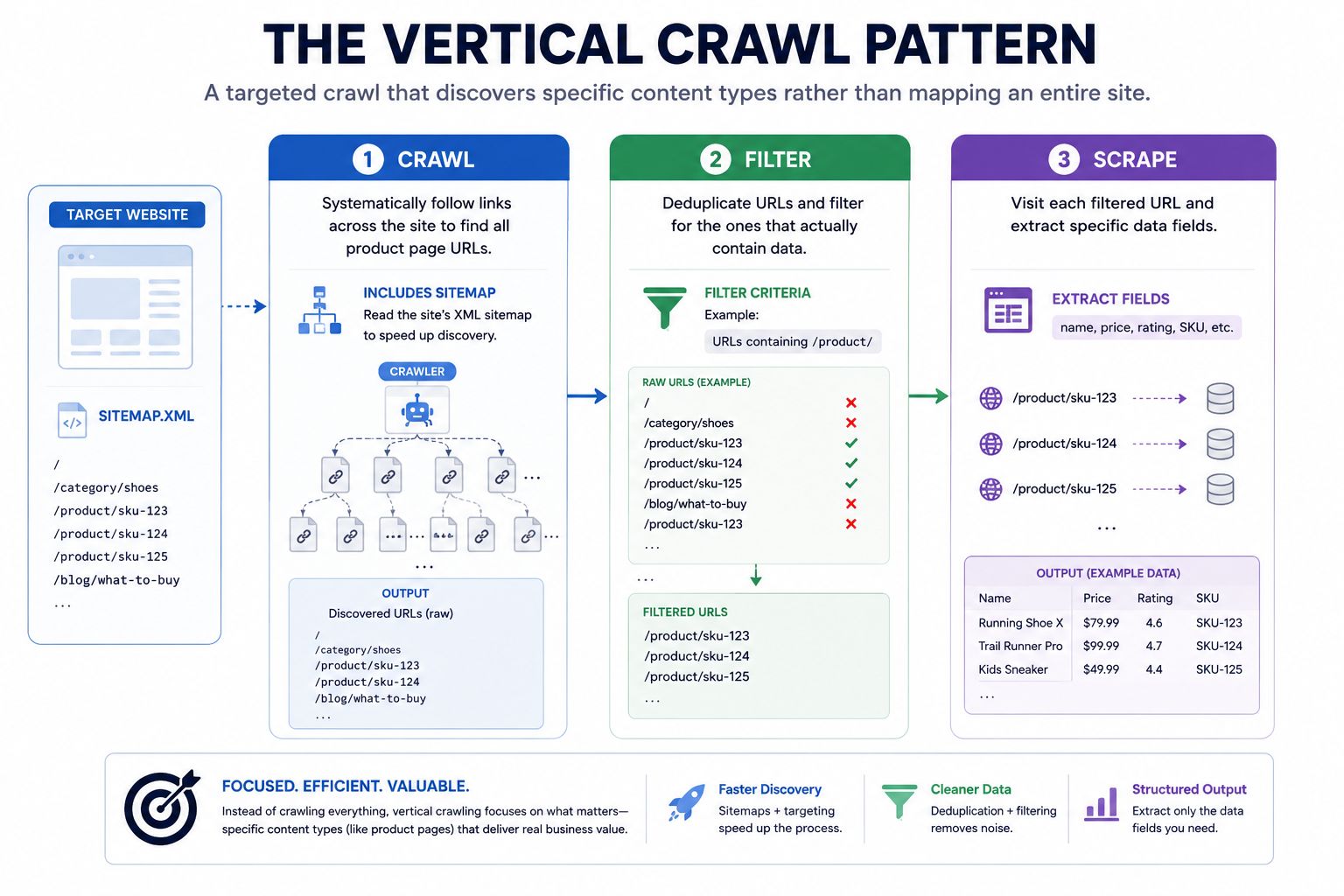
The most common production workflow is vertical crawling a targeted crawl that discovers specific content types rather than mapping an entire site:
- Stage 1: Crawl – Systematically follow links across the site to find all product page URLs. This often includes reading the site’s XML sitemap to speed up discovery.
- Stage 2: Filter – Deduplicate URLs and filter for the ones that actually contain data (e.g., URLs matching
/product/) - Stage 3: Scrape – Visit each filtered URL and extract specific data fields (name, price, rating, SKU)
This is how price tracking systems actually work in production. A crawler scans an e-commerce site weekly to collect all product pages. A scraper processes those URLs daily to extract current prices, stock status, and reviews. The results feed a pricing database that powers dashboards and repricing engines.
Real-world observation: One enterprise team extracting real-time competitor data from 14 marketplaces modularized their logic into 8 job-specific micro-extractors and saw 14x fewer job failures, even as site structures changed 9 times in a quarter. The key insight: they separated URL discovery (crawl) from data extraction (scrape) into independent services that could fail, retry, and scale separately.
When You Can Skip Crawling Entirely
In many cases, crawling is unnecessary. Here are three scenarios where you can go straight to scraping:
1. Data on a single page. If all the data you need exists on one page, don’t crawl. Build an extractor for that page. Simple, fast, efficient.
2. Predictable pagination. If data is split across pages with a URL pattern (e.g., site.com/products?page=1, page=2), generate the URLs programmatically and feed them to a scraper. No crawler needed.
3. Directory → Profile chaining. A very common structure: one directory page listing profiles, each linking to a detail page with structured data. The efficient approach:
- Extract links from the directory page (this is scraping, not crawling)
- Feed those URLs into a second scraper for the detail pages
This chaining method handles 80–90% of real-world extraction needs without a full crawler.
The Pipeline Architecture Decision
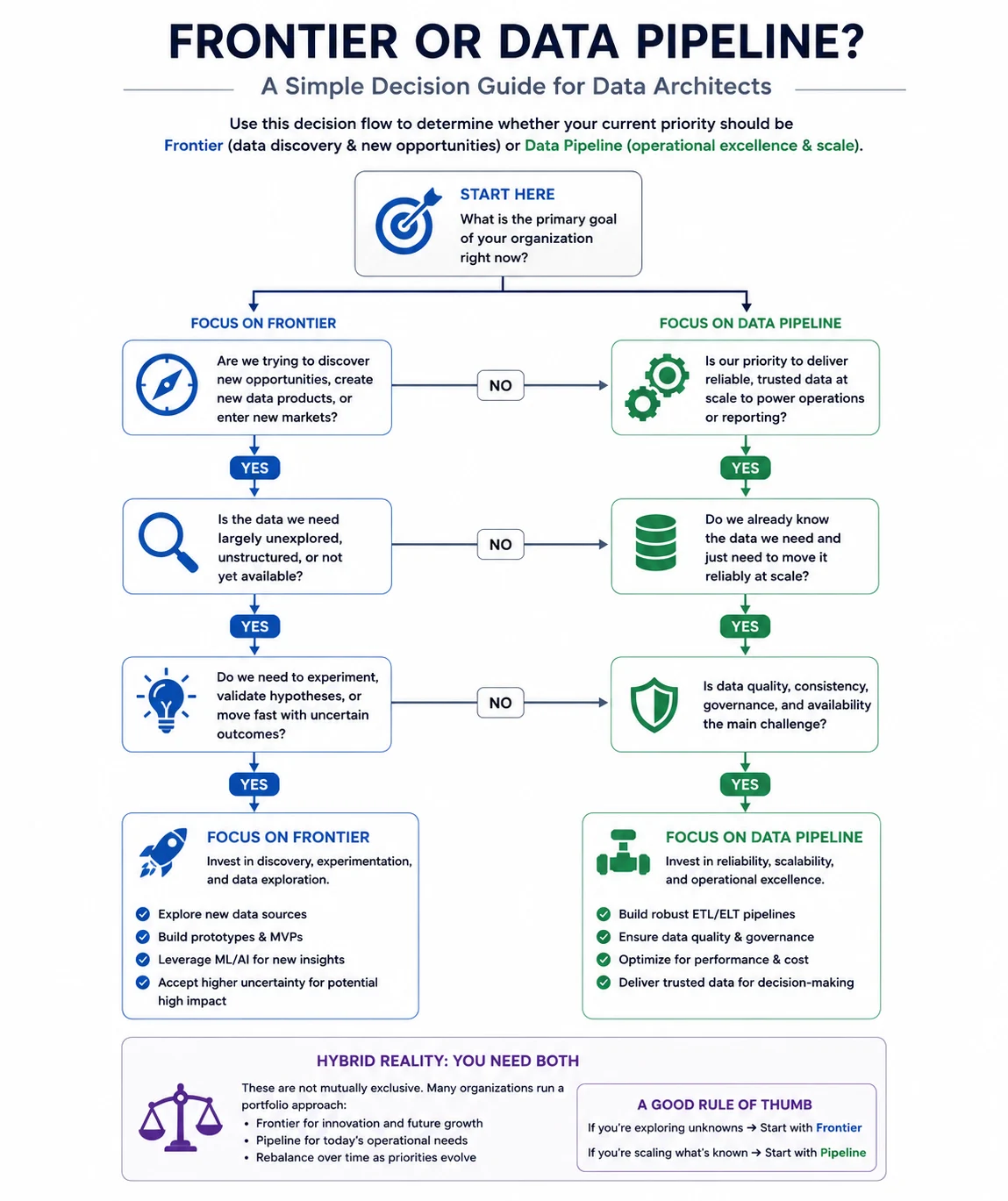
The choice between crawl-first and scrape-first isn’t about preference—it’s about what state your system manages:
- Crawler = Frontier Management: A crawler decides what to visit, in what order, without wasting resources. Its core state is the URL frontier: a prioritized queue of URLs to visit, plus a seen set for deduplication.
- Scraper = Pipeline Management: A scraper turns HTML into clean, validated records. Its core state is the data pipeline: raw HTML → parsed fields → validated records → storage.
Most production systems need both, but the emphasis depends on whether your primary uncertainty is what exists (crawl-heavy) or what it says (scrape-heavy).
Use Cases: When to Use What (With Real Numbers)
Use Case 1: E-Commerce Price Monitoring
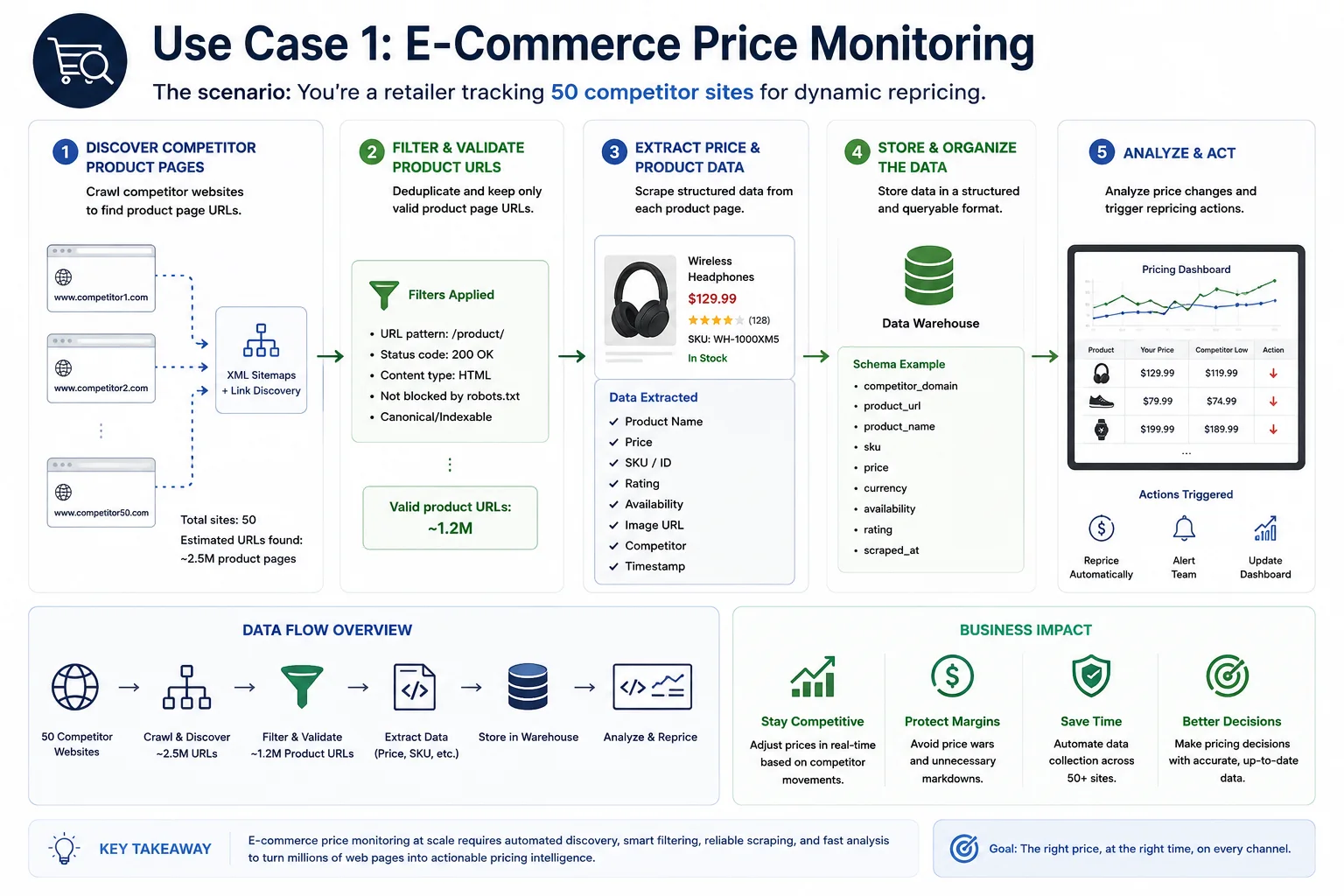
The scenario: You’re a retailer tracking 50 competitor sites for dynamic repricing.
The data: 81% of US retailers now use automated price scraping for dynamic repricing strategies, up from just 34% in 2020. The web scraping software market reached approximately $1.03 billion in 2025, with e-commerce dominating at over 48% of users.
The architecture: You don’t need a crawler. Most e-commerce sites have predictable URL patterns: competitor.com/products?page=N. Generate URLs 1–10,000 and scrape them directly. A team I advised spent two weeks building a crawler to “discover” product URLs before realizing the site had a sitemap.xml with every URL already listed. They could have been extracting data on day one.
The cost reality: Enterprise-scale scraping typically runs $1,500+/month for managed infrastructure. Self-hosting only makes sense if you have dedicated infrastructure engineers or volume exceeding $5,000/month in managed platform costs.
Use Case 2: SEO Site Audit
The scenario: You’re auditing a 50,000-page website for technical SEO issues.
The architecture: This is pure crawling. You need to discover every URL, check for broken links, identify orphan pages, and map the link graph. A scraper is useless here because you don’t know what you’re looking for yet.
The tool: Scrapy or a commercial crawler like Screaming Frog. The output is a URL list with metadata, not structured product data.
Use Case 3: Competitive Intelligence for a Startup
The scenario: You’re a seed-stage startup monitoring three competitors’ feature pages and pricing.
The architecture: Skip crawling entirely. You know the URLs. Build three scrapers with fallback selectors. Store data in a simple database. Alert on changes. Total build time: 2–3 days. Total maintenance: 2–4 hours per month when sites redesign.
The ROI: One marketplace analytics platform I worked with reduced downstream model error by 21% simply by adding a 2-pass scraper and field QA validator to flag anomalies. The cost of bad data is invisible until it distorts your pricing analysis or product recommendations.
Use Case 4: AI Training Data at Scale
The scenario: You’re building a domain-specific LLM and need millions of pages of cleaned text.
The architecture: Crawl first to discover relevant URLs (using seed URLs and link following), then scrape to extract and clean text. This is the classic two-stage pipeline. 65% of organizations now use scraped data to feed AI and machine learning projects.
The scale reality: Crawling millions of pages requires distributed infrastructure. One enterprise team extracting real-time competitor data from 14 marketplaces modularized their logic into 8 job-specific micro-extractors and saw 14x fewer job failures, even as site structures changed 9 times in a quarter.
Challenges: What Actually Breaks in Production
Challenge 1: Anti-Bot Walls Are Now the Default
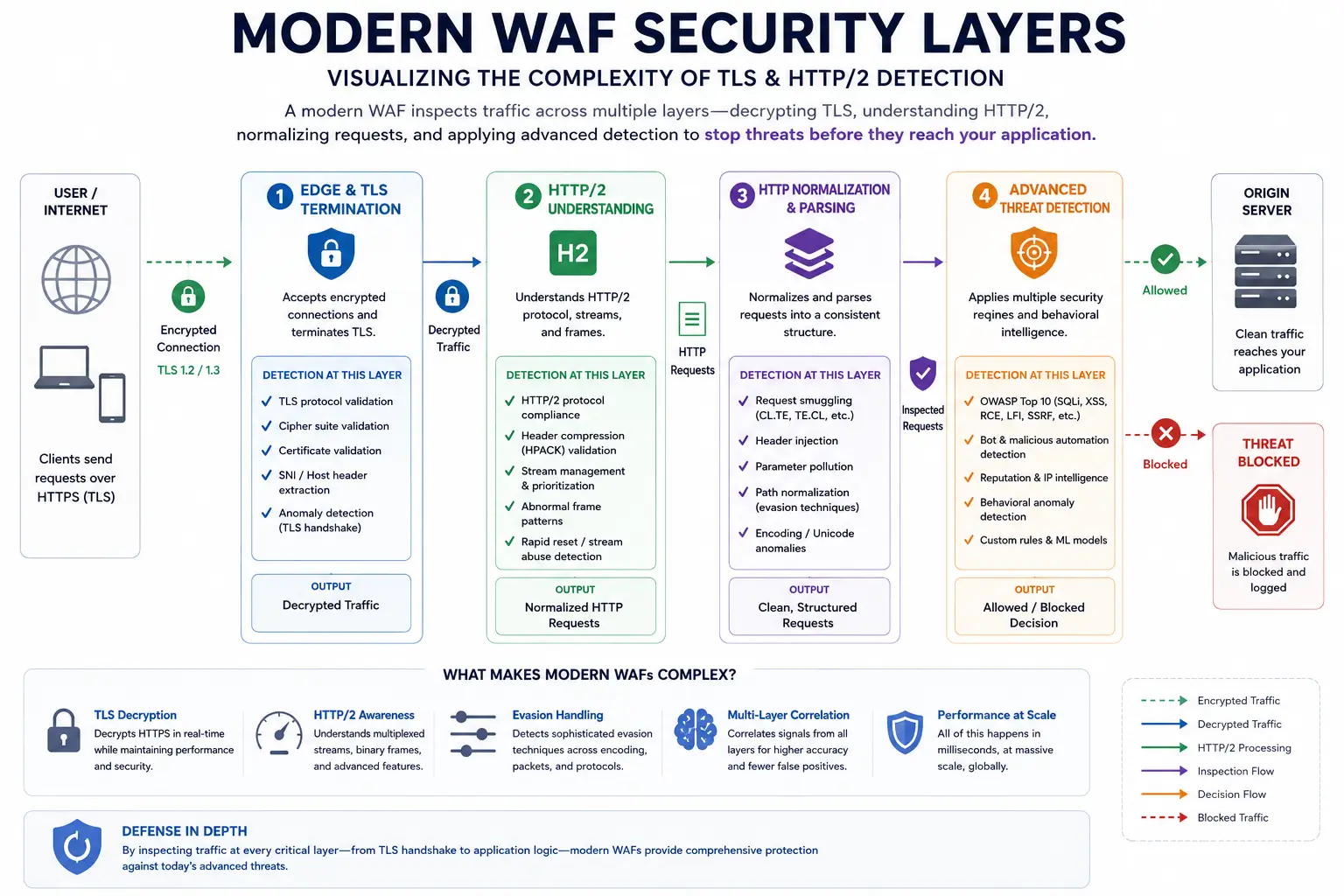
In 2025, Cloudflare began blocking AI-based scraping by default. The WAF market reached $11 billion, and anti-bot systems now deploy TLS fingerprinting, behavioral analysis, and CAPTCHA challenges that break traditional scrapers within days or weeks.
What this means: Modern anti-bot systems extract multiple advanced client signatures simultaneously. They analyze device fingerprinting (canvas, WebGL, font enumeration), behavioral traits (mouse movements, typing cadence, scroll patterns), TLS handshake characteristics (cipher suites, extensions, JA3 fingerprints), and HTTP/2 header validation (frame ordering, settings parameters, and pseudo-header sequences). These 2025-era detection methods go far beyond the IP rotation and cookie management that used to be sufficient. CAPTCHAs have evolved too. We’re seeing bot defenses use hidden traps—like elements only visible to bots—to quietly detect and block scrapers without alerting the user.
The fix: When one fintech aggregator switched from static IP proxies to a smart identity layer, their data delivery success jumped from 42% to 93%, even on heavily defended domains. Modern resilience requires rotating identities, stealth headless browsers, and session memory replication.
Challenge 2: DOM Drift and Silent Failures
Every site structure shifts slightly… often silently. A class name disappears. A container becomes a shadow DOM. A button now loads content via AJAX. Pagination switches from numbered links to infinite scroll.
What this means: These invisible shifts break static selectors instantly, causing hours of undetected data loss. The system isn’t blocked; it just scrapes nothing useful.
The fix: Move beyond hardcoded selectors. Implement contextual scraping (look for semantic cues, not rigid XPaths), schema monitoring (track version diffs over time), and self-healing scrapers (automatically test fallback selectors). In one high-frequency scraping case for a B2B e-commerce site, implementing version-aware selectors reduced downtime by 73% over two months, even as the frontend deployed 14 hotfixes.
Challenge 3: Scaling Logic Across Complex Catalogs
Scraping 10 pages = proof of concept. Scraping 10 million pages = architectural problem.
What this means: What looks stable in QA collapses under production load. Recursive loops from broken pagination. Filters injecting new endpoints via JS. Geo-specific content making selectors non-transferable across locales.
The fix: Scalability demands modular logic, not monoliths. Hierarchical scraper design (crawl paths, product extractors, reviews = separated logic). Dynamic pagination handling (timeout-aware infinite scroll scripts + link-based fallbacks). Request queuing and throttling with distributed crawling and concurrency guards.
Challenge 4: AI-Generated Content Pollution
As scrapers ingest data for training, they increasingly encounter model collapse—accidentally scraping AI-generated hallucinations that degrade the quality of their own output.
What this means: Data authenticity is now a technical challenge, not just a quality check.
The fix: Implement a pre-storage validation layer that calculates the perplexity of scraped text. AI-generated content often has unnaturally low perplexity. Discard data that falls below a certain uniqueness threshold.
Challenge 5: Compliance Is No Longer Optional
From HiQ Labs v. LinkedIn in the U.S. to GDPR-based scraping cases in the EU, the legal landscape is shifting. Cloudflare’s default blocking of AI scrapers in July 2025 marked a turning point: what used to be a gray area is now a blacklist.
What this means: You can’t “scrape politely” anymore. The stack knows who you are—and bans accordingly. GDPR violations carry fines up to €20 million or 4% of annual global revenue.
The fix: Compliance-grade scraping setups now require user-agent governance (registered IDs with opt-in), access request logs (create a paper trail), and CAPTCHA fallback handling. One US retailer blocked three major scraping engines within 48 hours of deployment. A B2B pricing intel tool used authenticated proxies, country-specific user agents, and Cloudflare-aware delays to stay under the radar.
Data Scraping for Business: The ROI Reality
The Market in Numbers
The web scraping software market was valued at $1.03 billion in 2025 and is estimated to grow to $1.17 billion in 2026, reaching $2.23 billion by 2031 at a 13.78% CAGR. The AI-driven web scraping market alone reached $886 million in 2025 and is set to hit $1.04 billion by 2026-end, growing at 17.3% CAGR.
But these numbers understate the real value. The alternative data ecosystem, heavily fueled by scraped information, has grown to $4.9 billion with 28% annual expansion. Hedge funds, market researchers, and competitive intelligence firms drive demand for real-time data streams that traditional sources cannot provide.
Where the Money Goes
| Business Function | Typical ROI | Data Point |
|---|---|---|
| Dynamic repricing | 18–25% revenue growth | E-commerce firms with automated pricing |
| Competitive monitoring | 15–30% faster decision-making | Real-time data access vs. manual collection |
| Predictive maintenance | 25% reduction in equipment downtime | Manufacturers using scraped operational data |
| Route optimization | 15% faster deliveries | Logistics firms using scraped traffic/weather data |
| Labor cost reduction | Up to 80% savings | Automation vs. manual data collection |
The Build vs. Buy Decision
For teams deciding between DIY and managed platforms:
| Factor | DIY Python Script | Managed API |
|---|---|---|
| Initial setup | Hours to days | Minutes |
| Maintenance overhead | 2–8 hrs/month per site | Near zero (self-healing) |
| JavaScript rendering | $0.001–0.01/page + infrastructure | Included |
| Proxy/anti-bot | $5–15/GB + rotation logic | Included |
| Parallelization | Manual implementation | 100K concurrent built-in |
| Monitoring & retries | You build it | Automatic |
| Scale (1M pages/month) | $1,000–5,000 (infra + time) | ~$1,000 predictable |
When to stay DIY: Single static site, learning project, <1K pages/month, full team bandwidth. When to switch to managed: JavaScript-heavy sites, 3+ target sites, >10K pages/month, limited maintenance time.
The Hidden Cost of Bad Data
Bad data still looks good on the surface. You won’t notice until your product recommendations are off, your ML model skews toward outliers, or your pricing analysis is distorted. Common issues:
- Duplicated entities across URLs or languages
- Outdated stock levels are causing incorrect listings
- Missing fields due to dynamic rendering or geo-blocks
- Sampling bias—scraping only what loads fastest or from specific regions
One marketplace analytics platform reduced downstream model error by 21%, simply by adding a 2-pass scraper and field QA validator to flag anomalies in the source HTML.
Expert Insights: What the Industry Gets Wrong
Insight 1: “Crawling and Scraping Are the Same Thing”
They’re not. Conflating them leads to architectural mismatches. A crawler optimized for breadth will fail at precision extraction. A scraper optimized for speed will waste resources trying to discover URLs.
Insight 2: “You Need Both for Every Project”
You don’t. If you know the URLs, skip crawling. If you only need a sitemap, skip scraping. The “crawl then scrape” pattern is dominant but not universal.
Insight 3: “AI Will Eliminate Scraping Maintenance”
AI reduces maintenance but doesn’t eliminate it. The best AI platforms generate deterministic code that executes reliably, but human oversight is still needed for legal compliance, data quality validation, and handling edge cases. Adaptive algorithms can cut maintenance overhead by roughly 40% compared to traditional selector-based approaches, but that still leaves significant engineering work for monitoring, fallback logic, and compliance review. The maintenance tax doesn’t disappear—it shifts from writing selectors to validating AI-generated extraction logic.
Insight 4: “Scraping Is Illegal”
Scraping publicly available data is generally legal in the US and EU, but the boundaries matter. The HiQ vs. LinkedIn ruling protected public data scraping, but scraping personal data, bypassing authentication, or ignoring cease-and-desist letters creates liability. Only 0.5% separates the rate of benign automation from malicious automation across all interactions—intent matters, and so does your paper trail.
Insight 5: “Proxies Solve Everything”
Proxies have become a “weak signal” in bot detection. Simply buying more proxies won’t save a failing scraping operation. Detection has moved well beyond IP-level signals. One industry expert put it bluntly: “Two days of unblocking efforts used to give two weeks of access. Now it’s the other way around.”
Common Mistakes (And How to Avoid Them)
Mistake 1: Building a Crawler When You Need a Scraper
If you already know the URL pattern, don’t build a crawler. Generate the URLs and scrape them directly. Crawlers add complexity, latency, and server load that you don’t need.
Example: A team building a price tracker for a single e-commerce site spent two weeks building a crawler to discover product URLs. The site had a predictable pattern: site.com/products?page=N. They could have generated URLs 1–10,000 and scraped them directly, saving 90% of the development time.
Mistake 2: Ignoring Schema Drift
Scrapers break silently. When a site redesigns, your selectors stop matching, and your pipeline returns empty records. No errors, no alerts—just missing data.
Solution: Build validation into your pipeline. Check that required fields are present and non-empty. Alert when parse success rate drops below a threshold. Maintain a library of fallback selectors for critical sites.
Mistake 3: Defaulting to Headless Browsers
Teams reach for Playwright or Puppeteer by default because “it just works.” But headless browsers are 10–100x more expensive than HTTP requests. For a static site, you’re burning money for zero benefit.
Solution: Start with HTTP requests. Only upgrade to headless if the site requires JavaScript rendering.
Mistake 4: No Deduplication
Crawlers discover the same URL through multiple navigation paths (main nav, footer links, related products, breadcrumbs). Without deduplication, you’ll scrape the same page 5–10 times, wasting bandwidth and server capacity.
Solution: Maintain a persistent “seen set” (Redis, database, or Bloom filter) and deduplicate URLs before scraping.
Mistake 5: Ignoring Rate Limits
Hammering a server with hundreds of requests per second is the fastest way to get blocked and attract legal attention. It’s also ethically indefensible—you’re degrading service for real users.
Solution: Implement rate limiting with random delays. Scrape during off-peak hours. Respect robots.txt crawl-delay directives.
Mistake 6: No Provenance Metadata
When data is wrong, you need to know where it came from, when it was collected, and which version of the scraper processed it. Without this, debugging is impossible.
Solution: Store metadata with every record: source URL, timestamp, scraper version, parse success/failure, and validation results.
The 60-Second Decision Checklist
| You Need… | Use |
|---|---|
| To map what pages exist on a site | Crawling |
| To build a search index or run a site audit | Crawling |
| To monitor prices on specific product pages | Scraping |
| To collect structured data (emails, reviews, stats) | Scraping |
| You don’t know the URLs yet | Crawl first, then scrape |
| You already have the target URLs | Scraping |
| You need to discover pages AND extract data from each | Both |
FAQ Web Scraping vs Web Crawling:
What is the difference between web scraping and web crawling?
Web scraping extracts specific data from pages you already know about. Web crawling discovers and indexes URLs across the web to find pages you didn’t know existed. Crawling finds pages; scraping collects data from them. Most large projects use both.
Can I scrape without crawling?
Yes. If you have URLs from a sitemap, API, or manual list, you can scrape directly without discovery. This is actually the most common scenario in production.
Can I crawl without scraping?
Yes. SEO audits, link analysis, and sitemap verification are pure crawling tasks that don’t require data extraction.
Why do my scrapers keep breaking?
Schema drift. When websites redesign, CSS classes and HTML structures change, breaking your selectors. Build validation, monitoring, and fallback extraction patterns. Version-aware selectors can reduce downtime by 73% even with frequent frontend changes.
Is web scraping legal in 2026?
Generally yes for publicly available data, but with important limits. Respect robots.txt, avoid personal data, don’t bypass authentication, and maintain audit trails. GDPR compliance is mandatory for EU user data. The legal landscape shifted significantly in 2025 when Cloudflare began blocking AI scrapers by default.
What’s the best tool for beginners?
BeautifulSoup + requests for static sites. Playwright for JavaScript-heavy sites. Scrapy for large-scale crawling projects. For non-technical teams, visual builders like Octoparse eliminate developer dependency.
How does AI improve web scraping?
AI enables self-healing extraction that adapts to site redesigns, generates scrapers from natural language descriptions, and improves data quality through automated validation. The best platforms use AI to generate deterministic code rather than extracting data at runtime with LLMs. This cuts maintenance overhead by 40% but doesn’t eliminate human oversight.
How much does enterprise web scraping cost?
SMB data teams typically budget $300–$1,500/month. Enterprise scale starts at $1,500+/month for managed infrastructure. Self-hosting only makes sense above $5,000/month in managed costs or with strict data residency requirements. The AI-driven web scraping market alone hit $886 million in 2025 and is growing at 17.3% CAGR.
What’s the biggest hidden cost of web scraping?
The maintenance tax. Teams spend 30–40% of engineering hours keeping scrapers alive. At 20+ sites, this becomes a full-time role. The other hidden cost is bad data—duplicates, outdated records, and sampling bias that look fine on the surface but distort your analysis.
Conclusion
The difference between web scraping and web crawling isn’t academic—it’s architectural. Crawling manages discovery and breadth. Scraping manages extraction and depth. Most production pipelines need both, but the emphasis depends on whether you’re answering “what exists?” or “what does it say?”
The teams that get this right build systems that are faster, cheaper, and more maintainable. The teams that get it wrong spend months fighting schema drift, server blocks, and compliance issues that could have been avoided with the right architecture from day one.
Here’s what I tell every team I advise: start with the simplest thing that could possibly work. If you know the URLs, don’t build a crawler. If you only need three data points, don’t architect for three million. Respect the web you’re extracting from—rate limits, robots.txt, and data privacy aren’t suggestions, they’re the cost of admission.
And remember: in 2026, with bots accounting for over half of all web traffic and AI-driven scraping attacks approaching 20% of global traffic, the web is more dynamic, more defended, and more legally complex than ever. Your architecture must account for all three, or your pipeline will be dead before your data is live.
You May Also Like
 Web Scraping
What Is Web Scraping and How Does It Work? A Complete 2026 Guide
 Web Scraping
How to Handle CAPTCHA While Scraping: A 2026 Developer’s Guide
 Proxies
Best Proxies for Web Scraping In 2026: How I Choose the Right Provider and Proxy Type
 Web Scraping
Cloudflare Blocking Scrapers Explained: Your 2026 Guide to Anti-Bot Protection
 Web Scraping
How Google Maps Scraping Actually Works (And Where Most Attempts Go Wrong)
 Web Scraping
Scrap.io Review 2026: What This Google Maps Lead Generation Tool Actually Gets Right (and Where It Falls Short)
 Web Scraping
The 7 Best PHP Web Scraping Libraries of 2026: The Ultimate Guide
 Use Cases
Inside Kimwolf Traffic: How Residential Proxies Fuel Credential Stuffing, Web Scraping, & Fraud
 Web Scraping