If you’ve ever watched an API stay healthy during a traffic spike, it usually wasn’t luck. It was traffic control done right.
That’s where people often mix up API throttling and API rate limiting. They treat them like the same thing, then build the wrong policy, expose the wrong headers, and wonder why good users get blocked while bad traffic still leaks through.
Here’s the clean version:
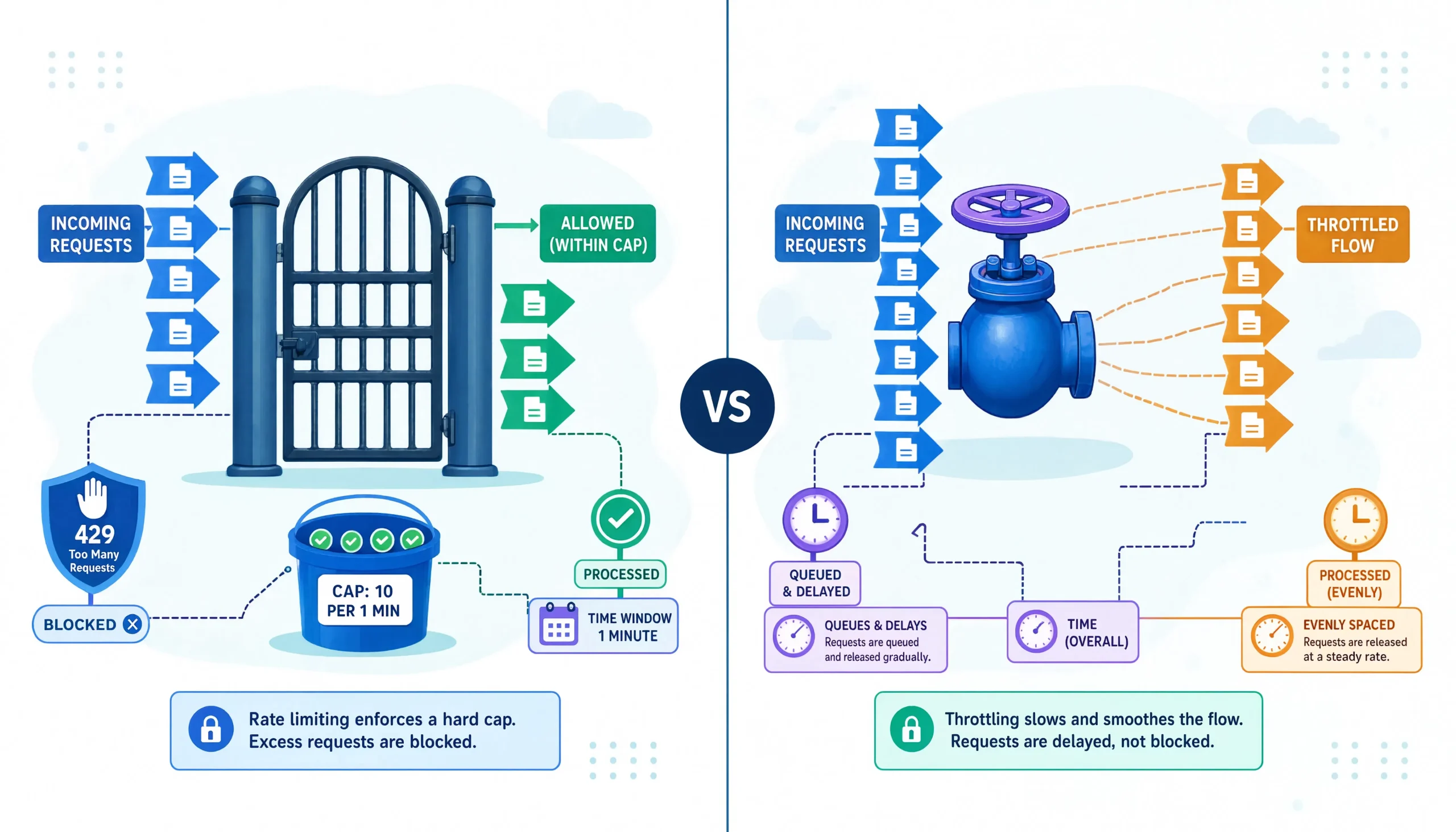
API rate limiting: Sets the rule.
API throttling: Enforces control when request pressure gets too high.
That sounds simple, but in real systems, the difference changes how you design gateways, retries, fairness policies, burst handling, abuse prevention, and even cloud cost controls.
This guide is for backend developers, platform engineers, system design interview prep readers, and SaaS teams that need an answer that goes beyond the usual one-paragraph definition.
Quick Answer
Rate limiting defines how many requests a client can make in a fixed or rolling time period.
Throttling controls how the system responds when traffic reaches or exceeds safe operating thresholds, often by slowing, queuing, shaping, or rejecting requests.
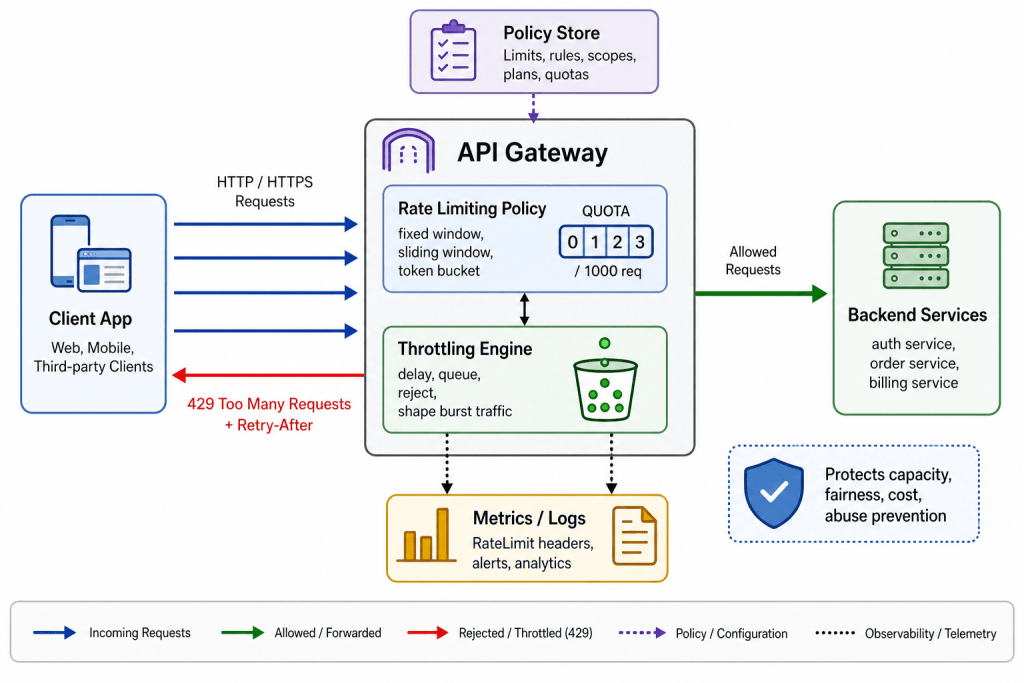
In practice, strong API platforms use both. They rate-limit to protect fairness and quotas, then throttle to smooth bursts and keep latency from collapsing.
Why This Difference Matters More Than Most Articles Admit
Most beginner articles say:
- rate limiting = limits requests
- throttling = slows requests
That’s not wrong, but it’s incomplete.
In production, the real question is this:
What are you protecting, and what behavior do you want under pressure?
Because those are different design goals.
If you care about fairness: You rate-limit by API key, user, tenant, IP, or subscription plan.
If you care about burst absorption: You throttle with a token bucket, queue, concurrency cap, or backpressure strategy.
If you care about cost: You rate-limit expensive endpoints such as OCR, AI inference, geocoding, or third-party billing calls.
If you care about uptime: You throttle before a hot shard, overloaded database, or slow downstream dependency drags the whole system down.
That’s the practical distinction most readers actually need.
What Is API Rate Limiting?
API rate limiting: A policy that defines the maximum number of requests a client can make within a given time window.
Examples:
- 100 requests per minute per API key
- 10 writes per second per tenant
- 5,000 requests per hour per authenticated user
- 1,000,000 requests per month per paid workspace
The point is not just “blocking too much traffic.” The point is predictable allocation of shared capacity.
GitHub’s official REST API documentation still shows a classic example: unauthenticated requests are limited to 60 requests per hour, while authenticated requests typically get 5,000 requests per hour. GitHub also documents secondary limits to prevent abuse from excessive concurrency or expensive request patterns.
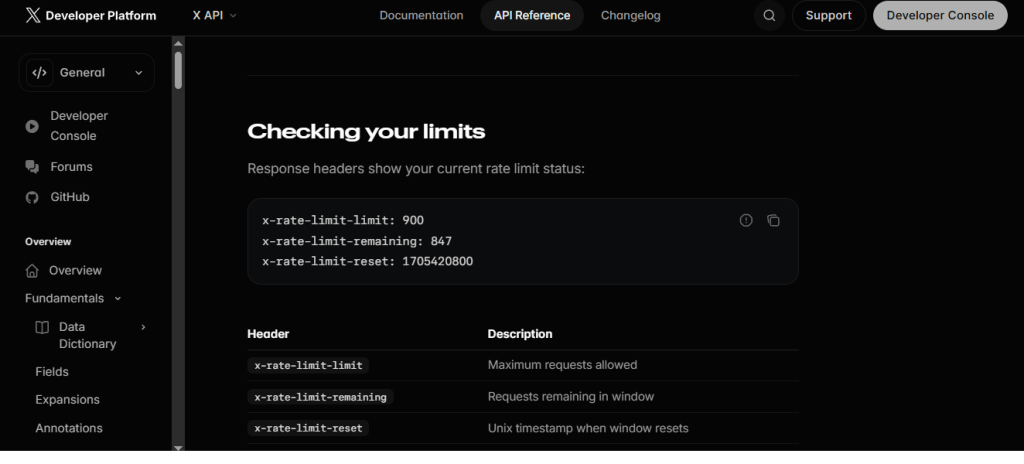
X’s API documentation makes the same principle explicit: rate limits control how many requests can be made to each endpoint, and exceeding those limits results in a 429 response until the window resets.
What Is API Throttling?
API throttling: The traffic control behavior applied when request volume approaches or exceeds the allowed or safe capacity.
Throttling is the “what happens next” layer.
That response can be:
- delaying requests
- queueing requests
- slowing response flow
- reducing concurrency
- rejecting excess traffic
- returning 429 responses
- prioritizing premium or internal traffic first
AWS API Gateway describes throttling with a token bucket algorithm using a steady-state rate plus burst capacity. When traffic exceeds those targets, clients may receive 429 Too Many Requests responses. AWS also notes these limits are applied on a best-effort basis, which is an important real-world nuance many simple explainers miss.
So yes, throttling may reject requests. But conceptually, throttling is broader than outright blocking. It is traffic shaping under load.
API Throttling vs API Rate Limiting: The Simplest Accurate Comparison
| Aspect | API Rate Limiting | API Throttling |
|---|---|---|
| Primary purpose | Define usage quotas | Control behavior under pressure |
| Main question | How much is allowed | What happens when traffic is too high |
| Typical unit | Requests per second, minute, hour, day | Delay, queue, reject, slow down, cap concurrency |
| Best fit | Fairness, abuse prevention, and cost control | Burst smoothing, latency protection, and overload handling |
| User experience | Hard ceilings are common | Graceful degradation is possible |
| Common layer | Gateway, app, service, edge | Gateway, reverse proxy, service mesh, worker pool |
| Typical algorithms | Fixed window, sliding window, token bucket | Token bucket, leaky bucket, queueing, concurrency control |
| Common response | 429 or quota denial | 429, delay, buffering, reduced throughput |
A Better Mental Model for System Design Interviews
If you’re preparing for system design, remember this:
Rate limiting: Is the contract.
Throttling: Is the runtime control loop.
That framing helps you answer deeper follow-up questions, such as:
- Should limits be per IP, per user, or per tenant?
- Should excess traffic be rejected or delayed?
- What happens across multiple gateway nodes?
- How do you protect downstream databases, not just the API edge?
- How do you expose Retry-After or rate headers for client retry logic?
Interviewers usually care less about dictionary definitions and more about whether you understand those trade-offs.
Where These Controls Sit in a Modern Request Path
A healthy production request path often looks like this:
- Edge or WAF: Filters obvious abuse, bot floods, geo rules
- API gateway or reverse proxy: Applies rate limits, throttles bursts, authenticates clients
- Application service: Enforces business-specific quotas and idempotency logic
- Downstream dependency protection: Concurrency caps, circuit breakers, bulkheads, queue limits
- Observability layer: Tracks remaining quota, 429 volume, retry success, tenant-level pressure
This matters because a single global rate limit at the gateway rarely solves everything.
For example:
- Gateway-level limit: Good for public API fairness
- Service-level limit: Good for protecting a write-heavy database
- Tenant-level quota: Good for SaaS plans
- Endpoint-specific limit: Good for expensive routes like exports, search, AI, billing, or report generation
What Happens When an API Returns HTTP 429
The HTTP 429 Too Many Requests status means the client sent too many requests in a given amount of time. We also note that servers may include a Retry-After header to tell the client how long to wait before retrying.
MDN’s Retry-After reference adds an important detail: the header can be expressed as either a delay in seconds or an HTTP date, and it is commonly used with 429 and 503 responses.
That means a good client should not blindly spam retries. It should:
- respect
Retry-After - use exponential backoff with jitter
- avoid synchronized retries across many workers
- log limit exhaustion separately from normal failures
The Part Most Teams Get Wrong
Most teams don’t fail because they forgot rate limiting exists.
They fail because they rate-limit the wrong identity.
Here’s the thing: if you limit only by IP, NAT users can get punished together. If you limit only by API key, bad actors can rotate keys. If you limit only globally, one noisy tenant can damage everyone else.
The better pattern is layered identity:
- Per IP: Good first-pass abuse control
- Per API key or token: Good for external consumer fairness
- Per user: Good for authenticated product workflows
- Per tenant/workspace: Good for multi-tenant SaaS
- Per endpoint: Good for expensive or dangerous routes
- Per concurrency class: Good for protecting slow downstream systems
That’s how you turn a generic limit into a production-ready one.
Real-World Examples That Help Clarify the Difference
Public developer APIs
GitHub’s REST API uses strict request quotas and also documents secondary limits around concurrency and endpoint pressure. That is a real example of combining quota enforcement with overload protection.
Cloud provider or platform APIs
Cloudflare documents a global API limit of 1,200 requests per five-minute period per user, and exceeding it leads to HTTP 429 responses for the next five minutes. That is a classic rate-limit policy with hard enforcement.
Expensive usage-based APIs
Google Maps documents quota behavior for some products, including 6,000 queries per minute per project for Place Details and Place Search elements in the Places UI Kit. This is a good reminder that rate limiting is also a cost-management mechanism, not just an abuse-control mechanism.
When to Use Rate Limiting
Use rate limiting when you need a clear quota or policy boundary.
Best use cases
Fair usage: Prevent one client or tenant from consuming all shared capacity.
Cost protection: Cap routes that trigger paid downstream calls.
Tiered plans: Different limits for free, pro, and enterprise users.
Abuse reduction: Slow down scraping, brute force, credential stuffing, and noisy automation.
Predictable operations: Keep request volume inside a budget the platform can support.
Strong examples
- login attempts
- OTP verification
- report exports
- search endpoints
- geocoding
- AI inference APIs
- webhook delivery retries
- admin-only bulk actions
When to Use Throttling
Use throttling when traffic shape matters as much as raw count.
Best use cases
Burst smoothing: Let short spikes through without crushing the backend.
Latency protection: Prevent queue explosion during sudden surges.
Graceful degradation: Slow or defer low-priority traffic instead of failing everything.
Downstream shielding: Protect databases, caches, or third-party vendors with lower tolerance.
Traffic shaping: Reserve capacity for premium users or critical internal flows.
Strong examples
- flash sales
- ticket launches
- mobile reconnect storms
- retry floods after outage recovery
- fan-out jobs
- asynchronous worker pools
- streaming ingestion pipelines
The Algorithms Behind Rate Limiting and Throttling
This is where system design answers become more credible.
Fixed Window Counter
Fixed window: Counts requests inside a set interval, such as 100 requests per minute.
Why teams use it: It’s simple and fast.
What goes wrong: Edge bursting. A client can send 100 requests at 12:00:59 and another 100 at 12:01:00.
Use it when simplicity matters more than fairness precision.
Sliding Window
Sliding window: Measures requests over a rolling period instead of a hard reset window.
Why teams use it: It reduces burst abuse at window boundaries.
What goes wrong: It is more complex and sometimes more expensive to track in distributed systems.
Use it when fairness matters and edge bursts are a real risk.
Token Bucket
Token bucket: Tokens refill at a steady rate, and each request consumes one token.
Why teams use it: It supports sustained limits while allowing short bursts.
What makes it powerful: It blends rate limiting and throttling naturally.
AWS API Gateway explicitly documents token bucket behavior for throttling rate and burst settings, which is one reason the model shows up so often in cloud API design.
Envoy’s local rate limiting filter also uses a token bucket and returns 429 when the bucket is empty, along with the x-envoy-ratelimited header by default.
Leaky Bucket
Leaky bucket: Requests flow out at a steady rate, like water leaving a bucket.
Why teams use it: It smooths traffic and is useful when backend throughput needs to stay stable.
NGINX documents its limit_req module using the leaky bucket method. It can delay excessive requests and reject them once the configured burst is exceeded.
NGINX, Envoy, and API Gateways: Why the Layer Matters
Let’s make this practical.
NGINX
NGINX is great for edge-level request control. It supports request-rate limiting with configurable burst, nodelay, dry-run mode, and custom rejection status codes. That makes it useful when you need fast edge protection with simple keys such as IP or host-level traffic classes.
Envoy
Envoy fits modern service mesh and gateway patterns well. Its local rate limiting filter is token-bucket-based and can apply limits per process or per downstream connection. That makes it useful when you need flexible enforcement close to services.
Managed API gateways
Managed gateways centralize policy. AWS API Gateway, for example, supports account-level, stage-level, method-level, and client-level throttling targets, with usage plans layered on top. That is far cleaner than scattering counters across individual microservices.
Rate Limiting vs Throttling vs Quotas
A lot of writers merge these three. You shouldn’t.
| Term | What it means | Example |
|---|---|---|
| Rate limiting | Request count allowed over time | 100 requests per minute |
| Throttling | Control behavior under load | Delay or reject once pressure rises |
| Quota | Longer budget cap | 1 million requests per month |
Practical tip: Use rate limits for short-term fairness, quotas for billing or plan enforcement, and throttling for real-time platform safety.
How to Design This Correctly in a Distributed System
This is where the easy article usually stops. It shouldn’t.
Centralized counters vs local counters
Local counters: Fast, but inaccurate across multiple nodes.
Centralized counters: More consistent, but introduce shared-state pressure.
This is why Redis, distributed caches, or gateway-managed counters are common. But once you go distributed, you also inherit:
- clock drift concerns
- partial failures
- eventual consistency
- uneven load balancing
- retries landing on different nodes
Best design pattern
Use a layered model:
- Global coarse limit: Protects the platform
- Tenant-level limit: Preserves fairness
- Endpoint-level limit: Protects expensive operations
- Local concurrency cap: Shields hot instances
- Queue or async fallback: Preserves user experience where possible
That mix is usually better than one giant universal threshold.
How Good APIs Communicate Limits
If you reject traffic but don’t explain the limit, clients will build terrible retry behavior.
GitHub exposes headers such as x-ratelimit-limit, x-ratelimit-remaining, x-ratelimit-used, and x-ratelimit-reset, which is exactly the kind of transparency client developers need.
A healthy API should expose some combination of:
- limit
- remaining
- reset time
- Retry-After when blocked
- clear error body
- docs that explain identity scope and window type
Why this matters: Bad retry logic can create a second outage after the first outage.
Common Mistakes
1. Limiting only by IP
Problem: Shared IPs get punished together, especially in mobile, enterprise, and NAT-heavy environments.
Better approach: Combine IP with API key, token, user, or tenant identity.
2. Using one limit for every endpoint
Problem: A cheap health check and an expensive search query do not deserve the same treatment.
Better approach: Apply endpoint classes. Reads, writes, search, export, auth, and AI calls should have different controls.
3. Returning 429 without guidance
Problem: Clients retry immediately and amplify the issue.
Better approach: Include Retry-After, reset hints, and a stable error format.
4. Ignoring burst behavior
Problem: Fixed windows allow ugly edge spikes.
Better approach: Use sliding windows or token buckets where burst fairness matters.
5. Enforcing only at the gateway
Problem: Internal services can still overload databases or third-party vendors.
Better approach: Add service-level concurrency controls and downstream budgets.
6. Making limits too strict for legitimate workflows
Problem: Good users get blocked during imports, webhooks, sync jobs, or mobile reconnects.
Better approach: Differentiate interactive traffic from batch traffic.
What Most People Get Wrong
The biggest misconception is this:
Rate limiting is not automatically enough to protect availability.
A system can still fail even with perfect quotas if:
- downstream latency explodes
- retry storms stack up
- long-running requests consume worker pools
- message queues keep filling
- one tenant triggers expensive database paths
- the gateway enforces request count but not concurrency
That’s why real resilience often combines:
- rate limiting
- throttling
- concurrency limiting
- queue backpressure
- circuit breaking
- caching
- load shedding
If you only use one of those tools, you’re usually under-defending the system.
Practical Tips
Start with identity first
Ask: who are you limiting?
- IP
- user
- token
- client app
- tenant
- organization
- region
- endpoint
- concurrency class
Separate reads from writes
Reads are usually cheaper. Writes are riskier.
Treat them differently.
Protect expensive routes aggressively
Search, report generation, AI prompts, geocoding, exports, and webhook fan-out often deserve tighter rules.
Use dry-run mode before hard enforcement
NGINX supports dry-run accounting for request limiting, which is useful when you want to see who would be blocked before enforcing the policy.
Expose retry guidance clearly
Clients should know when to wait and how long.
Measure the right metrics
Track:
- 429 rate
- delayed requests
- retry success
- per-tenant saturation
- endpoint hot spots
- cost per endpoint
- token bucket exhaustion
- concurrency pressure
- tail latency during bursts
A Production-Ready Decision Framework
Use this quick framework when choosing between throttling and rate limiting.
Choose rate limiting when:
- you need fairness
- you need quota enforcement
- you need billing or plan boundaries
- you need to reduce abuse
- you need predictable demand
Choose throttling when:
- you need burst absorption
- you need smoother latency under pressure
- you need overload protection
- you need graceful degradation
- you need downstream safety
Use both when:
- your API is public
- your platform is multi-tenant
- your routes have uneven cost
- your traffic has spikes
- your backend includes fragile dependencies
That last category is most real APIs.
FAQs:
Is API throttling the same as API rate limiting?
No: Rate limiting defines the allowed request budget. Throttling defines how the system behaves when traffic exceeds or approaches that budget. In strong systems, throttling is the enforcement and traffic-shaping layer built around rate policies.
Should an API return HTTP 429 when the limit is exceeded?
Yes: That is the standard signal for too many requests. MDN documents 429 as the correct status when a client sends too many requests in a given time, and Retry-After can be included to guide retries.
Can rate limiting protect against DDoS attacks?
Yes, partially: It helps reduce abuse and request floods, but it is not a complete DDoS defense by itself. You still need edge filtering, bot mitigation, WAF rules, CDN protections, and sometimes upstream network-layer defenses.
Should you enforce limits only at the API gateway?
No: Gateway limits are important, but they are not enough. Services still need downstream protection, concurrency caps, and endpoint-aware safeguards.
Do all API gateways support rate limiting?
Yes, in some form: But capabilities differ a lot. Some support only simple per-IP policies. Others support tenant-aware quotas, token buckets, analytics, per-endpoint rules, and custom headers. AWS API Gateway, for example, supports multiple throttling scopes and usage-plan-based controls.
Is token bucket usually better than fixed window?
Yes, for many real systems: Token bucket usually handles bursts more gracefully while keeping long-term request rates stable. Fixed window is simpler, but it can be unfair around window boundaries.
Final Verdict
If you want the one-line answer readers can actually remember, use this:
API rate limiting: Sets the request budget.
API throttling: Controls traffic behavior when demand pushes past safe operating conditions.
For small systems, that difference may feel academic.
For real systems, it affects uptime, fairness, customer trust, cloud cost, and whether your API feels stable or brittle under pressure.
If I were designing this today, I would not choose one or the other. I’d use:
- rate limiting for fairness and policy
- throttling for burst control
- quotas for billing
- service-level protection for fragile dependencies
- clear 429 and Retry-After behavior for clients
That’s the version that survives production.
You May Also Like
 Proxies
10 Best Proxy Providers for AI Agents in 2026: The Definitive Buyer’s Guide
 Web Scraping
What Is Web Scraping and How Does It Work? A Complete 2026 Guide
 Web Scraping
How to Handle CAPTCHA While Scraping: A 2026 Developer’s Guide
 Proxies
Best Proxies for Web Scraping In 2026: How I Choose the Right Provider and Proxy Type
 Proxies
Residential vs Datacenter Proxies: Use Cases and Best Providers (2026)
 Web Scraping
Cloudflare Blocking Scrapers Explained: Your 2026 Guide to Anti-Bot Protection
 Web Scraping
How Google Maps Scraping Actually Works (And Where Most Attempts Go Wrong)
 Web Scraping
Scrap.io Review 2026: What This Google Maps Lead Generation Tool Actually Gets Right (and Where It Falls Short)
 Web Scraping