
Most scraping bugs I’ve traced back to robots.txt weren’t caused by the file itself. They were caused by developers treating it as either sacred law or irrelevant noise, with nothing in between. Neither position holds up once you’re running a crawler at any real scale.
robots.txt is one of the oldest pieces of web infrastructure still in daily use — a plain-text convention from 1994 that quietly became RFC 9309 in September 2022. It looks trivial. It is not. It sits at the intersection of SEO, crawler engineering, server capacity planning, terms of service, and — since GPTBot arrived in August 2023 — the economics of AI training data.
This guide is written for engineers who actually build crawlers. I’ll cover what robots.txt controls, what it doesn’t, how to parse it correctly, and how to make defensible decisions when the rules are ambiguous, which they often are.
Six things worth knowing before you touch a parser
- robots.txt is guidance, not enforcement. It’s an unauthenticated text file. Any client can ignore it.
- It is not a security boundary. Disallowed paths are still publicly reachable, and often more discoverable because they appear in a public file.
- RFC 9309 standardized parsing in 2022, but real-world files still contain non-standard directives (
Crawl-delay,Host, comments as pseudo-directives) that parsers must tolerate. - Different crawlers see different worlds. Googlebot ignores
Crawl-delay; Bingbot honors it; your custom scraper does whatever you code it to do. - Compliance is a spectrum, not a binary. Responsible scraping weighs robots.txt, terms of service, rate limits, data sensitivity, and jurisdiction together.
- Fetching robots.txt is cheap. Parsing it correctly is not. Longest-match rules, path normalization, and 4xx/5xx handling all have edge cases that matter.
Why robots.txt Important for Web Scraping?
robots.txt matters to a scraper for reasons that go beyond politeness. It’s the first, cheapest signal a site gives you about how it wants to be crawled, and ignoring that signal has consequences that compound the longer a crawler runs in production:
- It protects your infrastructure investment. A crawler that respects
Disallowrules on faceted search, session URLs, or infinite calendar pages avoids wasting its own request budget on low-value, duplicate content. - It’s a proxy for site owner intent. Blocked paths, AI-crawler bans, and sitemap references tell you what a site considers safe to crawl versus what it would rather you avoid — information you’d otherwise have to guess at.
- It shapes your legal and reputational exposure. Courts evaluating scraping disputes have looked at robots.txt compliance alongside terms of service. Respecting it doesn’t make a scraper bulletproof, but ignoring it removes a layer of good-faith defense.
- It’s now part of the AI training data conversation. Since GPTBot arrived in 2023, robots.txt has become the primary mechanism sites use to opt out of AI training crawls. Honoring these tokens (
GPTBot,ClaudeBot,CCBot,Google-Extended) is the current baseline for defensible data collection. - It reduces the odds of getting blocked outright. Sites that notice a crawler ignoring robots.txt are far more likely to escalate to IP bans, CAPTCHA walls, or WAF rules — enforcement mechanisms that are far more disruptive than a
Disallowline ever was.
In short: robots.txt won’t stop a determined scraper technically, but it’s the cheapest way to keep a crawler out of trouble — operationally, legally, and reputationally.
What is robots.txt? Why do You Need to Know Before Scraping?
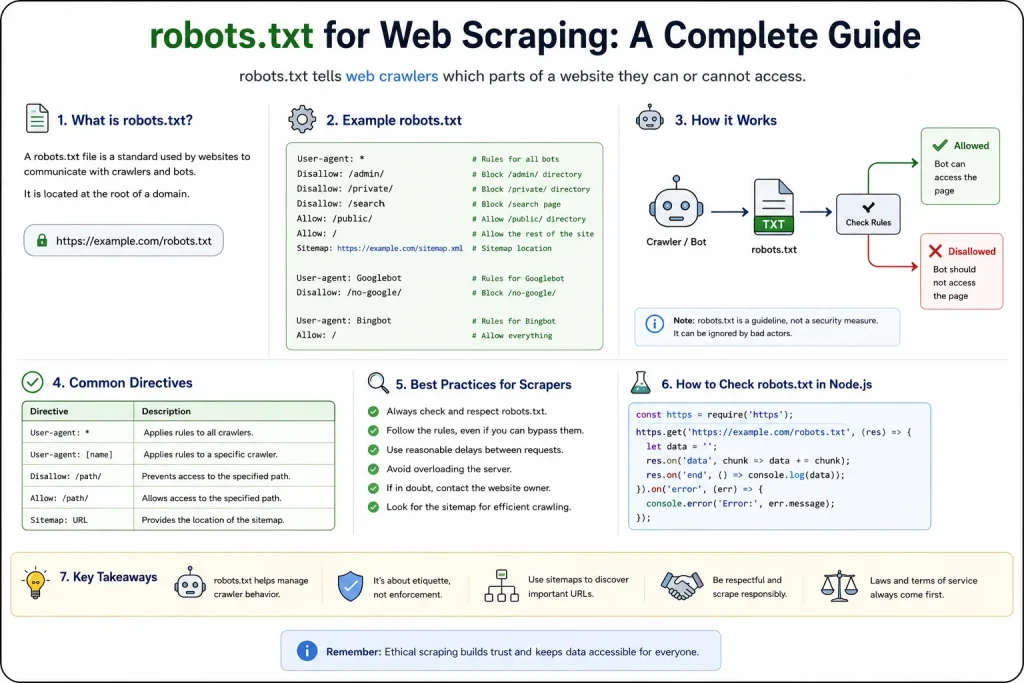
The Robots Exclusion Protocol is a text file served at the root of a host, https://datacelix.com/robots.txt, that communicates crawler preferences to automated clients. That’s the entire mechanism. There is no callback, no authentication, no enforcement layer. A crawler asks for the file, decides whether to obey it, and moves on.
A few facts worth internalizing before writing any parsing code:
- Scope is per-origin. The file at
https://example.com/robots.txtapplies tohttps://example.com/*only. It does not apply tohttps://sub.example.com/*or tohttp://example.com/*(different scheme). Each host+port+scheme combination has its own robots.txt namespace. - The file must be at the root path.
example.com/site/robots.txtis not a robots.txt file. Crawlers won’t discover it. - HTTP status codes carry semantic weight. Per RFC 9309: a 2xx response means “parse this.” A 4xx (except 429) generally means “assume everything is allowed.” A 5xx or network error means “assume everything is disallowed, temporarily.” This is where most homegrown parsers get things wrong.
- The file has a size cap. Google enforces 500 KiB. Content beyond that is ignored. RFC 9309 recommends a similar practical limit.
Websites publish robots.txt for several overlapping reasons: reducing wasteful crawling of infinite URL spaces (faceted search, session-based URLs), keeping low-value pages out of search indexes, protecting servers from aggressive bots, and post-2023, signaling opt-outs from AI training crawlers like GPTBot, PerplexityBot and ClaudeBot.

Reading the syntax the way a parser reads it
A minimal file:
User-agent: *
Disallow: /admin/
Disallow: /cart/
Allow: /cart/public-info
Sitemap: https://example.com/sitemap.xml
Groups are delimited by User-agent lines. Every Allow/Disallow after a User-agent applies to that agent until the next User-agent block or end of file. Sitemap is a top-level directive and is not scoped to a user-agent.
How User-agent matching really works
User-agent: *
User-agent: Googlebot
User-agent: GPTBot
The * wildcard applies to any crawler that doesn’t find a more specific match. Matching is case-insensitive and typically substring-based against the token the crawler advertises — not the full User-Agent HTTP header. A crawler identifying as MyBot/1.2 (+https://mycrawler.example) should match a rule for User-agent: MyBot.
When multiple groups match a crawler, RFC 9309 says the crawler MUST pick exactly one group. The one with the most specific user-agent token and ignore the others. It does not merge rules across groups. Many hand-written parsers get this wrong and end up applying the union of all matching groups, which is a subtly different (and usually more restrictive) behavior.
What Disallow actually blocks
Disallow: /admin/
Disallow: /*.pdf$
Disallow: /search?
Disallow uses prefix matching against the URL path plus query string. Two wildcard characters are supported per RFC 9309:
*matches any sequence of characters$anchors the match to the end of the URL
Disallow: / blocks everything for the matched user-agent. An empty Disallow: with no value means “nothing is disallowed” — historically used to explicitly grant full access.
The common beginner mistake: assuming Disallow: /admin blocks only /admin and not /admin/users. It blocks both, because it’s a prefix match. To block only the exact path, use Disallow: /admin$.
Why Allow exists, and how it resolves conflicts
User-agent: *
Disallow: /products/
Allow: /products/public/
Allow began as a Google extension and was formalized by RFC 9309. When a URL matches both an Allow and a Disallow rule, the more specific rule wins — specificity measured by the length of the matched path pattern. If they’re equally specific, Allow wins.
This resolution rule is where a surprising amount of parser complexity lives. Google’s open-source robotstxt library, Node’s robots-parser, and Python’s protego all handle it correctly. Most quick regex-based homegrown parsers do not.
The Sitemap line is more useful than most scrapers realize
Sitemap: https://example.com/sitemap.xml
Sitemap: https://example.com/sitemap-news.xml
The Sitemap directive is global — not scoped to any user-agent — and provides an absolute URL. For scrapers, this is often the most valuable line in the file. A sitemap tells you what the site wants discovered, which is frequently a better starting point than crawling links from the homepage.
Crawl-delay: the directive that isn’t really a standard
Crawl-delay: 5
This is where standard and reality diverge. Crawl-delay is not part of RFC 9309. It’s a de facto extension with inconsistent support:
- Googlebot ignores it entirely. Google’s official documentation confirms this; rate control happens through Search Console instead.
- Bingbot honors it, but interprets the value as a “time window” rather than strict seconds-between-requests.
- Yandex honors it as seconds between requests.
- Everyone else — including your custom scraper — decides for themselves.
Don’t rely on Crawl-delay being present. Implement your own adaptive rate limiting based on response times and HTTP 429/503 signals. Treat any Crawl-delay value you find as a hint about what the site owner considers reasonable, not as an authoritative ceiling.
Three robots.txt files, read like a code review
An e-commerce store
User-agent: *
Disallow: /cart/
Disallow: /checkout/
Disallow: /account/
Disallow: /*?sort=
Disallow: /*?filter=
Allow: /products/
Sitemap: https://shop.example.com/sitemap.xml
The interesting lines here aren’t /cart/ and /checkout/ — those are obvious. They’re /*?sort= and /*?filter=. Faceted navigation on e-commerce sites creates near-infinite URL combinations that all resolve to reshuffled versions of the same product list. Blocking these saves the site’s crawl budget on Google and stops less disciplined scrapers from hammering the server with duplicate content.
For a scraping engineer, this file is a gift: it tells you the canonical product URLs live under /products/, and it points you at the sitemap for a complete inventory.
Here’s how Datacelix blocks AI crawlers
User-agent: *
Content-Signal: search=yes,ai-train=no,use=reference
Allow: /

User-agent: Amazonbot
Disallow: /

User-agent: Applebot-Extended
Disallow: /

User-agent: Bytespider
Disallow: /

User-agent: CCBot
Disallow: /

User-agent: ClaudeBot
Disallow: /

User-agent: CloudflareBrowserRenderingCrawler
Disallow: /

User-agent: Google-Extended
Disallow: /

User-agent: GPTBot
Disallow: /

User-agent: meta-externalagent
Disallow: /

# END Cloudflare Managed Content

User-agent: *
Disallow: /wp-admin/
Allow: /wp-admin/admin-ajax.php

Sitemap: https://datacelix.com/sitemap_index.xml
This site allows general search engines but blocks internal search results (duplicate content), tag archives (thin content), and paginated author pages. Then it explicitly blocks three AI training crawlers: OpenAI’s GPTBot, Common Crawl’s CCBot, and Anthropic’s ClaudeBot. Post-2023, this pattern is now the norm rather than the exception across major publishers.
The file that quietly leaks the site map
User-agent: *
Disallow: /internal-api/
Disallow: /staging/
Disallow: /beta-features/checkout-v2/
Disallow: /admin-panel-legacy/
I’ve seen versions of this in the wild more times than I’d like. The file is telling every visitor, including anyone browsing example.com/robots.txt in a browser, exactly where the interesting endpoints are. Putting a path in Disallow doesn’t hide it. It advertises it.
If a URL genuinely needs to be private, robots.txt is the wrong tool. Authentication, network-level access controls, or simply not exposing the endpoint publicly are the right tools.
How to Use robots.txt in Web Scraping
Putting robots.txt to work in a real crawler comes down to five repeatable steps, regardless of language or framework:
- Fetch it once per origin, not once per URL. Request
/robots.txtat the root of each host+scheme+port combination you crawl, and reuse the parsed result for every URL on that origin. - Parse it with a spec-compliant library. Use
robots-parserin Node.js orprotegoin Python rather than a homegrown regex — both correctly implement longest-match resolution betweenAllowandDisallow. - Check every URL before fetching it. Call the parser’s
isAllowed/can_fetchmethod with your crawler’s own user-agent string before issuing the actual request. - Handle failure states deliberately. Follow RFC 9309: 2xx means parse normally, 4xx (excluding 429) means treat as unrestricted, and 5xx or a network error means treat as fully disallowed until you can retry.
- Cache and refresh. Store the parsed result per origin for up to 24 hours, then re-fetch — sites change their rules more often than crawlers expect.
The two code samples below show this pattern end to end, first in Node.js and then in Python.
Building the robots.txt check into a Node.js scraper
The robots-parser package is battle-tested and implements Google’s specification correctly, including longest-match resolution for conflicting rules.
import axios from 'axios';
import robotsParser from 'robots-parser';

const USER_AGENT = 'MyResearchBot/1.0 (+https://example.com/bot-info)';

async function loadRobots(origin) {
  const url = new URL('/robots.txt', origin).toString();
  try {
    const res = await axios.get(url, {
      headers: { 'User-Agent': USER_AGENT },
      timeout: 10_000,
      validateStatus: () => true, // handle all statuses ourselves
    });

    if (res.status >= 200 && res.status < 300) {
      return robotsParser(url, res.data);
    }
    if (res.status >= 400 && res.status < 500 && res.status !== 429) {
      // RFC 9309: treat as "no restrictions"
      return robotsParser(url, '');
    }
    // 5xx or 429: treat as fully disallowed until retried
    return robotsParser(url, 'User-agent: *\nDisallow: /');
  } catch {
    // Network error: be conservative
    return robotsParser(url, 'User-agent: *\nDisallow: /');
  }
}

async function canFetch(targetUrl) {
  const origin = new URL(targetUrl).origin;
  const robots = await loadRobots(origin);
  return robots.isAllowed(targetUrl, USER_AGENT);
}

// Usage
const url = 'https://example.com/products/widget-42';
if (await canFetch(url)) {
  // Proceed, respecting rate limits separately
}
A few production notes I’ve learned the hard way:
Cache the parsed robots object per origin with a TTL of 24 hours. Re-fetching robots.txt on every request is wasteful and — ironically — impolite. RFC 9309 permits caching up to 24 hours by default.
Handle 429 explicitly. A 429 on robots.txt itself is unusual, but it means the site is rate-limiting you before you’ve even started. Back off aggressively.
Send a real User-Agent string that identifies your bot and provides contact information. This isn’t about following robots.txt correctly; it’s about being contactable when something goes wrong.
The same check in Python, using protego
The standard library ships with urllib.robotparser, but for anything non-trivial I use protego The library Scrapy depends on because it faithfully implements the Google/RFC 9309 semantics.
import requests
from protego import Protego
from urllib.parse import urlparse

UA = "MyResearchBot/1.0 (+https://example.com/bot-info)"

def load_robots(origin: str) -> Protego:
    url = f"{origin.rstrip('/')}/robots.txt"
    try:
        r = requests.get(url, headers={"User-Agent": UA}, timeout=10)
    except requests.RequestException:
        return Protego.parse("User-agent: *\nDisallow: /")

    if 200 <= r.status_code < 300:
        return Protego.parse(r.text)
    if 400 <= r.status_code < 500 and r.status_code != 429:
        return Protego.parse("")  # unrestricted
    return Protego.parse("User-agent: *\nDisallow: /")  # 5xx/429: conservative

def can_fetch(target_url: str) -> bool:
    parsed = urlparse(target_url)
    origin = f"{parsed.scheme}://{parsed.netloc}"
    return load_robots(origin).can_fetch(target_url, UA)
If you’re building on Scrapy, robots.txt handling is already wired in — set ROBOTSTXT_OBEY = True in settings.py and it uses protego under the hood.
Where robots.txt sits among the other controls a site can use
| Mechanism | What it does | Enforceable? | Typical use |
|---|---|---|---|
| robots.txt | Requests crawler behavior | No — advisory only | Guiding well-behaved bots, SEO hygiene |
| meta name="robots" / X-Robots-Tag | Controls indexing per page | No — same trust model | Preventing indexing of individual pages |
| HTTP authentication | Requires credentials | Yes | Genuinely private content |
| WAF / rate limiting | Filters or throttles requests | Yes | Blocking abusive traffic |
| Terms of Service | Legal restriction on use | Contractually, sometimes | Defining acceptable use |
| CAPTCHA / anti-bot | Blocks automated clients | Practically yes | Preventing scraping at the request layer |
The pattern worth noticing: robots.txt and meta tags are the only advisory controls in this list. Everything below them enforces access; they merely request it.
When robots.txt checking is required, optional, or beside the point
| Scenario | What I’d do | Why |
|---|---|---|
| Search engine crawler | Required | It’s the primary trust signal for indexing eligibility |
| Broad web crawl or research crawl | Yes, strictly | Reputation, server load, and opt-out signals matter at scale |
| Targeted commercial scraping | Yes, with judgment | Combine with ToS review and rate limiting |
| First-party crawl of your own sites | Optional | You already know your infrastructure |
| Authenticated data behind a login | N/A | robots.txt doesn’t govern authenticated sessions |
| One-off manual data pull | Situational | If you’d hit the site in a browser, robots.txt is often not the binding constraint |
| Collecting AI training data | Yes, and respect AI-specific opt-outs | GPTBot, ClaudeBot, CCBot signals are now enforced legally and reputationally |
Lessons from actually running crawlers in production
robots.txt is a compliance input, not a compliance output. A well-designed scraping system treats robots.txt as one signal among several: HTTP response codes, Retry-After headers, sitemap contents, terms of service, and observed server behavior all inform how to proceed. Systems that check robots.txt and stop there miss the more important signals.
The User-Agent string you send matters more than you think. Sites frequently serve different robots.txt content based on User-Agent — usually via server logic that rewrites the response. Sending a generic python-requests/2.31 gets you one file; sending an identifiable bot name may get you a different one, or a stricter one, or occasionally a friendlier one with contact information in a comment.
Longest-match semantics create real bugs. Given:
User-agent: *
Disallow: /api/
Allow: /api/public
A URL like /api/public/users should be allowed — the Allow rule matches a longer prefix. A naive first-match parser would block it. If your scraper is skipping URLs it shouldn’t be skipping, or hitting URLs it shouldn’t, check your parser’s precedence logic before blaming the site.
Failure behavior is where scrapers diverge most. RFC 9309 gives clear guidance (4xx → allow all, 5xx → disallow all temporarily), but many parsers default to “allow all” on any error, and a few default to “disallow all.” The correct behavior depends on your risk posture. A search engine leans permissive; a scraper visiting sensitive domains should lean conservative.
Sitemaps are underused by scrapers. If a site publishes a sitemap in robots.txt, using it as your seed list is almost always better than following links from the homepage. You get canonical URLs, last-modified timestamps, and — critically — you avoid crawling paths the site itself considers low-value.
Watch the emerging llms.txt conversation. A parallel opt-in file for LLM training and retrieval is being discussed across the community. It isn’t standardized and adoption is uneven, but if your scraper is collecting training data, checking for it signals good faith even before it becomes a requirement.
The mistakes I see most often in code reviews
- Treating robots.txt as a security boundary. It isn’t one and never was. If you’ve put a URL in
Disallowto hide it, you’ve done the opposite — you’ve published its existence to anyone who reads the file. - Ignoring rate limits because robots.txt says
Allow: /. Permission to fetch a URL is not permission to fetch it 500 times per second. A URL being crawlable doesn’t override the site’s rate-limiting infrastructure or common decency. - Assuming
Disallowmeans the data is copyrighted or private. It might be either, both, or neither.Disallowis a crawling preference, not a statement about data ownership. Copyright, database rights, and terms of service are separate legal questions decided independently of what robots.txt says. - Skipping terms of service review. In several recent U.S. and EU cases, courts have weighed both robots.txt behavior and ToS compliance when evaluating scraping legality. Following robots.txt while ignoring an explicit ToS prohibition doesn’t provide much cover.
- Hardcoding rules from a snapshot. robots.txt files change. Sites reorganize URL structures, add AI-crawler blocks, or tighten rules after abuse incidents. Cache with a reasonable TTL; don’t bake rules into your code.
- Assuming subdomains inherit rules. They don’t.
www.example.com/robots.txtandapi.example.com/robots.txtare separate files. If your scraper crosses subdomains, fetch each one. - Treating
Crawl-delayas authoritative. Support is inconsistent enough that you have to build your own adaptive rate limiting anyway.
What happens if you ignore robots.txt when scraping a site?
Nothing stops the request from succeeding — robots.txt has no enforcement layer, so a crawler that ignores it will still get a 200 response back. But “nothing happens technically” isn’t the same as “nothing happens.” In practice, ignoring robots.txt tends to escalate along a fairly predictable path:
- Detection through logs. Site operators regularly review server logs for traffic hitting disallowed paths. A crawler ignoring
Disallowrules stands out quickly, especially if it’s also ignoring rate limits. - Enforcement escalation. Once flagged, sites move from advisory controls to enforced ones: IP bans, User-Agent blocking, CAPTCHA challenges, or handing traffic off to a bot-detection service like Cloudflare, DataDome, or PerimeterX.
- Weakened legal position. Ignoring robots.txt isn’t automatically illegal in most jurisdictions, but courts evaluating scraping disputes have factored robots.txt compliance into the broader picture alongside terms of service and computer-misuse statutes. Ignoring it removes a layer of good-faith defense if a dispute arises.
- Reputational cost. For commercial scraping operations, this is often the biggest cost. Site owners talk to each other, publish blocklists, and complain to hosting providers. A crawler with a reputation for ignoring robots.txt gets blocked faster across unrelated sites.
- AI-specific consequences. If the ignored rule was an AI-crawler opt-out (
GPTBot,ClaudeBot,CCBot), the exposure isn’t just technical — it can affect licensing negotiations, public perception of a training pipeline, and eligibility for content partnerships.
The short version: ignoring robots.txt rarely causes an immediate failure, but it steadily erodes the trust and headroom a crawler needs to keep operating at scale.
What to do differently on Monday morning
If you’re writing your first scraper:
- Use
robots-parser(Node.js) orprotego(Python). Don’t write a parser from scratch — the edge cases will bite you. - Set a distinctive User-Agent with contact info. Anonymous scrapers get blocked faster.
- Cache robots.txt for 24 hours per origin.
- Log every URL you skipped because of robots.txt. When something breaks, you’ll want that history.
If you’re running crawlers in production:
- Centralize robots.txt fetching and parsing in a service. Don’t let every worker fetch its own copy.
- Emit metrics for robots.txt fetch success/failure per origin. A sudden spike in 5xx responses often precedes a broader IP-level block.
- Implement per-origin adaptive rate limiting that reacts to 429/503 regardless of what
Crawl-delaysays. - Document how your crawler handles ambiguous cases, and revisit the policy when regulations or major site policies change.
If you own a website:
- Don’t put secrets in robots.txt paths.
- Use robots.txt for genuine crawl-budget management, not as a substitute for authentication or WAF rules.
- If you’re blocking AI crawlers, block them by name (
GPTBot,ClaudeBot,CCBot,PerplexityBot,Applebot-Extended,Google-Extended). Wildcard blocks catch general search engines too. - Test with Google’s open-source robots.txt parser before deploying changes. Small syntax errors have caused entire sites to be de-indexed.
Questions readers keep asking
Is robots.txt required for web scraping?
No, nothing in HTTP, browser standards, or scraping libraries requires you to fetch or honor robots.txt. It’s a voluntary convention. Whether you should follow it depends on the type of crawler you’re building, the site you’re scraping, and the risk profile of the project.
Can a website block scrapers using only robots.txt?
Not effectively. robots.txt is advisory; it depends entirely on the scraper choosing to comply. To actually block scrapers, sites need enforcement mechanisms: rate limiting, WAF rules, bot detection services (Cloudflare, DataDome, PerimeterX), CAPTCHAs, or authentication.
Is ignoring robots.txt illegal?
Not inherently, in most jurisdictions. But ignoring robots.txt can become part of a larger legal picture — computer misuse statutes, breach of contract via terms of service, or unauthorized access claims — depending on what you scrape and how. The safer framing: ignoring robots.txt won’t put you in jail on its own, but it weakens your position if a dispute arises. Consult a lawyer for anything commercial.
How do I check robots.txt automatically before scraping?
Use robots-parser in Node.js or protego in Python. Both handle the RFC 9309 semantics correctly, including longest-match resolution for conflicting rules. Code examples for both are in the sections above.
Does robots.txt protect private data?
No. Any URL a website considers genuinely private needs authentication or access controls. robots.txt is a public file; listing paths in it increases their visibility rather than reducing it.
Should AI crawlers follow robots.txt?
The major AI companies say yes and publish specific user-agent tokens for opt-out: OpenAI uses GPTBot and OAI-SearchBot, Anthropic uses ClaudeBot, Google uses Google-Extended, Common Crawl uses CCBot. Real-world compliance is mixed, and Cloudflare’s 2025 crawler traffic reports show GPTBot alone grew several times over year-on-year. If you’re building a training crawler, respecting these tokens is the current baseline for defensible practice.
What’s the difference between robots.txt and sitemap.xml?
robots.txt tells crawlers what they should or shouldn’t fetch. sitemap.xml tells crawlers what content exists and when it was last updated. They’re complementary — robots.txt often points to the sitemap. For scrapers, sitemap.xml is usually the more useful starting point for discovery; robots.txt is where you check whether individual URLs are in-bounds.
What happens if a scraper ignores robots.txt?
Technically, nothing automatic — the request will succeed if the server accepts it. Practically, the site may notice via server logs, block your IP or User-Agent, complain to your hosting provider, or (in some jurisdictions and contexts) pursue legal action. The reputational cost is often larger than the technical one, especially for commercial scraping services.
Closing thought
robots.txt is a communication protocol between site owners and crawlers, standardized in RFC 9309 but still shaped by decades of informal convention. It doesn’t enforce anything, it doesn’t protect anything, and it doesn’t grant permission to scrape what it allows. What it does — when handled correctly — is give a scraper a defensible position: “we asked, we listened, and we behaved accordingly.” That position matters more now than it did five years ago, and it will matter more in five years than it does today.
The engineering work is straightforward once you use a real parser and handle the failure modes RFC 9309 spells out. The judgment work — deciding when robots.txt is enough, when you need terms of service on top of it, when you need explicit permission, and when you shouldn’t be scraping at all — is what separates crawlers that scale from ones that get their IPs burned by lunchtime.
You May Also Like
 Web Scraping
What Is Web Scraping and How Does It Work? A Complete 2026 Guide
 Web Scraping
How to Handle CAPTCHA While Scraping: A 2026 Developer’s Guide
 Proxies
Best Proxies for Web Scraping In 2026: How I Choose the Right Provider and Proxy Type
 Web Scraping
Cloudflare Blocking Scrapers Explained: Your 2026 Guide to Anti-Bot Protection
 Web Scraping
How Google Maps Scraping Actually Works (And Where Most Attempts Go Wrong)
 Web Scraping
Scrap.io Review 2026: What This Google Maps Lead Generation Tool Actually Gets Right (and Where It Falls Short)
 Web Scraping
The 7 Best PHP Web Scraping Libraries of 2026: The Ultimate Guide
 Use Cases
Inside Kimwolf Traffic: How Residential Proxies Fuel Credential Stuffing, Web Scraping, & Fraud
 Web Scraping