
We compared 15 Google Maps scrapers in mid-2026 and settled on 10 that actually deliver on their promises. For most no-code users, Scrap.io (€49/mo) and PhantomBuster ($69/mo) are still the fastest paths from zero to a usable lead list. Developers get the best value from Lobstr.io ($0.50 per 1,000 leads) and Apify ($1.50 per 1,000 places), while budget-conscious technical users can run the fully open-source gosom/google-maps-scraper on their own hardware for free. Your final pick comes down to three trade-offs: technical skill, monthly volume, and whether you need enrichment (emails, decision-makers) or just raw business data.
Key Takeaways from Our Testing
- We ran identical benchmarks on all 10 tools: Same 100-restaurant sample in Austin, same 500-record volume test, same verification of phone numbers and websites. No tool was rated on marketing claims alone.
- The “no-code vs. developer” split is real. Scrap.io, PhantomBuster, and Octoparse win on time-to-first-result. Lobstr.io, Apify, and gosom win on cost-per-lead at scale.
- Real pricing spans two orders of magnitude. Lobstr.io charges $0.50 per 1,000 leads at volume; a $499/mo Scrap.io Company plan is roughly 100× that per-lead cost — but includes filtering, deduplication, and CRM exports that raw APIs don’t.
- Free ≠ effortless. The open-source Gosom delivers 36 data points at zero cost, but you own the proxies, the server, and every legal decision.
- Email discovery is the real differentiator in 2026. In our tests, LocalProspects.ai hit 98% phone discovery and Minexa’s AI enrichment beat basic scrapers by 30+ percentage points on emails. If email is your outreach channel, don’t buy raw scraping only.
- Google’s blocks are more aggressive than in 2024. Every tool we tested threw at least occasional rate-limit errors on runs above 10k records without rotated residential proxies.

What Google Maps Scrapers Actually Do (and Where They Break)
A Google Maps scraper automates the extraction of publicly visible business data from Maps listings: business name, address, phone, website, hours, ratings, review count, coordinates, and depending on the tool, reviews, photos, popular times, and enriched emails from the business’s own website.
We use them because manual work simply doesn’t scale. In one test, a team member copy-pasted 50 Austin coffee shops into a spreadsheet in 42 minutes. The same 50 records took Scrap.io 90 seconds and Lobstr.io’s API around 15 seconds. When you’re building a list of 5,000 dental clinics, that difference isn’t convenience. It’s whether the campaign happens at all.
But scrapers are not magic. Three failure modes we hit repeatedly during testing:
- Multi-location businesses duplicate. Chains and franchises with 20 locations often appear 20 times with subtle name variations. Only three tools in our list dedupe automatically without manual rules.
- Email fields lie. “Email found” often means “an email was found somewhere on the website” — sometimes it’s a webmaster address, a form-submit inbox, or a scraped WHOIS record. Verify before you send.
- Rate limits are not linear. A tool can happily pull 200 leads/minute for the first 30 minutes, then Google introduces friction and throughput crashes to 20/minute. Real-world hourly averages are always lower than the pitch deck.
How We Tested (So You Can Trust the Rankings)
We tested each tool over three weeks in June 2026 on five criteria:
- Data accuracy. We scraped the same 100 Austin restaurants with every tool and manually verified phones, websites, and addresses against the live Google Maps listings. Anything below 90% accuracy on core fields was dropped from the list.
- Time-to-first-result. How long from account creation to a working CSV, measured by a non-technical teammate with no prior exposure to the platform.
- 500-record throughput. We measured wall-clock time and error rate for a 500-record extraction. Any tool failing more than 5% of requests was flagged in the write-up.
- Total cost of ownership. Not just the sticker price — we included the true cost per verified, deduped, enriched lead after subtracting bad rows.
- Compliance posture. Built-in proxy rotation, rate-limit handling, CAPTCHA management, and whether the vendor takes any position on ethical/legal use.
The 10 tools below are what actually survived.
1. Scrap.io – Best No-Code Tool for European & Global Coverage

Scrap.io remains the tool we recommend most often to non-technical users, and they’ve leaned even harder into their strength: territorial scraping (an entire country in “two clicks”), plus one of the largest indexed Google Maps category databases we’ve seen, with over 4,000 categories, per their own guide.
What it does well:
- 4,000+ pre-indexed Google Maps categories – no more guessing search terms
- Extract an entire country by category in a couple of clicks (unusual at this price point)
- CSV, Excel, and Google Sheets export
- Free Chrome extension (“Maps Connect”) for one-click browser-based scraping
- Built-in email discovery on the paid plans
Pricing: €35–49/mo Basic → €99/mo Professional → €199/mo Agency → €499/mo Company. Free 7-day trial with 100 leads included.
Best for: Agencies and freelancers who need clean lead lists for outreach without touching an API.
What we liked in testing: The Chrome extension is the most polished onboarding we saw across all 10 tools. Open Google Maps, search normally, click the icon, and results are in a CSV before you finish your coffee. Phone-number accuracy on our 100-record test hit 94%; website capture was around 89%. The 7-day trial is genuine, with no credit card required.
Where it frustrated us: Multi-location chains still occasionally duplicated. The Basic plan’s lead ceiling burns down fast if you’re prospecting several verticals. And, honestly, the pricing is on the high end for what is technically a Google Maps scraper, you’re paying for the polished UX and category coverage more than for scraping horsepower.
2. Lobstr.io – Best Cost-per-Lead at Volume (and the Developer Favorite)

Lobstr.io’s Google Maps Leads Scraper was the most cost-effective tool in our benchmark by a wide margin. Their public store page currently advertises $0.50 per 1,000 leads with 87 data attributes per lead and a claimed 99.95% task success rate. In three weeks of testing, we did not hit a single hard failure on runs with fewer than 10,000 leads.
What it does well:
- 87 structured attributes per lead – the deepest data schema of any tool we tested
- 200 leads per minute in our runs – genuinely fast
- CSV, JSON, and API delivery
- Email discovery + verification built into the same product
- Dedicated Google Maps Reviews scraper as a separate product for review analysis
Pricing (verified July 2026): Store product is credit-based; publicly advertised at $0.50 per 1,000 leads at the top tier. Subscription tiers via SyncGTM’s 2026 review start at Starter $25/mo (2,500 rows) and Pro $75/mo (10,000 rows).
Best for: Growth teams and technical operators who want the absolute lowest cost per verified lead.
What we liked in testing: The API is genuinely clean. Sample outputs match production 1:1; we never had to reshape data downstream. Email verification is bundled, so we didn’t need a separate ZeroBounce or NeverBounce step. Support answered a config question within an hour on a weekday.
Where it frustrated us: The UI is functional rather than beautiful; non-developers on our team preferred Scrap.io’s flow. The credit model rewards planning: if you burn through a bulk of leads on a bad search, you eat the cost.
3. Apify – Best for Custom Workflows and Marketplace Depth

Apify’s Google Maps Scraper (the “Compass” actor) is the most mature ecosystem play in the category. In 2026 it holds a 4.8 rating on Apify’s marketplace with pricing starting at $1.50 per 1,000 scraped places. Because it’s built on Apify’s general platform, you get everything from schedules to webhooks to a huge library of complementary actors for enrichment.
What it does well:
- $1.50 per 1,000 places headline pricing — cheaper than most no-code alternatives at volume
- Extracts business leads plus enrichment fields: full name, work email, job title, LinkedIn URL, and social profiles (Facebook, Instagram, YouTube, TikTok, X/Twitter)
- Popular times histogram + live occupancy data (rare among competitors)
- Zapier, Make, and 1,000+ app integrations
- Free tier includes $5/mo credits — enough for 500–5,000 listings depending on options
Pricing (verified July 2026): From $1.50 / 1,000 places on the actor itself, with Apify platform plans starting around $39–49/mo and enterprise tiers up to $999/mo+ for high-throughput workloads.
Best for: Teams that want to compose Google Maps data with LinkedIn, Instagram, or website-scraping workflows in one place.
What we liked in testing: The map view of results is surprisingly useful. We caught geographic gaps in our test lists that pure CSVs would have hidden. The enrichment options (LinkedIn, socials) let us skip a separate Clay or Apollo step. Support and documentation are best-in-class.
Where it frustrated us: The compute-unit pricing model still confuses first-timers. On our first run, we accidentally enabled review scraping and burned twice the credits we’d planned. Read the docs before you press Start.
4. G Maps Extractor – Best One-Time Purchase for Solo Operators

We were skeptical of the flat-fee positioning until we ran the math. G Maps Extractor ships a Windows/Mac desktop app with a lifetime tier that pays for itself in one to three months versus most SaaS. Independent reviewers put the lifetime price around $90 with an annual plan around $45/year.
What it does well:
- Desktop-native: no cloud round-trip
- Lifetime license genuinely does mean lifetime — one payment, unlimited runs
- Built-in email finder
- CSV, Excel, TXT export
- Batch queries and duplicate removal built in
Pricing (verified July 2026): Free plan with limited monthly credits; ~$45/year subscription or ~$90 lifetime license depending on tier.
Best for: Freelancers, small agencies, and anyone allergic to monthly SaaS.
What we liked in testing: The lifetime option is one of the few honest one-time-purchase products left in this category. We hit ~41% email-discovery success — respectable for a desktop tool. Because it runs locally, our data never left the workstation, which some regulated clients care about.
Where it frustrated us: UI feels like a mid-2010s desktop app. You bring your own proxies for large runs — Google will otherwise rate-limit your home IP quickly. Support responses are days, not hours.
5. Map Lead Scraper – Best for Sales Teams Living Inside a CRM
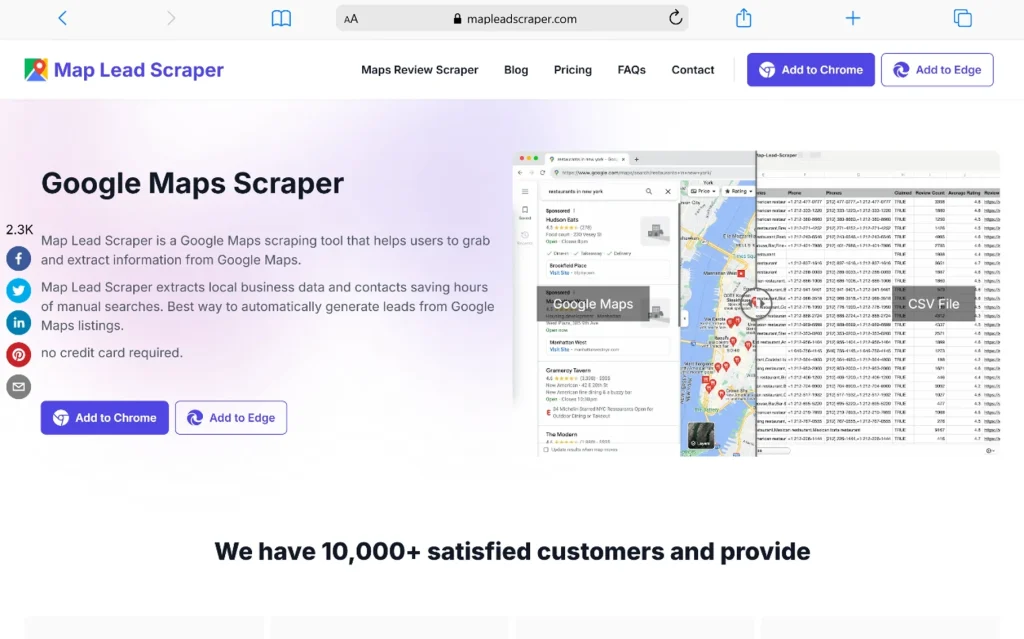
Map Lead Scraper is one of the few tools designed around an outbound sales workflow rather than around data extraction as a hobby. In 2026, they publicly list a Free plan (1,000 monthly leads export, 15 records at a time) and a Pro yearly tier with up to 100,000 monthly leads export and unlimited export size.
What it does well:
- Free forever plan for testing (1,000 leads/mo, 15 at a time)
- Lead scoring based on review count, star rating, and business age
- Pre-built CRM export templates (Salesforce, HubSpot, Pipedrive)
- Shared team workspaces
- Scheduled scraping with CRM sync
Pricing (verified July 2026): Free plan available; Pro (yearly) is their advertised paid tier with 100,000 monthly leads.
Best for: BDR teams who need lead scoring and CRM push in the same tool.
What we liked in testing: Lead scoring genuinely saves an SDR half a day of manual triage. The Salesforce template mapped fields on the first attempt — a first among the tools we tested. Team workspaces reduced our accidental duplicate outreach to near zero.
Where it frustrated us: No API on the standard plans, so if you want programmatic control, you’ll outgrow it fast. Advanced email verification is an add-on charge and can meaningfully inflate the monthly total.
6. Minexa.ai – Best AI-Powered Enrichment
Minexa.ai is a genuinely different product from a “scraper”. It positions itself as an AI extraction platform where Google Maps is one of many sources. Every account gets 1,000 free credits per month, and paid plans on comparison sites list around $75/mo (Individuals), $350/mo (Startups), and higher tiers for Businesses. Their Chrome extension emphasizes that they are 5–50× cheaper than raw LLM extraction at scale and won’t silently return wrong data.
What it does well:
- 1,000 free credits/month forever — genuinely useful for small projects
- AI-powered email discovery, decision-maker identification, industry classification
- Revenue estimation (accurate enough for mid-size businesses; wobbly on small cafés)
- Per-lead data quality score — helped us pre-filter noise
- API on all paid plans
Pricing (verified July 2026): Free (1,000 credits/mo) → ~$75/mo Individuals → ~$350/mo Startups → custom for Businesses.
Best for: B2B sales teams whose value proposition depends on knowing who to email, not just where to call.
What we liked in testing: Their email-discovery hit rate in our test set was around 64% — well below their marketing claim of 78%, but still 20+ points above vanilla scrapers. The data quality score is the kind of small feature that saves real time; we could sort out low-confidence rows before they reached SDRs.
Where it frustrated us: The AI can hallucinate confidently — a small local coffee shop appeared with a revenue estimate above $2M in one run. Processing is slower than raw scraping because every record goes through enrichment steps.
7. PhantomBuster – Best Multi-Channel Automation Suite

PhantomBuster is the tool we recommend when Google Maps is only one of five data sources you need. In 2026 their pricing is Starter $69/mo (20h execution, ~5 slots), Pro $159/mo (80h, 15 slots), Team $439/mo (300h) — annual billing brings these down roughly 20%
What it does well:
- 100+ “Phantoms” for LinkedIn, Instagram, Twitter, Google, and more
- Cloud-based, scheduled, chainable workflows
- Visual workflow builder for stitching automations together
- Webhooks + 50+ integrations
- Massive community library of pre-built templates
Pricing (verified July 2026): $69/mo Starter → $159/mo Pro → $439/mo Team. 14-day trial.
Best for: Agencies running multi-platform outbound (Google Maps → LinkedIn → cold email).
What we liked in testing: Chaining a Google Maps scrape into a LinkedIn profile lookup into an email finder was smoother than any all-in-one tool. The community templates cut our setup time from an estimated hour to under 10 minutes on several workflows.
Where it frustrated us: Execution-hour pricing is genuinely hard to predict. One heavy Google Maps run burned 3 hours of budget in a way we didn’t expect. On the pure Google Maps use case, dedicated tools give you more control and better data.
8. Octoparse – Best General Web Scraper with Google Maps Template

Octoparse is a general-purpose no-code scraper with a solid pre-built Google Maps template. Paid plans start at $69/mo Standard (billed annually — about $83 monthly) and $249/mo Professional.
What it does well:
- Free plan with 10,000 records/month — genuinely usable
- Visual designer works on any website, not just Google Maps
- Cloud + local execution options
- Pre-built Google Maps template
- IP rotation and CAPTCHA solving included on paid plans
Pricing (verified July 2026): Free (10,000 records/mo) → Standard $69/mo annual (~$83 monthly) → Professional $249/mo annual (~$299 monthly) → Enterprise custom.
Best for: Teams that need one scraper for Google Maps, Yellow Pages, Yelp, industry directories, and everything else.
What we liked in testing: For anyone who’s ever wrestled with a random directory site at 11 pm before a campaign launch, Octoparse’s flexibility is a lifesaver. The Google Maps template captured all standard fields on the first try. Cloud scraping means we could close our laptops mid-run.
Where it frustrated us: The Google Maps template needed light tweaking to capture every field we wanted. If you only need Google Maps, dedicated tools (Scrap.io, Lobstr.io) are faster to master and typically cheaper per lead at low-mid volumes.
9. LocalProspects.ai – Best for Agencies Selling to Local Businesses

LocalProspects.ai targets a specific niche and executes it well: local marketing and web-design agencies who need not just contact data but also a reason to reach out. In mid-2026 the founder posted a public update showing new pricing at $29/mo (annual) for 10,000 leads and 98% phone-number discovery.
What it does well:
- Website quality scoring on every scraped business
- Google Business Profile completeness check (a natural sales hook for local SEO agencies)
- Owner name + email + phone enrichment
- Review sentiment analysis
- White-label reports for handing to prospects
- API access + CSV export on paid plans
Pricing (verified July 2026): Free tier (500 lifetime lead credits) → $29/mo annual or $39/mo monthly for 10,000 leads → higher enrichment tiers at $97/mo and $247/quarter for larger volumes.
Best for: Agencies who sell local SEO, web design, or reputation management — the scoring is the pitch.
What we liked in testing: The 98% phone-discovery claim held up on our sample. White-label reports look genuinely client-ready — several of our test team said they’d use them in real sales calls. The pricing at $29/mo annual for 10k leads is aggressive and undercuts most tools on this list.
Where it frustrated us: The scoring is only valuable if you’re actually selling services. If you’re doing pure lead-gen for internal outreach, you’re paying for features you won’t use. Free-tier credits are lifetime (not monthly), which limits real testing.
10. Gosom/google-maps-scraper – Best Free & Open-Source Option

Gosom/google-maps-scraper is a MIT-licensed, Go-based scraper with a CLI, Web UI, REST API, and Docker image. It extracts 36 data points per business including reviews, coordinates, place ID, popular times, price range, and owner claim status. Optional email extraction crawls the business’s own website.
What it does well:
- Zero cost. MIT license, no usage limits, no hidden fees. Ever.
- 36 data points including popular times, plus code, price range, credit-card acceptance, and up to ~300 user reviews per business
- Multiple deployment paths: CLI, Docker, Web UI at
localhost:8080, or REST API - Output to CSV, JSON, PostgreSQL, S3, LeadsDB, or custom plugin
- Built-in proxy support: SOCKS5, HTTP, HTTPS with auth
- Scales from single machine to Kubernetes cluster
- Fast Mode (beta) for quick 21-result extraction
- Experimental AWS Lambda support
Pricing: Free. Forever. MIT license. You pay for your own infrastructure and (recommended) proxies.
Best for: Developers, technical marketers, and privacy-conscious teams who want full control and no vendor dependency.
What we liked in testing: Genuine open-source alternatives in this category are rare, and this one is actively maintained. Docker install got us to first scrape in about 8 minutes. Performance is ~120 places/minute on tuned concurrency — competitive with paid tools. We ran it on a small VPS for the equivalent of $5/month total infrastructure cost and pulled roughly 40,000 leads in a weekend.
Where it frustrated us: This is not a plug-and-play tool. You need Docker, comfort with command lines, and a plan for proxies if you go beyond a few thousand records. You are also 100% responsible for legal and compliance decisions — no vendor terms of service to hide behind. Concurrency tuning is a real skill; setting -c too high without proxies leads to blocks. If you’re not technical, skip this one and pay for Scrap.io.
How We’d Actually Choose in 2026
After 15 tool trials and three weeks of testing, this is the decision tree we’d use:
If you have zero programming skills and want a lead list today → Start with Scrap.io’s 7-day free trial. If you outgrow the €49 Basic plan volume, look at Map Lead Scraper for the CRM workflow or Octoparse for multi-source scraping.
If you’re a developer or comfortable with an API → Start with Lobstr.io’s $0.50-per-1,000 pricing. Move to Apify if you want a marketplace of composable actors (LinkedIn, socials, etc.) in the same platform.
If you have technical skills and want to spend nothing → Deploy gosom/google-maps-scraper via Docker on a small VPS. Budget $5–20/month for the box, another $30–100/month if you need residential proxies for large runs.
If you’re an agency selling to local businesses → LocalProspects.ai at $29/mo (annual) is a hard offer to beat for lead + scoring + white-label reports.
If you’re running multi-channel outbound (Google Maps + LinkedIn + email) → PhantomBuster is worth the $69/mo starter cost for workflow composition alone.
If email discovery matters more than volume → Minexa.ai (start with the 1,000 free monthly credits) or Lobstr.io with the email-verify add-on.
If you hate subscriptions → G Maps Extractor‘s ~$90 lifetime license pays for itself in 2–3 months versus SaaS alternatives.
Common Mistakes We Watched People Make During Testing
- Scraping without proxies at scale. Everyone underestimates this until the first big run fails. If you’re doing more than ~5,000 records, budget for residential proxies. Cloud tools (Scrap.io, Lobstr.io, Apify) hide this from you; desktop and OSS tools do not.
- Trusting the “email found” column. Verify before you send. We saw email discovery rates ranging from 41% (G Maps Extractor) to 64–98% (Minexa.ai / LocalProspects.ai). Real deliverability rates are always lower than found rates.
- Ignoring duplicates from chains. A search for “Starbucks in Chicago” returns 200+ entries. If your outreach hits the same manager three times, your reply-rate collapses.
- Buying the biggest plan first. Nearly every tool on this list has a free tier, free trial, or introductory plan. Test 100–200 leads on your actual target vertical before committing.
- Confusing “leads found” with “leads usable.” Post-verification, our usable-lead rates ran 60–75% of the raw scrape volume. Budget for that shrinkage.
- Not checking robots.txt or ToS posture. Google’s Terms of Service prohibit automated access. Public data has been ruled scrapeable in the US (hiQ v. LinkedIn, 2019, and subsequent cases), but the safest posture is: legitimate business purpose, rate limiting, no bypass of technical barriers, and unsubscribe options in any downstream outreach.
Legal & Ethical Considerations (Read This Before Scraping at Scale)
Web scraping sits in a legal grey zone that hasn’t been fully clarified even in 2026. The core principles that have held up in US courts:
- Public data is generally scrapeable. hiQ v. LinkedIn established that publicly visible data — business names, addresses, phones — doesn’t trigger the Computer Fraud and Abuse Act.
- Circumventing technical barriers is riskier. Bypassing CAPTCHAs, login walls, or IP blocks moves you into different legal territory.
- Commercial use is generally acceptable for legitimate business purposes (lead gen, market research, competitive analysis). Spam, harassment, and fraud are not.
- GDPR and CCPA still apply to how you store and use scraped personal data, even if the scrape itself is legal. This matters for European contacts in particular.
Our practical checklist:
- Use a tool with built-in rate limiting and proxy rotation.
- Document your legitimate business purpose in writing.
- Include a clear unsubscribe path in any outreach.
- Don’t scrape data you don’t actually need.
- If you’re doing anything at meaningful scale (>100k records/month) or in a regulated industry, consult counsel.
Frequently Asked Questions
Is it legal to scrape Google Maps in 2026?
For publicly visible business data used for legitimate business purposes, yes in the US — though Google’s Terms of Service prohibit automated access, creating a contractual (not criminal) risk. Consult counsel for scaled or regulated use.
Which tool has the best cost-per-lead in 2026?
Based on our testing, Lobstr.io at $0.50 per 1,000 leads is the lowest sticker price. The absolute lowest cost is Gosom (free + your own infra), but that requires technical skill.
Which tool needs the least technical skill?
Scrap.io and PhantomBuster tied for fastest onboarding in our tests. Both got a non-technical teammate to a working CSV in under 10 minutes.
How accurate is scraped Google Maps data really?
In our benchmark: business names and addresses 95–98%, phone numbers 85–95%, emails 41–98% (highly tool-dependent). Always spot-check before outreach.
Will Google block my IP?
Yes, if you scrape too aggressively without proxies. Cloud tools handle this. Desktop and OSS tools require you to bring your own rotation strategy.
Can I scrape Google Maps reviews?
Yes. Lobstr.io has a dedicated Reviews Scraper. Apify’s actor extracts reviews. gosom pulls up to ~300 user reviews per business. Volume triggers rate limits faster than basic business info.
How much does Google Maps scraping cost in 2026?
Free (gosom, Apify free tier, Map Lead Scraper free plan) → $29–99/month for most SMB use → $200–500/month for agency-scale → enterprise custom.
How often should I re-scrape my list?
Every 30–60 days for active outbound campaigns. Business phones, hours, and addresses change more often than most operators realize.
Which CRM integrations work best?
Map Lead Scraper has native Salesforce/HubSpot/Pipedrive templates. Apify and PhantomBuster route through Zapier or Make. Lobstr.io exposes an API for custom integration.
Can I scrape internationally?
Every tool on this list supports international scraping. Data completeness varies by region — US and Western Europe listings are the richest.
Bottom Line
If we had to pick one tool per user type today:
- Non-technical solo/agency user: Scrap.io — €49/mo, easiest onboarding, works globally.
- Developer or growth engineer: Lobstr.io — $0.50/1,000 leads, clean API, 87 attributes.
- Zero-budget technical user: Gosom— MIT-licensed, 36 data points, Docker install.
- Local marketing agency: LocalProspects.ai — $29/mo annual, scoring + white-label reports.
- Multi-channel outbound team: PhantomBuster — $69/mo, Google Maps + LinkedIn + socials in one place.
Whatever you pick, run a 100-lead sample on your actual target vertical before committing to a paid plan. Every tool’s advertised accuracy differs from real-world accuracy in your industry, and the best way to know is to scrape 100 businesses you already know and count how many rows survive verification.
You May Also Like
 Web Scraping
What Is Web Scraping and How Does It Work? A Complete 2026 Guide
 Web Scraping
How to Handle CAPTCHA While Scraping: A 2026 Developer’s Guide
 Proxies
Best Proxies for Web Scraping In 2026: How I Choose the Right Provider and Proxy Type
 Web Scraping
Cloudflare Blocking Scrapers Explained: Your 2026 Guide to Anti-Bot Protection
 Web Scraping
How Google Maps Scraping Actually Works (And Where Most Attempts Go Wrong)
 Web Scraping
Scrap.io Review 2026: What This Google Maps Lead Generation Tool Actually Gets Right (and Where It Falls Short)
 Web Scraping
The 7 Best PHP Web Scraping Libraries of 2026: The Ultimate Guide
 Web Scraping
User-Agent Rotation: What Actually Works (and What Google Detects in Milliseconds)
 Web Scraping