
Anyone who has run a scraper against a Cloudflare-protected domain has a version of the same story. The request works fine in the browser, the selectors are right, the pipeline is tested and then the script hits a wall that says “Access denied” or shows an endless spinner labelled “Checking your browser.” That wall isn’t a bug or an overzealous security team having a bad day. It’s Cloudflare doing exactly what it was built to do, and understanding the mechanics behind it changes how you approach every scraping project that comes after.
At Datacelix, we spend most of our time on the other side of that wall — building and testing extraction pipelines against exactly this kind of infrastructure. So this piece isn’t theoretical. It’s a breakdown of how Cloudflare actually decides who gets through, what the error codes mean when it doesn’t, and where the line sits between scraping that gets you blocked and scraping that gets you data.
The rules of engagement shifted meaningfully in the past year. Cloudflare’s July 2025 policy change, which it called Content Independence Day, moved AI crawlers from an opt-out to an opt-in model by default. Then, in 2026, the company went further, splitting bot traffic into Search, Agent, and Training categories and setting a September 15, 2026 deadline for new default blocking rules on ad-supported pages. None of this directly targets a developer pulling product prices or public listings, but it signals where the broader industry is heading: less tolerance for undisclosed automation, and more granular tools for site owners to decide who’s welcome.
Why Cloudflare Exists Between You and the Site You Want
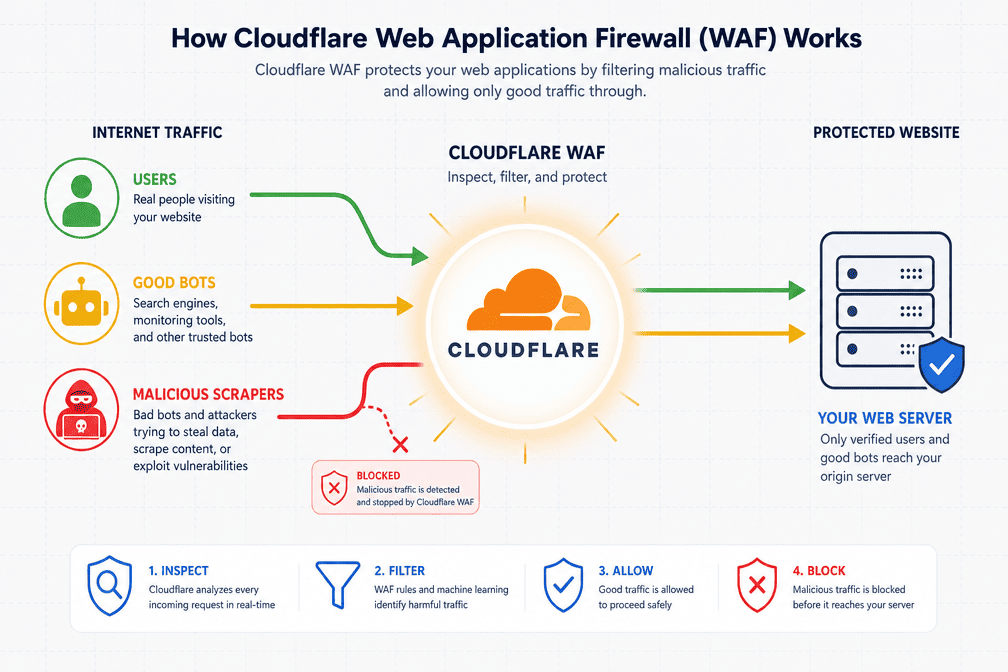
Cloudflare doesn’t host most of the sites that use it — it sits in front of them as a reverse proxy, which means every request a visitor sends, human or automated, passes through Cloudflare’s edge network before it ever reaches the origin server. That position gives Cloudflare visibility into billions of requests a day across a huge share of the web, and it uses that visibility to build models of what “normal” traffic looks like for a given site.
Scrapers get flagged for reasons that have nothing to do with malice:
- Load. A script firing hundreds of requests a minute can strain server resources in a way a human browsing session never would.
- Content value. Product catalogs, pricing tables, and original articles represent real investment, and site owners don’t love watching competitors pull that data automatically.
- Security overlap. The same detection systems that catch scrapers also catch credential-stuffing bots and vulnerability scanners, so Cloudflare’s defaults tend to err on the side of caution.
The practical result is a filtering system a Web Application Firewall paired with behavioral bot management that tries to separate “this looks like a person” from “this looks like a script,” and routes each down a different path.
What Cloudflare Actually Checks
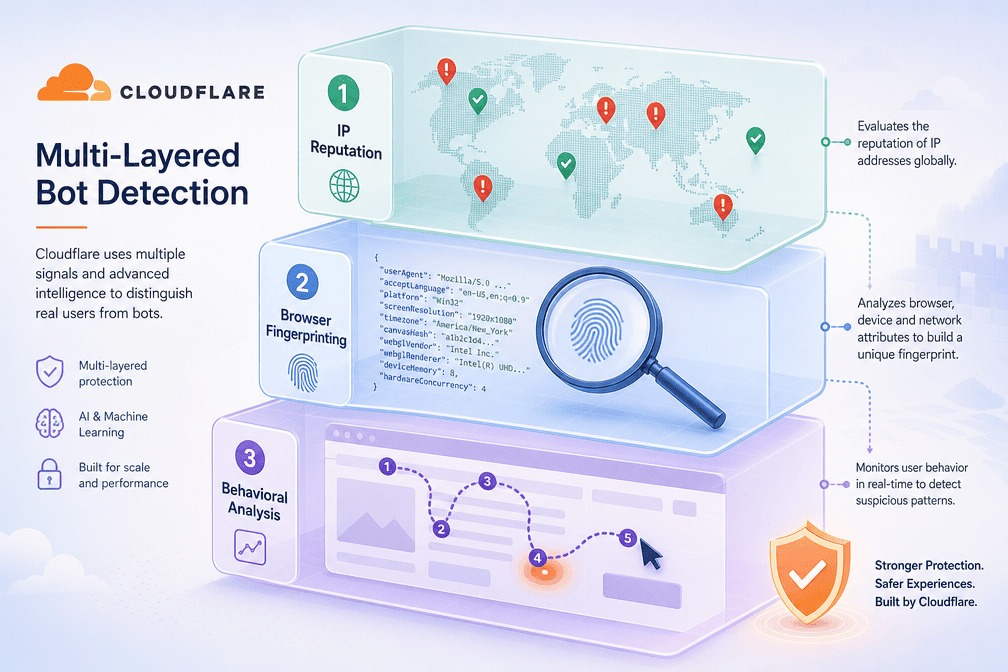
Cloudflare doesn’t rely on one signal. It stacks several, and a request only needs to trip a few of them before it gets challenged or blocked outright.
IP Reputation Comes First
Every incoming IP gets scored against a history of prior behavior. Addresses tied to spam campaigns, DDoS traffic, or known botnets get flagged immediately. Datacenter ranges — AWS, Google Cloud, Azure, and similar — are treated with suspicion by default, since almost no real person browses from a cloud server. Residential and mobile IPs are much harder to flag this way, though Cloudflare can still catch patterns like one IP hitting a site far more often than a typical visitor would, or the same address showing up across dozens of unrelated accounts. This is one of the reasons the quality of your residential proxies matters more than the sheer number of IPs you rotate through.
Fingerprinting Goes Deeper Than the User Agent
This is where a lot of scrapers get caught without ever realizing why. When a client opens a TLS connection, it sends a “Client Hello” message whose structure — cipher suites, extensions, ordering — varies by library. A Python requests session has a completely different signature than Chrome, even if both claim the same user agent string in their headers. Cloudflare has cataloged these signatures at scale and can flag a mismatch instantly.
For requests that do execute JavaScript, there’s a second layer: browser fingerprinting, which looks at canvas rendering behavior, installed fonts, WebGL output, and dozens of other environment details. Automation frameworks leave traces here too — certain JavaScript properties only exist when a page is being driven by Selenium or Puppeteer rather than a human-operated browser, and that’s the basis for most headless browser detection. If you want the deeper technical picture of how this fingerprinting actually works, it’s worth reading through the mechanics in detail rather than guessing.
Behavior Tells Its Own Story
Even a request with a perfect fingerprint can get flagged for how it behaves over time. A human session has pauses, scroll events, mouse movement, and a roughly logical path through a site. A scraper often jumps straight from URL to URL with no intermediate signals at all, and that gap between “how a person navigates” and “how a script navigates” is exactly what Cloudflare’s machine learning models are trained to notice. Requests that arrive far faster than a person could plausibly click also trip rate limiting thresholds, which brings its own specific error response.
The Challenge Layer: JavaScript, CAPTCHA, and Turnstile
When Cloudflare isn’t confident enough to block outright, it challenges instead. There are three tiers, roughly in order of how suspicious the traffic looks.
The JavaScript challenge is the “Checking your browser before accessing…” screen most people have seen at some point. Behind the scenes, Cloudflare sends obfuscated JavaScript that runs a set of computations and environment checks, resolving automatically for a real browser within a few seconds. Tools that can’t execute JavaScript at all — plain curl or requests calls — fail this instantly, which is one reason serious scraping work has largely moved toward full browser automation frameworks instead of raw HTTP libraries.
CAPTCHA and hCaptcha show up when the JavaScript check isn’t enough or the traffic already looks risky. Cloudflare moved away from Google’s reCAPTCHA years ago in favor of hCaptcha, asking users to solve visual puzzles that are trivial for a person and expensive for a bot to automate.
Turnstile, introduced in 2022, is Cloudflare’s attempt to fix the terrible user experience CAPTCHAs create. Instead of a puzzle, it runs quiet background checks — mouse movement, browser capability signals, timing — and for a legitimate visitor the whole thing resolves invisibly. Turnstile only escalates to a visible challenge as a last resort, and it’s become the default across most Cloudflare-protected properties precisely because it doesn’t punish real users for existing.
Reading the Error Codes
When a request does get blocked, the response code tells you roughly where things went wrong.
Error 1020 (Access Denied) means a specific firewall rule set by the site owner caught your request — bad IP reputation, wrong country, a suspicious fingerprint, or some combination. It’s Cloudflare’s most direct rejection, and it’s usually not something that resolves on retry.
Error 403 (Forbidden) overlaps with 1020 conceptually but can also come from application-level rules rather than Cloudflare’s edge logic. Understanding the distinction — and what each actually implies for your next request — is covered in more depth in this breakdown of 403 responses during scraping.
Error 1015 (Rate Limited) is the most straightforward: too many requests, too fast, from one source. The fix is almost always to slow down and add jitter between requests rather than trying to route around it.
Challenge loops happen when a browser or script keeps failing verification and Cloudflare keeps re-issuing the same test, which usually points to a fingerprint or JavaScript execution problem rather than a rate issue.
Scraping Responsibly on Cloudflare-Protected Sites
None of this is really a call to “beat” Cloudflare — it’s a call to scrape in a way that doesn’t need beating. A few practices matter more than any clever workaround:
- Start with
robots.txt. It’s the clearest signal a site gives about what it’s comfortable with, and respecting it is the baseline for ethical scraping under robots.txt rather than an optional courtesy. - Invest in proxy quality, not proxy volume. A handful of clean residential IPs will outperform a thousand flagged datacenter addresses every time.
- Use real browser automation for anything behind meaningful protection. Stealth-configured Playwright or Selenium sessions can execute JavaScript and pass basic challenges in a way that HTTP-only libraries never will.
- Vary your fingerprint, not just your headers. Rotating user agents alone does little if the TLS signature and header order stay static underneath — the whole profile needs to move together.
- Add real delay between requests. Something in the range of five to ten seconds, with randomness built in, mimics how people actually browse far better than a fixed interval does.
- Design for graceful failure. A scraper that recognizes a challenge page and pauses is far more sustainable long-term than one that keeps hammering a wall it can’t get through.

Where This Is Heading
Cloudflare’s defenses aren’t static, and the 2025-2026 push against AI crawlers is a good preview of the direction things are moving: more categorization of automated traffic, more granular controls for site owners, and less tolerance for automation that doesn’t identify itself honestly. For anyone doing this work long-term, the durable strategy isn’t finding this month’s bypass — it’s building pipelines that look, behave, and pace themselves like a careful human visitor would, because that’s the one thing detection systems have never been good at penalizing.
Frequently Asked Questions
Is it illegal to scrape a site protected by Cloudflare?
Not inherently. Cloudflare is a security layer, not a legal boundary, and scraping publicly available data is generally treated differently under the law than bypassing authentication or violating explicit terms of service. That said, the legal picture varies by jurisdiction and by what you’re doing with the data, so it’s worth reading through the actual legal considerations around web scraping before assuming a gray area is safe.
Why does my scraper get blocked even with a rotating proxy pool?
Because IP address is only one signal among several. If your TLS fingerprint, header order, and JavaScript environment all still scream “automation,” rotating IPs just gives Cloudflare a new address to flag under the same behavioral profile.
Does Cloudflare block all bots, including search engines?
No. Cloudflare distinguishes between bot categories, and as of its 2026 policy update it separates crawlers into Search, Agent, and Training classifications, generally keeping Search-purpose crawlers allowed by default while restricting Training and Agent bots on ad-monetized pages.
What’s the difference between a 403 error and a 1020 error?
Both indicate a blocked request, but 1020 specifically means a Cloudflare firewall rule caught you at the edge, while 403 can also originate from rules at the application layer behind Cloudflare. In practice, treat both as a sign to change your approach rather than retry immediately.
Can Turnstile be bypassed the way older CAPTCHAs were?
It’s meaningfully harder, since Turnstile evaluates a broad set of background signals rather than a single visual puzzle. Most reliable approaches rely on genuine browser automation with a clean fingerprint rather than any kind of direct bypass.
You May Also Like
 Web Scraping
What Is Web Scraping and How Does It Work? A Complete 2026 Guide
 Web Scraping
How to Handle CAPTCHA While Scraping: A 2026 Developer’s Guide
 Proxies
Best Proxies for Web Scraping In 2026: How I Choose the Right Provider and Proxy Type
 Web Scraping
How Google Maps Scraping Actually Works (And Where Most Attempts Go Wrong)
 Web Scraping
Scrap.io Review 2026: What This Google Maps Lead Generation Tool Actually Gets Right (and Where It Falls Short)
 Web Scraping
The 7 Best PHP Web Scraping Libraries of 2026: The Ultimate Guide
 Use Cases
Inside Kimwolf Traffic: How Residential Proxies Fuel Credential Stuffing, Web Scraping, & Fraud
 Web Scraping
User-Agent Rotation: What Actually Works (and What Google Detects in Milliseconds)
 Web Scraping