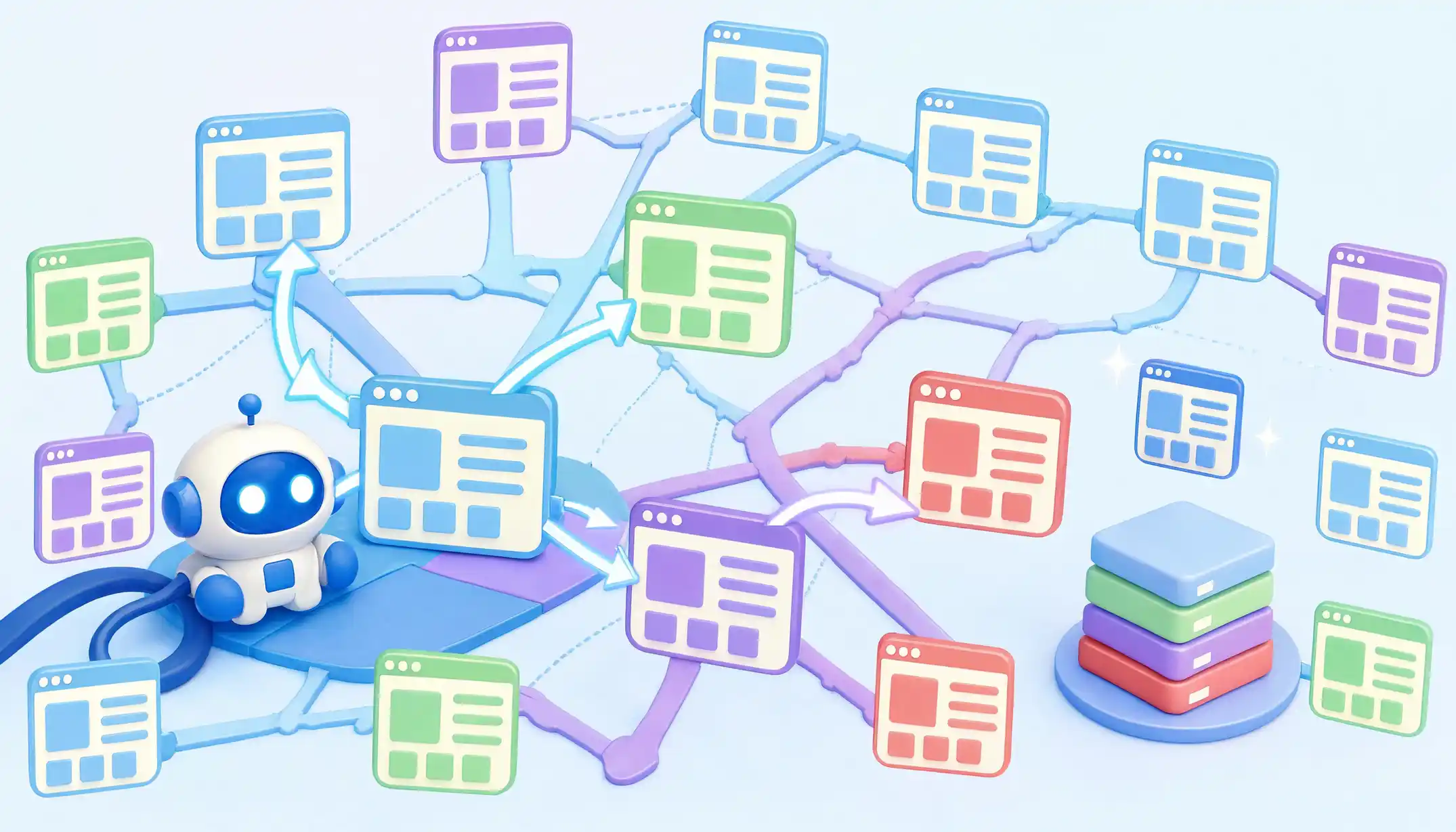
A page that has never been crawled may as well not exist. It can be beautifully written, technically perfect, and commercially valuable, yet remain completely invisible to the people searching for it. Search engines do not magically know your website is there. Something has to find it, read it, and decide it is worth remembering. That something is a web crawler.
For anyone working on a website, this is the part of SEO that quietly determines everything else. Rankings, traffic, conversions, organic visibility. All of it sits downstream of one unglamorous question. Did a crawler reach the page, understand it, and pass it on to the index? When the answer is no, no amount of keyword research or backlink building will rescue the situation.
The mechanics behind that simple question are far less tidy than the diagrams in most beginner guides suggest. Crawlers make tradeoffs. They skip pages. They wait days to render JavaScript. They quietly throttle slow servers. They ignore sitemaps when they feel like it. Understanding those behaviors is what separates someone who has read about SEO from someone who can actually fix a site that is failing to get indexed.
What follows is a working guide to web crawling the realities, the misconceptions, the tradeoffs, and the decisions that matter when you are responsible for a site’s visibility.
Key Takeaways
- Web crawling is the automated process by which bots discover and retrieve web pages, primarily by following links and reading sitemaps.
- Crawling and indexing are separate stages. A page can be crawled and still rejected from the index and this is more common than most site owners realize.
- Search engines assign a finite crawl budget to each site. Thin pages, duplicated content, and infinite URL parameters quietly burn through it.
- Web scraping vs. web crawling is a distinction worth understanding: crawlers map and discover, scrapers extract specific data from websites. The techniques overlap, but the intent is different.
- JavaScript-heavy sites pay a real cost in crawl efficiency. Rendering is expensive, and search engines defer it when they can.
- The most damaging SEO mistakes are usually structural and making good content hard to reach, not making bad content.
What Is Web Crawling?
Web crawling is the systematic, automated process of visiting web pages, reading their contents, and following the links they contain to discover more pages. The programs that perform this work are called crawlers, spiders, or bots; the terms are interchangeable across the industry, though crawler is the most precise.
A crawler begins with a list of known URLs, sometimes called a seed set. It fetches each URL, parses the HTML, extracts every link on the page, and queues those new links for future visits. Repeated across billions of pages and refreshed continuously, this loop is how search engines build a usable map of the public web.
In modern systems, the inputs are richer than just links. Crawlers also pull URLs from XML sitemaps, RSS feeds, internal historical records of previously seen pages, redirect chains, and signals from external sources. Google in particular blends data from across its ecosystem, though the exact contribution of each source is never fully disclosed.
The output of crawling is a vast collection of raw HTML and associated metadata. That collection then feeds the next stage, indexing, where the content is analyzed, deduplicated, ranked for quality, and stored in a structure that can be queried at search time.
Crawling Is Not Indexing
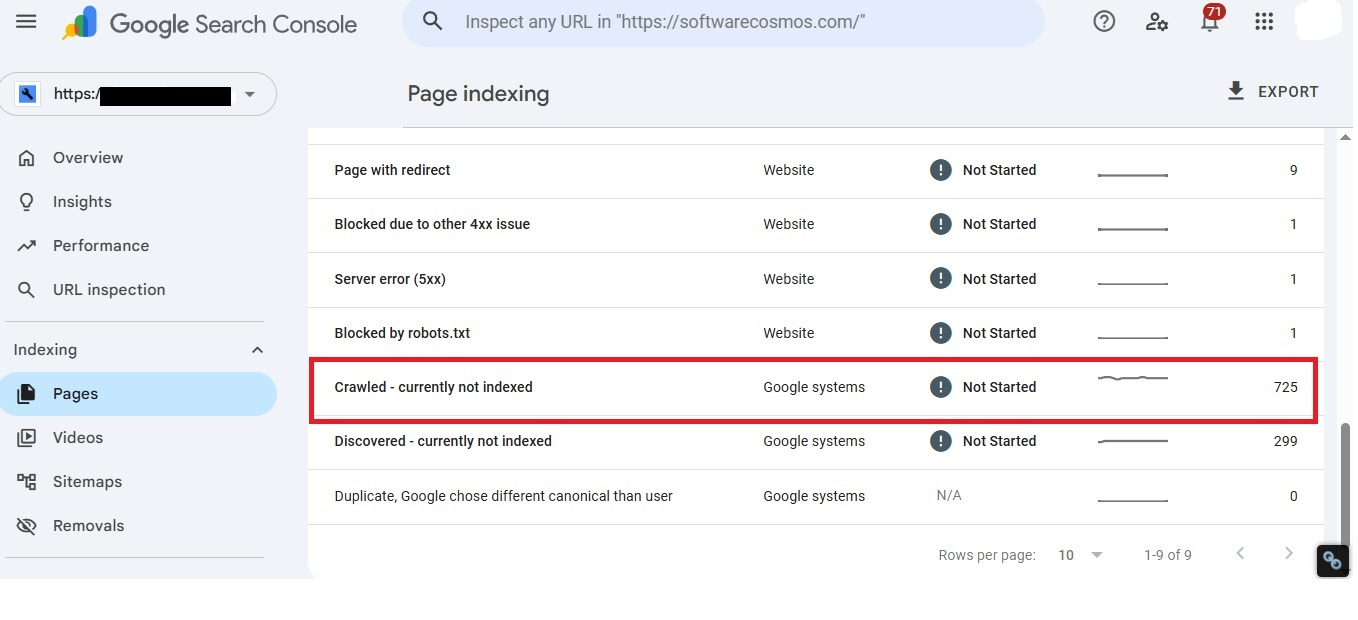
This distinction trips up almost every beginner, and a surprising number of intermediate practitioners. Crawling is discovery and retrieval. Indexing is understanding and storage. They are separate pipelines run by different systems, and a URL can succeed at one stage and fail at the other.
If you have ever opened Google Search Console and seen a long list of pages labeled Crawled – currently not indexed, you have seen this in action. The crawler did its job. It fetched the page, looked at it, and Google’s quality systems decided the content was not worth storing. That is a judgment about value, not a technical fault, and no amount of resubmitting sitemaps will reverse it. The fix lives in the content itself.
How Web Crawling Works: The Practical, Step-by-Step Blueprint for Technical SEO
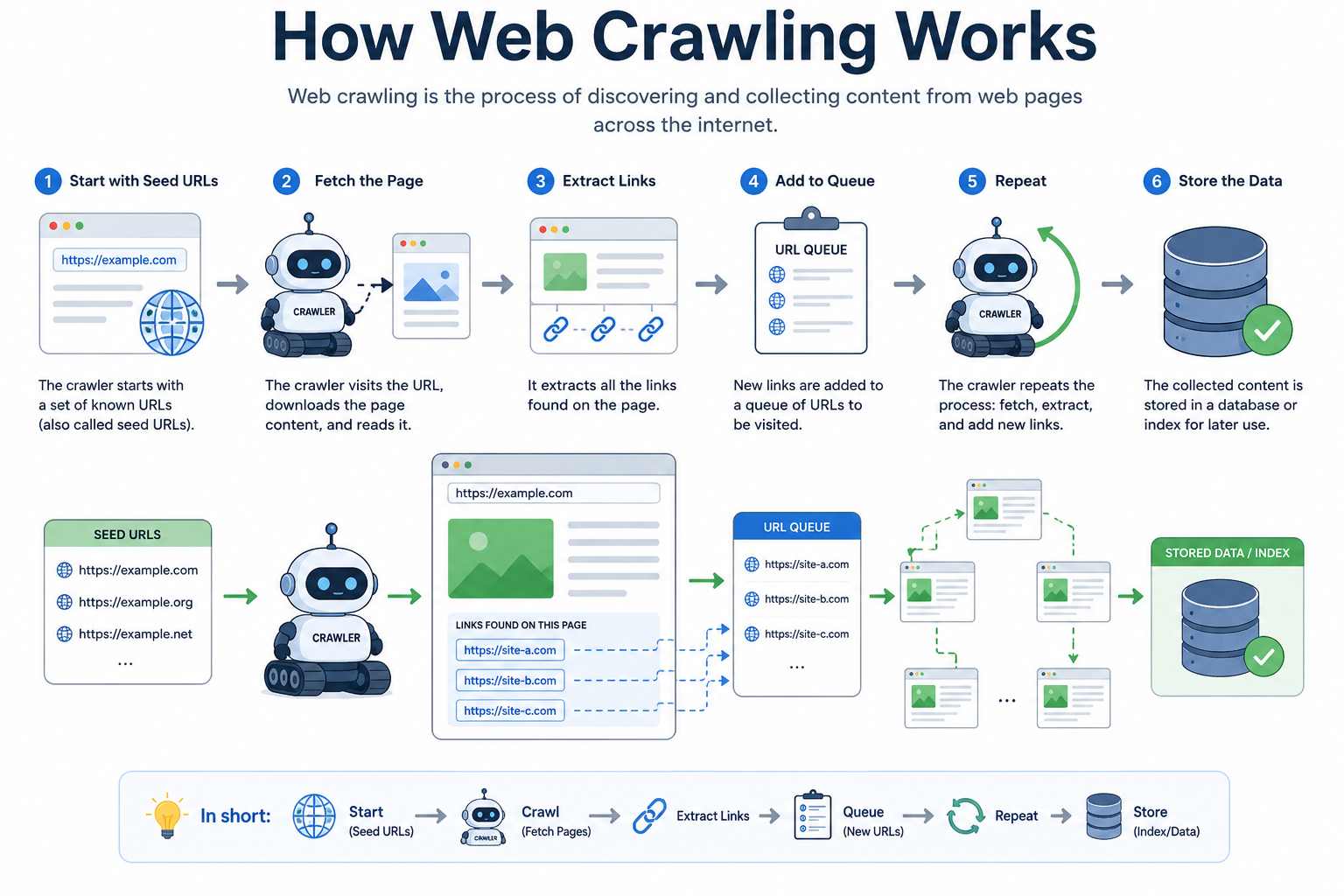
The textbook description of a crawler fetch, parse, follow links, repeat — is technically correct and practically incomplete. Real crawlers operate inside a tangle of priorities, constraints, and judgment calls. Here is a more honest view of what happens when Googlebot or Bingbot visits your site.
1. URL Discovery
Crawlers maintain a continuously updated frontier of URLs they intend to visit. URLs enter this frontier from several places:
- Links found on previously crawled pages
- XML sitemaps referenced in robots.txt or submitted through Search Console
- Redirects from URLs already known to the crawler
- External backlinks from other websites
- Manual submissions through tools like the URL Inspection feature
- Historical records, URLs the crawler has seen before and wants to recheck
A pattern worth noting from years of log analysis: on established sites, internal linking is by far the dominant discovery mechanism, not sitemaps. Sitemaps help search engines find new pages faster, but they do not communicate importance. A page buried five clicks deep in your site architecture, with no internal links pointing to it, will be treated as low priority, no matter how prominently it appears in your sitemap.
2. Prioritization
Crawlers do not treat every URL equally. They use signals to decide what to fetch first and how often to return:
- Authority signals derived from internal and external linking
- Freshness patterns — how often the page or its neighbors change
- Historical value — whether URLs in this section of the site have produced quality content before
- Site-wide trust factors, including server reliability and content quality across the domain
This is where crawl budget becomes relevant. Google has repeatedly said crawl budget is not a meaningful concern for sites with a few thousand URLs or fewer. For large e-commerce catalogs, news publishers, classifieds, and forums, it becomes one of the central problems in SEO. Faceted navigation that generates millions of parameter combinations is the classic example of a site eating its own crawl budget.
3. Fetching
The crawler issues an HTTP request, respecting:
- The robots.txt file, which can disallow specific paths
- HTTP response codes returned by the server
- Crawl-delay directives, where applicable (Bing honors them; Google does not)
- Server response time and apparent load
When a server consistently responds slowly or returns 5xx errors, Google automatically reduces the crawl rate as a protective measure. Most site owners never connect the dots, but a slow or unstable server can quietly suppress indexing across an entire site. Hosting quality is an SEO factor in ways that rarely show up in audits.
4. Parsing and Rendering
Two decades ago, a crawler downloaded HTML and was done. That world no longer exists. Much of the modern web is built on JavaScript frameworks like React, Vue, and Angular, where meaningful content is constructed in the browser after the initial HTML loads. The HTML a crawler downloads on first request often contains very little of what a user eventually sees.
Google handles this with a two-stage approach:
- First pass: Crawl the raw HTML, extract whatever links and content are visible without execution.
- Render queue: Pages requiring JavaScript are placed in a separate queue and processed by a headless Chrome instance later.
The render queue can lag by hours, sometimes days, and in problem cases far longer. If your site relies on client-side rendering, you are accepting a real structural disadvantage in how quickly and reliably your content gets indexed. Server-side rendering, static generation, or hybrid approaches like Next.js’s SSR mode largely solve the problem. Pure client-side rendering for content pages remains a quietly costly choice.
5. Link Extraction and Queueing
Once a page is fetched and rendered, the crawler extracts links, normalizes them (resolving relative URLs, applying canonical tags, handling redirects), checks them against URLs it has already seen, and adds new ones to the frontier. Then the cycle begins again.
Web Crawling vs. Web Scraping
These terms get used interchangeably, and they should not be. The distinction matters legally, ethically, and technically.
| Dimension | Web Crawling | Web Scraping |
|---|---|---|
| Goal | Discover and map web pages | Extract specific data points from pages |
| Scope | Broad — entire sites or the open web | Narrow — targeted fields like prices, reviews, and contact details |
| Typical operators | Search engines, archival projects, SEO auditing tools | Price monitoring tools, lead-gen services, research projects |
| Respect for robots.txt | Reputable crawlers comply | Mixed compliance; many scrapers ignore it |
| Legal exposure | Generally accepted as fair use | Increasingly contested, with active litigation in several jurisdictions |
| Output | An index of URLs and content | Structured datasets, often in CSV or JSON form |
In practice, web scraping uses crawling as a building block. A scraper has to find the pages before it can extract from them. The difference lies in intent and scope. A search engine crawler is interested in the page as a whole. A scraper wants the price in the third column of the second table.
Why Crawling Matters for SEO
Crawling sits upstream of every other SEO outcome. Rankings, click-through rates, conversion paths, and revenue attribution all assume the page is in the index. That assumption breaks more often than people realize.
The practical implications shift depending on the size and type of site.
| Site Type | Primary Crawling Concern | What Usually Goes Wrong |
|---|---|---|
| Small business site (under 500 URLs) | Discovery and freshness | New pages take weeks to appear because internal linking is weak |
| Blog or publisher | Crawl frequency on hub pages | Category pages buried; older content drops out of regular crawl rotation |
| E-commerce (thousands to millions of URLs) | Crawl budget allocation | Faceted navigation generates infinite URL variations; thin product pages dilute crawl priority |
| JavaScript SPA | Rendering reliability | Content arrives in the render queue, gets indexed slowly or inconsistently |
| Enterprise multi-region site | Hreflang handling and duplicate content | Wrong language version surfaced in search; duplicate URLs across subdirectories compete |
Expert Insights: What Experienced Practitioners Watch For
After enough technical audits, certain patterns become impossible to miss. These are the things that tend to matter far more than the topics that dominate SEO content.
Crawl budget is mostly a content quality problem, not a technical one. When Google reduces the crawl rate on a site, it is rarely because the robots.txt file is misconfigured. It is because the crawler has been fetching pages that turn out to be low value. Pruning thin content, consolidating duplicates, and tightening internal linking does more for crawl efficiency than any directive you can add to a configuration file.
Server log analysis tells the truth. Search Console reports what Google is willing to show you. Server logs show what is actually happening — which URLs Googlebot fetched, when, how often, and what response code was returned. Sites that have never looked at log files are working with incomplete information. For any site over a few thousand URLs, log analysis is not optional.
Discovery speed and indexing speed have decoupled. It used to be roughly true that if Google crawled a page, it would index it within days. That assumption no longer holds. Google now applies far more aggressive quality filtering before committing a page to the index. Getting crawled is the easy part. Getting kept is the harder one.
Internal linking is underused as a crawl control mechanism. Every internal link is a small signal about which pages matter. Sites that link generously to their most important content from across the site see those pages crawled more often and treated more favorably. Sites that bury important pages behind navigation menus and footers are quietly working against themselves.
The “noindex tag plus robots.txt block” combination is one of the most common technical mistakes. If you block a URL in robots.txt, the crawler will never reach it to see the noindex tag. The page can then remain indexed indefinitely based on external signals alone. The fix is to allow crawling and use the noindex tag, then add the robots.txt block only after the page has been removed from the index.
Common Mistakes Beginners Make
Patterns that come up again and again in audits:
- Treating sitemap submission as a guarantee of indexing. Sitemaps inform discovery; they do not compel indexing. A page in your sitemap that Google considers low quality will still be ignored.
- Confusing crawl errors with ranking problems. A few 404s in Search Console are normal. Obsessing over them while ignoring weak content is a misallocation of attention.
- Using robots.txt to fix duplicate content. Robots.txt prevents crawling, not indexing. To remove a page from the index, allow crawling and use noindex.
- Assuming JavaScript content will be indexed reliably. It often is, eventually. But “eventually” can mean weeks, and reliability varies by site and section.
- Ignoring server response time. A site that takes three seconds to respond is being crawled less frequently than one that responds in 300 milliseconds. The difference compounds over time.
- Building infinite spaces with URL parameters. Filters, sort orders, session IDs, and pagination combinations can generate millions of URLs from a handful of real pages. Crawlers waste budget exploring them, and quality signals dilute.
- Submitting URLs manually instead of fixing the underlying discovery problem. If a page needs to be manually submitted to be found, internal linking has failed somewhere upstream.
Practical Recommendations
A short framework for thinking about crawling on your own site:
- Audit what is actually getting crawled. Pull server logs or use a log analysis tool. Identify which URLs Googlebot visits most often and whether those URLs match your business priorities.
- Map your internal linking against your priority pages. If your most important pages do not receive the most internal links, restructure.
- Eliminate or consolidate thin content. Pages that exist but offer little value drag down crawl efficiency and overall site quality signals.
- Control URL parameters deliberately. Use canonical tags, URL parameter handling in Search Console, and consistent linking practices to prevent infinite crawl spaces.
- Test how your site renders without JavaScript. Disable JS in your browser and check whether the content and links a search engine needs are still present. If not, consider server-side rendering for content-critical pages.
- Monitor server response times as an SEO metric, not just a UX metric. Slow servers reduce crawl rate.
- Verify your robots.txt and noindex strategy. A surprising number of sites are accidentally blocking pages they want indexed, or trying to deindex pages while also blocking the crawler from seeing the noindex directive.
Common FAQ About Web Crawling:
How often do search engines crawl my site?
It varies enormously. A high-authority news site may be crawled continuously. A small business site with few external links may be crawled every few weeks. Crawl frequency is a function of perceived value, update frequency, and server reliability. Looking at the Crawl Stats report in Google Search Console gives you a reasonable baseline for your own site.
Can I force Google to crawl a page?
You can request crawling through the URL Inspection tool in Search Console, and it usually works for individual URLs. There is no equivalent at scale. For ongoing discovery, strong internal linking and a clean sitemap are the durable answer. Manual submission is a patch, not a strategy.
Does blocking a page in robots.txt remove it from Google’s index?
No. Robots.txt only prevents future crawling. A blocked page can remain indexed for a long time based on external signals like backlinks pointing to it. To remove a page from the index, allow crawling and apply a noindex meta tag, or use the URL Removal tool in Search Console for faster results.
What is the difference between a web crawler and a search engine?
A crawler is one component inside a search engine. The search engine also includes the indexing system, the ranking algorithms, the query processor, and the user interface. The crawler’s only job is to discover and fetch pages. Everything that happens after that — understanding, storing, ranking, serving — is handled by other systems.
Are all bots and spiders the same?
No, and the distinction matters. Googlebot, Bingbot, and similar crawlers operated by major search engines are well-behaved and follow standards like robots.txt. There is also a long tail of bots — SEO tool crawlers, scraping services, AI training crawlers, security scanners, and outright malicious bots. They vary widely in their respect for site rules and in the load they place on servers.
Does web crawling cost the site being crawled anything?
Yes, in server resources. Every crawl request consumes bandwidth and CPU. For most sites this is negligible, but aggressive crawling from less reputable bots can become a real performance problem. Rate limiting, firewall rules, and robots.txt directives are the standard tools for managing it.
How do I know if my JavaScript content is being crawled and indexed?
Use the URL Inspection tool in Search Console and view the rendered HTML. If the content you care about is missing from the rendered version, Google is not seeing it reliably. Testing with the Mobile-Friendly Test or Rich Results Test gives similar signals. For larger sites, comparing your raw HTML against your rendered HTML across a sample of URLs reveals systemic problems.
What happens to my old pages — do crawlers keep visiting them?
Yes, but at decreasing frequency if they do not change and do not attract new signals. Pages that stop receiving internal links, external links, or content updates eventually drop into a slower crawl cadence. In some cases, they can be dropped from the index entirely if Google decides they no longer add value.
Conclusion
Web crawling is the part of SEO that does its work in the background, which is exactly why it is so often misunderstood. The crawlers do not announce themselves. They do not explain their decisions. They simply visit, judge, and move on, and the consequences show up weeks later in traffic reports that nobody can quite explain.
The practitioners who get this right are not the ones who memorize directives or chase the latest tactical advice. They are the ones who think about their site the way a crawler does — as a graph of linked pages with varying levels of quality, freshness, and importance. They make their best content easy to find, their priorities visible through internal linking, and their infrastructure reliable enough to be trusted.
Everything else in SEO becomes easier when crawling is handled well. Content gets discovered faster. Updates propagate sooner. Quality signals accumulate where they should. The work is rarely glamorous and almost never the thing clients ask about, but it is the foundation that the rest of the discipline sits on. Sites that respect that foundation tend to outperform sites that do not, year after year, regardless of which ranking factor is fashionable at the moment.
You May Also Like
 Web Scraping
What Is Web Scraping and How Does It Work? A Complete 2026 Guide
 Web Scraping
How to Handle CAPTCHA While Scraping: A 2026 Developer’s Guide
 Proxies
Best Proxies for Web Scraping In 2026: How I Choose the Right Provider and Proxy Type
 Web Scraping
Cloudflare Blocking Scrapers Explained: Your 2026 Guide to Anti-Bot Protection
 Web Scraping
How Google Maps Scraping Actually Works (And Where Most Attempts Go Wrong)
 Web Scraping
Scrap.io Review 2026: What This Google Maps Lead Generation Tool Actually Gets Right (and Where It Falls Short)
 Web Scraping
The 7 Best PHP Web Scraping Libraries of 2026: The Ultimate Guide
 Use Cases
Inside Kimwolf Traffic: How Residential Proxies Fuel Credential Stuffing, Web Scraping, & Fraud
 Web Scraping