
Ask ten people what “scraping Google Maps” means and you’ll get ten different mental models — a Chrome extension clicking through listings, a Python script hitting some hidden endpoint, a SaaS dashboard that just spits out a spreadsheet. All three exist. All three work differently, break differently, and get blocked differently. Most write-ups on this topic skip straight to “here’s a tool, here’s the CSV” without explaining why Google Maps is a harder scraping target than a typical e-commerce site, or why the same script that worked last month might silently return empty results today.
This is the part usually left out. Not a tool roundup — the mechanics underneath it.
What You’re Actually Extracting
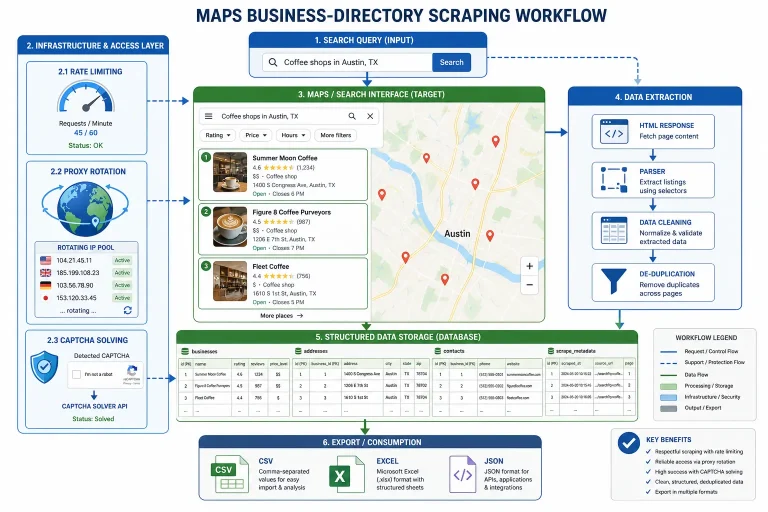
Google Maps isn’t a static page with business listings printed in the HTML. It’s a JavaScript application that renders a results panel client-side, lazy-loads additional entries as you scroll, and assigns each business an internal place ID that ties together its name, coordinates, category, hours, and review data behind the scenes. Understanding what web scraping actually is and how it works at a foundational level matters here, because Google Maps sits at the harder end of that spectrum — you’re not fetching HTML and running a regex over it, you’re driving a browser (or emulating one closely enough) to let the JavaScript execute, then reading the DOM after the fact.
There’s a related distinction worth being precise about: scraping and crawling aren’t the same activity. A crawler discovers and indexes pages; a scraper extracts structured fields from a page it already knows about. Most “Google Maps scrapers” are doing both at once — crawling search result pages to discover place IDs, then scraping each one for phone numbers, categories, and ratings. Tools that maintain a standing index (rather than hitting Google fresh on every query) are really running a crawler in the background and a scraper on demand, which is part of why they can return more results than a live search ever will.
The Three Ways People Actually Do This
The official Google Places API. This is the compliant, rate-limited, pay-per-call option. It’s reliable and won’t get your IP blocked, but it’s also expensive at volume, caps how many reviews you can pull per listing unless you own the business profile, and simply doesn’t expose some of the fields marketers actually want (classified emails, tech stack, ad pixels — none of that lives in Google’s own data model).
A custom headless browser script. This is the DIY path, and it means understanding what a headless browser is actually doing under the hood: launching a real browser engine without a visible window, so JavaScript executes exactly as it would for a human visitor. Most people building this today reach for Playwright over older alternatives, though plenty of production scrapers still run on Selenium, and the honest comparison between Playwright, Selenium, and Puppeteer comes down to how much you value modern auto-wait behavior versus an ecosystem with fifteen years of Stack Overflow answers behind it.
A managed SaaS scraper. This is the “someone already solved the maintenance problem” option — you get a search box and a CSV, and the anti-blocking, pagination, and parsing logic all happen on someone else’s infrastructure. It costs more per lead than the DIY route on paper, but the real comparison isn’t per-lead cost, it’s per-lead cost plus the engineering hours spent fixing broken selectors every time Google ships a front-end update. If you’re weighing that trade-off, it’s worth looking at how the current crop of Google Maps scrapers actually differ from each other, because “managed SaaS” isn’t one category — some are thin wrappers around the same anti-bot problems you’d face doing it yourself, and some have genuinely built their own indexed database that sidesteps live scraping entirely.
Why You Get Blocked (And Why It’s Not Random)
Getting blocked scraping Google Maps rarely feels random once you understand what’s being checked. Google’s anti-bot systems layer several signals on top of each other, and any one of them failing can trigger a CAPTCHA or a silent data degradation (results that look valid but are subtly wrong or truncated).
The first layer is the user agent string — a static or repeated one is an instant tell, which is why serious scraping setups implement user agent rotation as a baseline, not an optional extra. The second layer is IP reputation. Datacenter IPs get flagged fast at any real volume, which is the entire reason residential proxies exist as a category — they route your requests through IP addresses tied to real consumer ISPs, which is a much harder signal to distinguish from genuine traffic.
The third and increasingly dominant layer is browser fingerprinting — canvas rendering quirks, installed fonts, WebGL parameters, and dozens of other passive signals that identify a browser instance even when the IP and user agent both look clean. Understanding how fingerprinting works in web scraping is no longer optional if you’re running anything at scale, and the WebGL-specific fingerprinting techniques sites use are a good example of just how granular this detection has gotten — you can rotate your IP and user agent perfectly and still get flagged because your headless browser renders a test image slightly differently than a real Chrome install would.
When you do get blocked, the two error codes worth knowing on sight are a 403 and a 429. A 403 usually means you’ve been identified and denied outright — check the specific causes and fixes for a 403 Forbidden response rather than assuming it’s unfixable. A 429 is a different animal entirely: it’s Google (or any server) telling you explicitly that you’re going too fast, and the meaning behind a 429 rate-limit error is usually the first sign your request pacing needs work, not your proxy pool.
The Result-Cap Problem Isn’t a Bug — It’s a Deliberate Ceiling
Run a broad search on Google Maps and you’ll notice the results panel stops loading somewhere around 120 entries, regardless of how many businesses actually match your query in that area. This isn’t a scraping obstacle that a clever selector can route around — it’s a hard limit baked into how the results panel paginates. The only real ways past it are narrowing your search geographically (searching by neighborhood instead of city, city instead of state) to stay under the cap per query, or working from a pre-built index that was assembled by running thousands of narrow queries ahead of time rather than one broad one live. That second approach is exactly what separates tools that claim “unlimited results” from ones that are just running the same live query you would — worth confirming before you trust a vendor’s volume claims at face value.
Parsing: The Unglamorous Half of the Job
Getting the raw page to load is maybe half the problem. The other half is reliably turning a rendered DOM into structured rows — name, address, phone, category, rating — without your extraction breaking every time Google renames a CSS class (and they do this often enough that hardcoded selectors have a shelf life measured in weeks, not years). This is where data parsing in web scraping becomes its own discipline separate from the fetching step: building selectors resilient to structural change, handling missing fields gracefully instead of throwing an exception on the first business without a listed phone number, and normalizing inconsistent formats (a phone number written three different ways across three listings) into something a CRM can actually use.
Pacing Matters More Than People Think
Speed feels like the goal when you’re scraping — more requests per minute, more data per hour. In practice, request pacing is the single most common reason otherwise well-built scrapers get flagged. Sending requests at a constant, mechanical interval is itself a detectable pattern; real human browsing is bursty and irregular. Building in randomized delays and respecting rate limits in scraping workflows isn’t just about avoiding a 429 — it’s about not looking like a bot in the first place, which is a distinct and arguably more important goal than simply not crashing into a hard limit.
The Compliance Question Nobody Wants to Answer Precisely
Here’s the honest version, not the hedge-everything version: scraping publicly visible business data — names, addresses, phone numbers listed on a public page — sits on reasonably solid legal footing in the US following the hiQ Labs v. LinkedIn Ninth Circuit ruling, which found that accessing public data doesn’t itself violate the Computer Fraud and Abuse Act. That said, violating a platform’s terms of service is still a live contractual risk even where it isn’t criminal, and ignoring a site’s robots.txt directives — while not automatically illegal — signals intent in a way that matters if a dispute ever escalates. The full picture, including how GDPR’s legitimate interest basis applies to B2B contact data specifically, is worth reading in detail rather than assuming from a single sentence; the legal considerations around web scraping get genuinely nuanced once you’re combining data from multiple jurisdictions in one export.
Picking an Approach Based on What You’re Actually Trying to Do
If you need a few hundred leads for a one-off campaign, the official API or a narrow manual search is fine — the infrastructure investment of building a real scraper isn’t worth it for that volume. If you’re running this weekly at city or country scale, the calculus flips: the maintenance burden of a self-built Playwright or Selenium script (broken selectors, proxy costs, CAPTCHA-solving subscriptions) usually exceeds what a managed platform charges per export once you count engineering hours honestly. And if your prospecting needs extend past Google Maps into other platforms entirely, that’s a different decision tree involving broader scraping infrastructure rather than a Maps-specific tool at all.
The mistake I see most often isn’t picking the “wrong” tool — it’s picking a scale of solution that doesn’t match the actual scale of the problem. A three-person agency running one campaign a quarter doesn’t need the same setup as a data team running continuous extraction across 40 markets, and a lot of the frustration people report with scraping in general traces back to that mismatch rather than any single tool being bad.
Frequently Asked Questions
Is scraping Google Maps legal?
Extracting publicly visible business data sits on defensible legal ground in the US under precedent from hiQ v. LinkedIn, though it can still conflict with Google’s terms of service as a contractual matter. Compliance obligations shift depending on jurisdiction and how the data is subsequently used, particularly for outreach.
Why does my Google Maps scraper keep getting blocked?
Usually a combination of a static or repeated user agent, a flagged datacenter IP, mechanical request timing, or browser fingerprinting signals that don’t match genuine human browsing. Fixing one of these in isolation often isn’t enough — blocking systems typically weigh several signals together.
Can you get more than 120 results from a single Google Maps search?
Not through the live results panel — that cap is structural, not a bug you can route around with a better selector. Getting more requires either narrowing your search geographically into smaller sub-queries or pulling from a pre-built index assembled from many narrow queries run in advance.
Should I build my own Google Maps scraper or use an existing tool?
It depends on volume and frequency. Occasional, small-scale extraction favors building it yourself or using the official API. Regular, large-scale extraction usually favors a managed platform once you account for the ongoing engineering time spent on proxy management and selector maintenance rather than just the sticker price per lead.
What’s the difference between a 403 and a 429 error when scraping?
A 403 generally means you’ve been identified and denied access outright. A 429 means the server recognizes you but is telling you explicitly to slow down — it’s a pacing signal, not necessarily a block, and often the easier of the two to resolve.
You May Also Like
 Web Scraping
What Is Web Scraping and How Does It Work? A Complete 2026 Guide
 Web Scraping
How to Handle CAPTCHA While Scraping: A 2026 Developer’s Guide
 Proxies
Best Proxies for Web Scraping In 2026: How I Choose the Right Provider and Proxy Type
 Web Scraping
Cloudflare Blocking Scrapers Explained: Your 2026 Guide to Anti-Bot Protection
 Web Scraping
Scrap.io Review 2026: What This Google Maps Lead Generation Tool Actually Gets Right (and Where It Falls Short)
 Web Scraping
The 7 Best PHP Web Scraping Libraries of 2026: The Ultimate Guide
 Web Scraping
User-Agent Rotation: What Actually Works (and What Google Detects in Milliseconds)
 Web Scraping
10 Best Google Maps Scrapers in 2026: What We Actually Recommend After Testing
 Web Scraping