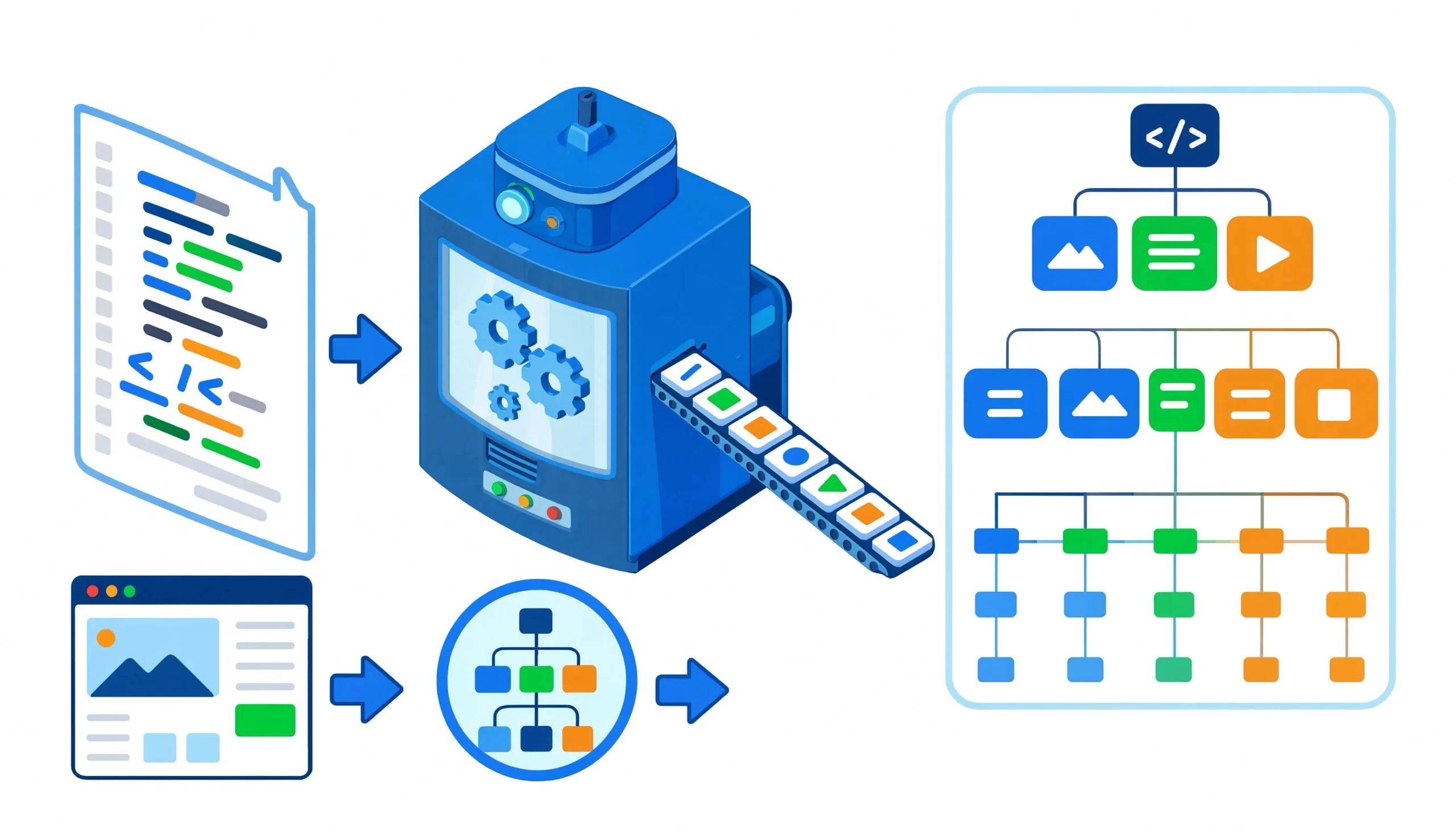
The web scraping market is projected to hit \$1.17 billion in 2026, growing at a 13.78% CAGR toward \$2.23 billion by 2031. Behind every scraper pulling product prices, news articles, or real estate listings sits an HTML parser. It turns raw markup into something your code can navigate, search, and extract. Pick the wrong one and your pipeline grinds to a halt. Pick the right one and you barely notice it exists.
This guide breaks down the libraries that matter across Python, JavaScript, Java, and Ruby. Each one is benchmarked with real numbers where available, explained with working code, and matched to the use case where it performs best.
What Is an HTML Parser?
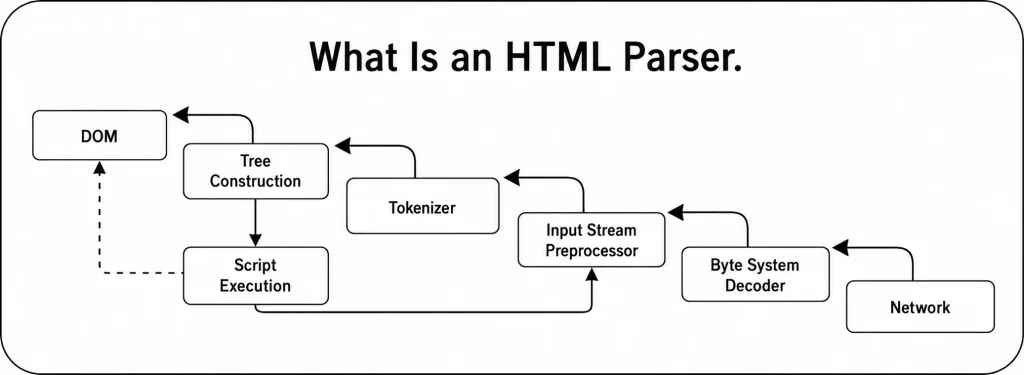
An HTML parser is software that reads raw markup and builds a structured tree representation of the document. This tree is usually the Document Object Model, or DOM, where each tag becomes a node, text becomes leaf nodes, and attributes hang off the nodes as properties.
Without a parser, you are left treating HTML as a giant string. You could search for text with regular expressions, but HTML is not a regular language. Tags nest inside each other. Attributes change order. Browsers auto-close tags that were left open. A parser handles all of that complexity and gives you an API to query the tree by tag name, class, ID, or CSS selector.
Most parsers also clean up broken HTML. Real websites are messy. Tags go unclosed. Attributes lack quotes. Nesting is wrong. A good parser reads the page the same way a browser does and produces a predictable tree so your extraction logic does not crash on the first malformed page.
What We Consider When Evaluating the Best HTML Parsing Libraries
Speed matters, but it is not the only factor. A parser that processes fifty pages per second is useless if it chokes on the first unclosed div tag. Here is what actually counts:
- Raw parsing speed: How many pages can the library process per second on a single CPU core? This is measured on real-world HTML, not toy documents.
- Memory footprint: Some parsers build a full DOM tree in memory. Others stream the document or use native C structures. When you parse millions of pages, the difference between 10 MB and 100 MB per page adds up fast.
- Selector support: CSS selectors are familiar. XPath is more powerful for complex queries. Some libraries support both. Some only support one. The best library for your project depends on how you prefer to query the tree.
- Tolerance for broken HTML: The web is not valid HTML. A parser that crashes on malformed markup is not suitable for scraping. We look at how each library handles unclosed tags, missing attributes, and incorrectly nested structures.
- Language and ecosystem fit: A Python team should not force Java into the stack just for a marginally faster parser. The best library is often the one that installs with a single command in your existing environment.
- API ergonomics: How long does it take to go from zero to extracted data? Some libraries need three lines of code. Others need twenty. Developer time is expensive, and a friendly API can outweigh a 2x speed difference on small projects.
The Parser Landscape at a Glance
| Library | Language | Parser Backend | Speed (Pages/Sec) | Ease of Use | Best For |
|---|---|---|---|---|---|
| Selectolax | Python | C++ (Modest/Lexbor) | 56 | Medium | Millions of pages, bulk parsing |
| lxml (raw) | Python | C (libxml2) | 44 | Medium | High-volume scraping, XPath queries |
| Parsel | Python | C (libxml2 via lxml) | ~44 | Medium | Scrapy users, CSS + XPath combined |
| BeautifulSoup + lxml | Python | C (libxml2) | 7 | High | Learning, prototyping, small-to-medium scale |
| BeautifulSoup + html.parser | Python | Pure Python | 5 | High | Quick scripts, no dependencies |
| BeautifulSoup + html5lib | Python | Pure Python | 3 | High | Browser-identical parsing, broken HTML |
| Cheerio | JavaScript | htmlparser2 / parse5 | ~40-50 | High | Node.js stacks, jQuery-style traversal |
| jsoup | Java | Custom Java parser | ~15-25 | High | Java/Android stacks, enterprise scraping |
| Nokogiri | Ruby | C (libxml2/libxslt) | ~20-30 | Medium | Ruby/Rails stacks, XPath + CSS support |
| html5lib | Python | Pure Python | 3 | High | Browser-identical parsing, edge-case HTML |
The gap between Selectolax and BeautifulSoup with html.parser is roughly 10x on a single document. On 100,000 pages, that is the difference between 8 minutes and 83 minutes of pure parse time.
Selectolax: The Speed King
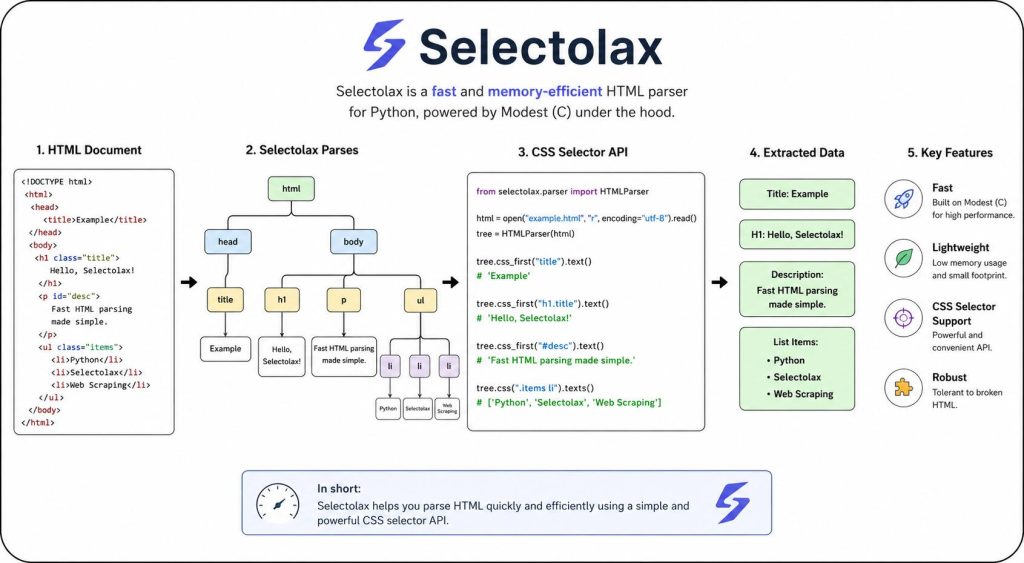
Selectolax is built on C++ parsing engines Modest and Lexbor, and skips the abstraction layers that slow down other libraries. It provides a minimal API focused on CSS selector extraction.
How It Works
from selectolax.parser import HTMLParser

html = '''
<div class="product-card" data-id="12345">
    <h2 class="product-title">Wireless Headphones Pro</h2>
    <span class="price">$199.99</span>
    <div class="rating">
        <span class="stars">4.5</span>
        <span class="count">(2,847 reviews)</span>
    </div>
</div>
'''

tree = HTMLParser(html)

# Extract single elements
title = tree.css_first('h2.product-title')
price = tree.css_first('span.price')

if title and price:
    print(f"Title: {title.text(strip=True)}")
    print(f"Price: {price.text(strip=True)}")

# Iterate over multiple elements
for card in tree.css('div.product-card'):
    t = card.css_first('h2.product-title')
    p = card.css_first('span.price')
    if t and p:
        print(f"{t.text(strip=True)}: {p.text(strip=True)}")
The API is intentionally minimal. css() returns a list of matching nodes. css_first() returns the first match or None. Text extraction uses the text() method with an optional strip parameter.
Performance
In independent benchmarks parsing 11,824 real-world pages, Selectolax with the Modest backend processed 56 pages per second. That makes it the fastest parser tested, roughly 8x faster than BeautifulSoup with the lxml backend and 11x faster than BeautifulSoup with html.parser.
| Parser | Time (Seconds) | Pages/Second |
|---|---|---|
| Selectolax (Modest) | 211 | 56 |
| Selectolax (Lexbor) | 274 | 43 |
| lxml (raw) | 266 | 44 |
| BeautifulSoup (lxml) | 1,694 | 7 |
| BeautifulSoup (html.parser) | 2,292 | 5 |
| BeautifulSoup (html5lib) | 4,575 | 3 |
When to Use Selectolax
- You are parsing millions of pages and the parser is the bottleneck.
- You only need CSS selector extraction, not complex DOM traversal.
- Memory usage is constrained. Selectolax has a smaller footprint than BeautifulSoup.
- You are comfortable with a minimal API that does less hand-holding.
The Hybrid Pattern
A trick many high-volume scrapers use: parse the full HTML with Selectolax to extract the section you care about, then hand that smaller fragment to BeautifulSoup for the actual data extraction. You get Selectolax’s speed where it matters and BeautifulSoup’s ergonomics where it does not:
from selectolax.parser import HTMLParser
from bs4 import BeautifulSoup

tree = HTMLParser(full_html)

# Extract just the product section with Selectolax (fast)
product_section = tree.css_first('div#product-detail')
if product_section:
    # Parse the smaller fragment with BeautifulSoup (friendly)
    soup = BeautifulSoup(product_section.html, 'lxml')
    title = soup.find('h1', class_='product-title').get_text(strip=True)
    description = soup.find('div', class_='description').get_text(strip=True)
lxml: The Power User’s Choice
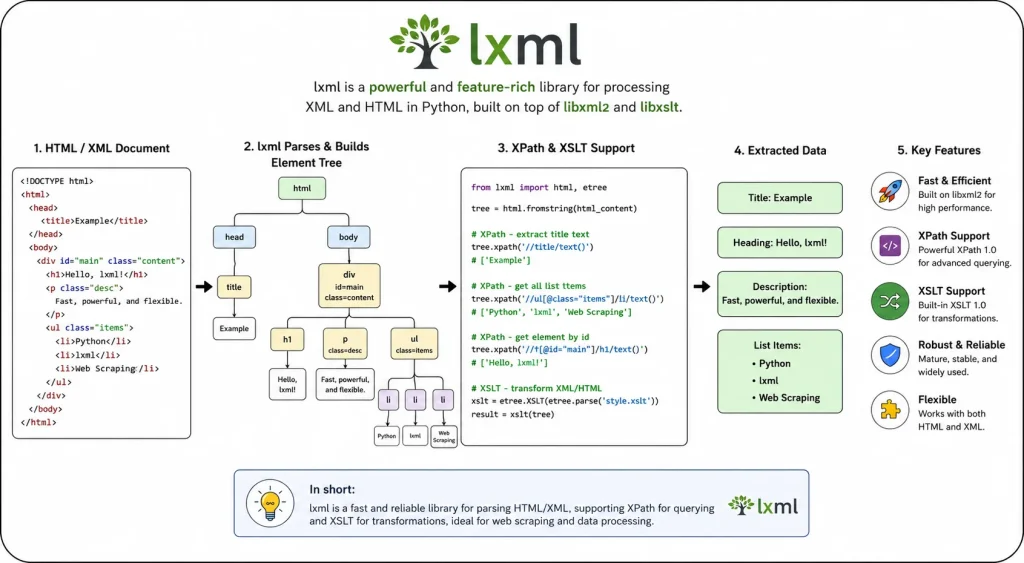
lxml is a Python binding for the C libraries libxml2 and libxslt. It provides both HTML and XML parsing with full support for XPath 1.0 and CSS selectors via the cssselect package.
XPath: Precision Selection
XPath is a query language for XML that works equally well on HTML. It is more powerful than CSS selectors for complex queries involving parent-child relationships, text content matching, and positional selection.
from lxml import html

tree = html.fromstring(html_string)

# Select by XPath
title = tree.xpath('//h2[@class="product-title"]/text()')[0].strip()
price = tree.xpath('//span[@class="price"]/text()')[0].strip()

# Select nested elements
rating = tree.xpath('//div[@class="rating"]/span[@class="stars"]/text()')[0]

# Select by attribute
product_id = tree.xpath('//div[@class="product-card"]/@data-id')[0]

# Select all product cards and iterate
for card in tree.xpath('//div[@class="product-card"]'):
    title = card.xpath('.//h2[@class="product-title"]/text()')[0].strip()
    price = card.xpath('.//span[@class="price"]/text()')[0].strip()
    print(f"{title}: {price}")
The .// prefix in inner queries tells XPath to search within the current element, not the entire document. This is essential when iterating over a set of elements and extracting data from each one.
CSS Selectors with lxml
If you prefer CSS selector syntax, lxml supports it through the cssselect package:
from lxml import html
from lxml.cssselect import CSSSelector

tree = html.fromstring(html_string)

title_sel = CSSSelector('.product-title')
price_sel = CSSSelector('.price')

title = title_sel(tree)[0].text_content().strip()
price = price_sel(tree)[0].text_content().strip()
When to Choose lxml Over BeautifulSoup
- You are parsing more than 10,000 pages per hour and the parser is the bottleneck.
- You need XPath’s advanced querying capabilities.
- Memory efficiency matters. lxml uses native C data structures and creates Python objects only on demand.
Performance
In the 11,824-page benchmark, raw lxml processed 44 pages per second. That is roughly 6x faster than BeautifulSoup with the lxml backend, despite both using the same underlying C parser. The difference is BeautifulSoup’s Python-level tree construction overhead.
Parsel: The Scrapy Companion
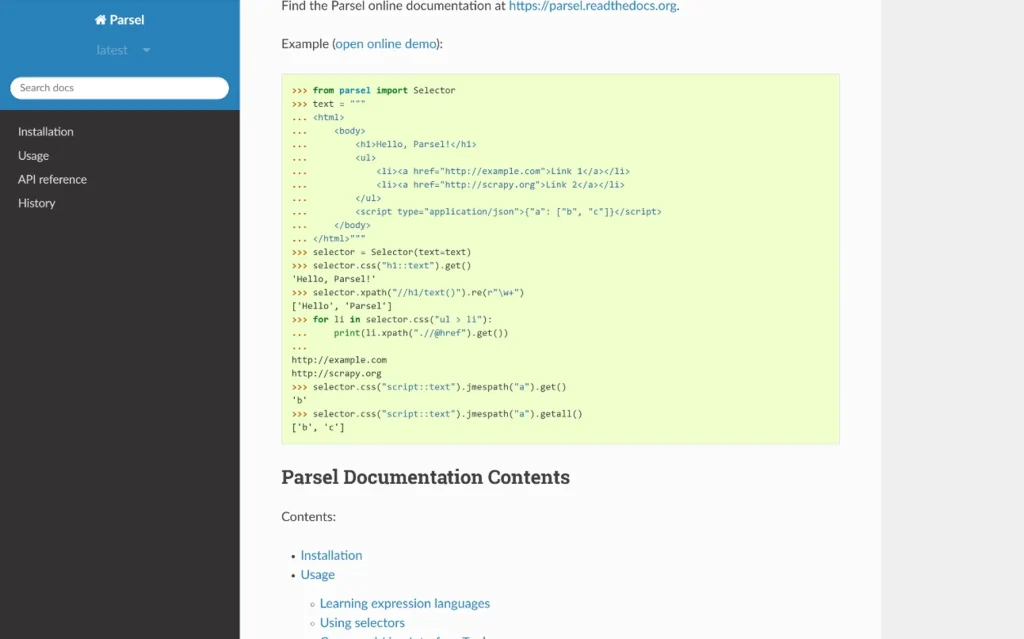
Parsel is the parsing library built into Scrapy, the most widely used Python web scraping framework. It wraps lxml and provides a unified interface for both XPath and CSS selectors.
from parsel import Selector

selector = Selector(text=html_string)

# CSS selectors
title = selector.css('.product-title::text').get().strip()
price = selector.css('.price::text').get().strip()

# XPath
title = selector.xpath('//h2[@class="product-title"]/text()').get().strip()

# Extract all matches
products = []
for card in selector.css('div.product-card'):
    products.append({
        'title': card.css('.product-title::text').get(),
        'price': card.css('.price::text').get(),
    })
The ::text pseudo-element extracts text content directly. The .get() method returns the first match or None. The .getall() method returns a list of all matches.
When to Use Parsel
- You are already using Scrapy for your scraping framework.
- You want both XPath and CSS selectors in a single, consistent API.
- You do not need DOM traversal beyond what selectors provide.
Performance
Parsel performs roughly on par with raw lxml because it is a thin wrapper around it. In parsing benchmarks, it clocks in at approximately the same speed as lxml.html.
BeautifulSoup: The Default Starting Point
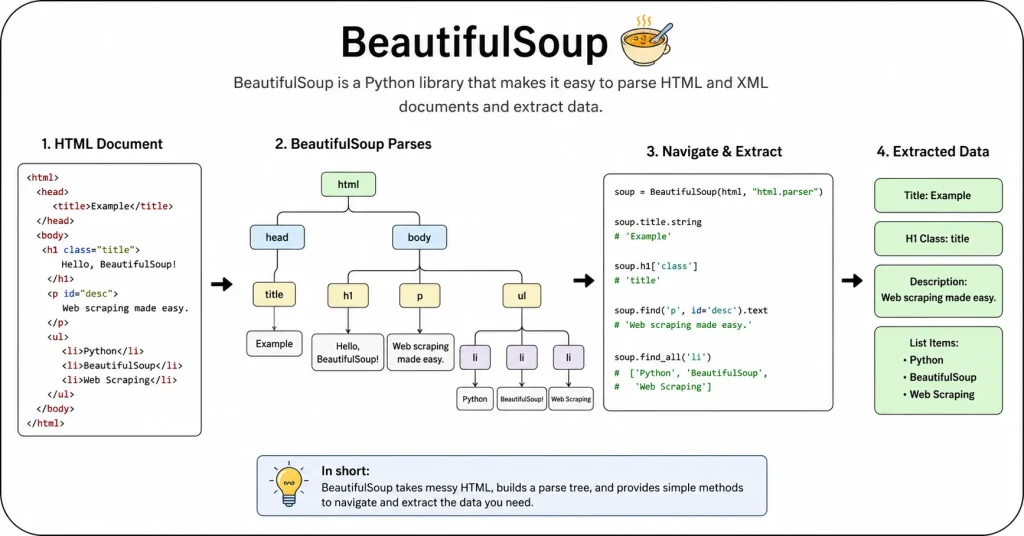
BeautifulSoup is the most widely used HTML parsing library in Python, with roughly 43.5% adoption among developers. It is not a parser itself. It is an interface that sits on top of other parsers and provides a Pythonic API for navigating the resulting tree.
How It Works
from bs4 import BeautifulSoup

html = '''
<div class="product-card" data-id="12345">
    <h2 class="product-title">Wireless Headphones Pro</h2>
    <span class="price">$199.99</span>
    <div class="rating">
        <span class="stars">4.5</span>
        <span class="count">(2,847 reviews)</span>
    </div>
</div>
'''

soup = BeautifulSoup(html, 'lxml')

# Find by tag and class
title = soup.find('h2', class_='product-title').get_text(strip=True)
price = soup.find('span', class_='price').get_text(strip=True)

# Find nested elements with CSS selectors
rating_stars = soup.select_one('.rating .stars').get_text(strip=True)
review_count = soup.select_one('.rating .count').get_text(strip=True)

# Extract attributes
product_id = soup.find('div', class_='product-card')['data-id']

print(f"Title: {title}")
print(f"Price: {price}")
print(f"Rating: {rating_stars} stars")
print(f"Reviews: {review_count}")
print(f"Product ID: {product_id}")
The class_ parameter (with the trailing underscore) avoids conflict with Python’s reserved class keyword. The get_text(strip=True) method extracts text content while removing surrounding whitespace. The select_one() method finds the first element matching a CSS selector.
The Parser Backend Matters
When you initialize BeautifulSoup, you choose the parser backend. This choice has a massive impact on speed and reliability:
html.parser — Python’s built-in parser. No extra dependencies. Decent speed. Less forgiving on broken HTML than lxml but better than it used to be. Good for quick scripts and learning.
lxml — A C-based parser that is 3 to 10 times faster than html.parser. Much more forgiving on malformed markup. The standard choice for production BeautifulSoup work. Install with pip install lxml.
html5lib — A pure-Python parser that follows the HTML5 specification exactly, the same way a browser does. Extremely lenient on broken HTML but 20 to 100 times slower than lxml. Use only when you need browser-identical parsing.
# Fast, forgiving, production standard
soup = BeautifulSoup(html, 'lxml')

# No dependencies, decent for small jobs
soup = BeautifulSoup(html, 'html.parser')

# Browser-identical, very slow
soup = BeautifulSoup(html, 'html5lib')
When BeautifulSoup Is the Right Choice
- Learning and prototyping. The API is intuitive. The documentation is excellent. You can go from zero to extracting data in minutes.
- Small to medium scale. If you are parsing fewer than 10,000 pages per hour, BeautifulSoup with the
lxmlbackend is fast enough. - Complex navigation. When you need to traverse up, down, and sideways through the DOM tree, BeautifulSoup’s navigation methods (
parent,children,next_sibling,find_previous) are more convenient than raw XPath.
When BeautifulSoup Becomes a Bottleneck
At scale, BeautifulSoup’s abstraction layer adds overhead. Benchmarks show that even with the lxml backend, BeautifulSoup is roughly 10 times slower than raw lxml.html for parsing alone. On a real-world scrape of 11,824 pages, raw lxml processed 44 pages per second while BeautifulSoup with the lxml backend managed only 7 pages per second.
If your scraper is network-bound — meaning it spends most of its time waiting for HTTP responses — this difference does not matter. But if you are parsing millions of cached pages or running on a fast local network, the parser becomes the bottleneck and you need something faster.
Cheerio: The Node.js Workhorse
Cheerio is a fast, flexible, and lean implementation of core jQuery designed specifically for the server. It parses markup and provides an API for traversing and manipulating the resulting data structure. It does not execute JavaScript, produce a visual rendering, or handle browser events. It is just parsing and querying.
Cheerio runs on top of htmlparser2 or parse5. In benchmarks against JSDOM, Cheerio is roughly 8 to 10 times faster for pure parsing and selector tasks because it skips the full DOM emulation that JSDOM provides.
How It Works
const cheerio = require('cheerio');

const html = `
<div class="product-card" data-id="12345">
    <h2 class="product-title">Wireless Headphones Pro</h2>
    <span class="price">$199.99</span>
    <div class="rating">
        <span class="stars">4.5</span>
        <span class="count">(2,847 reviews)</span>
    </div>
</div>
`;

const $ = cheerio.load(html);

// Extract single elements
const title = $('h2.product-title').text().trim();
const price = $('span.price').text().trim();
const productId = $('div.product-card').attr('data-id');

console.log(`Title: ${title}`);
console.log(`Price: ${price}`);
console.log(`Product ID: ${productId}`);

// Iterate over multiple elements
$('div.product-card').each((i, elem) => {
    const t = $(elem).find('h2.product-title').text().trim();
    const p = $(elem).find('span.price').text().trim();
    console.log(`${t}: ${p}`);
});
The $ function loads the HTML and returns a queryable object. The .find() method searches within the current element. The .text() method extracts text content. The .attr() method reads attributes. The API mirrors jQuery, which makes it familiar to anyone who has written front-end code.
When to Use Cheerio
- You are already running Node.js and want to stay in the same language.
- You are comfortable with jQuery-style traversal and chaining.
- You do not need JavaScript execution. If the page loads content dynamically, Cheerio will not see it. You would need Playwright or Puppeteer instead.
- You want something faster than JSDOM but lighter than a full headless browser.
Performance
Cheerio processes roughly 40 to 50 pages per second on real-world HTML, depending on document size and selector complexity. It uses less memory than JSDOM because it does not build a full DOM with event support. For server-side parsing tasks, it is the standard choice in the Node.js ecosystem.
jsoup: The Java Standard
jsoup is a Java library for working with real-world HTML. It provides a convenient API for fetching URLs and extracting and manipulating data, using DOM, CSS, and jQuery-like methods. It is designed to deal with all varieties of HTML found in the wild, including malformed tags, unclosed elements, and incorrectly nested structures.
jsoup is particularly popular in Android development and enterprise Java environments. It handles HTTP connections, cookies, and redirects out of the box, which makes it a full scraping solution rather than just a parser.
How It Works
import org.jsoup.Jsoup;
import org.jsoup.nodes.Document;
import org.jsoup.nodes.Element;
import org.jsoup.select.Elements;

public class Scraper {
    public static void main(String[] args) {
        String html = "<div class=\"product-card\" data-id=\"12345\">" +
            "<h2 class=\"product-title\">Wireless Headphones Pro</h2>" +
            "<span class=\"price\">$199.99</span>" +
            "<div class=\"rating\">" +
            "<span class=\"stars\">4.5</span>" +
            "<span class=\"count\">(2,847 reviews)</span>" +
            "</div></div>";

        Document doc = Jsoup.parse(html);

        // Extract single elements
        Element title = doc.selectFirst("h2.product-title");
        Element price = doc.selectFirst("span.price");
        Element card = doc.selectFirst("div.product-card");

        String titleText = title.text();
        String priceText = price.text();
        String productId = card.attr("data-id");

        System.out.println("Title: " + titleText);
        System.out.println("Price: " + priceText);
        System.out.println("Product ID: " + productId);

        // Iterate over multiple elements
        Elements cards = doc.select("div.product-card");
        for (Element c : cards) {
            String t = c.selectFirst("h2.product-title").text();
            String p = c.selectFirst("span.price").text();
            System.out.println(t + ": " + p);
        }
    }
}
The Jsoup.parse() method reads a string and returns a Document object. The .select() method uses CSS selectors. The .selectFirst() method returns the first match or null. The .text() method extracts text content. The .attr() method reads attributes.
When to Use jsoup
- You are in a Java or Android stack and want a single library that handles HTTP and parsing.
- You need reliable handling of broken HTML without extra configuration.
- You are building an enterprise scraper where type safety and Java’s ecosystem matter more than raw speed.
Performance
jsoup processes roughly 15 to 25 pages per second on real-world HTML. It is not the fastest parser on this list, but it is fast enough for most Java applications. The convenience of built-in HTTP handling and robust error recovery often outweighs the speed difference on smaller to medium-scale projects.
Nokogiri: The Ruby Standard
Nokogiri is the dominant HTML and XML parsing library in the Ruby ecosystem. It wraps the C libraries libxml2 and libxslt, giving Ruby programs access to fast native parsing. It supports both XPath and CSS selectors.
In the Ruby world, Nokogiri is the standard. It powers many Rails scraping tools and is the default choice when you need to extract data from HTML documents in a Ruby project.
How It Works
require 'nokogiri'

html = <<-HTML
<div class="product-card" data-id="12345">
    <h2 class="product-title">Wireless Headphones Pro</h2>
    <span class="price">$199.99</span>
    <div class="rating">
        <span class="stars">4.5</span>
        <span class="count">(2,847 reviews)</span>
    </div>
</div>
HTML

doc = Nokogiri::HTML(html)

# Extract single elements
title = doc.at_css('h2.product-title').text.strip
price = doc.at_css('span.price').text.strip
product_id = doc.at_css('div.product-card')['data-id']

puts "Title: #{title}"
puts "Price: #{price}"
puts "Product ID: #{product_id}"

# Iterate over multiple elements
doc.css('div.product-card').each do |card|
    t = card.at_css('h2.product-title').text.strip
    p = card.at_css('span.price').text.strip
    puts "#{t}: #{p}"
end
The Nokogiri::HTML() method parses the string. The .at_css() method returns the first match or nil. The .css() method returns all matches. The .text() method extracts text content. Attribute access uses hash syntax.
When to Use Nokogiri
- You are working in Ruby or Rails.
- You need XPath and CSS support in the same library.
- You want the performance of C-backed parsing without leaving the Ruby ecosystem.
Performance
Nokogiri processes roughly 20 to 30 pages per second on real-world HTML. It is not as fast as Selectolax or raw lxml, but it is significantly faster than pure-Ruby alternatives. For most Ruby projects, it is fast enough that the parser is rarely the bottleneck.
html5lib: Browser-Identical Parsing
html5lib is a pure-Python parser that implements the HTML5 specification exactly as browsers do. It is the slowest option by a wide margin — roughly 100 times slower than Selectolax — but it produces the same parse tree as Chrome or Firefox.
When You Need html5lib
Use html5lib when the site serves extremely broken HTML that other parsers handle differently. If a browser shows content that lxml or html.parser cannot find, html5lib might parse it correctly. This is rare in practice, but it happens with legacy sites, malformed templates, or HTML generated by broken content management systems.
from bs4 import BeautifulSoup

# Browser-identical parsing, very slow
soup = BeautifulSoup(broken_html, 'html5lib')
For most scraping work, lxml handles broken HTML well enough that html5lib is unnecessary. Reserve it for the edge cases where parsing accuracy matters more than speed.
Handling Broken HTML: The Reality of the Web
The web is not valid HTML. Tags are unclosed. Attributes are malformed. Nesting is wrong. Scripts and stylesheets are injected mid-document. A parser that crashes on invalid markup is useless for scraping.
Here is how each parser handles a common problem: a p tag closed with a div tag.
Input:
<p>This paragraph is not closed properly <div>and a div starts inside it</div>
html5lib output (browser-identical):
<p>This paragraph is not closed properly </p><div>and a div starts inside it</div>
lxml output:
<p>This paragraph is not closed properly </p><div>and a div starts inside it</div>
html.parser output (older Python versions): May produce unexpected nesting depending on the Python version. Modern versions (3.2.2+) handle this better.
For most practical purposes, lxml and html5lib handle broken HTML similarly. The difference only matters on pathologically malformed documents.
Text Extraction: Beyond get_text()
Extracting clean text from HTML is harder than it looks. Consider this markup:
<div class="description">
    <p>The <strong>Wireless Headphones Pro</strong> features</p>
    <ul>
        <li>Active noise cancellation</li>
        <li>30-hour battery life</li>
    </ul>
    <script>var tracking = true;</script>
    <style>.hidden { display: none; }</style>
</div>
A naive get_text() call returns everything, including script and style content:
soup = BeautifulSoup(html, 'lxml')
text = soup.find('div', class_='description').get_text(separator=' ', strip=True)
# Result includes "var tracking = true;" and ".hidden { display: none; }"
The fix is to remove unwanted elements before extracting text:
soup = BeautifulSoup(html, 'lxml')
desc = soup.find('div', class_='description')

# Remove script and style elements
for unwanted in desc.find_all(['script', 'style']):
    unwanted.decompose()

text = desc.get_text(separator=' ', strip=True)
For lxml, the equivalent approach uses XPath to exclude specific element types:
from lxml import html

tree = html.fromstring(html_string)
# XPath that selects all text nodes except inside script/style
paragraphs = tree.xpath('//div[@class="description"]//text()[not(ancestor::script) and not(ancestor::style)]')
text = ' '.join(p.strip() for p in paragraphs if p.strip())
Table Extraction: The Most Common Parsing Task
Tables are everywhere in scraping: product specifications, financial data, sports statistics, election results. Extracting them correctly requires understanding table structure.
<table class="specs-table">
    <thead>
        <tr><th>Specification</th><th>Value</th></tr>
    </thead>
    <tbody>
        <tr><td>Battery Life</td><td>30 hours</td></tr>
        <tr><td>Weight</td><td>250g</td></tr>
        <tr><td>Connectivity</td><td>Bluetooth 5.3</td></tr>
    </tbody>
</table>
Extracting into a dictionary:
import pandas as pd
from bs4 import BeautifulSoup

soup = BeautifulSoup(html, 'lxml')
table = soup.find('table', class_='specs-table')

# Method 1: Manual extraction
specs = {}
for row in table.find('tbody').find_all('tr'):
    cells = row.find_all('td')
    if len(cells) == 2:
        key = cells[0].get_text(strip=True)
        value = cells[1].get_text(strip=True)
        specs[key] = value

# Method 2: pandas read_html (convenient for simple tables)
df = pd.read_html(str(table))[0]
specs = dict(zip(df.iloc[:, 0], df.iloc[:, 1]))
For complex tables with rowspan and colspan attributes, manual parsing is usually necessary because pandas.read_html() does not always handle merged cells correctly.
Cleaning and Normalizing Extracted Data
Parsing gives you raw strings. Those strings need cleaning before they are useful:
import re

def clean_price(price_text):
    # Remove currency symbols, commas, whitespace
    cleaned = re.sub(r'[^\d.]', '', price_text.strip())
    return float(cleaned) if cleaned else None

def clean_text(text):
    # Normalize whitespace, remove control characters
    text = re.sub(r'\s+', ' ', text)
    text = re.sub(r'[\x00-\x08\x0b-\x0c\x0e-\x1f]', '', text)
    return text.strip()

def parse_rating(rating_text):
    # Extract numeric rating from "4.5 out of 5 stars"
    match = re.search(r'(\d+\.?\d*)', rating_text)
    return float(match.group(1)) if match else None
Always clean data at extraction time, not later. If you store raw strings and clean them during analysis, you will discover edge cases that break your cleaning logic when you have thousands of records instead of dozens.
FAQ
What is the difference between an HTML parser and a headless browser?
An HTML parser reads the static markup that the server sends back. It does not execute JavaScript, click buttons, or wait for network requests. A headless browser like Playwright or Puppeteer runs a real browser engine, executes JavaScript, and renders the page. Use a parser when the data is in the raw HTML. Use a headless browser when the site loads content dynamically after the initial page load.
Why does my BeautifulSoup selector return None when the element clearly exists?
The element might be loaded dynamically by JavaScript after the initial HTML is rendered. BeautifulSoup only sees the static HTML that your HTTP client receives. It has no knowledge of JavaScript execution. Check the raw page source (Ctrl+U in most browsers) to see what your scraper actually gets. If the element is missing there but present in the browser’s Inspect Element view, you need a headless browser like Playwright to render the page before parsing.
What is the difference between find(), find_all(), and select() in BeautifulSoup?
find() returns the first matching element or None. find_all() returns a list of all matching elements, or an empty list if none match. select() uses CSS selector syntax and is often more concise for complex queries. Use find() when you expect exactly one result, find_all() when you expect multiple, and select() when CSS selectors express your query more clearly than chained find() calls.
Should I use XPath or CSS selectors for HTML parsing?
CSS selectors are simpler and sufficient for 90% of scraping tasks. XPath is more powerful for complex queries involving parent-child relationships, text content matching, and positional selection. If you are comfortable with CSS selectors from browser DevTools, start there. Switch to XPath when you need features that CSS selectors cannot express, like selecting elements based on the text content of their children.
How do I handle pages where the HTML structure changes frequently?
Avoid brittle selectors that depend on exact class names or DOM positions. Use semantic selectors that target stable attributes like data-* attributes, id values, or ARIA labels. Extract data from multiple possible selectors and use the first one that matches. Consider using AI-powered extraction tools like Crawl4AI or ScrapeGraphAI that can adapt to layout changes without manual selector updates.
What is the difference between get_text() and text_content()?
In BeautifulSoup, get_text() extracts all text from an element and its descendants, with options to customize the separator and strip whitespace. In lxml, text_content() does the same thing but is a property, not a method. Both include text from all descendant elements, including those inside script and style tags. Always remove unwanted elements before extracting text if you need clean output.
How do I extract data from HTML tables with merged cells?
Merged cells use rowspan and colspan attributes, which pandas.read_html() does not always handle correctly. For complex tables, parse manually with BeautifulSoup or lxml, tracking the row and column indices as you iterate. Maintain a grid data structure that accounts for merged cells by filling in the spanned positions with the same value.
Why is html5lib so slow, and when should I actually use it?
html5lib is slow because it is written in pure Python and implements the full HTML5 parsing algorithm exactly as browsers do. Use it only when a site serves pathologically broken HTML that lxml or html.parser cannot parse correctly. In practice, this is rare. lxml handles 99% of real-world broken HTML well enough that html5lib is unnecessary for most scraping work.
How do I parse HTML fragments rather than full documents?
BeautifulSoup automatically wraps fragments in <html> and <body> tags. If you need to parse a fragment like a single <div> without this wrapping, use BeautifulSoup(fragment, 'lxml') and then extract the relevant element. For lxml, use html.fragment_fromstring() instead of html.fromstring() to parse fragments without document-level wrapping.
What is the best way to handle encoding issues in HTML parsing?
Always let your HTTP client handle encoding detection. httpx and requests automatically detect encoding from HTTP headers and meta tags. Pass the decoded text string to your parser, not raw bytes. If you must parse bytes directly, BeautifulSoup and lxml both accept byte strings and attempt to detect the encoding, but this is less reliable than letting the HTTP client handle it.
How do I extract URLs from anchor tags correctly?
Anchor tags often contain relative URLs. Always resolve them to absolute URLs using the base page URL:
from urllib.parse import urljoin

base_url = 'https://example-store.com/products/'
for link in soup.find_all('a', href=True):
    absolute_url = urljoin(base_url, link['href'])
    print(absolute_url)
This handles relative paths like /about, ./details, and ../category correctly.
Can I parse HTML with regular expressions instead of a proper parser?
Technically yes, practically no. Regular expressions cannot handle nested HTML structures correctly. They break on attribute order changes, self-closing tags, comments, and CDATA sections. Use a proper parser for any task beyond the simplest string replacement. The time you save by not learning a parser will be lost debugging regex failures on edge cases.
The Bottom Line
HTML parsing is not a solved problem with one right answer. It is a set of trade-offs between speed, accuracy, and developer ergonomics.
- Start with BeautifulSoup + lxml for learning and prototyping in Python. It is fast enough for most work and the API is forgiving.
- Move to raw lxml when speed matters and you need XPath’s precision.
- Switch to Selectolax when you are parsing millions of pages and the parser is the bottleneck.
- Use Cheerio when you are in a Node.js environment and want a jQuery-style API.
- Use jsoup when you are in Java or Android and need a library that handles HTTP and parsing together.
- Use Nokogiri when you are in Ruby and need the standard tool for the ecosystem.
- Use html5lib only when browser-identical parsing is mandatory.
The parser is just one step in the pipeline. A fast parser does not help if your HTTP requests are slow or your selectors are brittle. But a slow parser can absolutely become the bottleneck that turns a 20-minute job into a 3-hour job. Choose the right tool, measure your actual performance, and upgrade when the data proves you need to.
You May Also Like
 Web Scraping
What Is Web Scraping and How Does It Work? A Complete 2026 Guide
 Web Scraping
How to Handle CAPTCHA While Scraping: A 2026 Developer’s Guide
 Proxies
Best Proxies for Web Scraping In 2026: How I Choose the Right Provider and Proxy Type
 Web Scraping
Cloudflare Blocking Scrapers Explained: Your 2026 Guide to Anti-Bot Protection
 Web Scraping
How Google Maps Scraping Actually Works (And Where Most Attempts Go Wrong)
 Web Scraping
Scrap.io Review 2026: What This Google Maps Lead Generation Tool Actually Gets Right (and Where It Falls Short)
 Web Scraping
The 7 Best PHP Web Scraping Libraries of 2026: The Ultimate Guide
 Use Cases
Inside Kimwolf Traffic: How Residential Proxies Fuel Credential Stuffing, Web Scraping, & Fraud
 Web Scraping