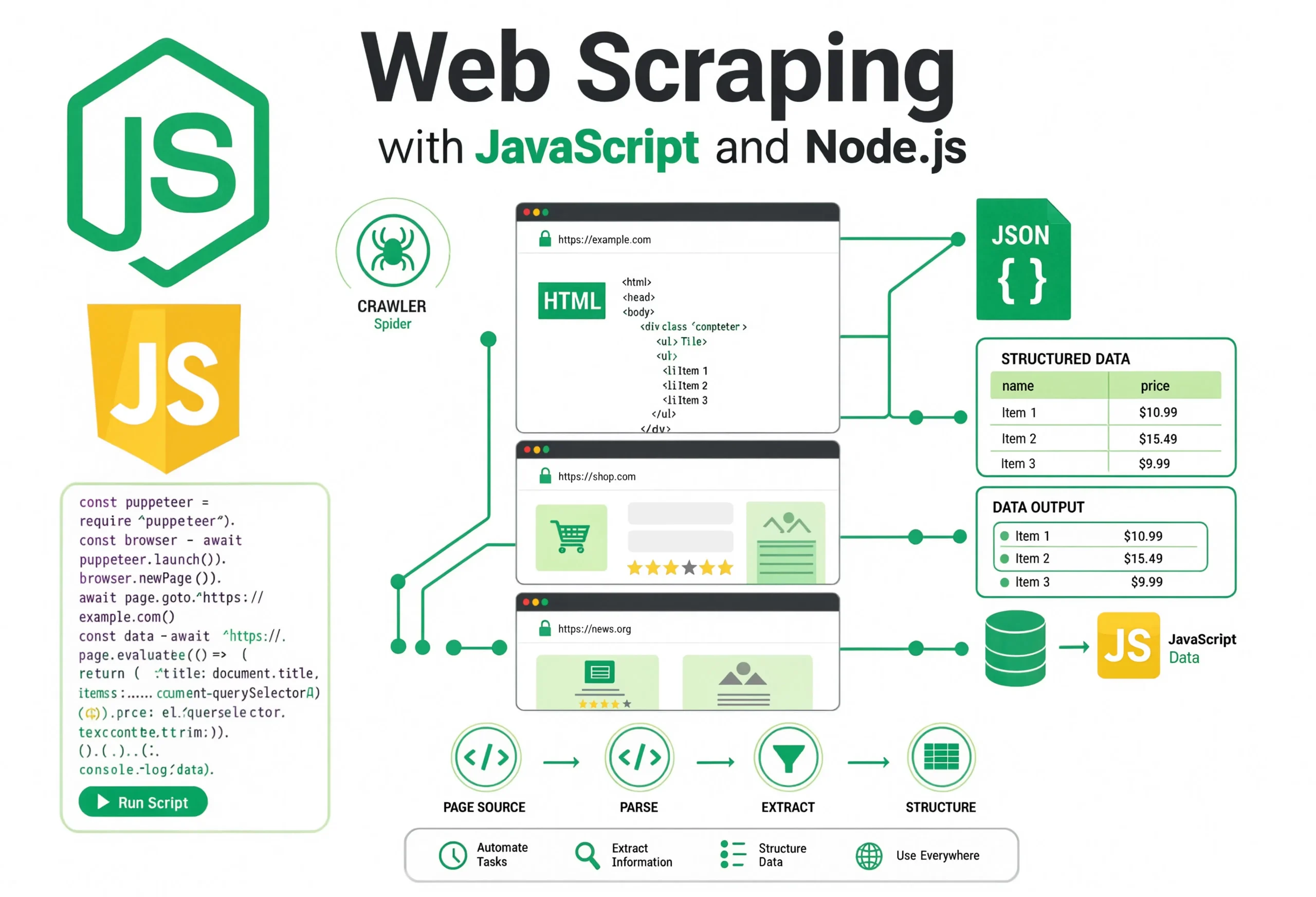
Most web scraping tutorials show you how to fetch a page and log a title to the console. Then reality hits: the site changes a class name, one request in fifty times out, the target ships a client-side render, and your “scraper” turns into an afternoon of firefighting.
This guide is written from the other side of that experience. You’ll build a complete Node.js scraper for books.toscrape.com — the community’s standard sandbox for practicing scraping — that walks all 50 catalog pages, visits each of the 1,000 product detail pages, extracts structured fields, handles errors gracefully, and exports clean JSON and CSV. Along the way I’ll explain the why behind each choice: why Axios plus Cheerio beats Puppeteer for a site like this, why your selectors will eventually break, and how to architect a scraper so a small HTML change doesn’t rewrite half your code.
If you’ve written JavaScript and touched Node.js, you have enough to follow along.
Key Takeaways
- Web scraping with JavaScript is a strong default when the target ships server-rendered HTML — Node.js gives you fast HTTP clients, mature parsers, and native async concurrency.
- Axios + Cheerio is faster and cheaper than headless browsers for static HTML. Reach for Puppeteer or Playwright only when the data lives behind client-side JavaScript.
- Selectors are the fragile part. Isolate them in one module so a redesign is a five-minute fix, not a rewrite.
- Reliability comes from error handling, retries, and rate limits — not from clever extraction code.
- Ethical scraping is also cheaper scraping. Respect
robots.txt, throttle requests, cache aggressively, and prefer official APIs when they exist.
What Is Web Scraping?
Web scraping is the automated extraction of structured data from HTML documents that were designed for humans. It’s worth separating three terms that get used interchangeably:
- Scraping: Parsing an HTML response and pulling fields out of it.
- Crawling: Discovering URLs by following links, usually as the input to a scraper.
- API consumption: Calling a documented JSON/GraphQL endpoint the site owner intends third parties to use.
If a documented API exists, use it. It’s faster, more stable, and legally clearer. Scraping is what you do when the data is only available through pages meant for a browser.
When is scraping the right tool
- Price monitoring, competitor tracking, market research
- Aggregating public information (job postings, real-estate listings, product catalogs)
- Building internal datasets from sites without an API
- Migrating your own content off a legacy CMS
When scraping is the wrong tool
- The site publishes an API that covers your needs — use it.
- You need real-time data at high volume — an official feed will always beat scraping.
- The data is behind authentication and covered by terms that prohibit automated access.
- You’re extracting personal data (names, emails, profiles) without a lawful basis. Under GDPR and similar regimes, scraping personal data is a legal minefield regardless of whether the page is “public.”
Static vs. JavaScript-rendered sites
This is the single most important classification for choosing your toolchain:
- Static / server-rendered: the HTML the server returns already contains the data. Books to Scrape, most news sites, most e-commerce category pages, and WordPress sites. Cheerio-class parsers handle these perfectly.
- Client-rendered (SPA): the server returns a shell of HTML plus a JavaScript bundle, and the data is fetched and rendered in the browser. Twitter/X, most modern dashboards, many SaaS apps. You need a real browser (Puppeteer/Playwright) or must reverse-engineer the underlying XHR calls.
A quick check: view the page’s raw HTML (curl it, or “View source” in your browser — not “Inspect”). If the data is in there, use Axios and Cheerio. If it isn’t, either automate a browser or find the underlying API call.
Why Use JavaScript and Node.js for Scraping
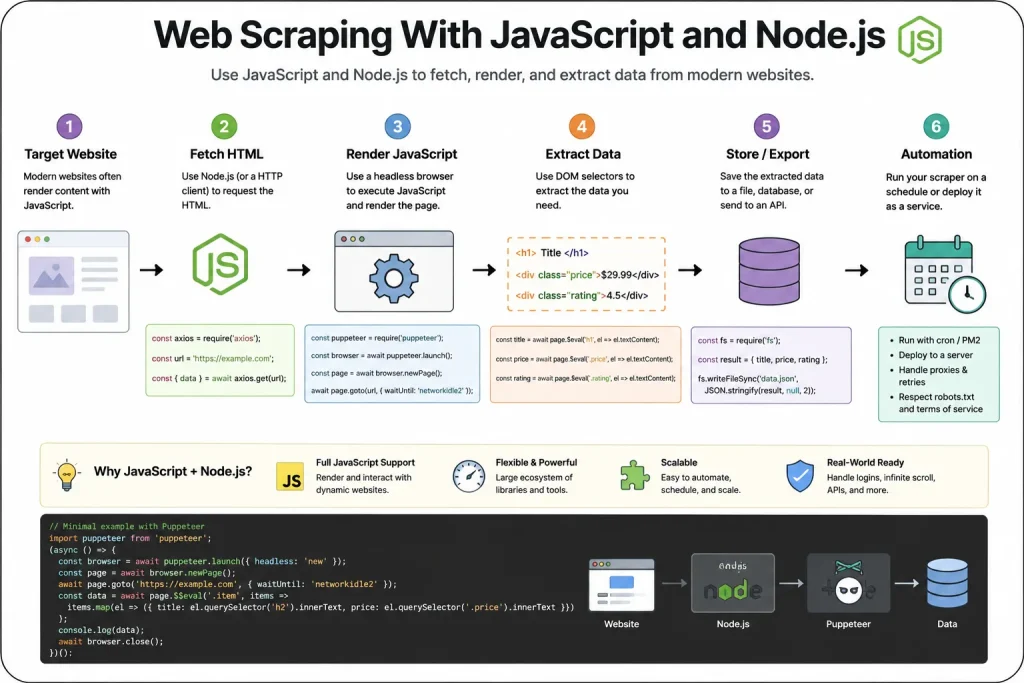
Python gets most of the scraping press, but Node.js has genuine advantages:
- Async I/O is native. Scraping is 90% waiting for network responses. Node’s event loop was designed for exactly this shape of workload.
- One language across the stack. If your app already runs on Node, the scraper doesn’t need a separate deployment story.
- Cheerio matches BeautifulSoup feature-for-feature with a jQuery-style API most JS developers already know.
- Puppeteer and Playwright are first-class Node libraries. For headless browser work, Node is arguably the primary ecosystem, both tools are maintained by browser-vendor teams.
- The same code runs in serverless environments. Cloud Functions, Vercel, AWS Lambda are the deployment surfaces for periodic scrapers, which is huge.
The one thing Node doesn’t give you out of the box that Python’s Scrapy does is a batteries-included framework with built-in queuing, deduplication, and pipelines. For that, look at Crawlee once you outgrow a hand-rolled scraper.
Project Setup
Let’s build the scraper. Create a fresh directory and initialize it:
mkdir books-scraper && cd books-scraper
npm init -y
npm install axios cheerio p-limit csv-writer
npm install --save-dev nodemon
What each dependency does:
- axios — HTTP client. Handles redirects, gzip decoding, timeouts, and headers cleanly.
- cheerio — Server-side jQuery-compatible HTML parser. Small, fast, no browser required.
- p-limit — Concurrency limiter. Essential for well-behaved scrapers.
- csv-writer — Streams rows to disk so you don’t have to hold the whole dataset in memory.
Update package.json to use ES modules:
{
  "type": "module",
  "scripts": {
    "start": "node src/index.js",
    "dev": "nodemon src/index.js"
  }
}
Folder Structure
Real scrapers benefit from separation of concerns. Even for this project, use a small module layout — it pays off the moment the site changes.
books-scraper/
├── src/
│   ├── index.js          # Orchestrator
│   ├── http.js           # HTTP client with retries + throttling
│   ├── selectors.js      # Every CSS selector, in one place
│   ├── parsers/
│   │   ├── listPage.js   # Parses catalog/pagination pages
│   │   └── detailPage.js # Parses individual book pages
│   └── storage.js        # JSON + CSV writers
├── data/                 # Output directory (gitignored)
├── package.json
└── README.md
The rule I follow on every scraping project: selectors live in exactly one file. When the site redesigns, you edit one module, not fifteen.
Understanding the Target: books.toscrape.com
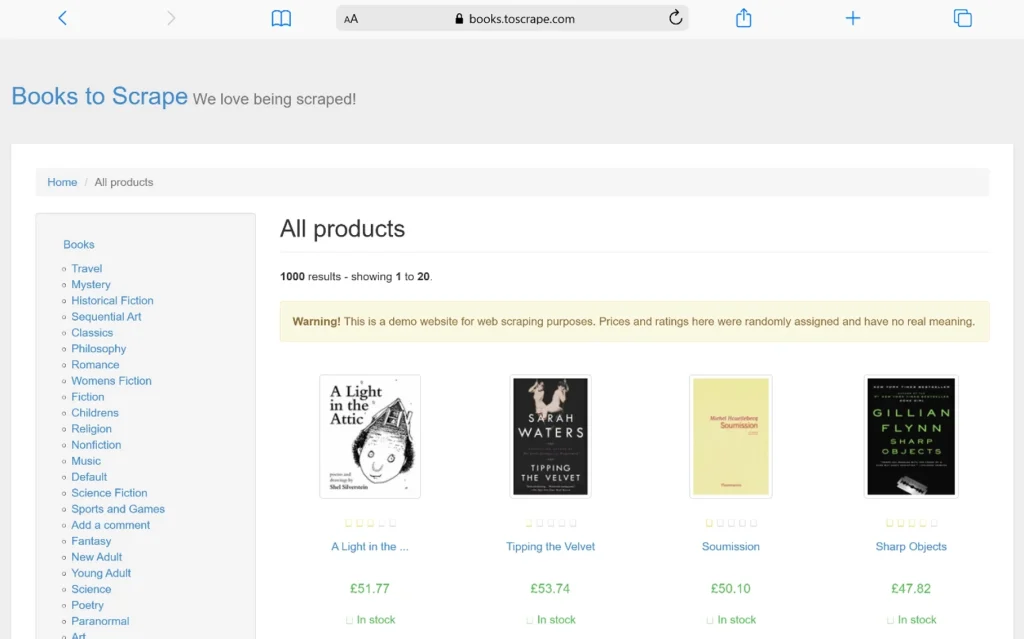
Before writing extraction code, spend five minutes with browser DevTools. Open the site, right-click a book card, and choose “Inspect.” You’ll see a structure like this:
<article class="product_pod">
  <div class="image_container">
    <a href="catalogue/a-light-in-the-attic_1000/index.html">
      <img src="media/cache/..." class="thumbnail" alt="A Light in the Attic" />
    </a>
  </div>
  <p class="star-rating Three"> ... </p>
  <h3>
    <a href="catalogue/a-light-in-the-attic_1000/index.html" title="A Light in the Attic">
      A Light in the ...
    </a>
  </h3>
  <div class="product_price">
    <p class="price_color">£51.77</p>
    <p class="instock availability">
      <i class="icon-ok"></i>
      In stock
    </p>
  </div>
</article>
A few observations that shape the extraction code:
- Each book is one
article.product_pod. That’s our container selector. - The rating is encoded as a CSS class, not text.
star-rating Threemeans three stars. That’s a small trap — beginners often try to count<i>elements and get five every time. - The title in the
<h3><a>is truncated with an ellipsis. The full title is in thetitleattribute. Always prefer attributes over rendered text when the site provides both. - URLs on list pages are relative (
catalogue/…), and on paginated pages under/catalogue/, they’re relative to that directory. You’ll need to resolve them against the current page URL. - Pagination is dead simple:
page-1.html,page-2.html, …,page-50.html. No JavaScript, no infinite scroll, no cursor tokens.
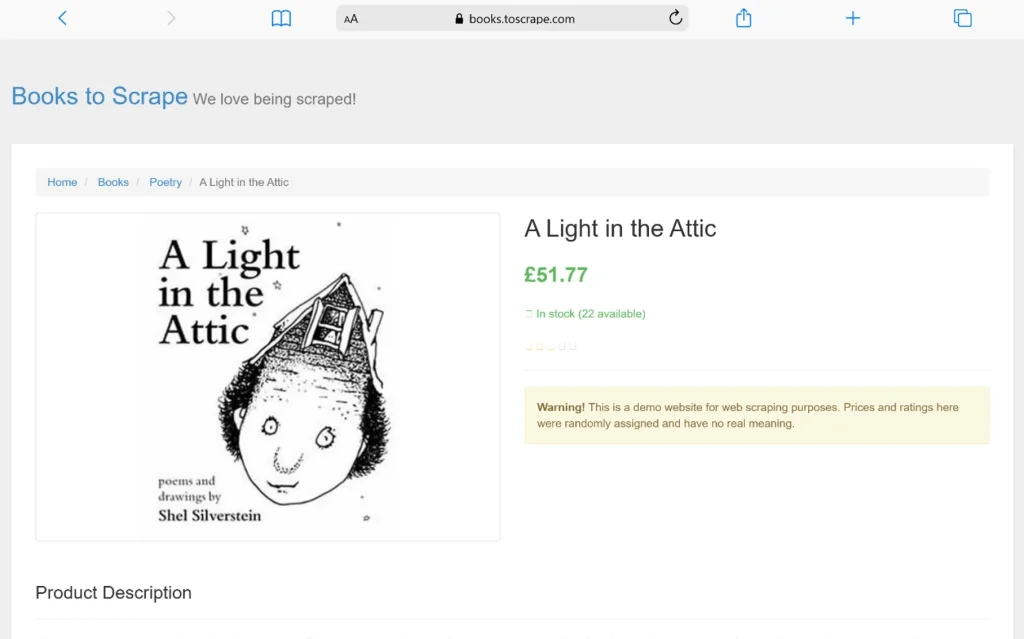
The detail pages contain additional data in a <table class="table table-striped">:
<table class="table table-striped">
  <tr><th>UPC</th><td>a897fe39b1053632</td></tr>
  <tr><th>Product Type</th><td>Books</td></tr>
  <tr><th>Price (excl. tax)</th><td>£51.77</td></tr>
  <tr><th>Availability</th><td>In stock (22 available)</td></tr>
  <tr><th>Number of reviews</th><td>0</td></tr>
</table>
And the category comes from the breadcrumb:
<ul class="breadcrumb">
  <li><a href="../../index.html">Home</a></li>
  <li><a href="../category/books_1/index.html">Books</a></li>
  <li><a href="../category/books/poetry_23/index.html">Poetry</a></li>
  <li class="active">A Light in the Attic</li>
</ul>
Category is the third <li>. Description is in the paragraph immediately following #product_description.
Building the HTTP Layer
Most tutorials call axios.get() inline. In production that becomes painful the first time the target rate-limits you. Build an HTTP module with three things baked in: sensible headers, retries with backoff, and a global request delay.
src/http.js:
import axios from 'axios';

const client = axios.create({
  timeout: 15000,
  headers: {
    // Identify yourself. Some sites block generic axios/node UAs;
    // an honest UA also helps site owners contact you if there's an issue.
    'User-Agent': 'books-scraper/1.0 (+https://example.com/contact)',
    'Accept': 'text/html,application/xhtml+xml',
    'Accept-Language': 'en-US,en;q=0.9',
  },
  // Follow redirects; treat 4xx as errors, but let us inspect the response.
  validateStatus: (s) => s >= 200 && s < 400,
});

const REQUEST_DELAY_MS = 500;  // Politeness delay between requests
let lastRequestAt = 0;

async function throttle() {
  const wait = REQUEST_DELAY_MS - (Date.now() - lastRequestAt);
  if (wait > 0) await new Promise((r) => setTimeout(r, wait));
  lastRequestAt = Date.now();
}

export async function fetchHtml(url, { retries = 3 } = {}) {
  let attempt = 0;
  while (true) {
    try {
      await throttle();
      const res = await client.get(url);
      return res.data;
    } catch (err) {
      attempt += 1;
      const status = err.response?.status;

      // Don't retry client errors (except 429). Not found is not found.
      const retriable = !status || status === 429 || status >= 500;
      if (!retriable || attempt > retries) {
        throw new Error(
          `GET ${url} failed after ${attempt} attempt(s): ${err.message}`
        );
      }

      // Exponential backoff with jitter
      const backoff = Math.min(2000 * 2 ** (attempt - 1), 15000);
      const jitter = Math.floor(Math.random() * 500);
      console.warn(`[retry ${attempt}/${retries}] ${url} (${status ?? err.code}) in ${backoff + jitter}ms`);
      await new Promise((r) => setTimeout(r, backoff + jitter));
    }
  }
}
Why this shape?
- Global throttle — one place enforces politeness. It doesn’t matter how many concurrent workers you add later; they all serialize through this bottleneck.
- Selective retry — retrying a 404 is pointless and confuses your logs. Retrying a 429 or 503 is exactly what the server is asking you to do.
- Exponential backoff with jitter — plain fixed-delay retries cause thundering-herd problems when a target briefly hiccups. Jitter breaks up synchronized retries.
- Timeouts — a scraper without timeouts eventually hangs forever on some flaky endpoint. Fifteen seconds is generous for a static page.
Centralizing Selectors
src/selectors.js:
// Every CSS selector used by the scraper lives here.
// When the target site changes its HTML, this is the only file you should
// need to touch for a small redesign.

export const list = {
  container: 'article.product_pod',
  titleLink: 'h3 > a',
  price: '.price_color',
  availability: '.availability',
  rating: 'p.star-rating',
  thumbnail: '.image_container img',
  nextPage: 'li.next > a',
};

export const detail = {
  title: '.product_main h1',
  price: '.product_main .price_color',
  availability: '.product_main .availability',
  rating: '.product_main p.star-rating',
  description: '#product_description ~ p',
  breadcrumbCategory: 'ul.breadcrumb li:nth-child(3) a',
  productImage: '#product_gallery img',
  infoTable: 'table.table-striped tr',
};

// Rating classes map to numbers. The site uses word forms in class names.
export const RATING_MAP = {
  One: 1, Two: 2, Three: 3, Four: 4, Five: 5,
};
This is small enough to feel like overkill — until the day someone renames product_pod to book-card. Then it’s the reason your fix is a two-line PR.
Parsing the Listing Pages
src/parsers/listPage.js:
import * as cheerio from 'cheerio';
import { URL } from 'node:url';
import { list, RATING_MAP } from '../selectors.js';

function parsePrice(text) {
  // "£51.77" -> 51.77. Keep currency separate; don't lie about the number.
  const match = text.match(/([\d.]+)/);
  return match ? Number(match[1]) : null;
}

function parseRating($el) {
  // Rating lives in the class name, e.g. "star-rating Three"
  const classes = ($el.attr('class') || '').split(/\s+/);
  for (const c of classes) {
    if (RATING_MAP[c] !== undefined) return RATING_MAP[c];
  }
  return null;
}

export function parseListPage(html, pageUrl) {
  const $ = cheerio.load(html);
  const items = [];

  $(list.container).each((_, el) => {
    const $el = $(el);
    const $link = $el.find(list.titleLink);

    const relativeUrl = $link.attr('href');
    const productUrl = new URL(relativeUrl, pageUrl).toString();

    const imgSrc = $el.find(list.thumbnail).attr('src');
    const imageUrl = imgSrc ? new URL(imgSrc, pageUrl).toString() : null;

    items.push({
      title: $link.attr('title')?.trim() ?? null,   // full title, not the truncated text
      price: parsePrice($el.find(list.price).text()),
      currency: 'GBP',
      rating: parseRating($el.find(list.rating)),
      availability: $el.find(list.availability).text().trim(),
      productUrl,
      imageUrl,
    });
  });

  // Next-page URL, or null if this is the last page
  const nextHref = $(list.nextPage).attr('href');
  const nextPageUrl = nextHref ? new URL(nextHref, pageUrl).toString() : null;

  return { items, nextPageUrl };
}
Two decisions worth calling out:
$link.attr('title')instead of.text(). The rendered text is truncated (“A Light in the …”). Thetitleattribute holds the real value. Any time a site truncates for display, look for a data attribute ortitle=.new URL(relative, base)for URL resolution. Never concatenate strings — you’ll get//catalogue/page-2.htmlbugs the first time a base URL has a trailing slash.
Handling Pagination
There are two obvious approaches to walking 50 pages: recursion or a loop. Recursion feels elegant, but I strongly prefer a loop for scrapers.
- Recursion grows the call stack per page. For 50 pages, it doesn’t matter; for 50,000 it does.
- Loops make state explicit. You can log progress, checkpoint to disk mid-run, and pause without unwinding a stack.
- Loops don’t hide errors. A thrown error in a deeply recursive scraper is harder to attribute to a page than one raised inside a
forloop where you have the current URL in scope.
Here’s the crawler:
// src/index.js  (partial)
import { fetchHtml } from './http.js';
import { parseListPage } from './parsers/listPage.js';

const START_URL = 'https://books.toscrape.com/catalogue/page-1.html';

async function crawlAllListPages(startUrl) {
  const seen = new Set();
  const all = [];
  let url = startUrl;
  let page = 0;

  while (url && !seen.has(url)) {
    seen.add(url);
    page += 1;

    let html;
    try {
      html = await fetchHtml(url);
    } catch (err) {
      console.error(`Skipping page ${page} (${url}): ${err.message}`);
      break;  // Or: continue to a saved next-URL. Fail-loud is fine here.
    }

    const { items, nextPageUrl } = parseListPage(html, url);
    console.log(`Page ${page}: ${items.length} books | next: ${nextPageUrl ?? '—'}`);
    all.push(...items);
    url = nextPageUrl;
  }

  return all;
}
The seen set is a small piece of paranoia that has saved me more than once. If a site ever links “next” back to a previously visited page (which happens with buggy paginators or wrap-around behavior), this loop terminates instead of running forever.
Memory considerations: at 1,000 books, holding everything in memory is fine — a few hundred KB. At a million records, stream to disk as you go rather than accumulating. The pattern is the same, but you’d write each page’s items to a JSONL file inside the loop and skip the all.push(...).
Extracting Detail-Page Data
The listing gives us the seven fields the brief calls for. To get the description, UPC, review count, and precise category, we need to visit each product page.
src/parsers/detailPage.js:
import * as cheerio from 'cheerio';
import { URL } from 'node:url';
import { detail, RATING_MAP } from '../selectors.js';

function parsePrice(text) {
  const m = text.match(/([\d.]+)/);
  return m ? Number(m[1]) : null;
}

function parseAvailabilityCount(text) {
  // "In stock (22 available)" -> 22
  const m = text.match(/(\d+)\s*available/i);
  return m ? Number(m[1]) : null;
}

export function parseDetailPage(html, pageUrl) {
  const $ = cheerio.load(html);

  // Product-info table -> object keyed by header text
  const info = {};
  $(detail.infoTable).each((_, tr) => {
    const key = $(tr).find('th').text().trim();
    const value = $(tr).find('td').text().trim();
    if (key) info[key] = value;
  });

  const ratingClasses = ($(detail.rating).attr('class') || '').split(/\s+/);
  const ratingWord = ratingClasses.find((c) => RATING_MAP[c] !== undefined);

  const imgSrc = $(detail.productImage).attr('src');

  return {
    title: $(detail.title).text().trim() || null,
    price: parsePrice($(detail.price).text()),
    currency: 'GBP',
    rating: ratingWord ? RATING_MAP[ratingWord] : null,
    availability: $(detail.availability).text().trim().replace(/\s+/g, ' '),
    stockCount: parseAvailabilityCount($(detail.availability).text()),
    category: $(detail.breadcrumbCategory).text().trim() || null,
    description: $(detail.description).first().text().trim() || null,
    upc: info['UPC'] ?? null,
    productType: info['Product Type'] ?? null,
    priceExclTax: parsePrice(info['Price (excl. tax)'] ?? ''),
    priceInclTax: parsePrice(info['Price (incl. tax)'] ?? ''),
    tax: parsePrice(info['Tax'] ?? ''),
    numberOfReviews: Number(info['Number of reviews'] ?? 0) || 0,
    productUrl: pageUrl,
    imageUrl: imgSrc ? new URL(imgSrc, pageUrl).toString() : null,
  };
}
Why a keyed object for the info table? Because the site’s table row order isn’t guaranteed and neither is the presence of every field. Keying by the <th> text is resilient — reordering rows or removing “Tax” won’t shift what “UPC” points at, which is exactly the class of change that silently corrupts positional parsers.
Detail-page scraping increases request volume by ~50×
That’s not a rounding error. For books.toscrape.com the math is: 50 list pages + 1,000 detail pages = 1,050 requests instead of 50. That’s the classic scraping tradeoff:
- List-only scraping — cheap and fast, but you get whatever fields the listing exposes.
- Detail-page scraping — complete data, dramatically higher request volume and runtime.
Optimizations that matter in production:
- Skip detail pages when the listing has everything you need. Most projects need less than they think.
- Cache detail responses by product identifier. UPCs and permalinks don’t change. Re-scraping later? Skip pages you’ve already fetched.
- Parallelize with a concurrency limit — never
Promise.all()over 1,000 requests, or you’ll DoS the target and get IP-banned. Usep-limit, typically 3–8 concurrent connections.
Here’s the detail-scraping loop with bounded concurrency:
// src/index.js  (partial)
import pLimit from 'p-limit';
import { parseDetailPage } from './parsers/detailPage.js';

async function scrapeDetails(listItems) {
  const limit = pLimit(5);   // At most 5 detail pages in flight at once
  const results = [];
  let done = 0;

  await Promise.all(
    listItems.map((item) =>
      limit(async () => {
        try {
          const html = await fetchHtml(item.productUrl);
          const detail = parseDetailPage(html, item.productUrl);
          // Merge — listing fields lose to detail fields on conflict
          results.push({ ...item, ...detail });
        } catch (err) {
          console.error(`  detail fail: ${item.productUrl} :: ${err.message}`);
          results.push({ ...item, _error: err.message });
        } finally {
          done += 1;
          if (done % 50 === 0) console.log(`  ${done}/${listItems.length}`);
        }
      })
    )
  );

  return results;
}
Notice we push a record even on failure, with an _error field. Losing 3 of 1,000 records silently is worse than surfacing them as errors. You want dead-letter visibility, not phantom success.
Storage: JSON and CSV
src/storage.js:
import fs from 'node:fs/promises';
import path from 'node:path';
import { createObjectCsvWriter } from 'csv-writer';

export async function saveJson(records, outPath) {
  await fs.mkdir(path.dirname(outPath), { recursive: true });
  await fs.writeFile(outPath, JSON.stringify(records, null, 2), 'utf8');
  console.log(`Wrote ${records.length} records to ${outPath}`);
}

export async function saveCsv(records, outPath) {
  if (records.length === 0) return;
  await fs.mkdir(path.dirname(outPath), { recursive: true });

  // Derive the header from the union of all keys — some records may have
  // missing fields, and we want columns for all of them.
  const headerSet = new Set();
  for (const r of records) Object.keys(r).forEach((k) => headerSet.add(k));
  const header = [...headerSet].map((id) => ({ id, title: id }));

  const writer = createObjectCsvWriter({ path: outPath, header });
  await writer.writeRecords(records);
  console.log(`Wrote ${records.length} records to ${outPath}`);
}
Data Cleaning Before Storage
Ship your cleaning logic upstream, close to extraction, not downstream in the sink. That way the data on disk is already trustworthy.
- Normalize whitespace (
text.replace(/\s+/g, ' ').trim()) — HTML happily nests newlines and tabs inside text nodes. - Coerce numeric fields to numbers, not strings.
"51.77"is a bug waiting to happen.51.77isn’t. - Represent missing data as
null, not"", not"N/A", notundefined. Null survives JSON round-trips and is unambiguous in CSVs. - Store units separately from magnitudes. Price
51.77+ currency"GBP", not"£51.77". If you ever need to sort, sum, or convert, you’ll thank yourself. - Timestamp every record with
scrapedAt: new Date().toISOString(). Scraped data is a snapshot; without a timestamp you can’t tell freshness from staleness.
Putting It All Together
src/index.js:
import pLimit from 'p-limit';
import { fetchHtml } from './http.js';
import { parseListPage } from './parsers/listPage.js';
import { parseDetailPage } from './parsers/detailPage.js';
import { saveJson, saveCsv } from './storage.js';

const START_URL = 'https://books.toscrape.com/catalogue/page-1.html';

async function crawlAllListPages(startUrl) {
  const seen = new Set();
  const all = [];
  let url = startUrl;
  let page = 0;

  while (url && !seen.has(url)) {
    seen.add(url);
    page += 1;
    const html = await fetchHtml(url);
    const { items, nextPageUrl } = parseListPage(html, url);
    console.log(`Page ${page}: ${items.length} books`);
    all.push(...items);
    url = nextPageUrl;
  }
  return all;
}

async function scrapeDetails(listItems) {
  const limit = pLimit(5);
  const results = [];
  await Promise.all(
    listItems.map((item) =>
      limit(async () => {
        try {
          const html = await fetchHtml(item.productUrl);
          const detail = parseDetailPage(html, item.productUrl);
          results.push({ ...item, ...detail, scrapedAt: new Date().toISOString() });
        } catch (err) {
          results.push({ ...item, _error: err.message, scrapedAt: new Date().toISOString() });
        }
      })
    )
  );
  return results;
}

async function main() {
  console.time('total');
  console.log('Crawling listing pages...');
  const listItems = await crawlAllListPages(START_URL);
  console.log(`Collected ${listItems.length} books from listings.\n`);

  console.log('Scraping detail pages...');
  const enriched = await scrapeDetails(listItems);

  await saveJson(enriched, 'data/books.json');
  await saveCsv(enriched, 'data/books.csv');

  const failed = enriched.filter((r) => r._error).length;
  console.log(`\nDone. Records: ${enriched.length}, failed detail fetches: ${failed}`);
  console.timeEnd('total');
}

main().catch((err) => {
  console.error('Fatal:', err);
  process.exit(1);
});
Run it with npm start. On a decent connection you should see all 50 listing pages walked and 1,000 detail pages fetched in a few minutes, producing data/books.json and data/books.csv.
Choosing Your Tools: Comparison Tables
Table 1: Scraping Tools Comparison
| Tool | Best For | Advantages | Limitations |
|---|---|---|---|
| Axios + Cheerio | Static / server-rendered sites | Fast, low memory (~30 MB), simple API, easy to test | Cannot execute JavaScript; no interaction with dynamic content |
| Puppeteer | Chromium-based automation, screenshots, PDFs | Full JS execution, stealth plugins available, mature ecosystem | ~10× the memory of Cheerio, single browser (Chromium), slower startup |
| Playwright | Cross-browser automation, modern SPAs | Chromium + Firefox + WebKit, superior auto-wait, better selectors (getByRole) | Larger install footprint, steeper learning curve than Puppeteer |
| Native fetch | One-off requests, minimal dependencies | Built into Node ≥18, zero install | No retry/timeout/interceptor primitives; you’ll rebuild what Axios gives you |
| Crawlee | Production crawlers at scale | Request queues, dedup, autoscaling, session pool | Framework buy-in; overkill for a one-file scraper |
Table 2: Choosing the Right Approach
| Situation | Best Choice | Why |
|---|---|---|
| Site has a documented API | Use the API | More stable, faster, legally clearer |
| Server-rendered HTML, all data in-page | Axios + Cheerio | 10× faster and cheaper than a headless browser |
| Data loaded via XHR after page render | Axios + Cheerio hitting the XHR endpoint directly | Skip the browser entirely by finding the real request in DevTools’ Network tab |
| Client-rendered SPA, no accessible XHR | Playwright (preferred) or Puppeteer | You genuinely need a browser to execute the framework |
| Needs login, cookies, multi-step flows | Playwright | Session handling and auto-waits are more ergonomic than Puppeteer’s |
| One-time, small dataset, ambiguous ethics | Manual copy or contact the site owner | Not every problem is a scraping problem |
Expert Insights From Real Projects
A pattern I keep seeing in scraping consults: teams get the extraction working, ship it, and then spend six months in reactive maintenance because they treated the scraper as a script instead of software. Some observations from the trenches:
- Beginners obsess over selectors; the site’s structural stability is what actually determines your maintenance burden. A brittle selector on a stable site outlives a “robust” XPath on a redesigned one. Track the site, not just its DOM.
- The fastest scraper is the one that avoids browser automation. Every project should start with “can I do this with a plain HTTP client?” and only escalate to Puppeteer/Playwright when the answer is clearly no. I’ve replaced Puppeteer-based scrapers with Axios+Cheerio and cut infrastructure costs by 90%.
- Reliability lives in the error handling layer, not the extraction layer. A scraper with mediocre selectors and excellent retries/logging/alerting outperforms a scraper with beautiful parsers and no observability.
- Nobody plans data storage until they have too much of it. Decide up front: append or replace? Deduplication key? Schema evolution? A JSON file is fine at 10 MB and horrifying at 10 GB.
- Treat scrapers like real software. Version control, code review, unit tests on your parsers (freeze a saved HTML fixture and assert extraction outputs), CI, deploys. The dismissive “it’s just a script” attitude is why so many scrapers are unmaintainable.
- Production scraping needs monitoring — three metrics at minimum: success rate per URL pattern, records extracted per run vs. baseline, and field-completeness rates. A silent 10% drop in a specific field is almost always a selector that partially broke.
- Sites change more often than developers expect — usually invisibly (class rename, whitespace change) rather than dramatically. Snapshot the raw HTML you scraped, at least for the last N runs. When someone asks “why is this record wrong?” three weeks later, you’ll want the receipts.
Common Mistakes
1. Selectors coupled to page structure instead of semantic meaning. div > div:nth-child(3) > span will break the day a designer adds a wrapper. Prefer class or data-attribute selectors that describe the thing, not its neighborhood.
2. No error handling. .text() on undefined throws. One malformed page shouldn’t crash a 10,000-page crawl. Wrap per-record extraction in try/catch and emit an error record.
3. Ignoring rate limits. Promise.all() over an array of URLs is a footgun. It’s the scraping equivalent of a DDoS from the target’s perspective. Always bound concurrency, always throttle, always respect Retry-After on 429 responses.
4. Hardcoded URLs everywhere. Base URLs, path patterns, and pagination templates belong in configuration or a small constants module. When the site moves from /catalogue/page-N.html to /browse?p=N, you should touch one file.
5. No data validation. The extraction “succeeded” — but the price is null and nobody noticed. Validate expected fields per record and count how many pass. If your success-rate baseline is 99% and a run comes in at 87%, alert on it.
6. Over-reliance on browser automation. Puppeteer is a great hammer, but not every scraping problem is a nail. If the raw HTML has the data you need, a browser is dead weight and a huge cost multiplier.
7. Not respecting robots.txt. Machine-readable convention exists for a reason. Fetch it once, parse it, and skip the paths it disallows. Libraries like robots-parser do this in a few lines.
8. Storing scraped personal data casually. Names, emails, and profile photos are personal data. GDPR, CCPA, and comparable laws apply even when the source is public. Have a lawful basis, and be able to honor deletion requests.
Practical Recommendations
If you’re starting out:
- Build a scraper for a stable target you want to scrape periodically, not a one-off. You learn maintenance the hard way.
- Save every raw HTML response to disk during development. Parsers should be developed against fixtures, not live requests.
- Write two unit tests per parser: one for the happy path, one for a page with a missing field. Bugs live in the latter.
If you’re building for production:
- Put the scraper behind a job scheduler (cron, GitHub Actions, or a proper workflow orchestrator like Temporal).
- Ship structured logs (JSON to stdout) so you can query success rate by URL pattern.
- Set up a per-domain proxy or residential IP pool only if you actually need it — for many sites, a polite
User-Agentand reasonable throttling is enough. - Cache raw responses by URL for at least 24 hours during development. It’s free correctness insurance and it stops you from hammering the target during debugging.
- Have a “canary” URL you scrape on every run whose expected output is known. If canary parsing fails, halt the run and page yourself.
FAQ
How difficult is web scraping with JavaScript?
Basic scraping with Node.js is genuinely easy — the tools are mature and the async model fits the workload naturally. What’s difficult is reliable scraping: handling site changes, blocks, timeouts, and data quality over time. Expect to spend more effort on error handling and observability than on writing extraction code.
Is Cheerio better than Puppeteer?
For sites whose HTML response already contains the data — yes, by a wide margin. Cheerio uses roughly a tenth of the memory and runs several times faster because it never spins up a browser. Puppeteer is only “better” when you need JavaScript execution, and even then, check whether the underlying data endpoint can be called directly first.
Can Node.js scrape dynamic websites?
Yes. Use Puppeteer or Playwright for pages that render data client-side. Both are official Node libraries. Better still: open your browser’s DevTools Network tab, find the XHR/fetch call that loads the data, and call it directly with Axios — dynamic sites often have hidden JSON APIs that are dramatically easier to scrape than the rendered DOM.
Is web scraping legal?
Scraping publicly accessible information is generally permissible in most jurisdictions, but the details matter. The safe boundaries are: don’t bypass authentication, don’t ignore explicit terms of service you’ve agreed to, don’t collect personal data without a lawful basis, don’t circumvent technical access controls, and don’t create load that degrades the target’s service. The hiQ v. LinkedIn line of cases in the US clarified some of this, but nothing here is legal advice — if the stakes are meaningful, consult a lawyer.
How do I avoid scraper failures?
Isolate selectors in one module. Wrap every extraction in try/catch. Emit an error record instead of throwing away failed pages. Retry only on transient errors. Log per-field success rates. Keep fixtures of raw HTML so you can reproduce bugs offline. And schedule a smoke test that runs against a known URL and fails loudly when the output changes.
How can I scale a Node.js scraper?
Progression: (1) single-process with p-limit for concurrency — good to a few hundred thousand pages; (2) a proper queue (BullMQ, SQS) with multiple worker processes; (3) session/proxy rotation if the target blocks; (4) a framework like Crawlee that handles queueing, deduplication, and autoscaling. Don’t skip ahead — most scrapers never need stage 3, and premature scaling costs you more than it saves.
Should I use Puppeteer or Playwright?
For new projects in 2026, default to Playwright. It supports Chromium, Firefox, and WebKit; its auto-wait behavior is more forgiving; and its selector engine (getByRole, getByText) produces less brittle scripts. Puppeteer is still excellent and slightly simpler if you know you’ll only ever target Chromium.
How do I store scraped data?
For small datasets: JSON or CSV files. For anything you’ll query: a database. Postgres is a good default — JSONB columns let you store the raw scraped object and add typed columns for the fields you filter on. For time-series scraping (price history), consider a database with good time-series ergonomics like TimescaleDB.
Conclusion
You’ve built a scraper that walks 50 catalog pages, follows 1,000 product links, extracts a dozen fields per record, retries on transient errors, throttles requests, and writes both JSON and CSV output. More importantly, you’ve built it with the shape of a real project: HTTP concerns isolated, selectors centralized, parsers tested against static fixtures, and errors surfaced instead of swallowed.
Three engineering lessons carry over to every scraping project you’ll build after this one:
- Match the tool to the target. Static HTML deserves Axios and Cheerio. Client-rendered apps need Playwright — but check for a hidden API first.
- Reliability is an architecture problem, not an algorithm problem. Retries, throttling, structured errors, and monitoring outweigh clever selectors every time.
- Treat scrapers as software. They’re long-lived services against a target you don’t control. The ones that survive are the ones with tests, logs, versioning, and a single place to update when the site changes.
The next natural steps are worth considering as extensions of what you’ve built here: swap the local files for a Postgres table, put the entrypoint behind a scheduler, add a canary URL check, and drop in Playwright as an alternate fetcher when you need to scrape a client-rendered site. The architecture you set up in this project accommodates all of that with minor changes — which is really the whole point.
You May Also Like
 Web Scraping
What Is Web Scraping and How Does It Work? A Complete 2026 Guide
 Web Scraping
How to Handle CAPTCHA While Scraping: A 2026 Developer’s Guide
 Proxies
Best Proxies for Web Scraping In 2026: How I Choose the Right Provider and Proxy Type
 Web Scraping
Cloudflare Blocking Scrapers Explained: Your 2026 Guide to Anti-Bot Protection
 Web Scraping
How Google Maps Scraping Actually Works (And Where Most Attempts Go Wrong)
 Web Scraping
Scrap.io Review 2026: What This Google Maps Lead Generation Tool Actually Gets Right (and Where It Falls Short)
 Web Scraping
The 7 Best PHP Web Scraping Libraries of 2026: The Ultimate Guide
 Use Cases
Inside Kimwolf Traffic: How Residential Proxies Fuel Credential Stuffing, Web Scraping, & Fraud
 Web Scraping