Most articles about how web scraping works with Python read like a stitched-together tour of requests.get() and a BeautifulSoup find_all call. That gets you a toy script. It does not get you a scraper that survives Monday morning.
The honest version is more interesting. Web scraping in 2026 sits at the intersection of HTTP mechanics, browser fingerprinting, evolving anti-bot stacks, fragile DOM structures, and a legal landscape that has shifted meaningfully since the hiQ v. LinkedIn decisions. Python remains the dominant language for it, not because it is the fastest, but because its ecosystem (Requests, httpx, BeautifulSoup, lxml, Scrapy, Playwright, Selenium) maps cleanly onto every layer of that stack.
This article walks through how the whole pipeline actually works, where each tool genuinely belongs, and the decisions experienced scrapers make that beginners rarely see explained.
Key Takeaways
- Web scraping with Python is a four-stage pipeline: request → render (if needed) → parse → store. Most beginner failures stem from skipping or misjudging stage two.
- Requests + BeautifulSoup handles maybe 40% of the modern web. The rest needs JavaScript rendering, session management, or reverse-engineered APIs.
- Scrapy is not “BeautifulSoup but bigger.” It is a concurrency framework with parsing attached, and the wrong choice for one-off scripts.
- The highest cost in production scraping is rarely code. It is proxies, anti-bot bypass, and maintenance as target sites change their DOM.
- Legality depends on what you scrape (public vs. authenticated, personal data vs. not), how (rate, ToS, circumvention), and where (CFAA in the US, GDPR in the EU). “Public means legal” is a dangerous oversimplification.
- The most overlooked skill is looking for a hidden JSON endpoint before writing a scraper. It saves 80% of the work when it exists.
What Web Scraping Actually Is (and Why Python Won)
Web scraping is the automated extraction of data from web pages, taking content that was designed for human eyes in a browser and turning it into structured records (CSV, JSON, a database row) that a program can use.
Python won this niche for three concrete reasons, not the usual hand-waving about “readability”:
- The HTTP and parsing libraries are unusually mature.
requestsset the API standard a decade ago;lxmlis a C-speed parser with a Pythonic interface;BeautifulSoupForgives the malformed HTML that real websites actually serve. - Async arrived in time.
httpxandaiohttpLet a single process handle thousands of concurrent requests, which matches the I/O-bound nature of scraping perfectly. - The data-science gravitational pull. Scraped data usually ends up in pandas, a Jupyter notebook, or a model. Keeping the whole pipeline in one language removes friction.
The competing ecosystems Node.js (excellent for headless browsers), Go (faster, but smaller scraping ecosystem), and increasingly LLM-based scraping APIs, each have legitimate niches. But for general-purpose work, Python remains the default, and that is unlikely to change before the end of the decade.
How Web Scraping Works With Python: The Four-Stage Pipeline
Every Python scraper, from a 10-line script to a distributed Scrapy cluster, is some version of these four stages. Understanding them as discrete stages rather than as a single blob of code is what separates people who debug scrapers in minutes from people who debug them for hours.
Stage 1: The Request
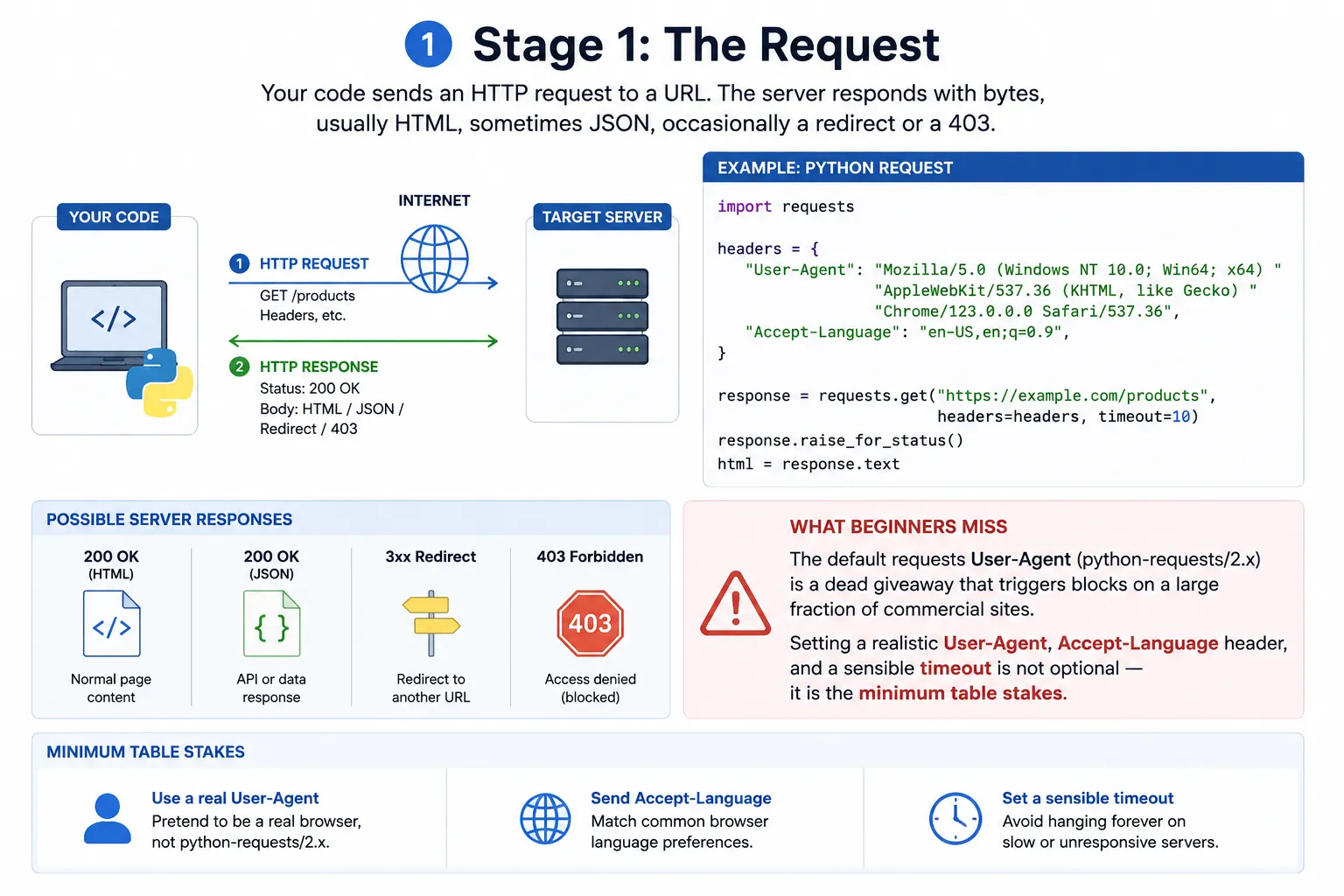
Your code sends an HTTP request to a URL. The server responds with bytes, usually HTML, sometimes JSON, occasionally a redirect or a 403.
import requests

headers = {
    "User-Agent": "Mozilla/5.0 (Windows NT 10.0; Win64; x64) "
                  "AppleWebKit/537.36 (KHTML, like Gecko) "
                  "Chrome/123.0.0.0 Safari/537.36",
    "Accept-Language": "en-US,en;q=0.9",
}

response = requests.get("https://example.com/products", headers=headers, timeout=10)
response.raise_for_status()
html = response.text
What beginners miss: the default requests User-Agent (python-requests/2.x) is a dead giveaway that triggers blocks on a large fraction of commercial sites. Setting a realistic User-Agent Accept-Language header, and a sensible timeout is not optional — it is the minimum table stakes.
Choice of HTTP client matters more than people think:
| Library | When it fits | When it does not |
|---|---|---|
| requests | Scripts, prototypes, small scrapers, anything synchronous | High-volume scraping where latency dominates |
| httpx | Modern projects that may need async later; HTTP/2 support | When you need maximum raw async throughput |
| aiohttp | Pure async pipelines with thousands of concurrent requests | Synchronous code; the API is heavier |
| curl_cffi | Sites with TLS/JA3 fingerprinting (Cloudflare, Akamai) | Anything where you do not need browser TLS impersonation |
curl_cffi It is the one most tutorials skip and most professional scrapers rely on. It impersonates the TLS handshake of real browsers, which defeats a whole class of fingerprint-based blocks that no amount of header spoofing can bypass.
Stage 2: Rendering (the stage that catches beginners)
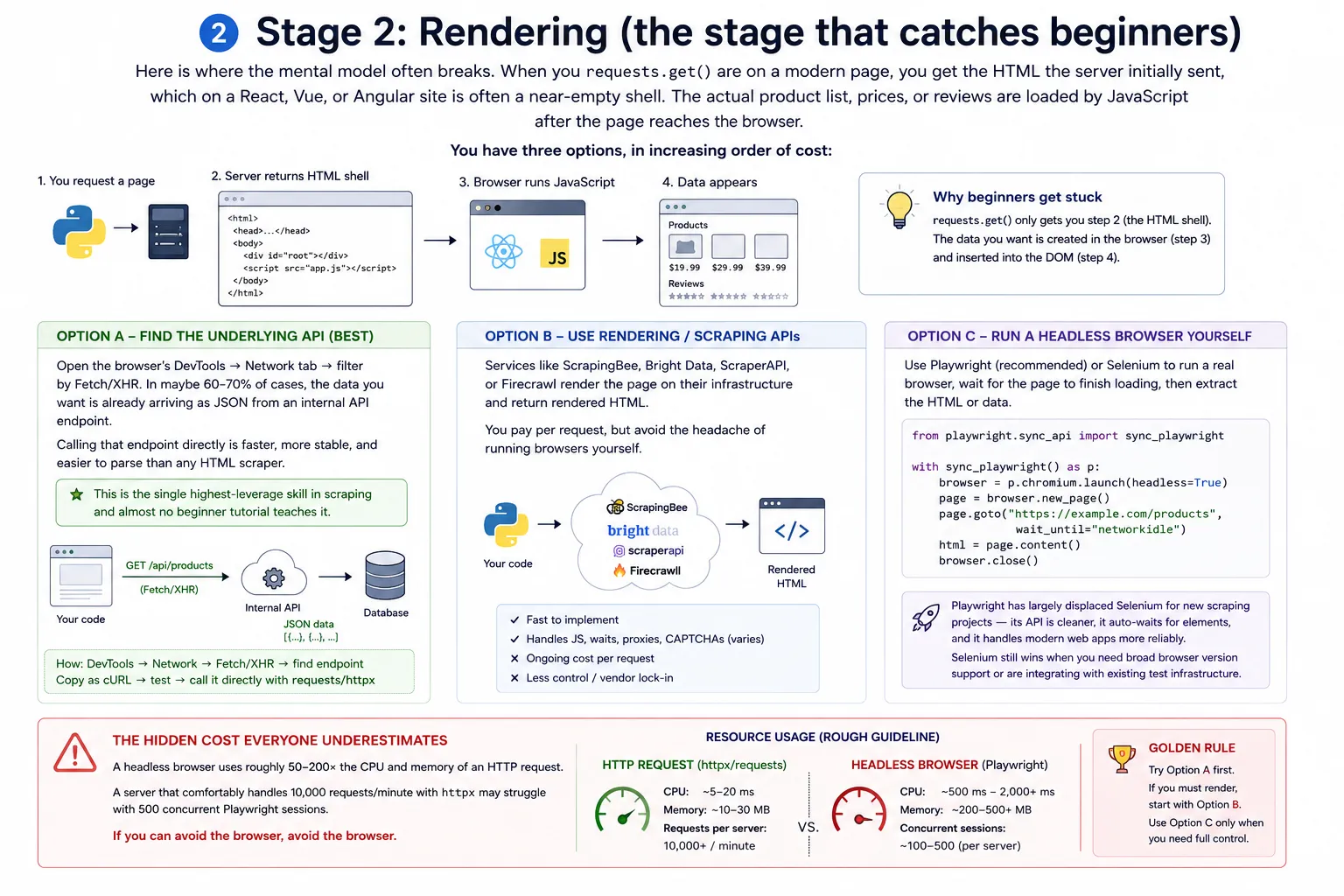
Here is where the mental model often breaks. When you requests.get() are on a modern page, you get the HTML the server initially sent, which on a React, Vue, or Angular site is often a near-empty shell. The actual product list, prices, or reviews are loaded by JavaScript after the page reaches the browser.
You have three options, in increasing order of cost:
Option A – Find the underlying API. Open the browser’s DevTools → Network tab → filter by Fetch/XHR. In maybe 60–70% of cases, the data you want is already arriving as JSON from an internal API endpoint. Calling that endpoint directly is faster, more stable, and easier to parse than any HTML scraper. This is the single highest-leverage skill in scraping and almost no beginner tutorial teaches it.
Option B – Server-side rendering services or scraping APIs. Services like ScrapingBee, Bright Data, ScraperAPI, or Firecrawl render the page on their infrastructure and return rendered HTML. You pay per request, but avoid the headache of running browsers yourself.
Option C – Run a headless browser yourself with Playwright or Selenium.
from playwright.sync_api import sync_playwright

with sync_playwright() as p:
    browser = p.chromium.launch(headless=True)
    page = browser.new_page()
    page.goto("https://example.com/products", wait_until="networkidle")
    html = page.content()
    browser.close()
Playwright has largely displaced Selenium for new scraping projects — its API is cleaner, it auto-waits for elements, and it handles modern web apps more reliably. Selenium still wins when you need broad browser version support or are integrating with existing test infrastructure.
The hidden cost everyone underestimates: a headless browser uses roughly 50–200× the CPU and memory of an HTTP request. A server that comfortably handles 10,000 requests/minute with httpx may struggle with 500 concurrent Playwright sessions. If you can avoid the browser, avoid the browser.
Stage 3: Parsing
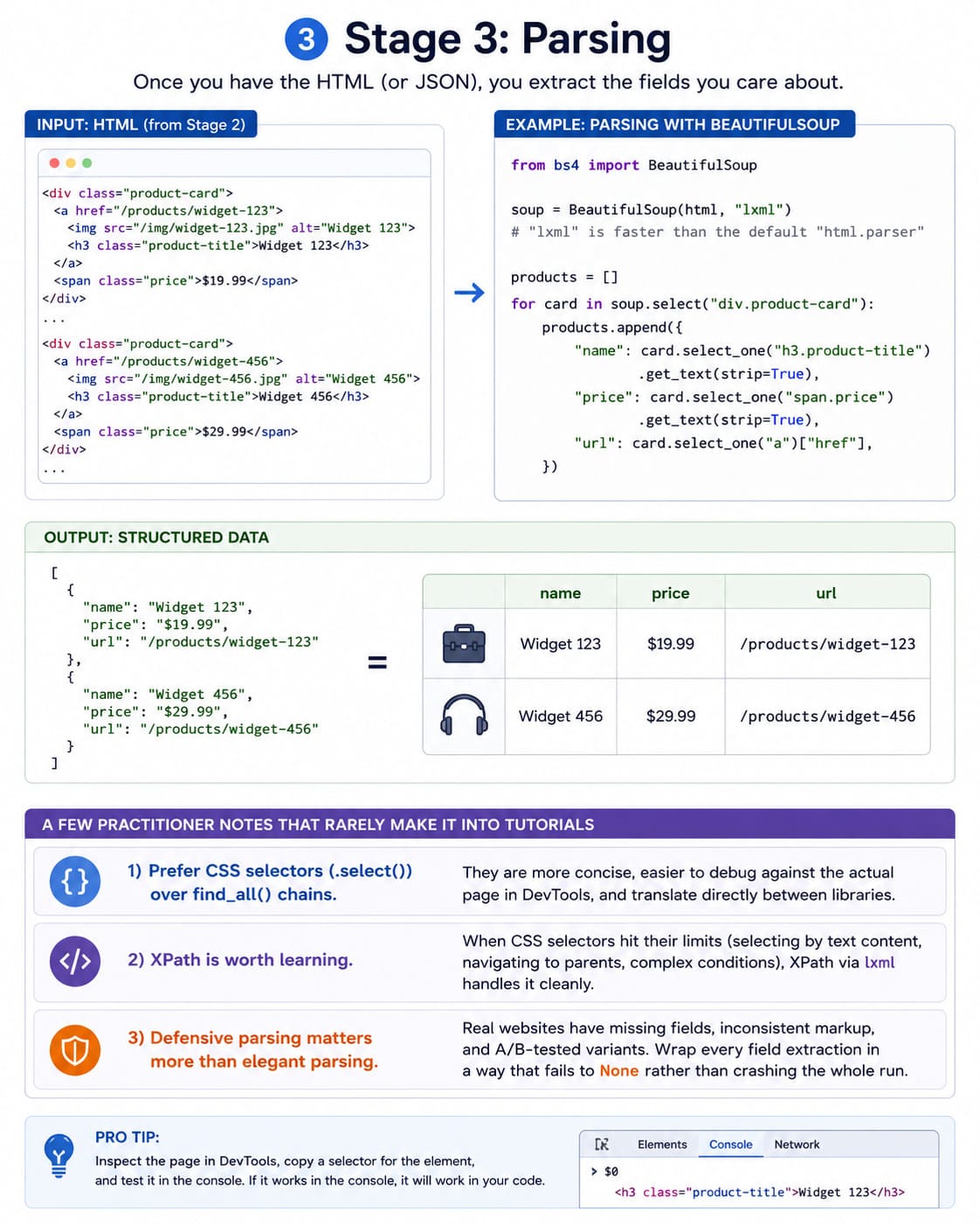
Once you have the HTML (or JSON), you extract the fields you care about.
from bs4 import BeautifulSoup

soup = BeautifulSoup(html, "lxml")  # "lxml" is faster than the default "html.parser"

products = []
for card in soup.select("div.product-card"):
    products.append({
        "name": card.select_one("h3.product-title").get_text(strip=True),
        "price": card.select_one("span.price").get_text(strip=True),
        "url": card.select_one("a")["href"],
    })
A few practitioner notes that rarely make it into tutorials:
- Prefer CSS selectors (
.select()) overfind_all()chains. They are more concise, easier to debug against the actual page in DevTools, and translate directly between libraries. - XPath is worth learning. When CSS selectors hit their limits (selecting by text content, navigating to parents, complex conditions), XPath via
lxmlhandles it cleanly. - Defensive parsing matters more than elegant parsing. Real websites have missing fields, inconsistent markup, and A/B-tested variants. Wrap every field extraction in a way that fails to
Nonerather than crashing the whole run.
Stage 4: Storage
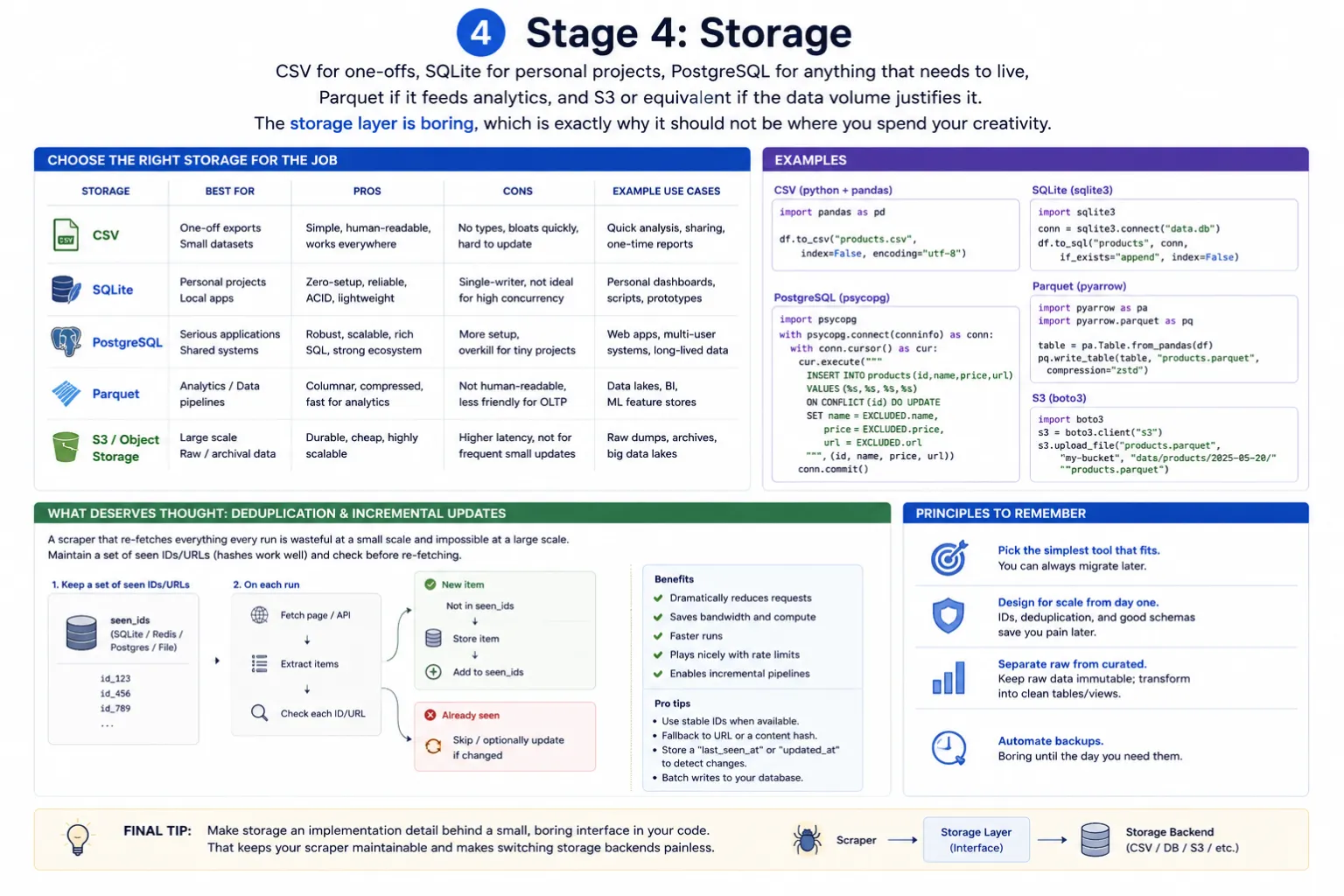
CSV for one-offs, SQLite for personal projects, PostgreSQL for anything that needs to live, Parquet if it feeds analytics, and S3 or equivalent if the data volume justifies it. The storage layer is boring, which is exactly why it should not be where you spend your creativity.
What does deserve thought: deduplication and incremental updates. A scraper that re-fetches everything every run is wasteful at a small scale and impossible at a large scale. Maintain a set of seen IDs/URLs (hashes work well) and check before re-fetching.
Choosing the Right Library: An Honest Decision Tree
The library question dominates beginner forums and gets answered badly because the answers ignore context. Here is the decision tree I actually use:
| Situation | Right tool | Why |
|---|---|---|
| Single page, static HTML, one-off script | requests + BeautifulSoup | Lowest friction, fewest dependencies |
| Multiple pages, static HTML, need it to be fast | httpx (async) + selectolax or lxml | Async throughput; faster parsers |
| Site is JavaScript-heavy, can’t find an API | Playwright | Modern, reliable, good defaults |
| You’re crawling a whole site with rules, queues, pipelines | Scrapy | Built for this; reinventing it is painful |
| Site has aggressive anti-bot (Cloudflare, PerimeterX, DataDome) | curl_cffi + residential proxies, or a managed scraping API | TLS fingerprinting is the actual barrier |
| You’re a non-engineer who needs data this week | Managed API (Firecrawl, Bright Data, Apify) | Build vs. buy — your time is the expensive resource |
The Scrapy misconception worth flagging: Scrapy is often recommended as “the professional choice.” It is excellent, but it is a framework, not a library, and it expects you to think in terms of spiders, items, pipelines, and middlewares. For a 50-line script to grab product data once a week, Scrapy is overkill and the cognitive overhead will slow you down. Reach for it when you are crawling thousands of pages with structured rules and you need the queueing, retry logic, and concurrency controls it provides out of the box.
Anti-Bot Reality in 2026
The arms race has tilted heavily toward defenders. Modern bot detection stacks (Cloudflare Bot Management, DataDome, PerimeterX/HUMAN, Akamai Bot Manager, Kasada) layer multiple signals:
- TLS/JA3/JA4 fingerprinting – your TLS handshake reveals whether you are a real browser before a single byte of HTTP is exchanged.
- HTTP/2 fingerprinting – frame ordering and SETTINGS values differ between Python clients and Chrome.
- Headless browser detection –
navigator.webdriver, missing plugins, abnormal canvas/WebGL rendering, suspicious timing. - Behavioral analysis – mouse movements, scroll patterns, time-on-page.
- IP reputation – datacenter IPs are blocked by default on many sites; residential and mobile IPs are not.
The practical hierarchy of defenses, from easiest to hardest to bypass:
- Header checks – solved by setting realistic headers.
- Rate limiting / IP blocks – solved by proxy rotation and respectful pacing.
- JavaScript challenges – solved by running a real browser.
- TLS/HTTP/2 fingerprinting – solved by
curl_cffi,tls-client, or undetected browser builds. - Behavioral analysis – hardest; often requires either Playwright with stealth plugins or a managed service.
The pragmatic takeaway most articles avoid stating: if a site is actively investing in anti-bot infrastructure, you are in an arms race you will not win economically with a homebrew scraper. Either find a different data source, use their official API (often the right answer), or pay a specialized scraping provider whose entire business is staying one step ahead.
The Legal and Ethical Layer
This is the section make sure to follow the law.” Reality is messier and more important.
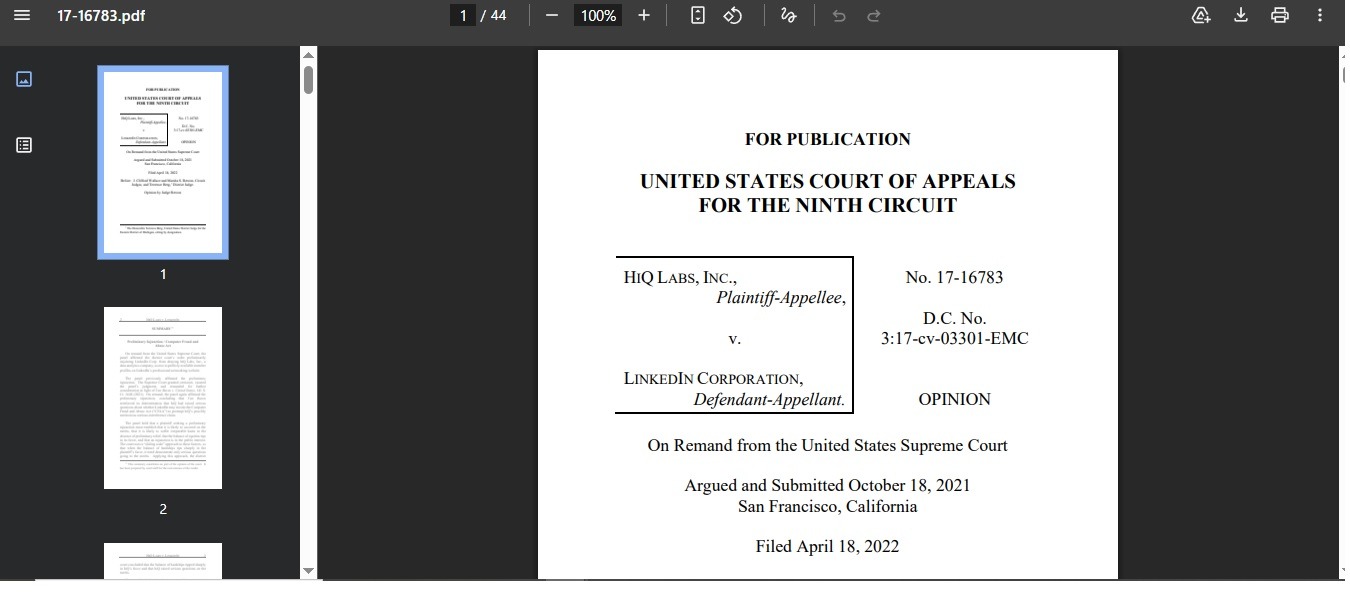
Scrape public data, generally legal. In the US, the Ninth Circuit’s hiQ Labs v. LinkedIn line of cases established that scraping publicly available data does not violate the Computer Fraud and Abuse Act (CFAA). That is a meaningful protection, but narrower than it sounds.
Where it gets complicated:
- Authentication boundaries. Scraping behind a login is a different legal animal. You are arguably “exceeding authorized access,” which CFAA does cover, and you are almost always violating Terms of Service.
- Personal data under GDPR. If you scrape data about EU residents, even publicly visible data, GDPR applies. You need a lawful basis, you need to handle data subject rights, and “I scraped it from a public page” is not a defense.
- Copyright on the content itself. Scraping factual data is generally safer than scraping creative content. Reproducing scraped articles, images, or substantial text on your own site invites copyright claims independent of any scraping law.
- Contract law via Terms of Service. Even where scraping is not a criminal violation, breaching ToS can ground a civil claim, especially after the website has sent a cease-and-desist.
- The CFAA still bites when sites send explicit revocation (typically a C&D letter) and you keep scraping anyway.
Ethical practice, separate from legality:
- Respect
robots.txteven though it is not legally binding. Ignoring it without a good reason signals bad faith. - Crawl at a rate that does not degrade the target’s service. A reasonable rule of thumb: stay below 1 request per second per domain unless you have a specific reason to go faster.
- Identify your bot in the User-Agent when you can, as many sites are more tolerant of identified, well-behaved scrapers than of stealth ones.
- Cache aggressively. The most ethical scrape is the one you don’t repeat.
None of this is legal advice; jurisdiction, purpose, and target all matter. For anything commercial, talk to a lawyer who has actually litigated a scraping case.
Common Mistakes I See Repeatedly
These are not theoretical. They are the patterns that show up over and over in code reviews, forum questions, and broken production scrapers.
- Not checking for an API first. Hours spent fighting Playwright when a JSON endpoint was waiting in DevTools.
- Hardcoding selectors against a single page. A class name that exists today may not exist next week. Build selectors that target stable attributes (
data-*, IDs) where possible, and assume your scraper will break and need to be repaired. - No retry logic, no backoff. Networks fail. Servers return transient 503s. A scraper without
tenacityor equivalent retry-with-exponential-backoff is a scraper that loses data. - Ignoring encoding.
response.textguesses the encoding. On sites that mislabel their encoding (more common than you’d think), this produces garbled output. Inspectresponse.encodingand override when you know better. - Synchronous code for an I/O-bound problem. A
for url in urls: requests.get(url)loop is leaving 95% of the throughput on the table. Async or thread pools should be the default past a few dozen URLs. - Running a headless browser when an HTTP request would do. Slow, memory-hungry, and unnecessary on most pages.
- Not respecting
Retry-Afterheaders. When a server explicitly tells you to slow down, slowing down is both ethical and the fastest way to stay unblocked. - Treating scraped data as clean. It is not. Plan for HTML entities, whitespace, currency symbols mixed with prices, dates in five different formats, and Unicode surprises. Normalize at parse time.
- No monitoring. Production scrapers should alert when success rates drop, when parsed records suddenly halve, or when a target’s response size shifts. A silent scraper is a wrong scraper.
- Storing raw HTML “just in case” without a plan. It adds up to terabytes faster than people expect. Either store the raw response with intent (you will reparse), or extract and discard.
Real-World Scenarios
- The startup competitive intelligence scraper. A small SaaS company wants to track competitor pricing. Right answer: a Python script using
httpx, run on a cron schedule, storing snapshots in PostgreSQL with aprice_historytable. Don’t build Scrapy infrastructure for ten URLs. - The data analyst’s research project. A researcher needs five years of news article metadata across twenty sites. Right answer: check each site for an RSS feed or sitemap first (often 80% of the work is already done), then a Scrapy project with per-domain spiders, with results dumped to Parquet for pandas/DuckDB analysis.
- The enterprise market-research platform. A BI team needs continuous data from a thousand e-commerce sites. Right answer: do not build this in-house unless data is your core product. Use a commercial scraping platform (Bright Data, Oxylabs, Apify) for the acquisition layer, and focus your engineering on normalization, deduplication, and the actual analytics.
- The student learning Python. Pick one static site (Wikipedia, books.toscrape.com, quotes.toscrape.com) and write a scraper end-to-end: requests, parsing, CSV output, deduplication, error handling. Then port it to async. Then try a JavaScript-heavy site with Playwright. You will learn more from finishing one realistic project than from reading ten tutorials.
Expert Insights: What Changes With Scale
Three shifts happen as scrapers grow from a script to a system, and they catch almost everyone by surprise:
- The bottleneck moves. At small scale, parsing speed is irrelevant. At ten million pages, switching from BeautifulSoup with
html.parsertoselectolaxcan cut your runtime by 5–10×. Profile before optimizing, but know where the cliffs are. - Maintenance dwarfs initial development. A scraper takes a day to write and breaks every two months when the target redesigns. Over a year, you will spend ten times more hours on maintenance than on the original build. Design for observability and quick selector updates from the start.
- The cost structure inverts. At small scale, your code is the expensive part. At large scale, the code is cheap and proxies are the budget line. Residential proxies cost $5–15 per GB; serious operations spend more on proxies in a month than on engineering.
Practical Recommendations
For anyone serious about learning how web scraping works with Python, the following sequence has held up well across teaching contexts and hiring conversations:
- Build with
requestsand BeautifulSoup until you understand the request/parse split. Resist the urge to jump to Scrapy or Playwright too early. - Make the DevTools Network tab your first stop on every new target. Find the API. If there is no API, then think about scraping.
- Add
httpxand async once you feel the limits of sequential code. Not before. - Learn one headless browser (Playwright) when JavaScript-rendered pages start blocking you. You don’t need both Playwright and Selenium.
- Reach for Scrapy when you outgrow ad-hoc scripts — typically when you have a queue, multiple spiders, and pipelines that look like reinventing a framework.
- Treat proxies and anti-bot bypass as a separate problem from scraping logic. Abstract the HTTP layer behind an interface so you can swap providers without rewriting parsers.
- Write parsers as if they will fail. Every selector should fail safely; every record should pass validation before storage.
- Build monitoring before you need it. Success rate, record count per run, parse-error rate. Three numbers, dashboarded, will save you weeks over a year.
Common FAQ About Python Web Scraping:
Is web scraping legal?
Yes, in most jurisdictions, scraping publicly available data is not illegal per se, but it can violate terms of service, copyright, computer-misuse laws, or data-protection laws depending on what you scrape, how, and from whom. US case law (notably hiQ v. LinkedIn) leans toward permitting public-data scraping under the CFAA; the EU’s GDPR adds significant constraints when personal data is involved. Treat legality as situation-specific, not as a yes/no.
Do I need to know HTML and CSS to scrape with Python?
Yes, at least enough to read a page’s structure and write selectors. You don’t need to write websites, but you need to understand the DOM, how CSS selectors target elements, and what JavaScript-rendered content looks like in DevTools.
Which is better: BeautifulSoup or Scrapy?
They solve different problems. BeautifulSoup is a parsing library you call from your own code. Scrapy is a full framework that manages requests, concurrency, retries, and pipelines for you. For one or two pages, use BeautifulSoup. For crawling a whole site systematically, use Scrapy (which can use BeautifulSoup internally if you want).
Can I scrape sites that require login?
Technically yes — requests.Session() or Playwright’s storage state handle cookies and authentication. Legally and ethically, this is much riskier than public scraping: you’re operating inside an authentication boundary, almost certainly violating ToS, and potentially exceeding “authorized access” under CFAA. Be cautious.
How do I avoid getting blocked?
The honest stack: realistic headers, sensible request rates, rotating residential proxies for repeat work, a real browser (or curl_cffi) when TLS fingerprinting is in play, and respect for Retry-After. There is no magic header that hides you from a serious anti-bot system.
Is scraping with AI/LLMs replacing traditional scraping?
It’s adding a new layer, not replacing the old one. LLM-based extractors (Firecrawl, Reader by Jina, custom GPT-based parsers) are excellent at turning messy HTML into structured data without writing selectors — that solves the parsing stage. They don’t solve the request stage, the rendering stage, or anti-bot. Expect to see hybrid pipelines: traditional acquisition, LLM-assisted extraction.
How fast can a Python scraper actually go?
With async (httpx or aiohttp) on a single machine, a few thousand requests per minute against well-behaved targets is realistic. The ceiling is usually set by the target’s rate limits, not by Python. With distributed Scrapy or commercial scraping APIs, you can scale into millions per day, but the bottleneck shifts to proxy budgets and target tolerance.
Conclusion
Understanding how web scraping works with Python is less about memorizing library APIs and more about internalizing a pipeline — request, render if you must, parse defensively, store with intent — and developing taste for which tool fits which problem. The four-line tutorial scraper and the production system at scale share the same skeleton; what differs is how each stage is hardened against the realities of the modern web.
The most underrated skills in this discipline are unglamorous: reading the Network tab before writing code, designing parsers that fail safely, treating maintenance as a first-class concern, and being honest about when to stop fighting an anti-bot system and pay for a service that already won that fight. Python gives you exceptional tools for every layer, but tools do not make decisions. Practitioners do.
If you take one thing from this article, take this: the best scraper is the one you didn’t have to write because you found the API first. Everything after that is engineering discipline.
You May Also Like
 Web Scraping
What Is Web Scraping and How Does It Work? A Complete 2026 Guide
 Web Scraping
How to Handle CAPTCHA While Scraping: A 2026 Developer’s Guide
 Proxies
Best Proxies for Web Scraping In 2026: How I Choose the Right Provider and Proxy Type
 Web Scraping
Cloudflare Blocking Scrapers Explained: Your 2026 Guide to Anti-Bot Protection
 Web Scraping
How Google Maps Scraping Actually Works (And Where Most Attempts Go Wrong)
 Web Scraping
Scrap.io Review 2026: What This Google Maps Lead Generation Tool Actually Gets Right (and Where It Falls Short)
 Web Scraping
The 7 Best PHP Web Scraping Libraries of 2026: The Ultimate Guide
 Use Cases
Inside Kimwolf Traffic: How Residential Proxies Fuel Credential Stuffing, Web Scraping, & Fraud
 Web Scraping